Ed Nisley's Blog: Shop notes, electronics, firmware, machinery, 3D printing, laser cuttery, and curiosities. Contents: 100% human thinking, 0% AI slop.
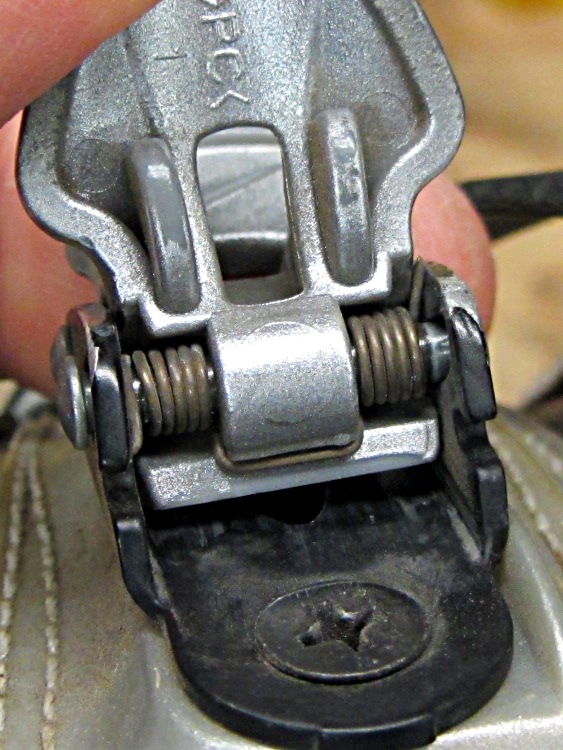
The Nike cycling shoes I bought some years ago (at a steep discount when they got out of the cycling shoe biz) close with a ratcheting plastic strap rather than laces, so I bought a spare set of straps: the plastic part always breaks first. As it turned out, a coil spring inside each latch failed and the stub end (on the right side here) gradually worked its way between the latch tab and the frame:
Cycling shoe latch – broken spring
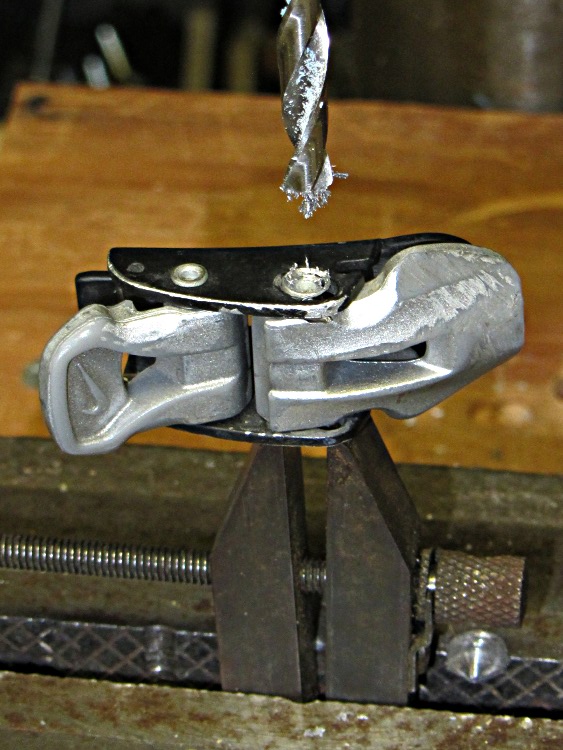
Eventually this got to the point where the latches jammed and I had to do something. The first step was to drill out the rivet holding the spring and tab in place:
Drilling latch rivet – magnetized bit
You’ll note the rich collection of swarf clinging to the drill bit, which indicates this one hasn’t been used since a lightning strike magnetized all the steel in the house. A pass through that demagnetizer shook off the swarf and prepared the bit for the next time.
Releasing all the parts shows the problem:
Nike cycling shoe latch – broken spring
The OEM springs used 24 mil spring wire that, surprisingly, matched a box of music wire in the Basement Laboratory Warehouse Wing. The spring coils have 5 turns that just clear the 3 mm rivet that I recycled as a mandrel; I think a 2.5 mm pin would produce a better fit. Not being a fan of rivets, I replaced them with 4-40 machine screws, even though the threads probably won’t do the aluminum frame any good at all.
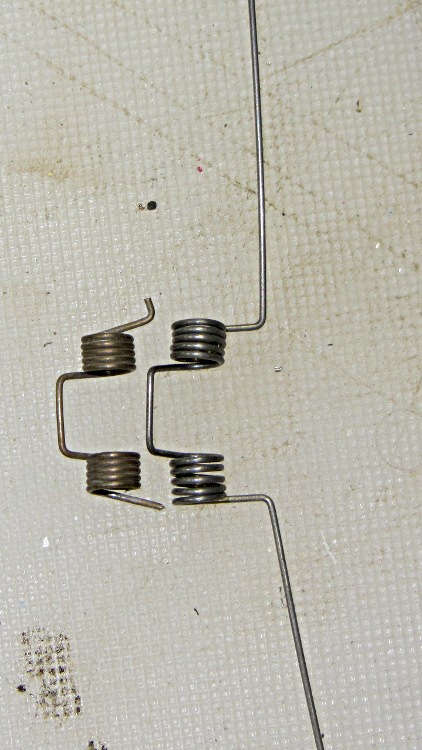
A protracted bending and wrapping session produced a reasonable approximation of the OEM spring:
Latch spring – formed
It’s worth noting that each of those coils uses up about 55 mm of wire: 5 × 3.5 mm × π. Cut an excessively long piece from the music wire coil!
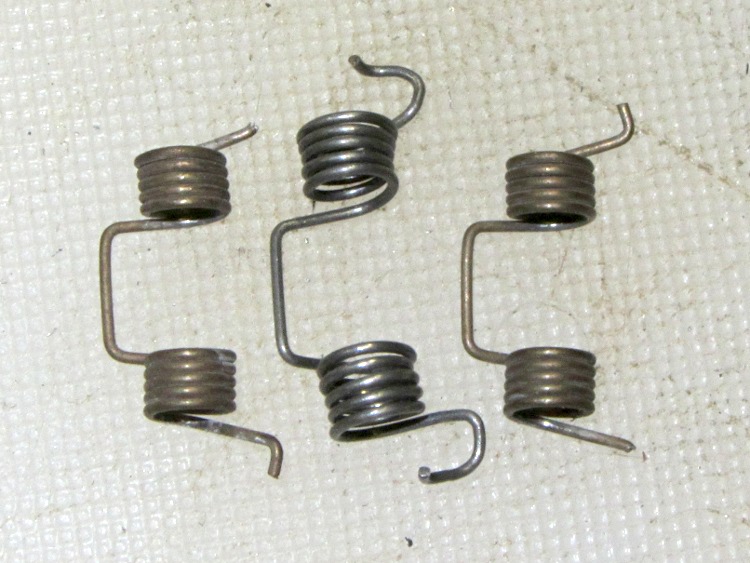
Trimming and shaping the ends to fit through the notches and around the outside of the frame shows that my wire-bending skills need considerably more practice. This spring (the second one I made) also shows that my beginner’s luck with the first coils wore off all too quickly:
OEM springs with homebrew replacement
But both springs fit and work fine, so I’ll call it done for now:
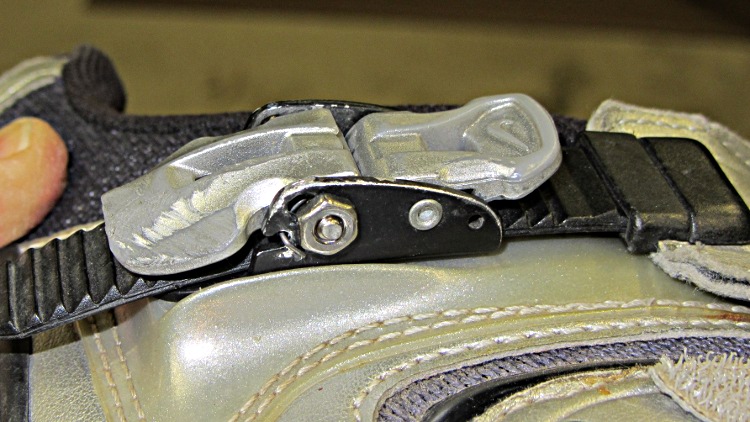
Repaired latch – nut side
Will a replacement spring break before the plastic strap?
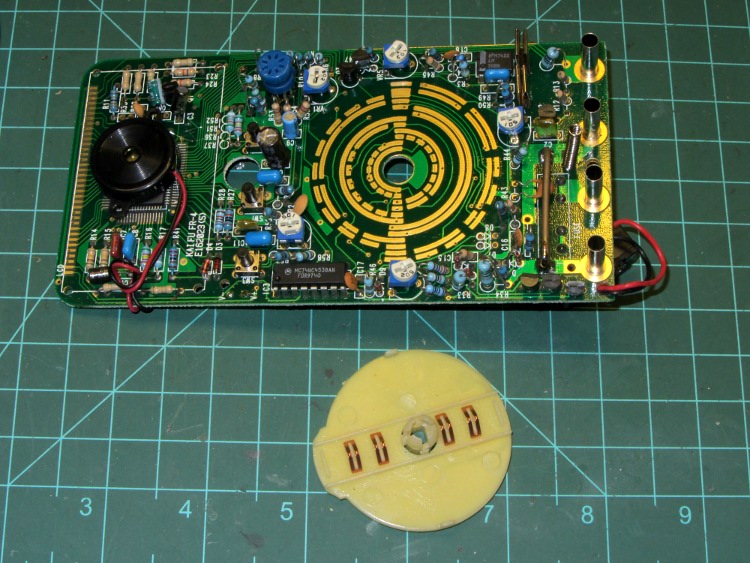
One of my multimeters began reporting bogus values that improved by working the range switch back-and-forth, which suggested the switch contacts need cleaning. Taking the meter apart was easy, right up to the point where I removed the range switch from the PCB by compressing the four locking tabs on the central shaft:
Multimeter range selector switch
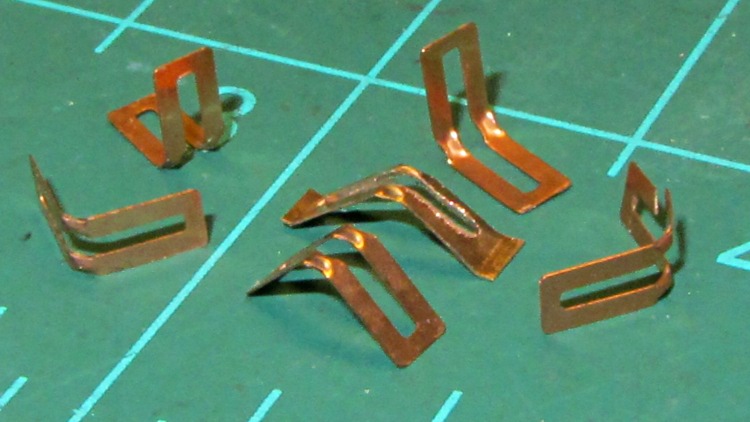
Just before taking that picture, the switch launched half a dozen spring contacts across the bench, my shirt, and the floor… I recovered four for the picture and later found a fifth smashed on the floor, but the last contact remains AWOL.
The contact in the middle, the oddly shaped one with small tabs on the ends, is a prototype replacement conjured from 6 mil phosphor bronze stock:
Multimeter range switch contacts
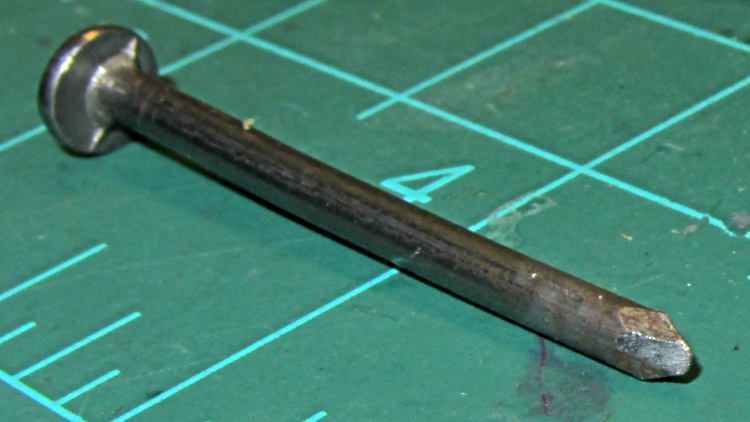
The little domes ensure a good sliding surface, but require two bends in the middle of the contact and some way to shape the metal into a dome. After a few experiments, I filed the end of a nail into a rounded chisel that worked pretty well:
DMM switch contact punch
The original contacts came from 3.5 mil stock and have considerably more flex; 6 mil stock is what I have.
I think I should make half a dozen contact springs to replace the entire set, a task requiring more time than I have right now. For the record, the overall process goes like this:
lay out overall shape, slightly longer than needed
cut center opening with abrasive wheel
cut out contact
punch contact domes (from back = dimples)
bend to shape
trim ends to length (not done in picture)
dress raw edges (not done in picture)
Given the number of parts and the fiddly accuracy required to make the slot, this might be a good job for the Sherline, although clamping each little proto-spring down while getting the abrasive wheel in there seems daunting.
Perhaps cutting the slots and punching the dimples would work better before cutting out the contacts, with a sheet clamped on four sides? The center will be floppy, what with all the slots, but grinding slots on the middle contacts first might be helpful. Would adhesive under the sheet to hold down the middle gunk up the abrasive wheel?
A Black & DeckerPocket Power emerged from the heap and refused to take a charge, which obviously calls for a teardown. The case has three screws, one lurking behind the label:
Pocket Power – case screws
The sticker over on the right says it’s five years old, which explains the whole problem right there; you can evidently buy new-old-stock units from the usual low-dollar sources that will arrive with a similarly dead battery.
Peeling off the rubber bumpers and prying the case open reveals the innards:
Pocket Power – internal layout
The battery pack looks to be an octet of ordinary NiMH cells; the label on the other side of the shrink wrap reports 9.6 V @ 1200 mA·h, which is about what you’d expect, with a date in mid-2007 that matches the sticker on the case.
The upper left corner of the main label has some interesting information:
Pocket Power – label specs
The tiny wall wart that came with the unit produces 12 VDC at 300 mA, which doesn’t match the INPUT spec at all. Perhaps the maximum current from the internal pack made its way to the label by mistake?
The label also shows the reason I got this thing: it can produce just enough 120 VAC power to run an arbitrary wall wart charger for a gadget that doesn’t charge from a 12 VDC source. Upconverting 9.6 VDC to 120 VAC, then downconverting it to, say, 14.4 VDC makes no sense whatsoever, unless that’s the only way to charge that particular gadget. Which has, I’m sorry to say, been the case every now and again.
I think the Model name has a typo: everything else suggests this is a CP120B. So it goes.
Unsoldering the leads and perpetrating the obvious tests produces these curves:
B&D Pocket Power
The black curve is the initial “won’t accept a charge” state with the wall wart and internal circuitry; the pack obviously has two weak cells. The curves in the lower left correspond to individual cells and series pairs that I discharged to 0.9 V/cell after the top curve ended.
The tiny stroke between the sets, way over on the Y axis, is cell pair BC (my arbitrary labels) that probably accounts for the sudden drop in the black curve. However, the orange curve also came from pair BC after charging for about 18 hours at 120 mA, so they’re not completely dead. Their capacity has dropped to about 700 mA·h, though, which isn’t good.
Soldering the pack back together and charging for another 18 hours at 120 mA produced the green curve at the top, which shows the same sudden dropoff at about 700 mA·h.
So I’ll put it back together again and let it charge for a while, but new cells will definitely brighten its disposition.
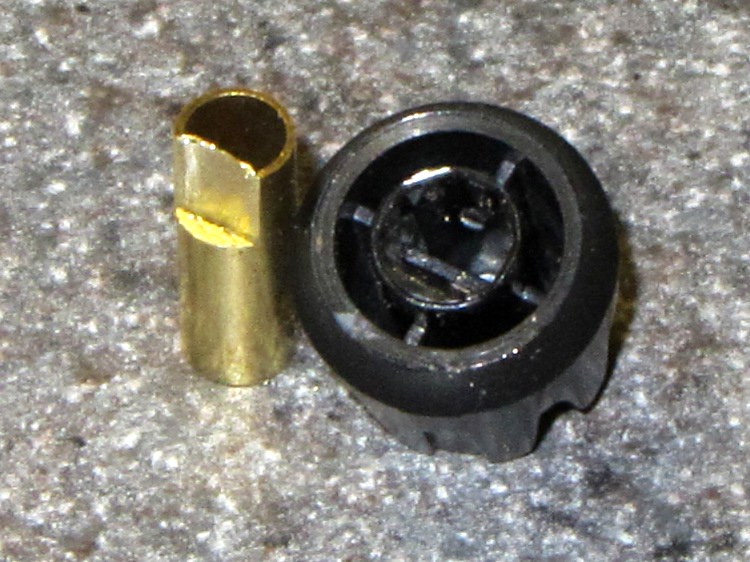
Clamp a cutoff chunk of 3/16 =0.1875 inch diameter brass tubing in the lathe and file down one side to put the flat 0.150 inch from the far side, so that the knob is a tight slip fit. If you happen to have some solid rod, that would work just as well. In this case, the file pushed the paper-thin brass remnant into the tubing and I didn’t bother to clean it out:
KG-UV3D knob with fixture
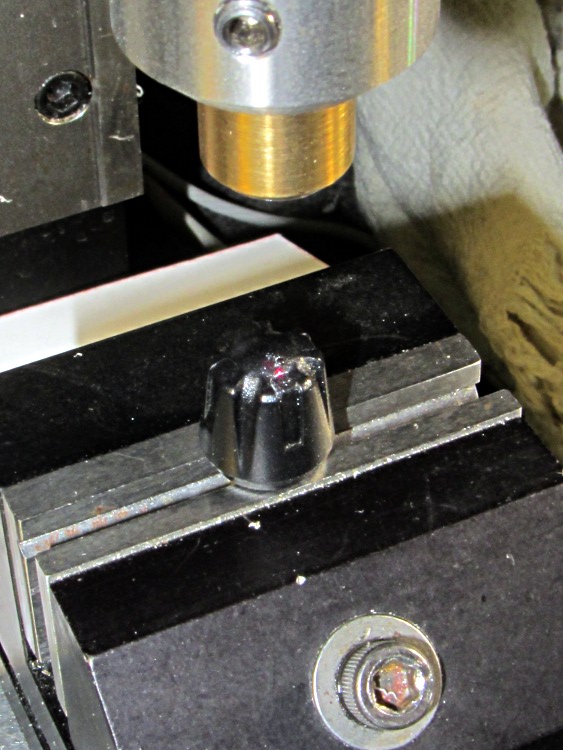
Clean the white glop off the knob, jam the knob on the fixture, clamp the fixture in the Sherline’s vise, use laser targeting to center the spindle on the notch adjacent to the minuscule pip on the knob:
Laser aligning to knob feature
Drill a 2 mm recess that en passant obliterates the pip:
Drilling index recess
Fill it with some light gray paint that just happens to be on the shelf:
Knob with filled index mark
And, by gosh, it really does dress up the radio! [grin]
Wouxun KG-UV3D with improved knob
While I had the Sherline set up, I did the knob for the other radio, too.
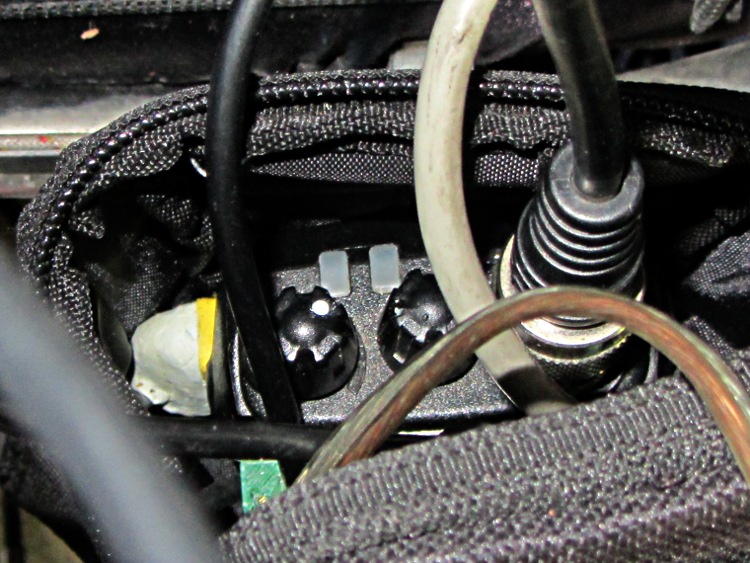
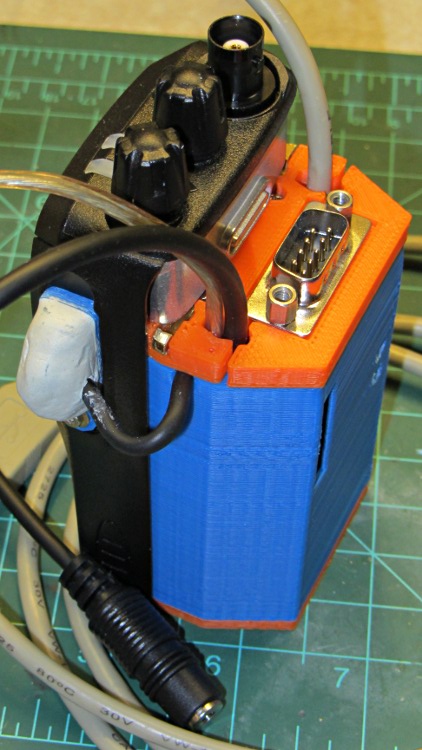
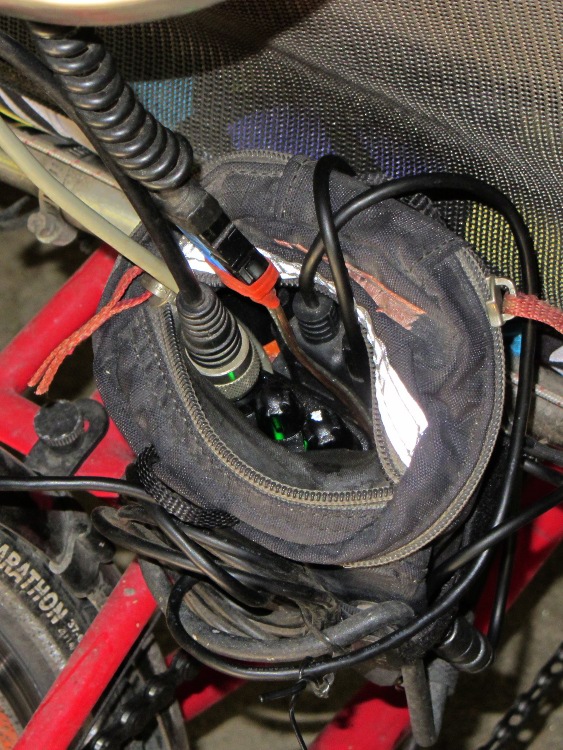
Both of the GPS+voice interfaces for the Wouxun KG-UV3D radios have been working fine for a while, so I should show the whole installation in all its gory detail.
If you haven’t been following the story, the Big Idea boils down to an amateur radio HT wearing a backpack that replaces its battery, combines the audio output of a Byonics TinyTrak3+ GPS encoder with our voice audio for transmission, and routes received audio to an earbud. Setting the radios to the APRS standard frequency (144.39 MHz) routes our GPS position points to the global packet databaseand, with 100 Hz tone squelch, we can use the radios as tactical intercoms without listening to all much of the data traffic.
The local APRS network wizards approved our use of voice on the data channel, seeing as how we’re transmitting brief voice messages using low power through bad antennas from generally terrible locations. This wouldn’t work well in a dense urban environment with more APRS traffic; you’d need one of the newfangled radios that can switch frequencies for packet and voice transmissions.
So, with that in mind, making it work required a lot of parts…
The flat 5 A·h Li-ion battery pack on the rack provides power for the radio; it’s intended for a DVD player and has a 9 V output that’s a trifle hot for the Wouxun radios. Some Genuine Velcro self-adhesive strips hold the packs to the racks and have survived surprisingly well.
Just out of the picture to the left of the battery pack sits a Byonics GPS2 receiver puck atop a fender washer glued to the rack, with a black serial cable passing across the rack and down to the radio bag.
A dual-band mobile antenna screws into the homebrew mount attached to the upper seat rail with another circumferential clamp. It’s on the left side of the rail, just barely out of the way of our helmets, and, yes, the radiating section of the antenna sits too close to our heads. The overly long coax cable has its excess coiled and strapped to the front of the rack; I pretend that’s an inductor to choke RF off the shield braid. The cable terminates in a PL-259 UHF plug, with an adapter to the radio’s reverse-polarity SMA socket.
The push-to-talk button on the left handgrip isn’t quite visible in the picture. That cable runs down the handlebar, along the upper frame tube, under the seat, and emerges just in front of the radio bag, where it terminates in a 3.5 mm audio plug.
The white USB cable from the helmet carries the boom mic and earbud audio over the top of the seat, knots around the top frame bar, and continues down to the radio. USB cables aren’t intended for this service and fail every few years, but they’re cheap and work well enough. The USB connector separates easily, which prevents us from being firmly secured to a dropped bike during a crash. I’d like much more supple cables, a trait that’s simply not in the USB cable repertoire. This is not a digital USB connection: I’m just using a cheap & readily available cable.
I long ago lost track of the number of Quality Shop Time hours devoted to all this, which may be the whole point…
In other news, the 3D-printed fairing mounts, blinky light mounts, and helmet mirror mounts continue to work fine; I’m absurdly proud of the mirrors. Mary likes her colorful homebrew seat cover that replaced a worn-out black OEM cover for a minute fraction of the price.
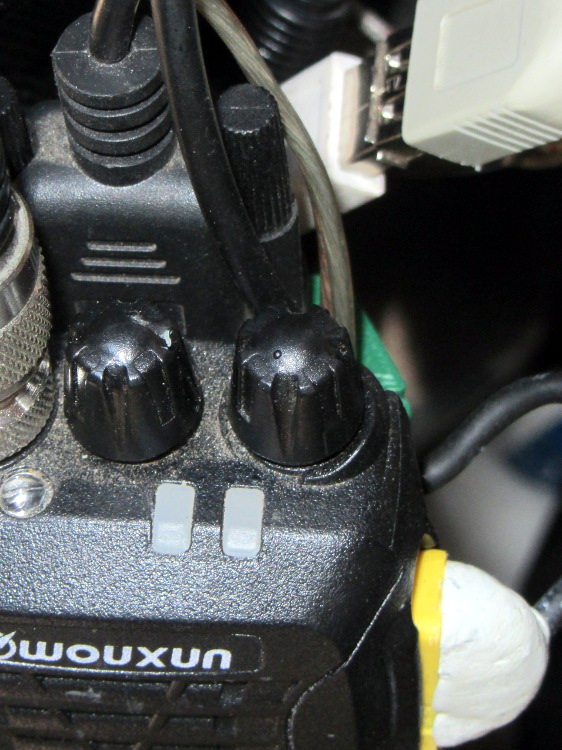
The volume / on-off control knob on our Wouxun KG-UV3D radios has the most minute raised dot you can imagine to mark its orientation. Yes, it’s another subtle black-on-black control! See if you can spot the dot:
Wouxun KG-UV3D – volume knob marking
The radio lives in a small pack attached to the back of the seat frame: we turn it with a fingertip and adjust the volume by touch; the dot is just barely perceptible to my finger. Nevertheless, WIBNI (Would It Be Nice If) you could look at the knob from a distance and determine whether the radio was turned on?
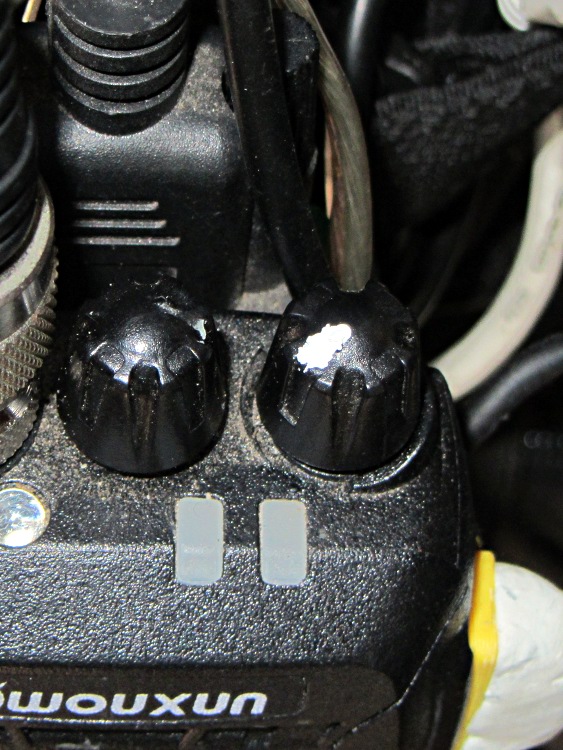
A dab of typewriter (remember typewriters?) correction fluid later:
Wouxun KG-UV3D – garish knob marking
Not elegant and sure to wear off after a while, but the smudge should remain visible forever.
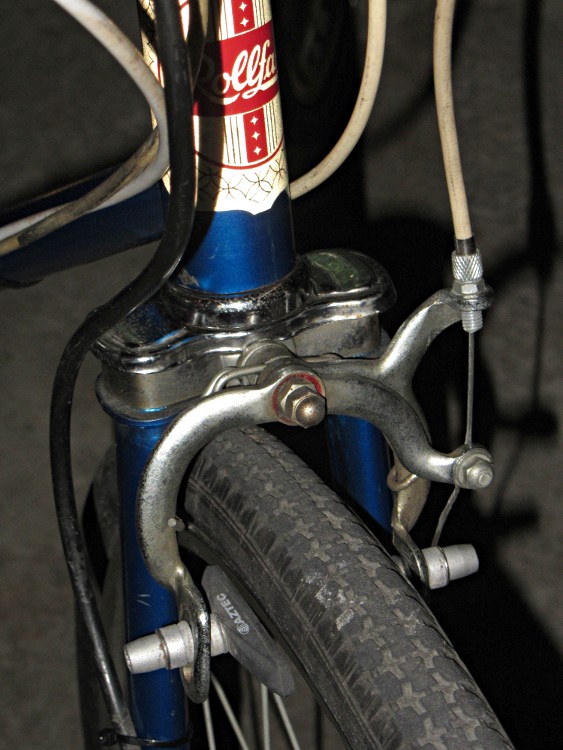
Our Larval Engineer acquired a free bicycle to get around at school: a Rollfast “girl’s bike” dating back to 1972 with 105 miles on the odometer. She completely dismantled it, cleaned everything, reassembled it in reverse order, and added a rear rack & panniers. Having touched every part of the bike, she’s now in a much better position to fix whatever may go wrong in the future.
It was an inexpensive bike to start with and we left everything as-is, with the exception of the brake pads. You’re supposed to bend the brake arms to align the pads with the rims, a technique which I didn’t like even back in the day. So we swapped the OEM pads with worn-but-serviceable Aztek pads sporting spherical washers:
They’re way grippier than the old pads, even on those chromed-steel rims. I had a bike with steel rims and old pads; given the slightest hint of water, it didn’t stop for squat. With any luck, the Azteks will at least slow this one down.
Although she wanted to take the Tour Easy, the bike must live outside under the apartment stairs all year and, frankly, that’d kill the recumbent in short order. Forgive me for being a domineering parent; when she has a good place to store a spendy bike, it’s hers for the taking.
We haven’t figured out how to mount the GPS/APRS tracker + radio and antenna. The evidence suggests she prefers to travel incognito from now on…







 The Smell of Molten Projects in the Morning