Ed Nisley's Blog: Shop notes, electronics, firmware, machinery, 3D printing, laser cuttery, and curiosities. Contents: 100% human thinking, 0% AI slop.
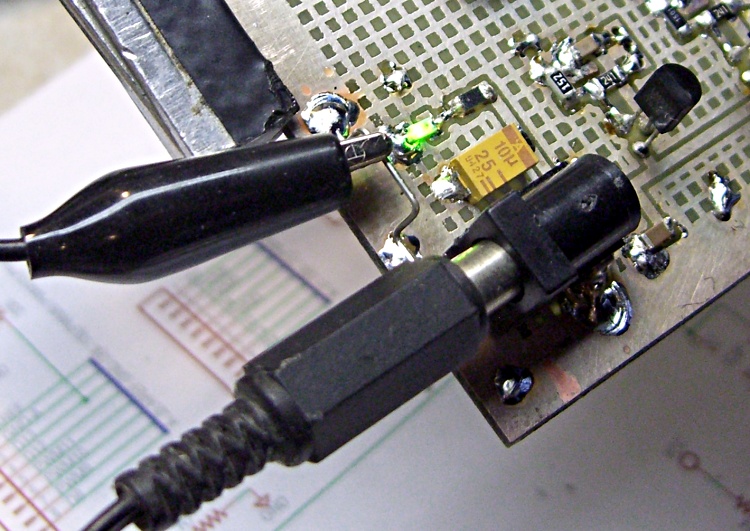
When you’re bringing up a new circuit board, you need a place to attach test equipment ground clips.
Take a resistor lead from that pile you’ve been collecting (you do save snipped-off through-hole component leads, don’t you?), bend it into a sort of flattened horseshoe with the ends pointing out, and firmly solder the ends to a convenient point on the board’s ground plane, ideally near the power entry point.
It helps if you leave a nice spot for the thing; tiny boards with all surface-mount parts pose a problem.
Long dangly ground leads clipped to a distant part of the board are definitely not adequate for low-level or high-frequency analog probing, but when you’re just trying to figure out if the mumble thing is alive, this hack will do the trick.
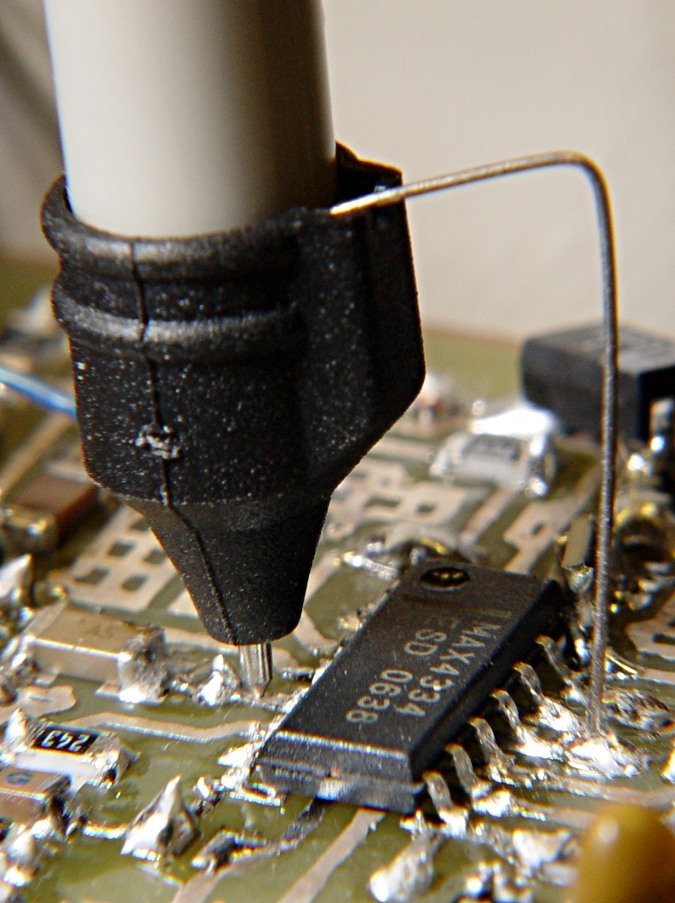
Oscilloscope probe tip ground
For detailed stuff, get up close & personal with that odd little scope probe nosepiece you’ve been keeping in a bag for some reason.
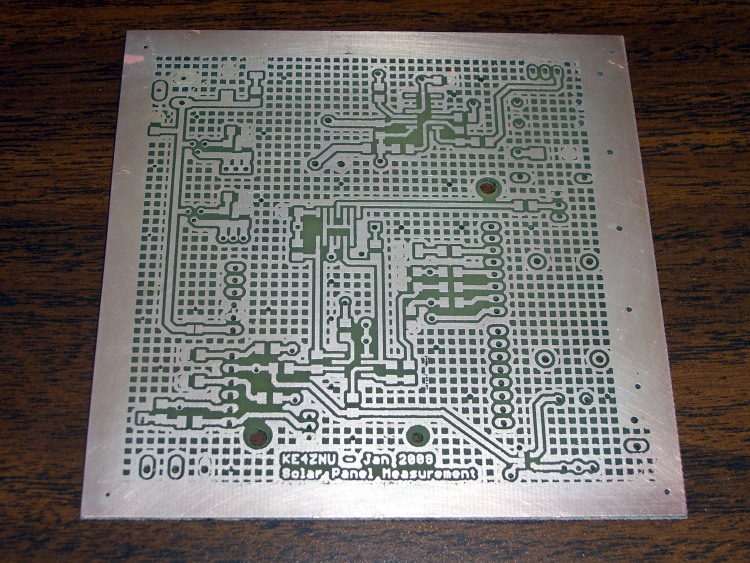
The top board is, of course, the one you’ve seen earlier.
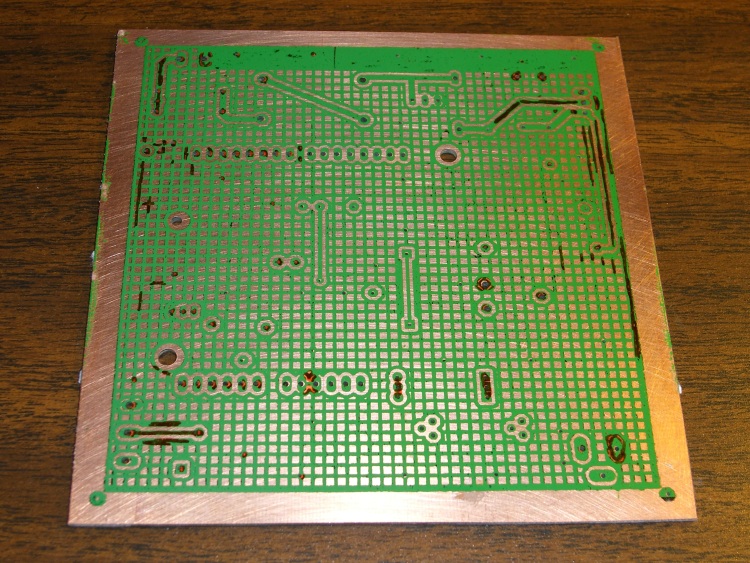
Continuing the saga from there, this is the etched and plated board.
I mask around the edges with ordinary masking tape and cover the back surface with duct tape. Basically, the less copper you remove, the better and faster the job.
I use ferric chloride etchant, formerly available in nearby Radio Shack stores. These days it’s getting harder to find, so I picked up a few kilos of dry powder on eBay. Most likely that supply will vanish, too.
The usual directions call for heating the etchant, submerging the board, bubbling or agitating, and so forth and so on. The folks at Pulsar suggest simply rubbing the etchant on the board with a sponge and, perhaps not surprisingly, that works perfectly with boards sealed using their green film.
I hold the board horizontally in my left hand, pour a dollop of etchant on it, then rub it with a small sponge in my right hand. The etchant gradually turns into a gel as it removes copper from the board; when the gel becomes too stiff, I just wipe it off with the sponge.
I do this over a small glass tray and scrape the accumulated gunk off the sponge into the tray. Pulsar recommends diluting the residue in a gallon of water, but I’d just as soon not have that much spent solution sitting around.
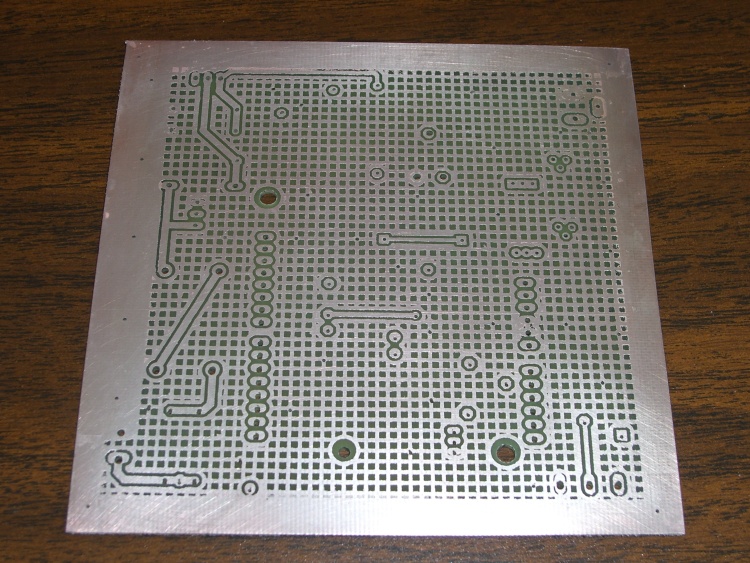
PCB Etched and Plated – Rear
Wear latex gloves, an apron, and eye protection. Expect that everything within a radius of two meters will accrue small spots of ferric chloride that will instantly produce a vivid, permanent yellow stain. Repeat: everything within two meters will sprout yellow spots.
You have been warned!
Even if you pay attention to the board’s edges and corners, those will still be the last areas to finish etching. You’ll also learn to not run fine lines parallel to the edges right next to the masking tape, as the tape protects adjacent areas from the sponge: no contact, no etching!
Spent ferric chloride (most likely, it’s now copper chloride or some such) disposal occurs on our town’s Household Hazmat collection days, but direct etching leaves very little bulk waste. Although it’s not particularly hazardous, the rituals should be observed.
After eching, rinse the board, remove all the tape, and rinse the board again.
Acetone and paper towels remove the green sealant film and the laser toner from the board, an operation best done outdoors. I have yet to find protective gloves that don’t disintegrate in acetone, so I simply try to not soak my hands in the stuff. Remember: leave the mask on the back side of the board to help protect it from the etchant when you do the front side.
Then I silver-plate the copper with Cool-Amp Silver Plating Powder, which makes the board look and solder better. Looks are important, as the boards sometimes wind up in my Circuit Cellar columns.
That hasn’t stopped me from hand-soldering SMD parts: the bigger the blob, the better the job.
The next step in the process for this board: toner transfer masking.
What you see here follows the basic process given by the folks at Pulsar, so go there for the instructions & supplies. The overall flow is:
Print the PCB trace pattern on the special paper
Align to the circuit board
Tape in place
Fuse toner to PCB
Apply green sealant film
Etch
Repeat for the other side
Some tricks:
An Eagle CAM file (found there in Useful Stuff) creates Postscript files for the top & bottom copper (and the silkscreen, although I don’t use that).
I load those PS files in The GIMP at 600 dpi with mild antialiasing, crop (autoshrink!), combine into a single image, then print on a single sheet of paper using an HP Laserjet 1200 (obsolete, but pretty nearly any laser printer should work).
Turn off all the toner saving features; you want a really dark image with plenty of toner!
I run a sheet of paper through to find out exactly where the images will wind up, then tape the transfer paper atop the images (shiny side up!) using laser address labels (because they can take the heat) on the first-to-enter end of the transfer paper.
Vital step: run that whole assembly through the printer to print a blank page. This cooks the moisture out of the transfer paper and pre-shrinks it for the next step. This might not matter for very small circuit boards, but if you’re doing anything over an inch or so, it makes a big difference.
Run it through the printer again to print the trace patterns. They should wind up exactly in the middle of the transfer papers, although you’ll be surprised at how far off they can be from the patterns on the sheet underneath. Lasers have great dot resolution, but are not particularly accurate at locating the paper relative to the printing drum. That doesn’t matter for ordinary documents, but be sure you leave more margin on the transfer paper around your patterns than you think necessary.
PCB Masked – Rear
Use the printer’s manual-feed feature to queue up all three prints at once. My printer is in the basement laboratory and my comfy chair is upstairs, so that saves several trips up & down the stairs. Not that I can’t use the exercise, mind you, but it’s the principle of the thing.
Cut the transfer paper off the backing sheet. Don’t bother trying to un-stick the labels; they’re fused solid. Stick another label on the back side of the transfer paper along shortest side.
Alignment trick: now lay the paper pattern-side-up on a light table (I use an old fluorescent fixture with a frosted-glass lens), lay the board atop it, and adjust for best hole alignment over the whole board. The trace patterns on the paper form very nice bright spots that shine up through the holes in the circuit board. You can do it with the board on the bottom, but this way works better.
You’ll be dismayed at how far off some of the holes are, but you should get within perhaps 10 mils all across the board. Squish the board down on the sticky side of the label and fold the label over the top of the board. That anchors the paper to the board and, because the label is fairly wide, keeps the paper from twisting relative to the board.
Flip it over, verify that the holes still line up by looking through the paper, then apply labels to the sides to hold the transfer paper flat and in alignment. I’ve tried it without the side attachments and the result is, ahem, not quite as good. You can see the label residue on the front side in the photo above; obvously, you’ll be cleaning the gunk off before doing that side.
I’ve tried the clothes-iron technique with little success, so I have one of the heated roller fusers. Works pretty well, although it requires some fiddling to get the proper combination of heat and spacing.
Add water, let the paper soften, peel it off.
Run it through the fuser again with the green sealer film. I get better results with a layer of ordinary paper atop the green film, perhaps because that prevents the film from touching anything inside the fuser. Without the paper, the film sometimes transfers lengthwise scratches to the toner.
Peel off the film and touch up any imperfections with an Ultra-Fine-Point Sharpie; I use orange to make the corrections easy to see against the green background. Those are the highly visible ugly marks on the bottom mask.
Having masked one side, etch it. Then you mask the other side and etch that. Don’t try to get clever and do both sides at once; it doesn’t work. Ask me how I know.
Next step: etching. More on that later…
Suggestions: after you etch the first side, leave the mask in place to protect the copper. When you run the board through the fuser, add a sheet of paper on the masked side to keep the film and toner from coming off on the rollers.
Memo to self: always pre-shrink the transfer paper.
I use Cadsoft’s Eagle for schematics & circuit board layouts, then build the boards in my basement laboratory using Pulsar’s laser toner transfer and ferric-chloride etching. My Sherline CNC milling machine pokes the holes in the board, which means they actually wind up in the right places. I don’t mill the outline into any fancy shapes, generally using a tin snip and maybe a little filing; glass-fiber dust is a nuisance.
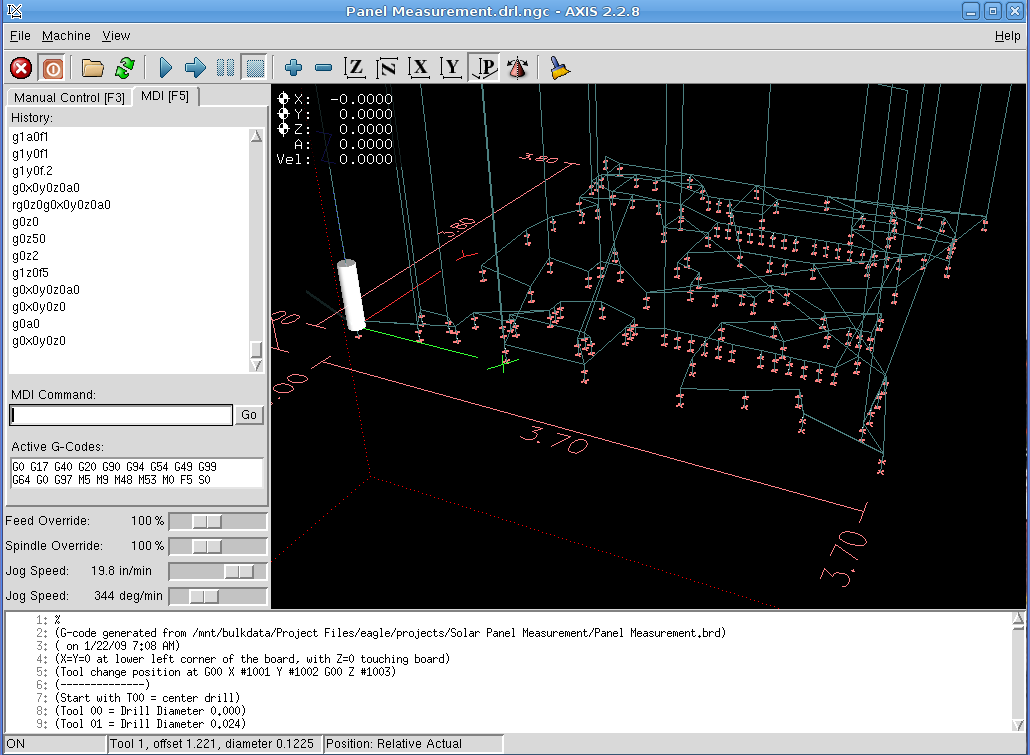
AXIS hole-drilling screenshot
My Eagle ulp routine (in the Useful Stuff page) extracts the holes from the circuit board layout, sorts by drill size, then visits each hole in nearest-neighbor order. It starts by touching each hole with a center drill, which probably isn’t necessary, but it makes me feel good and provides a last-minute check that everything is lined up properly.
Figuring the tool path is obviously the traveling-salesman problem in disguise, but a strict nearest-neighbor order is close enough for boards of this size. You could probably optimize it by brute-force exhaustion and that would be appropriate for production use, but I rarely make more than one version of each board.
Eagle’s standard part libraries use a weird set of hole diameters, which my routine rounds off to the nearest mil. I don’t have a vast array of drills, so I don’t pay much attention to the differences between, say, 0.024, 0.025, and 0.027 inch drills. Tool changes are strictly manual and I don’t have to change the drill if I don’t want to!
Got a bunch of teeny carbide drills as resharps from DrillBitCity a long time ago.
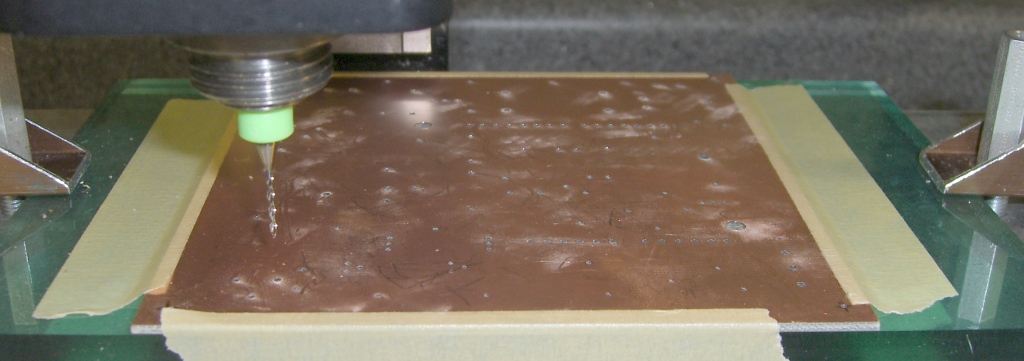
I double-stick-tape the board (center and corners) to a flycut sacrificial plate, which makes it flat enough for these purposes.The pic below shows a 60-mil board held down with masking tape; it’s the same layout as in the screen shot above.
Tool changes use a 2-inch block (plus a sheet of paper) as a height reference. You can tweak the ulp file for your setup.
My board layouts have a giant via at each corner, with the lower-left corner at (0,0). Drilling doesn’t require any fussy alignment, because I etch the board after drilling: the holes serve as bright lights to line up the pads & vias. I’ll have more to say about this elsewhere.
Speeds and feeds are on the sissy side; I crank the 10k rpm head up to a dangerous chattering whine and feed the drills at 5 inches/min (call it 125 mm/min). Both of those are far too slow, but work OK.
Run a shop vac to suck up the dust as you drill! I doubt that a typical shopvac filter removes the fines, but it’s better than letting all the dust settle on the mill and in my lungs.
Circuit board drilling
The clamps are these, mounted on studs screwed into the tooling plate.
Incidentally, the Sherline mill’s throat depth and Y-axis travel limits the board to about 4 inches along the Y axis; yes, with the spacer block installed. That’s just about exactly the maximum size the low-end version of Eagle can produce, so it’s a nice match.
There are other ways of doing PCBs. I haven’t tried trace-isolation milling, but PCB-Gcode looks like the ticket if you want to generate a breathtaking amount of glass-fiber dust. My quick check shows that it inserts semicolon-delimited comments into the tool-change commands, which EMC 2.2.8 promptly chokes upon, but that’s probably a quick configuration tweak and will change with EMC 2.3 anyway.
If you’ve got the scratch, there are commercial solutions: Chris Daniel (who was also at the Cabin Fever EMC booth) uses a T-Tech gantry router at work.
Memo to Self: Expect a call from a patent lawyer either telling me that I’m infringing somebody’s Nearest Neighbor Algorithm claims or asking me for my design notebooks to establish me as the Prior Artist.
Wireless mice have fairly good power-saving routines; if they’re not moving, they shut down. Alas, if you’re packing a mouse to bring along with your PC, it may stay awake for the whole trip… at least until its battery goes flat.
Isolating tab for storing a mouse
You can remove the cells, but then you’re stuck with a bunch of moving parts: mouse, receiver, a couple of AA cells. Now you need a ziplock baggie. Fooey.
Better to take a strip of thin plastic, like a small plastic Post-It flag, and isolate one cell. Make it long enough to stick out through the slot in the case and you’ll have a reminder that the mouse won’t start up automagically.
Mouse with battery disconnected and tabbed
Some mice actually have a mechanical switch, but if it’s a pushbutton then you may as well insert the plastic strip.
This works for cell phones, too, at least if you’re the sort who can afford to turn the phone off because you’re not expecting any calls.
Inside a batteries.com 9V batteryCorrosion inside batteries.com 9V battery
Back in the Good Old Days, 9 V batteries had a stack of half a dozen pancake cells inside that completely filled the outer case. These days, it seems they use cylindrical cells similar to AAAA cells, with more wasted space around the edges.
I retrieved these batteries from our smoke detectors. I tend to poke the self-test button occasionally and wait until the low-battery alarm starts chirping, rather than throwing half-used batteries out. Being that sort of bear, I date the batteries when I put them in; they usually last two years.
This one is from batteries.com and lasted 18 months. The obvious corrosion inside the shrink-wrap plastic sleeve says that the cell sealing isn’t nearly as good as you’d wish. The two most heavily corroded cells are completely dead, but the rest have about 500 mAh of life left in them (at a rather low 50 mA discharge rate). With a bit better QC, it’d be a winner.
Notice that the case contacts have sharp points that ensure a decent connection, perhaps despite the crud. Only one or two of the points actually make contact, which probably contributes to a faster assembly time: just get the ribbons in the right neighborhood and crimp the case closed. On the other hand, all the current must flow through one or two points, so don’t use them as a high-current source.
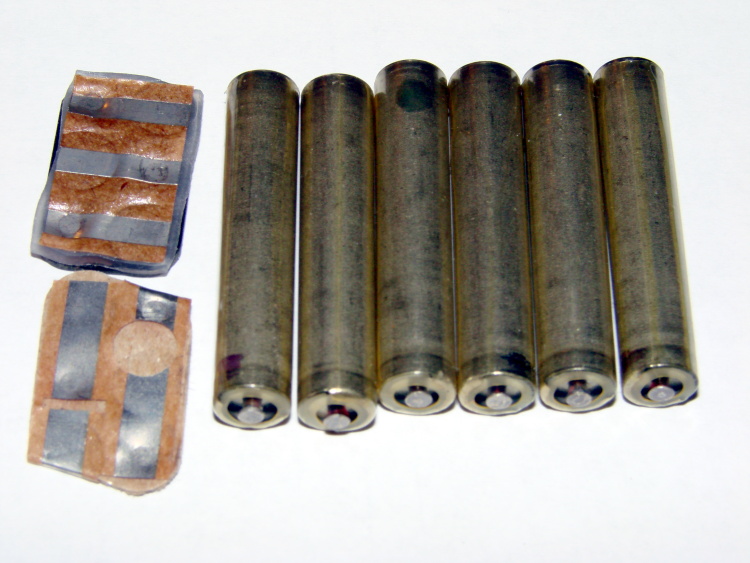
Eveready Gold 9V battery innards
On the other end of the scale, this Eveready Gold battery has six loose cells and lasted 2.5 years. All the cells have roughly the same level of charge remaining: they’re thoroughly dead.
The build quality seems better, with individually shrink-wrapped cells and a compliant closed-cell foam layer on the bottom of the case to maintain pressure against the contacts. No sharp points, so they need more pressure.
The cell polarity is exactly reversed from what you’d expect: the button end is negative. So, even though this looks like a cheap source of AAAA cells, that’s a cruel deception…
A long time ago I got an HP54602B oscilloscope with a serial port data link. HP provided a sample app that snarfed screenshots & data from the scope, but it wasn’t really ready for prime time and, besides, I vastly preferred to use OS/2 (!) and then Linux rather than Windows.
Here’s my Kermit script to fetch screenshots. All the software comes more-or-less standard in Ubuntu Linux and (I presume) in most others. If you’re running Windows, you’re on your own.
Scope Setup
HP54602B Serial Setup Screenshot
The oscilloscope’s HP Plotter setting spits out bog-standard HPGL commands in flat ASCII. I’ve always meant to investigate what HP Printer does, but …
I wish the scope ran faster than 19200 b/s, but that speed works reliably over generic USB-to-serial converters (and the scope can’t feed data that fast, anyway). The other choice, back in the day, was HPIB / GPIB; I’d have had to buy three or four different adapters to suit all the PC data buses since then: ISA, EISA, VLB, PCI …
Xon/Xoff flow control (a.k.a. handshaking) works better than hardware flow control, simply because the cable’s easier to build.
The Factors setting adds a bunch of text to the end of the data stream that’s not useful, except for the fact that an HPGL LB instruction follows all of the useful data and gives the Kermit script something to look for. Otherwise, the only way to detect the end of the stream is to time out after a looong time.
I haven’t the foggiest idea what Resolution does, but High seems appropriate.
Hardware Notes
The scope requires a Null Modem in front of a standard DB-25 to DB-9 cable. I’ve been meaning to rewire my standard cable to eliminate the Null Modem, but …
Adding an LED breakout / monitoring adapter to the serial port loads the signals too much and can lead to puzzling errors. Maybe it’s just my adapter: YMMV.
I’ve run the cable all the way across my basement lab with no problem. This is, after all, good old RS-232, not some high-falutin’ USB or Firewire interconnect.
Taking the Shot
Get a picture you like, poke the Print Screen button, then quick like a bunny run the script. The scope copies the current screen into an internal buffer, then sends out a torrent of HPGL commands. The script will capture the data and eventually spit out a PNG file.
You may want to Stop the trace, rather than leave it running.
In XY mode, the scope seems to have trouble copying the entire trace. I tap Auto Store twice, then Stop, then Print Screen. It’s fuzzier, but copies the whole thing.
What Happens
The script captures the incoming serial data into a log file, processes that text through the hp2xx program to get an Encapsulated Postscript EPS file, then runs that though convert to get a PNG file. The bank shot off EPS results in better-looking output, for reasons I don’t understand.
The 240-second timeout value for the Input command seems long, but it takes a lot of plotter commands to define a four-trace plot. A too-short timeout chops off the tail end of the HPGL stream and prompts bizarre error messages from hp2xx.
The parameters for hp2xx and convert came from protracted and tedious twiddling. The ‘scope image is 512 dots across and 300-some-ish vertically; the output mimics the not-quite-square graticule aspect ratio on the actual screen. If HP thinks it looks good, then it looks good to me.
The active (bright) traces use Pen 2, which I’ve set to Blue (color 4). The graticule, annotations, and stored traces all use Pen 1, which appears as Black (color 1). Tweak -c 14 as you wish.
The pen widths (set by -p 34) don’t actually seem to do very much, although I vaguely recall that using the default width of 1 makes the output entirely too faint.
The PNG has a transparent background that turns white when you actually use it in a document; I suppose you could overlay it atop a background image if you wanted to get cute.
When the dust settles and the smoke clears, you get PNG images like this. It’s an XY plot, so the blue section appears as a bright trace on the oscilloscope’s screen.
BH curve for LC0263-A coil
Kermit Script
#!/usr/bin/kermit +

# Fetches screen shot from HP54602B oscilloscope

# Presumes it's set up for plotter output...

# Converts HPGL to PNG image
set modem none
set line /dev/ttyS0
set speed 19200
set flow xon/xoff
set carrier-watch off
# Make sure we have a param
if not defined %1 ask %1 {File name? }
set input echo off
set input buffer-length 150000
# Wait for PRINT button to send the plot
echo Set HP54602B for HP Plotter, FACTORS ON, 19200, XON/XOFF
echo Press PRINT SCREEN button on HP54602B…
log session “%1.hgl”
# Wait for end of data stream
input 240 lb
echo … got final lb command
close session
close
echo Converting HPGL in
echo — %1.hgl
echo to PNG in
echo — %1.png
# without labels = no terminating lb info
#run hp2xx -m png -a 1.762 -h 91 -c 14 “%1.hgl”
#run mogrify -density 300 -resize 200% “%1.png”
# with labels = terminating lb
run hp2xx -q -m eps -r 270 -a 0.447 -d 300 -w 130 -c 14 -p 34 “%1.hgl”
run convert -density 300 -resize 675×452+2+2 “%1.eps” “%1.png”





 The Smell of Molten Projects in the Morning