Ed Nisley's Blog: Shop notes, electronics, firmware, machinery, 3D printing, laser cuttery, and curiosities. Contents: 100% human thinking, 0% AI slop.
I suppose this shouldn’t be surprising, but the nature of groundwave propagation pretty much requires vertical polarization: the E-field is perpendicular to the ground.
Perforce, that means the H-field is parallel to the ground, which means that ferrite bar antennas must be horizontal in order to work properly.
A simple experiment with the Alpha-Geek Clock conclusively demonstrates this. Turning it vertically is just as bad as aiming a bar end directly at Colorado: the signal drops right into the noise.
Horizontal and broadside to Colorado, it’s fine.
Alas, I’d been hoping to tuck the bar antenna inside the Totally Featureless Clock I’ve been building. The ideal location, mounted vertically behind the right-hand digit at the end of the circuit board, as far from the Arduino Pro as possible, just isn’t going to work. Good location, wrong orientation!
I want to avoid an external antenna or a tall case. Drat!
The script (writeups there and there) I use to convert the HPGL screen dumps from my HP54602 into PNG images produced a transparent background. I put the files into an OpenOffice mockup of my Circuit Cellar columns and the background turns white, so I figured it worked OK.
Turns out that the workflow at Circuit Cellar Galactic HQ turns the background black. A bit of digging showed that the ImageMagick convert program produced an alpha channel that selected only the traces and left everything else unselected. Why that produces white here and black there is a mystery, but there’s no point in putting up with such nonsense.
Another wrestling match produced this revision (the two changed lines are highlighted), which has no alpha channel and a white background. That ought to simplify things: an image shouldn’t depend on where it’s dropped to look right.
#!/usr/bin/kermit +
# Fetches screen shot from HP54602B oscilloscope
# Presumes it's set up for plotter output...
# Converts HPGL to PNG image

set modem none
set line /dev/ttyUSB0
set speed 19200
set flow rts/cts
set carrier-watch off

# Make sure we have a param
if not defined \%1 ask \%1 {File name? }

set input echo off
set input buffer-length 200000

# Wait for PRINT button to send the plot
echo Set HP54602B for HP Plotter, FACTORS ON, 19200, DTR
echo Press PRINT SCREEN button on HP54602B...

log session "\%1.hgl"

# Factors On
input 480 \x03

close session
close

echo Converting HPGL in
echo --\%1.hgl
echo to PNG in
echo --\%1.png

# Factors Off
#run hp2xx -q -m png -a 1.762 -h 91 -c 14 "\%1.hgl"
#run mogrify -density 300 -resize 200% "\%1.png"

# Factors On
run sed '/lb/!d' "\%1.hgl" > "\%1-1.hgl"
run hp2xx -q -m eps -r 270 -a 0.447 -c 14 -f "\%1.eps" "\%1-1.hgl"
run rm "\%1-1.hgl"
run convert "\%1.eps" -alpha off -resize 675x452 "\%1.png"

echo Finished!

exit 0
When I flipped this switch on, it started fizzing and emitting ozone-scented smoke while the lights it controlled flickered. This is not a nominal outcome. I toggled the switch a few times, but it continued to misbehave, so I installed a replacement switch and laid the old one out on the desk for an autopsy.
It’s an old-school mechanism, as suits the 1930-vintage structure it came from. The lyre-shaped arch with the spring swings back and forth on its tabs, which rest in the small recesses near the middle of the switch body. The peg on the toggle handle engages the spring, thus providing the over-center snap action.
The switch action takes place at the bottom of the arch, where those two very small tabs stick out. They wipe on the grubby-looking bottom tabs of the oddly shaped flat-brass doodads, the U-shaped ends of which surround the screws that clamp the copper wire to the switch.
I expected to find a scorched contact or perhaps an insect in the mechanism, but nothing seemed out of the ordinary. Apart, that is, from the layer of congealed grease covering everything inside. I suspect the grease was applied in the factory to help prevent contact corrosion, but the volatiles are long gone.
Switch Contacts
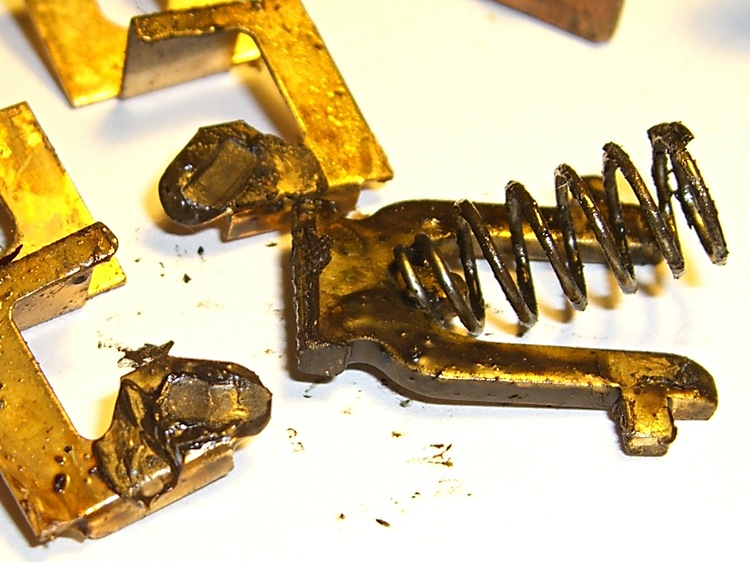
A closeup of the switch contacts shows (what I think is) the problem.
All the contact points are covered in grease, but the lyre-shaped gizmo looks like it’s been painted: its contact points were black and resisted cleaning by fingernail scraping.
As nearly as I can tell, all the current passed through a very few high spots that were wiped somewhat clean as the contacts closed. As those spots heated up, the grease melted and flowed over them, increasing the resistance and the heat.
The switch had been working for many decades, as the BX armored cable in the box had fabric-covered rubber (stiff rubber) insulation. I managed to install the replacement switch without breaking the insulation, but it was ugly in there.
Got a package from halfway around the world that, I thought, corresponded to a recent eBay order. Opened the envelope and pulled out a box containing … a Digital Media Player?
That’s odd. I don’t recall ordering one of those.
At this point, anybody who’s read Frank Herbert’s The White Plague should get the chills. Do you or don’t you open a mysterious package from far away that seems to offer something interesting?
Well, open it I did, and found exactly what I’d ordered: a stash of female headers pins. Of course, one can’t tell what else might have come in the package, but so it goes.
Now I can hand Eks half a lifetime supply of the strips to replace the ones I mooched.
One other mildly surprising part of the package: it seems we’ve gotten to the point where magnetic closures are cheap enough to replace everything else, including intricate origami tucks. There’s a small steel plate pasted under the flap. Who knew?
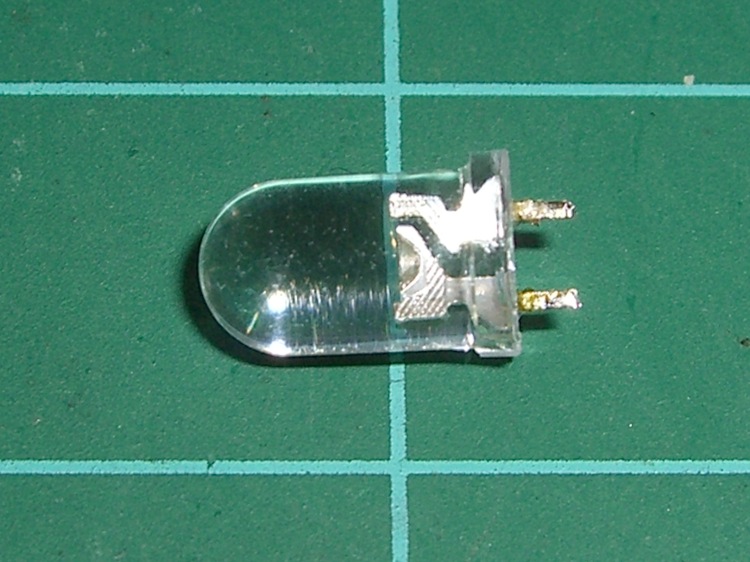
Doesn’t look like much, does it? It’s an ordinary blue LED that I used for the upper colon dot in a clock. Worked fine for a few dozen power-on hours, then it turned off a bit after 6:00 pm one day. Back on an hour later, more or less, then off again by the next morning, back on again, off again.
Might be a software error, as each colon LED is a separate TLC5916 display driver output. Might be a soldering problem, as my board doesn’t have plated-through holes. Might be (shudder) a burned-out transistor inside the TLC5916.
When it’s off, VCC appears on both sides, within a few tens of millivolts.
Resoldered the joints, after which it worked for a while. When it’s on, voltage measurements look normal: about 3.5 V drop across the diode and 1.5 V across the driver transistor.
No obvious code problems, but, then, code problems are never obvious.
Finally the thing stopped working for a few hours. I unsoldered it and there’s no continuity: it failed open. Peering deeply inside with a microscope shows nothing unusual: the flying gold wires look OK, the bonds look flat, and the chip has no burn marks.
Just a bad LED, I suppose. It’s surplus, of course, but that doesn’t mean much these days; there’s a lot of surplus going around.
Soldered in a replacement from the same batch and it’s all good.
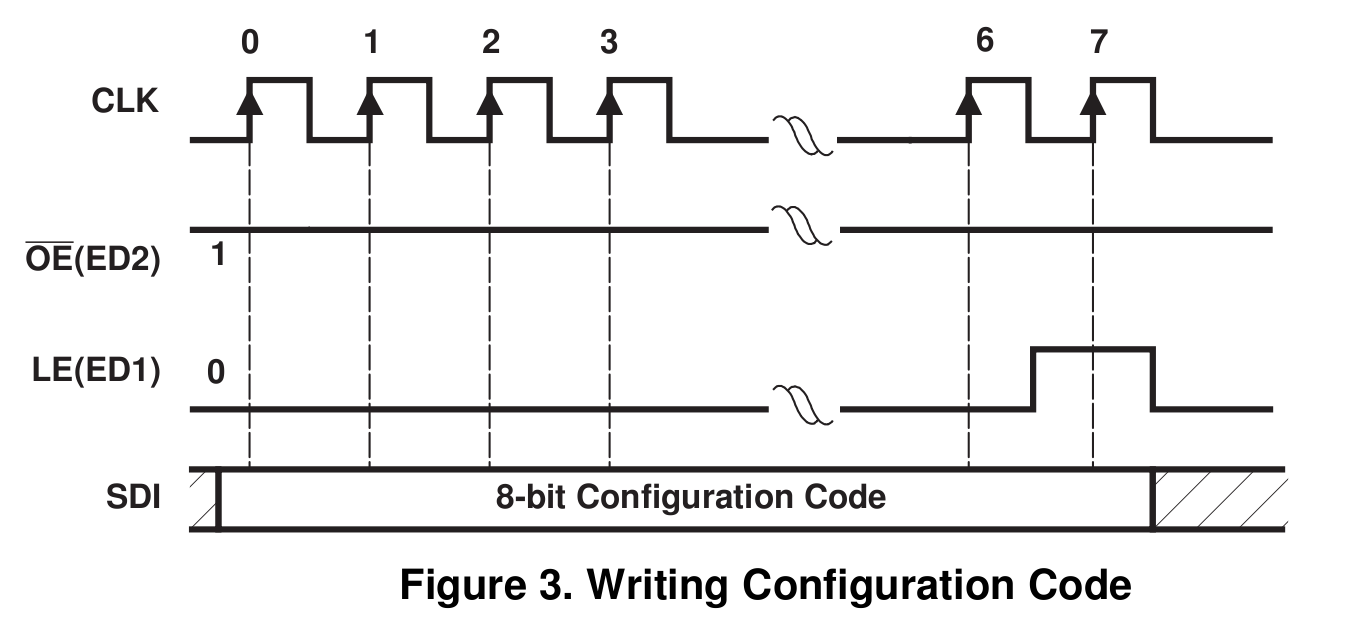
The TLC5916 data sheet clearly shows that you write the configuration code (which controls the LED current) by shifting seven bits in, then raising LE during the 8th SCK pulse while simultaneously shifting the 8th bit.
That makes no sense whatsoever: you couldn’t use standard SPI hardware in a chained configuration, because you’d have to blip LE while shifting.
In fact, the chip doesn’t work that way. You set the config code in Special Mode just like you set the LED driver bits in Normal Mode: shift ’em all in, then blip LE to latch ’em into the parallel holding register.
Here’s the code to make it happen…
DisableSPI();                               // manual SPI control

 digitalWrite(PIN_DISABLE_DISPLAY,HIGH);    // initial condition
 digitalWrite(PIN_LATCH_DO,LOW);

 PulsePin(PIN_SCK);                         // 1
 digitalWrite(PIN_DISABLE_DISPLAY,LOW);
 PulsePin(PIN_SCK);                         // 2
 digitalWrite(PIN_DISABLE_DISPLAY,HIGH);
 PulsePin(PIN_SCK);                         // 3
 digitalWrite(PIN_LATCH_DO,HIGH);           //   sets Special Mode
 PulsePin(PIN_SCK);                         // 4
 digitalWrite(PIN_LATCH_DO,LOW);
 PulsePin(PIN_SCK);                         // 5

//-- Send brightness level

 EnableSPI();                               // turn on SPI hardware

 SendRecSPI(Brightness);
 SendRecSPI(Brightness);
 SendRecSPI(Brightness);
 SendRecSPI(Brightness);
 SendRecSPI(Brightness);

 PulsePin(PIN_LATCH_DO);                    // latch new shift reg contents into drivers

//-- put LED drivers back in Normal Mode

 DisableSPI();

 digitalWrite(PIN_DISABLE_DISPLAY,HIGH);     // initial condition
 digitalWrite(PIN_LATCH_DO,LOW);

 PulsePin(PIN_SCK);                          // 1
 digitalWrite(PIN_DISABLE_DISPLAY,LOW);
 PulsePin(PIN_SCK);                          // 2
 digitalWrite(PIN_DISABLE_DISPLAY,HIGH);
 PulsePin(PIN_SCK);                          // 3
 digitalWrite(PIN_LATCH_DO,LOW);             //   sets Normal Mode
 PulsePin(PIN_SCK);                          // 4
 digitalWrite(PIN_LATCH_DO,LOW);
 PulsePin(PIN_SCK);                          // 5

 digitalWrite(PIN_DISABLE_DISPLAY,LOW);      // turn the LEDs on again
The SendRecSPI() function does exactly what you’d expect:
byte SendRecSPI(byte Dbyte) {                // send one byte, get another in exchange

 SPDR = Dbyte;                      // assume it's OK to send a new byte

 while (! (SPSR & (1 << SPIF))) {   // wait for shift to finish
  continue;
 }

 return SPDR;                       // SPIF will be cleared
}
I don’t know. Maybe the chip also works the way they show in the datasheet, but I doubt it’s worth finding out.
I’m using Texas Instruments TLC5916 constant-current LED driver chips for my my friend’s Totally Featureless Clock. An 8-bit configuration value sets the output current, with the external resistor defining the maximum value as described there.
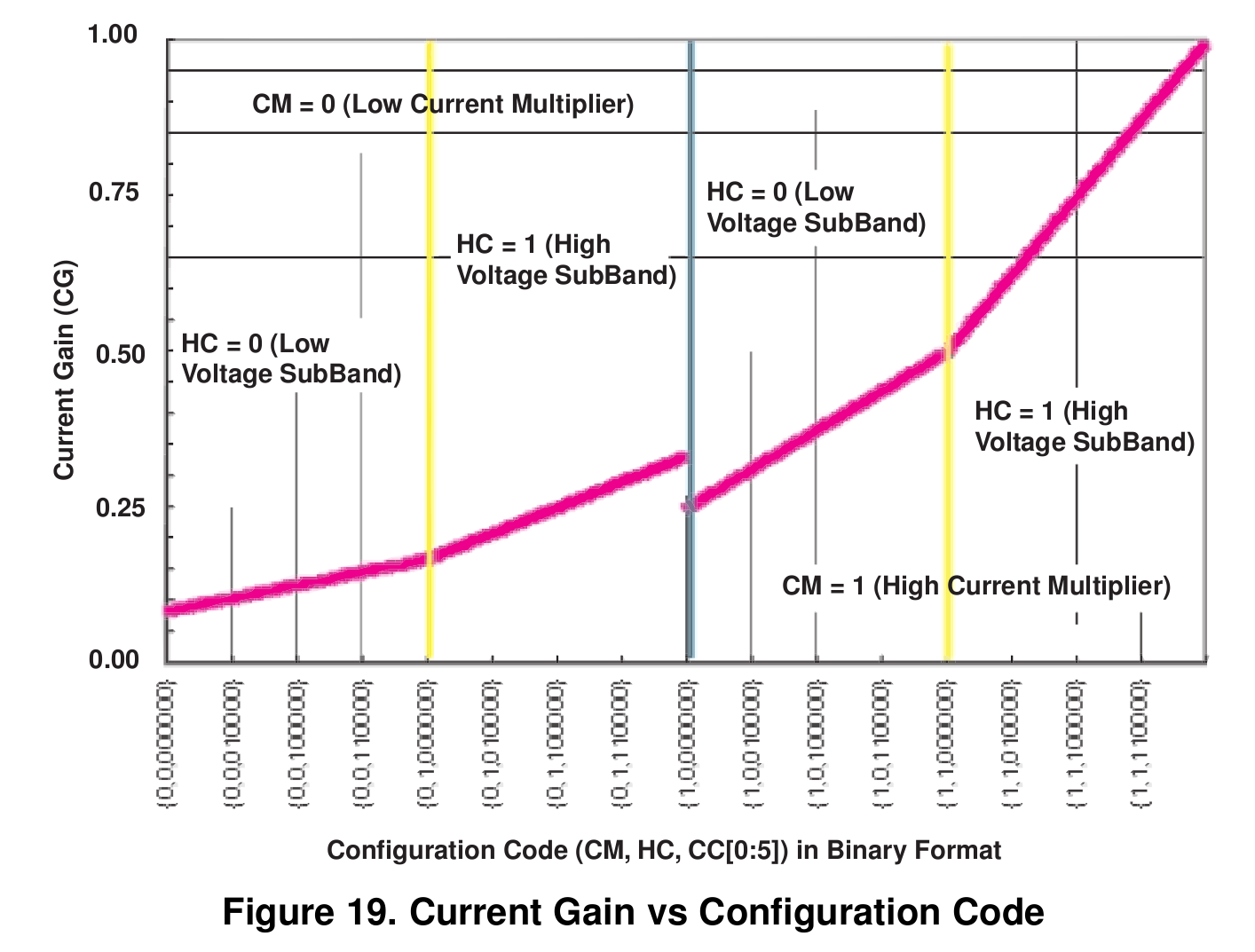
The problem is that the current-versus-config-value curve has a non-monotonic discontinuity in the middle, where the Current Multiplier bit switches from 0 to 1. I don’t know in which alternate universe this design decision made sense, but right here and now…
It. Does. Not.
Why it’s a problem: the LED brightness tracks room illumination as seen by a CdS photoresistor, averaged over maybe half a minute. The brightness changes very slowly, so the jump when it goes from 0x7f to 0x80 is really eyecatching. At least to me, anyway.
Eyeballometric measurement of the curve shows the current at 0x80 pretty much matches the current at 0x60, soooo let’s just shove the second quarter of the curve (between 0x40 and 0x7f) downward until it meets the high-current value at 0x80.



 The Smell of Molten Projects in the Morning