The Smell of Molten Projects in the Morning

Ed Nisley's Blog: Shop notes, electronics, firmware, machinery, 3D printing, laser cuttery, and curiosities. Contents: 100% human thinking, 0% AI slop.

Category: Electronics Workbench

Electrical & Electronic gadgets

  • Keeping Magnet Wire on the Spool

    Magnet wire wants to unspool itself, so it comes with a wrap of tape that eventually turns into a gummy layer. Rather than put new tape on the spool, gash a notch in the rim with a utility knife and capture the wire therein.

    Notched Wire Spool
    Notched Wire Spool

    If you’re really clever, you’ll angle the notch so the wire folds backwards and holds itself snug. If you’re not, well, there’s nobody going to notice having two opposing notches in the spool, right?

    They used to do this with thread and string, back in the old days when such stuff came on wooden spools, but it seems a lost art…

  • On Schematic Capture and PCB Layout Programs

    This useful comment thread showed up in relation to a post about a chainsaw repair, which would hide it from any rational collection of search terms. Here’s the thread in all its glory, as there doesn’t seem to be a way to move comments from one post to another.

    Feel free to continue the topic in the comments to this post…

    randomdreams

    Offtopic: have you ever used gEDA for schematic or pcb? I’m looking for something with reasonable abilities, and the crippled demo versions of orcad, eagle, and winqcad all look fairly crippled. I’ve zero use for autorouters and autoplacers (because they suck for analog design) but it’d be nice to have something that’s fairly usable for schematic and layout.

    Ed

    used gEDA for schematic or pcb?

    Nope. Every time I’ve looked at it, the status seems to be heartbreakingly close to being useful by someone who really doesn’t want to work around a morass of limitations. That’s becoming less true and maybe by now it’s practical… but I haven’t done a serious examination for maybe a year.

    I actually coughed up half a kilobuck for the Standard version of Eagle schematic & layout, as an autorouter doesn’t do much for the little bitty boards I build. Works fine, no complaints, but if I weren’t doing columns and suchlike, it’d be hard to justify.

    Neal H.

    andomdreams,

    I have used it for both a small project and a slightly bigger project,
    http://www.instructables.com/file/FPCHBLIG1M2BQTH (schematic)
    http://www.instructables.com/file/F6SYDYYG1M2KI8M (render of layout)

    It is quite usable, but the version that ships with most linux distros is pretty old, I had much better luck building it from source following the instructions on the gEDA homepage. The hardest part is creating symbols for the PCB tool, that is a little tricky to learn, but there are a lot of them pre-created for you on gedasymbols.org.

    randomdreams

    Thanks to both of you. I’ll probably give it a run. I currently spend much of my day creating symbols for Cadence, and I consider it impossible for any other part-creation process to be as painful or difficult as that. I’m more worried about general usability. Eagle’s the back-up plan.

    John Rehwinkel

    I still haven’t found a PCB layout program I like (and I’ve gotten tired of the truly primitive one I wrote 20 years ago). For schematics, I use DesignWorks Lite, which is apparently no longer offered (though DesignWorks Professional is still available).

    John Rehwinkel

    Ah, it is still offered (only $40), just not at the main Capilano site. The companion PCB layout program is Osmond ($200), which I keep meaning to try out. You can download the trial version at designworks4.com.

  • Monthly Aphorism: On Supplies

    • Never put a part back in the supply cabinet

    The Great Green, another excellent manager from my IBM days, mandated that very simple stockroom rule.

    He knew, even if we didn’t, that the next engineer would spend two days figuring out that the part you returned was defective, costing far more in the long run than just tossing the part.

    Of course, we never tossed the parts…

  • Sideways Cyanoacrylate Glue: Bad Idea

    Super Glue Tube
    Super Glue Tube

    I keep all my various adhesive & lubricant tubes standing on their nose or tail in a can, so as to avoid smashing them underneath something else.

    This one got opened for a project (the previous tube’s contents having turned into gum) and wound up on the Electronics Workbench overnight. That was long enough for a few drops of glue to leak out of the (I thought) securely tightened cap and wick along the length of the tube against the workbench.

    You can’t tell by looking, but that tube is glued down tight.

    I managed to chop the tube off the workbench using a stiff scraper, at the cost of a small nick near the top. Even though it’s now sealed with some flexible caulk, it’ll be gum before I need it next… but it won’t leak, because it’s sitting on its tail in a can.

    Drat!

    FWIW, the workbench surface is leftover laminate flooring from the kitchen / laundry room reflooring project. Works great and should last basically forever.

  • Running the AADE Filter Design Program in WINE

    This requires a bit of hocus-pocus, all of which you can find by diligent searching. Nothing original here, but I’m sure to need it again one of these days.

    To install THREED32.OCX:

    winetricks mfc40
    

    To fix the “ActiveX component can’t create object” error, you can try the process described there. It didn’t work for me, but one of the messages points out that the error is tied to the nag screen, which will vanish after 10 (?) iterations. That worked, although I admit to losing track of the number of crashes.

    Alas, the Help function crashes with that same message while trying to invoke the HELP menu item; the crash brings down the entire program. So it goes.

    Anyhow, in the process of figuring that out, I fetched the msscript.ocx file from the Windows installation on this box:

    sudo mount -o ro,uid=ed /dev/sda2 /mnt/part
    find /mnt/part/WINDOWS/ -iname "msscript*"
    

    Which reports it’s located at:

    /mnt/part/WINDOWS/system32/msscript.ocx
    

    Copy it locally for convenience:

    cp /mnt/part/WINDOWS/system32/msscript.ocx ~/.wine/drive_c/users/ed/My\ Documents
    sudo umount /mnt/part
    

    Then you can register the control:

    regsvr32 ~/.wine/drive_c/users/ed/My\ Documents/msscript.ocx
    

    The program entry shows up in the “Other” category of the XFCE menu structure. I added a launcher and eventually found the icon:

    ~/.local/share/icons/32ce_filter.0.xpm
  • Crystal Capacitance Measurement Fixture

    Crystal Capacitance Fixture
    Crystal Capacitance Fixture

    The trick to measuring small capacitance values is to get your body out of the loop: this fixture holds a crystal rigidly and makes solid contacts to both the case and leads while measuring the internal crystal-to-case capacitance. It’s sized for wire-terminated HC-49/U and HC-49/US cases, but you could obviously adapt it to other cases.

    The meter is an AADE L/C Meter IIB, with binding posts on 3/4″ centers. The post caps are plastic, so the only reliable connection is on the bottom surface. I used double-sided 62-mil PCB material for the fixture base plate, with copper-foil tape wrapped around the sides and soldered along the top edge; the adhesive is allegedly conductive, but I suspect that’s for static dissipation and shielding, rather than for actually conducting signal current. Kapton tape over the copper foil prevents gashes on the sharp edges.

    Notes:

    • Run a 1/8″ end mill across (both sides of!) the PCB and drill 1/4″ holes with a step drill at the appropriate spots.
    • A 25-mil brass shim stock rectangle soldered to the right half supports the crystal case to get the flange off the board.
    • Slice up an alligator clip with a Dremel cutoff wheel, drill a hole in the board to mount it with the screw that’s supposed to secure its wire, and it’ll hold crystal cans down with grim determination.
    • A snippet of phosphor bronze spring stock, bent in a slight arc with a tab soldered to the board at the far end, holds the crystal leads against the PCB. You could probably use brass shim stock.
    • The black strip on the far side of the binding posts is half of a wire-wrap IC socket, leads bent & clipped appropriately, then soldered to the underside foil. That’s where you stick crystals to measure their lead-to-lead capacitance (aka Co or C0). Works fine for through-hole caps, too.

    A detail view…

    Crystal Capacitance Fixture - Detail
    Crystal Capacitance Fixture – Detail

    Typical crystal case-to-lead capacitance is on the order of a few pF, so zeroing the fixture capacitance is important: (meter + fixture) weighs in at about 6 pF.

    There’s another half pF of crystal-lead-to-fixture capacitance that’s nullable by positioning the cap leads just over the spring contact when zeroing the meter.

    There’s essentially no stray capacitance due to a crystal in the socket strip along the back; zeroing the meter without the crystal seems to be adequate.

    I find that pressing the Zero button with a screwdriver while bracing the other side of the case with another screwdriver gives the best results; doing it with fingers produces about +0.5 pF offset.

    Done right, the meter reads within ±0.03 pF of zero and remains stable as long as you stay away while reading the digits!

  • Generic Sony NP-FS11 Lithium-Ion Packs: FAIL

    Somewhat to my surprise, the eBay vendor responsible for those curves sent three replacement NP-FS11 batteries, commenting:

    We’ve sent all your comments to the factory and ask them for a total quality inspection in this batch of batteries.

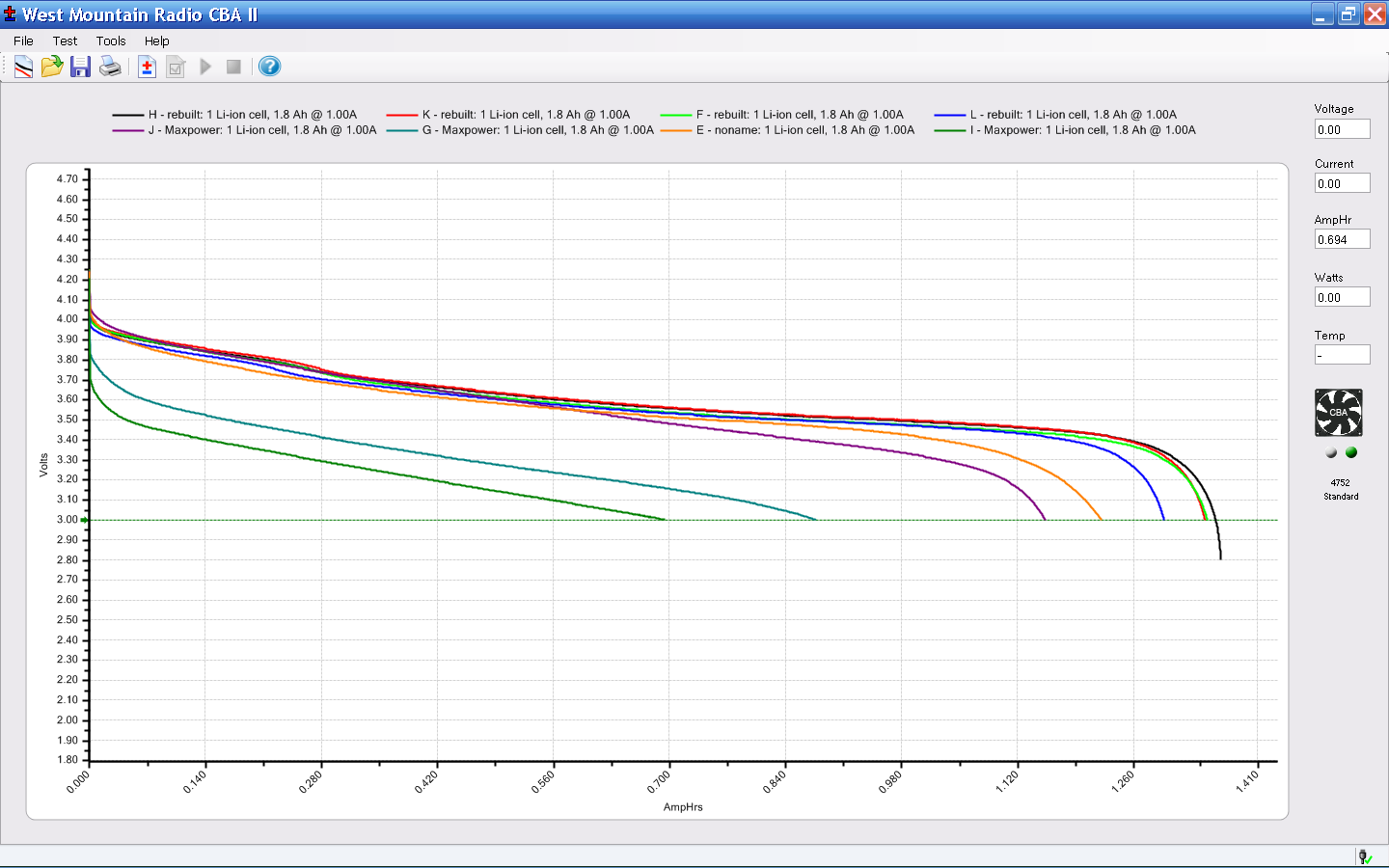
    Here are the capacity curves for an initial charge, a test, recharge, and another test on each pack. The curves match up reasonably well (the top & bottom traces are nearly exact overlays), so I believe the results are accurate.

    MaxPower NP-FS11 - Packs JKL
    MaxPower NP-FS11 – Packs JKL

    One pack is the best I’ve seen yet. The other two are junk, pure and simple.

    So, to summarize:

    • One of three batteries DOA in first batch, others weak
    • Two of three batteries DOA in replacement

    Overall, that’s a 50% failure rate even if you have relaxed standards…

    I decided that, despite their “customer service”, this level of quality deserves the dreaded Negative Feedback checkbox.

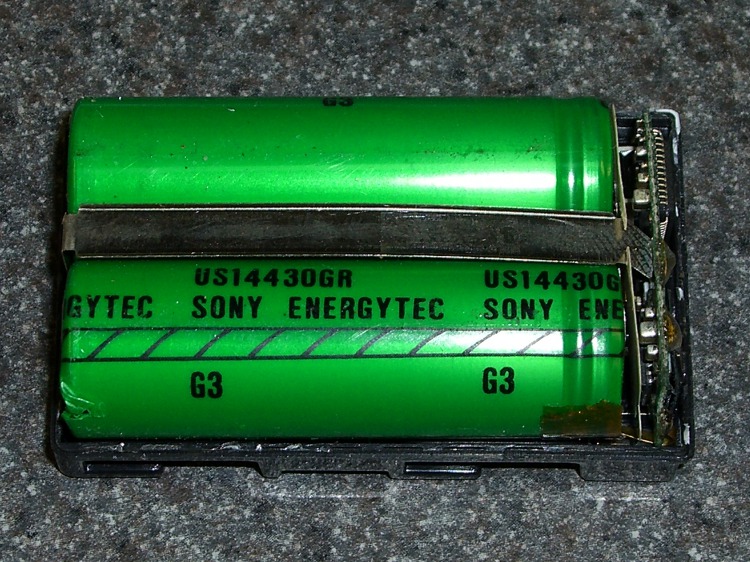
    Now, to saw the cases open and replace the cells. I cannot imagine any way to justify this on an economic basis, but we’ll certainly have enough batteries for that camera when I’m done.

    If I had any confidence that spending more on the batteries would get a higher quality product, I’d do it. The question is, would another order of magnitude make any difference?