The Smell of Molten Projects in the Morning

Ed Nisley's Blog: Shop notes, electronics, firmware, machinery, 3D printing, laser cuttery, and curiosities. Contents: 100% human thinking, 0% AI slop.

Category: Electronics Workbench

Electrical & Electronic gadgets

  • Arduino Mega: Mounting Standoff and Screw

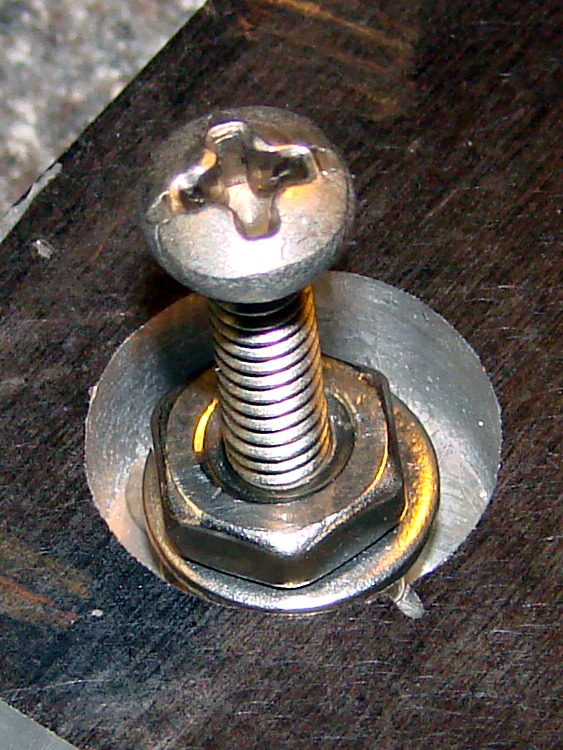
    The Arduino Mega has four, count them, four mounting holes in a more-or-less rectangular pattern around the edge of the board. Three of the four have enough room for standard pan-head 4-40 screws. The fourth hole is squeezed between two pin-header sockets, to the extent that no screw in my collection will fit.

    Screw on Arduino Mega board
    Screw on Arduino Mega board

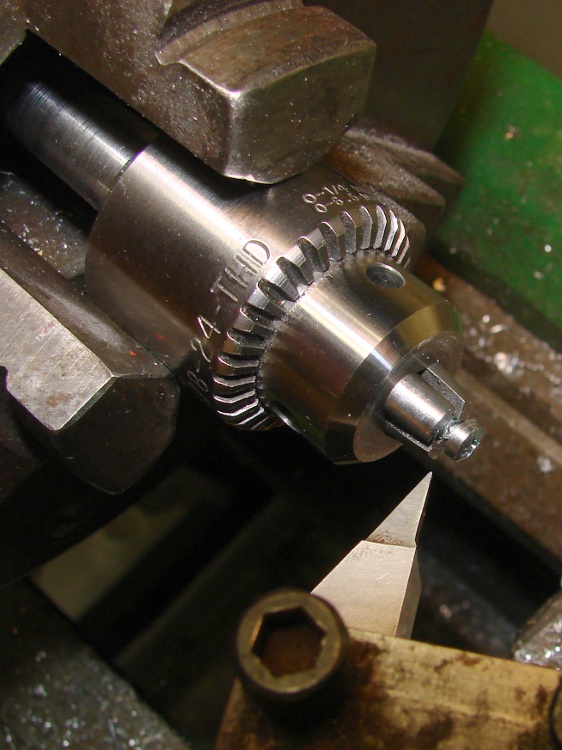
    Having a lathe, however, makes this situation no big deal… and this time, I put the Sherline drill chuck in the 3-jaw because I wanted to, not because the 3-jaw was stuck. In truth, the lathe chuck simply won’t grab a 4-40 screw at all.

    Turning down the screw
    Turning down the screw

    I had that pointy right-cutting tool in the holder, so that’s how I cleared off the burr on the backside of the head.

    The chuck did grab the hex standoff just fine, though, and the final result looks like this…

    Modified standoff and screw for Arduino Mega
    Modified standoff and screw for Arduino Mega

    For future reference, the turned-down sections are 0.180 inch in diameter; call it 4.5 mm. The snout on the standoff must clear the pins,so it’s 0.100 inch or 2.5 mm long.

  • AA Cell Holder: Fragile Contacts

    Broken cell holder contact
    Broken cell holder contact

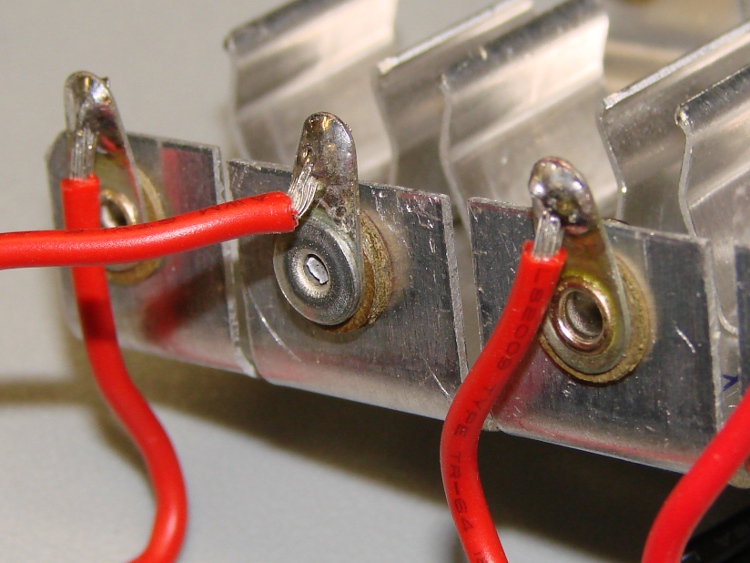
    It seems I applied a bit too much pressure to one of the contacts on a metal AA cell holder: the outer rim of the rivet holding the solder tab in place departed for the distant reaches of the Basement Laboratory.

    No big deal, I thought: pop another rivet in place and get back in operation…

    You really want the rivet to go in with the flat head inside the cell holder where the original flat head was. Unfortunately, the rivet yanker’s head won’t fit into the holder; I’m pretty sure the manufacturer has a Special Machine to make that happen.

    So I put the reinforcing washer and lumpy end inside. That meant switching the insulating washers to keep the overall distance from the negative cell contact about the same.

    Cell holder rivet - inside
    Cell holder rivet – inside

    The outside looks much better…

    Cell holder rivet - outside
    Cell holder rivet – outside

    For what it’s worth, these pix came from the Sony DSC-H5 with the flash turned down 1 EV. Much better results than the Casio EX-Z850, even with its flash set to Soft (whatever that is). The H5 has much better macro capability… and with the new Eneloop cells, it lasts long enough to make it usable in the shop.

  • LED Worklight: Innards Thereof

    So I added a cheap 72-LED worklight as a box-filler to a recent order. Popped in four AA alkaline cells, clicked the switch, and … huh, that thing looks dim.

    Took it apart and what do we find inside? Resistors!

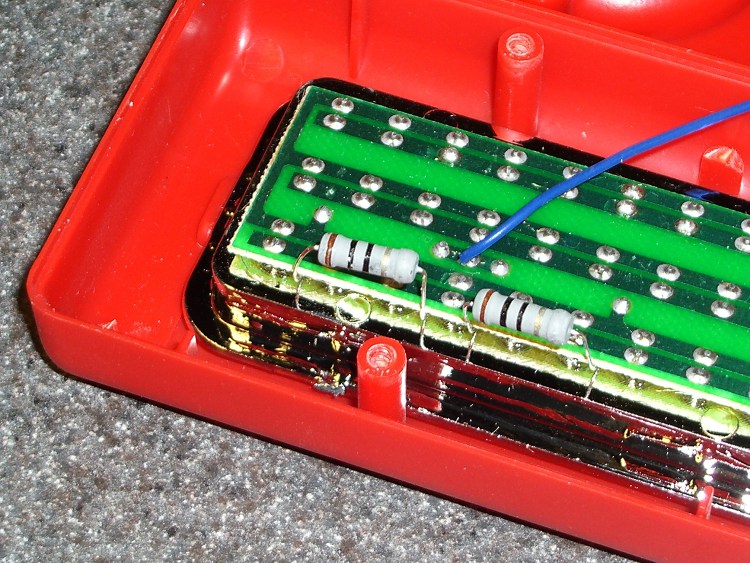
    Over on the left lives a pair of 10-Ω resistors that limit the overall LED current. They’re in parallel, so it’s running with a 5-Ω ballast.

    LED ballast resistors
    LED ballast resistors

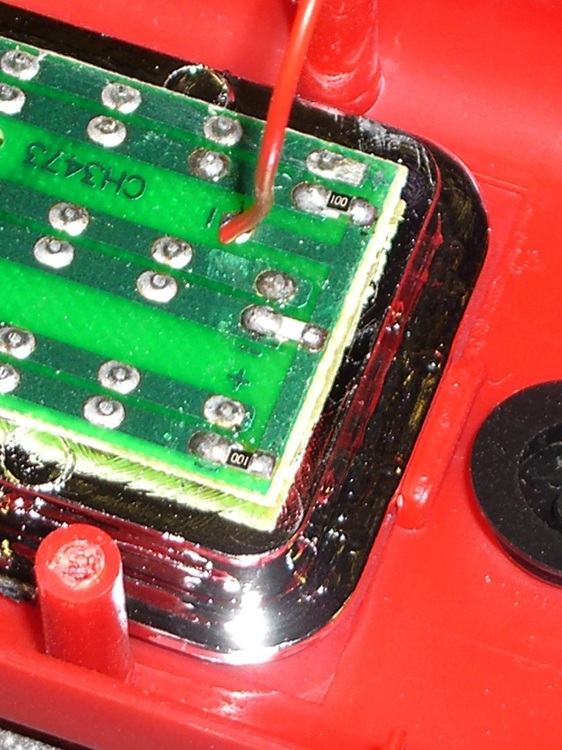
    Over on the right, each string of 24 parallel LEDs has a separate 10-Ω equalizing resistor.

    LED equalizing resistors
    LED equalizing resistors

    A quick ammeter check gives the dismal news: total current is 220 mA = 73 mA per string of 24 LEDs = 3 mA per LED.

    Well, no wonder why it’s dim!

    The ballast resistors drop 0.22 x 5 = 1.1 V, each equalizing resistor is good for 0.073 x 10 = 0.73 V, and (as you’d expect) the LEDs run at about 4 V.

    Run it on rechargeables and it’s much worse.

    Given the low price, I’d expect these LEDs to fall over dead if I goosed them all to 20 mA… not to mention, 0.02 x 72 = 1.44 A is a pretty stiff load for alkalines and the housing wouldn’t stand up to nearly 9 W of power dissipation.

    Ah, well, it’ll come in useful here & there…

  • Broken Tap Removal: The CNC Way

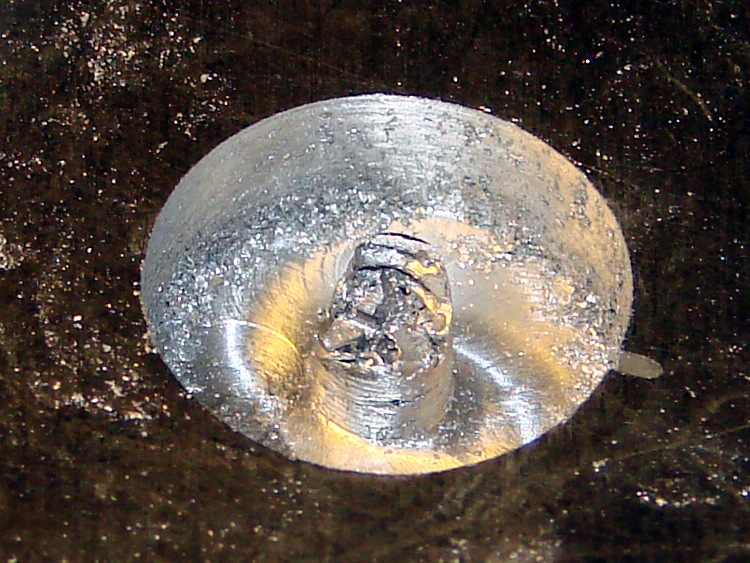
    Having successfully drilled and tapped eight 4-40 holes for the MOSFETs and two 8-32 holes for the heatsink clamps, I needed four more holes for the 6-32 standoffs that will mount the heat spreader to the base. As is always the case, the tap broke in the next-to-last hole…

    Broken tap
    Broken tap

    This is a three-flute tap, the break is recessed below the surface, and it looks like it’s cracked along one of the flutes. Bleh! I don’t have any tap extractors, mostly because I don’t do that much tapping, and I doubt the extractors work all that well on tiny taps.

    I tried something I’d never done before: slit the top of the tap with an abrasive wheel and unscrew it. That didn’t work, of course, but it’s a useful trick to keep in mind. I think the tap was cracked lengthwise and, in any event, a three-flute tap doesn’t have the proper symmetry for a slot. Better luck with larger four-flute taps.

    Slotted tap
    Slotted tap

    So I must dig the mumble thing out…

    Starting the moat
    Starting the moat

    The overall plan:

    • Clamp the heat spreader to the Sherline tooling plate
    • Helix-mill a trench around the tap
    • Grab the stub with Vise-Grips
    • Unscrew it
    • Repair the damage

    The clearance hole for a 6-32 screw is 0.1405 inch and that’s a 3/16-inch end mill: 70 + 93 = 163 mil radius, call it 0.170 inch. You really don’t want to kiss the tap flutes with the end mill, so you could make that the ID a bit larger.

    Manual CNC, feeding commands into Axis and using the history list to chew downward 20 mils on each pass. With the origin in the middle of the broken tap and the cutter starting at (-0.170,0), the code looks like:

    G2 I+0.170 Z=-0.020
    G2 I+0.170 Z=-0.040
    ... and so on ...
    

    About 3000 rpm and 2 inches per minute feed; the feed was too slow, because the aluminum chips were much too fine. I actually used cutting lube for this job: the heat spreader got nice and warm.

    Coolant
    Coolant

    I stopped at Z=-0.100 and made a final pass around the bottom of the hole to clean out the ramp. Then, try unscrewing the tap…

    Tap stub - first attempt
    Tap stub – first attempt

    Of course, the stub broke off more or less flush with the bottom of the hole, so I continued milling downward to Z=-0.260, a bit more than halfway through the plate. This time, the needle-nose Vise-Grips got a good grip on an uncracked section and the remains twisted out with very little effort.

    Grabbing the stub
    Grabbing the stub

    Although the central pillar is outside the tap’s OD, leaving a solid aluminum shell, there’s not much meat to it. The shell broke off with the first twist and came out with the tap.

    Those are not, by the way, gold-plated Vise-Grips. It’s a flash picture and the worklight is a warm-white compact fluorescent: the color correction that makes the aluminum look neutral gray turns the reflected CFL into gold.

    Aligning replacement nuts
    Aligning replacement nuts

    I milled off the remains of the shell around the tapped hole, leaving a more-or-less flat bottom. If I cared enough, I’d machine a snug-fitting replacement aluminum plug, epoxy it into place, then (attempt to) drill-and-tap the hole again.

    Instead, because the hole was deep enough for a pair of 6-32 nuts and a washer, I simply aligned those on a screw and filled the hole with JB Weld epoxy.

    It doesn’t show in the picture, but the screw is well-lubricated with silicone grease to prevent it from becoming one with the nuts.

    I eased epoxy into the recess, chasing out the inevitable air bubbles, and then scraped off most of the excess.

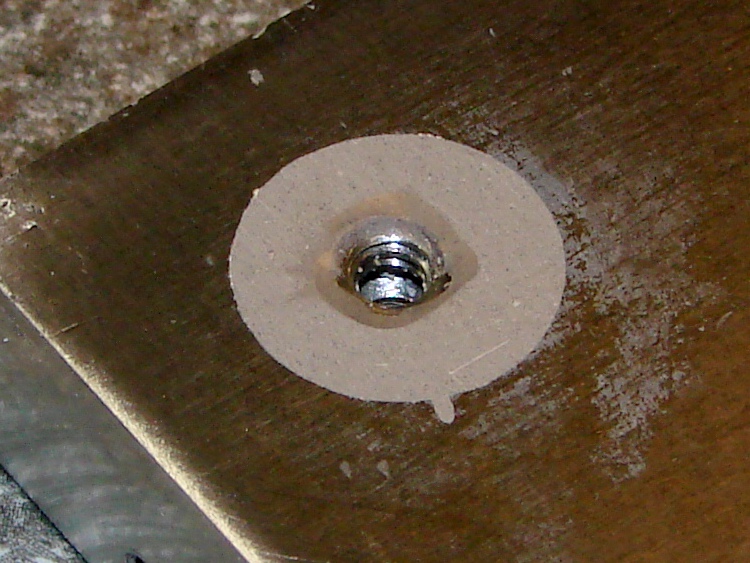
    Epoxy fill
    Epoxy fill

    Let it cure overnight, scrub it on some sandpaper atop the sacrificial side of the surface plate, and it’s all good again…

    Sanded flat
    Sanded flat

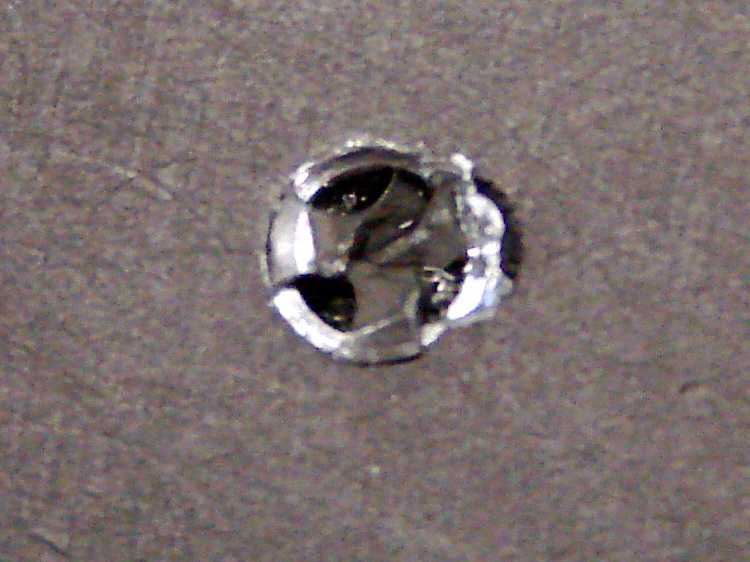
    The little finger of epoxy sticking out to the front fills the end of the slit I carved into the top of the tap, which is visible in the other pictures if you look closely. The area around the hole isn’t stained; that’s smooth epoxy.

    Of course, the thermal conductivity of epoxy is a lot less than that of solid aluminum. I’m not really pushing the limits of TO-220 packages, so this kludge will work fine in this application. It’s also nice that the repair is on the bottom of the heat spreader, where nobody will ever know I screwed up…

    Now, to return to the project at hand, with even more motivation to avoid tapping holes in the future!

  • Arduino Mega: Showstopper Workaround

    The discussion following that post gave me enough impetus to figure this out. What I have here is not a complete solution, but it seems to solve the immediate problem.

    Downside: this will not survive the next regular system update that touches the gcc-avr package (yes, it’s the avr-gcc compiler and the gcc-avr package). Hence, I must write down the details so I can do it all over again…

    To review:

    The problem is that the avr-gcc cross-compiler produces incorrect code for Atmega1280-class chips with more than 64 KB of Flash space: a register isn’t saved-and-restored around a runtime routine that alters it. Simple sketches (seem to) run without problems, but sketches that instantiate objects crash unpredictably. Because Arduino sketches depend heavily on various objects (like, oh, the Serial routines), nontrivial sketches don’t work.

    The workaround is to patch the library routine that invokes the constructors, as detailed in that gcc bug report, to push / pop r20 around the offending constructors. The patch tweaks two spots in the libgcc.S source file, which then gets built into an assortment of chip-specific libgcc.a files during the compile.

    I was highly reluctant to do that, simply I’ve already installed the various gcc packages using pacman (the Arch Linux package manager) and really didn’t want to screw anything up by recompiling & reinstalling gcc from source. It’s certainly possible to update just the avr portion, but I don’t know exactly how to do that and doubt that I could get it right the first time… and the consequences of that catastrophe I don’t have time to deal with.

    So I elected to build the avr cross-compiler from source, verify that the as-built libgcc.a file was identical to the failing one, apply the patch, recompile, then manually insert the modified file in the right spot(s) in my existing installation. This is less manly than doing everything automagically, but has a very, very limited downside: I can easily back out the changes.

    Here’s how that went down…

    The instructions there (see the GCC for the AVR target section) give the overview of what to do. The introduction says:

    The default behaviour for most of these tools is to install every thing under the /usr/local directory. In order to keep the AVR tools separate from the base system, it is usually better to install everything into /usr/local/avr.

    Arch Linux has the tools installed directly in /usr, not /usr/local or /usr/local/avr, so $PREFIX=/usr. Currently, they’re at version 4.5.1, which is typical for Arch: you always get the most recent upstream packages, warts and all.

    Download the gcc-g++ (not gcc-c++ as in the directions) and gcc-core tarballs (from there or, better, the gnu mirrors) into, say, /tmp and unpack them. They’ll both unpack into /tmp/gcc-4.5.1, wherein you create and cd into obj-avr per the directions.

    I opted to feed in the same parameters as the Arch Build System used while installing the original package, rather than what’s suggested in the directions. That’s found in this file:

    /var/abs/community/gcc-avr/PKGBUILD
    

    Which contains, among other useful things, this lump of command-line invocation:

    ../configure --disable-libssp \
                   --disable-nls \
                   --enable-languages=c,c++ \
                   --infodir=/usr/share/info \
                   --libdir=/usr/lib \
                   --libexecdir=/usr/lib \
                   --mandir=/usr/share/man \
                   --prefix=/usr \
                   --target=avr \
                   --with-gnu-as \
                   --with-gnu-ld \
                   --with-as=/usr/bin/avr-as \
                   --with-ld=/usr/bin/avr-ld
    

    Yes, indeed, $PREFIX will wind up as /usr

    Feeding that into ./configure produces the usual torrent of output, ending in success after a minute or two. Firing off the make step is good for 15+ minutes of diversion, even on an 11-BogoMIPS dual-core box. I didn’t attempt to fire up threads for both cores, although I believe that’s a simple option.

    The existing compiler installation has several libgcc.a files, each apparently set for a specific avr chip:

    [ed@shiitake tmp]$ find /usr/lib/gcc/avr/4.5.1/ -name libgcc.a
    /usr/lib/gcc/avr/4.5.1/libgcc.a
    /usr/lib/gcc/avr/4.5.1/avr35/libgcc.a
    /usr/lib/gcc/avr/4.5.1/avr3/libgcc.a
    /usr/lib/gcc/avr/4.5.1/avr51/libgcc.a
    /usr/lib/gcc/avr/4.5.1/avr4/libgcc.a
    /usr/lib/gcc/avr/4.5.1/avr6/libgcc.a
    /usr/lib/gcc/avr/4.5.1/avr5/libgcc.a
    /usr/lib/gcc/avr/4.5.1/avr31/libgcc.a
    /usr/lib/gcc/avr/4.5.1/avr25/libgcc.a
    

    The key to figuring out which of those files need tweaking lies there, which says (I think) that the Atmega1280 is an avr5 or avr51. Because I have an Arduino Mega that’s affected by this bug, I planned to tweak only these files:

    /usr/lib/gcc/avr/4.5.1/libgcc.a
    /usr/lib/gcc/avr/4.5.1/avr51/libgcc.a
    /usr/lib/gcc/avr/4.5.1/avr5/libgcc.a
    

    I have no idea what the top-level file is used for, but … it seemed like a good idea.

    Now, I innocently expected that the libgcc.a files for a 4.5.1 installation would match the freshly compiled files for a 4.5.1-from-source build, but that wasn’t the case. I don’t know what the difference might be; perhaps there’s an embedded path or timestamp or whatever that makes a difference?

    The Arch Linux standard installation of gcc 4.5.1 has these files:

    $ find /usr/lib/gcc/avr/4.5.1/ -iname libgcc.a -print0 | xargs -0 ls -l
    -rw-r--r-- 1 root root 2251078 Sep  4 16:26 /usr/lib/gcc/avr/4.5.1/avr25/libgcc.a
    -rw-r--r-- 1 root root 2256618 Sep  4 16:26 /usr/lib/gcc/avr/4.5.1/avr31/libgcc.a
    -rw-r--r-- 1 root root 2252506 Sep  4 16:26 /usr/lib/gcc/avr/4.5.1/avr35/libgcc.a
    -rw-r--r-- 1 root root 2256310 Sep  4 16:26 /usr/lib/gcc/avr/4.5.1/avr3/libgcc.a
    -rw-r--r-- 1 root root 2250930 Sep  4 16:26 /usr/lib/gcc/avr/4.5.1/avr4/libgcc.a
    -rw-r--r-- 1 root root 2251846 Sep 27 12:58 /usr/lib/gcc/avr/4.5.1/avr51/libgcc.a
    -rw-r--r-- 1 root root 2251550 Sep 27 12:58 /usr/lib/gcc/avr/4.5.1/avr5/libgcc.a
    -rw-r--r-- 1 root root 2252458 Sep  4 16:27 /usr/lib/gcc/avr/4.5.1/avr6/libgcc.a
    -rw-r--r-- 1 root root 2251474 Sep 27 12:57 /usr/lib/gcc/avr/4.5.1/libgcc.a
    

    The compilation-from-source using the gcc 4.5.1 tarballs has these files:

    $ pwd
    /tmp/gcc-4.5.1/obj-avr
    $ find -iname libgcc.a -print0 | xargs -0 ls -l
    -rw-r--r-- 1 ed ed 2250258 Sep 27 15:51 ./avr/avr25/libgcc/libgcc.a
    -rw-r--r-- 1 ed ed 2255798 Sep 27 15:51 ./avr/avr31/libgcc/libgcc.a
    -rw-r--r-- 1 ed ed 2251686 Sep 27 15:51 ./avr/avr35/libgcc/libgcc.a
    -rw-r--r-- 1 ed ed 2255490 Sep 27 15:51 ./avr/avr3/libgcc/libgcc.a
    -rw-r--r-- 1 ed ed 2250110 Sep 27 15:51 ./avr/avr4/libgcc/libgcc.a
    -rw-r--r-- 1 ed ed 2251838 Sep 27 15:51 ./avr/avr51/libgcc/libgcc.a
    -rw-r--r-- 1 ed ed 2251550 Sep 27 15:51 ./avr/avr5/libgcc/libgcc.a
    -rw-r--r-- 1 ed ed 2251638 Sep 27 15:52 ./avr/avr6/libgcc/libgcc.a
    -rw-r--r-- 1 ed ed 2251474 Sep 27 15:52 ./avr/libgcc/libgcc.a
    -rw-r--r-- 1 ed ed 2250258 Sep 27 15:51 ./gcc/avr25/libgcc.a
    -rw-r--r-- 1 ed ed 2255798 Sep 27 15:51 ./gcc/avr31/libgcc.a
    -rw-r--r-- 1 ed ed 2251686 Sep 27 15:51 ./gcc/avr35/libgcc.a
    -rw-r--r-- 1 ed ed 2255490 Sep 27 15:51 ./gcc/avr3/libgcc.a
    -rw-r--r-- 1 ed ed 2250110 Sep 27 15:51 ./gcc/avr4/libgcc.a
    -rw-r--r-- 1 ed ed 2251838 Sep 27 15:51 ./gcc/avr51/libgcc.a
    -rw-r--r-- 1 ed ed 2251550 Sep 27 15:51 ./gcc/avr5/libgcc.a
    -rw-r--r-- 1 ed ed 2251638 Sep 27 15:52 ./gcc/avr6/libgcc.a
    -rw-r--r-- 1 ed ed 2251474 Sep 27 15:52 ./gcc/libgcc.a
    

    The top-level files have the same size, but are not identical:

    $ diff ./avr/libgcc/libgcc.a ./gcc/libgcc.a
    Binary files ./avr/libgcc/libgcc.a and ./gcc/libgcc.a differ
    

    Haven’t a clue what’s going on with different files in different spots, but I saved the existing files in the installed tree as *.base and copied the new ones from ./gcc/avr* into place. While there are many ways to crash a program, the AnalogInOutSerial demo program ran correctly on a Duemilanova (presumably with the existing libgcc.a) and failed on the Mega (with the recompiled libgcc.a). Save those files as *.rebuild just in case they come in handy.

    Manually change the libgcc.S source file (it’s only four lines, I can do this), recompile, and the build process recompiles only the affected files; that’s comforting. Copy those into the installed tree and, lo and behold, the demo program now runs on both the Duemilanova and the Mega.

    While it’s too soon to declare victory, the hardware bringup program I’m writing also works, so the initial signs are good.

    Thanks to Mark Stanley for blasting me off dead center on this. I didn’t do a complete install, but he got me thinking how to make the least disruptive change…

    And a tip o’ the cycling helmet to the whole Free Software collective for making a mid-flight patch like this both feasible and possible: Use The Source!

  • Tour Easy: Underseat Pack Repair Finished

    So, after a bit more than a year, I replaced the cracked backing plate in the other ERRC underseat pack on my Tour Easy. The first plate held up much better than I expected: hasn’t cracked or poked through the pack fabric.

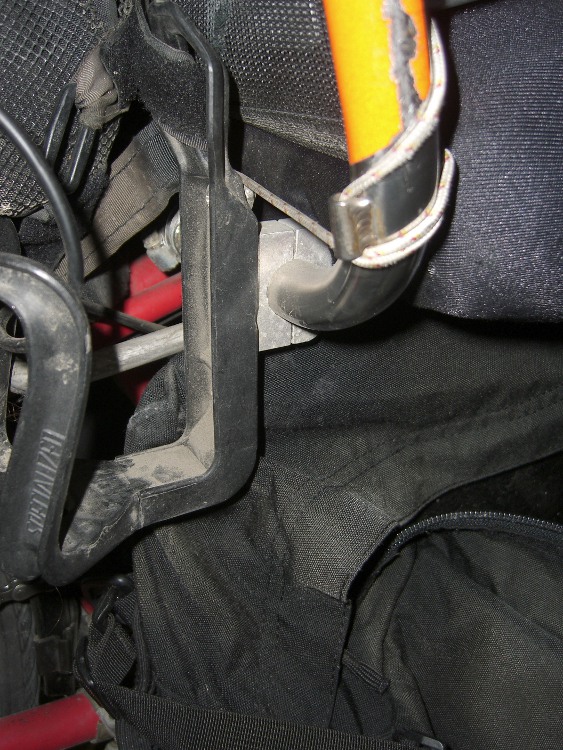
    This repair followed the same outline, including cutting off the ripped netting on the outside of the pack and marching the pack into the clothes washer for a spin with a few shop rags. Reassembled everything, put it back on the bike, and … the new aluminum extrusion across top  of the plate smacked firmly into the water bottle holder clamped to the rear of the seat frame for the amateur radio.

    Underseat pack vs radio holder
    Underseat pack vs radio holder

    The extrusion is the lump running horizontally, just under the seat cushion. The corner of the pack extended rearward (left) of the water bottle holder’s black plastic body.

    The original flexy plastic pack plate simply bent out of the way, but that’s not going to work now.

    So I loosened the clamp, moved it a bit more to the right, and tightened it up again. I’d originally located it at the far right end of the straight part of the seat frame, so it’s now edging into the curved part that eventually forms the right side of the frame, but it’s good enough.

    My shop assistant says she wants another water bottle holder for an actual water bottle on her bike. I say she should just go to the shop and make whatever she wants, then install it. Negotiations continue…

  • Copper Tape for PCB Edge Binding

    I’m laying out a PCB with ampere load currents, millivolt sense voltages, and PWM drive, all connected to an Arduino’s strictly digital ground layout through the usual headers. While I’ve laid the board out with the high-current stuff over there, the sense inputs here, and the PWM as far off in its own corner as possible, I fear this will get ugly.

    One step to reducing the noise involves a decent ground system. The Arduino pretty much eliminates the whole single-point ground concept, so I’m using a double-sided ground plane with plenty of Z-wire stitching , plus copper tape around the edge binding the top and bottom planes.

    Copper tape on PCB edge
    Copper tape on PCB edge

    The PCB is 60 mils thick, so I cut four copper foil strips about 3/16-inch wide, folded them around the board edges, then burnished the surfaces flat.

    Although the tape has adhesive on one side which is allegedly conductive, I figured running a solder bead along the edges couldn’t possibly hurt. That worked out reasonably well, if you don’t mind blobular solder along the edge of your board.

    Copper tape solder joint
    Copper tape solder joint

    The joint along the bottom edge shows one problem: some adhesive oozed out while soldering and formed a barrier. I think that happened along the tape edges from the outside of the roll, because it’s most prominent along two board edges.

    Memo to Self: Slice off and discard the outer few millimeters. Mask the outer board edge for a solid pour, not a hatch.