Ed Nisley's Blog: Shop notes, electronics, firmware, machinery, 3D printing, laser cuttery, and curiosities. Contents: 100% human thinking, 0% AI slop.
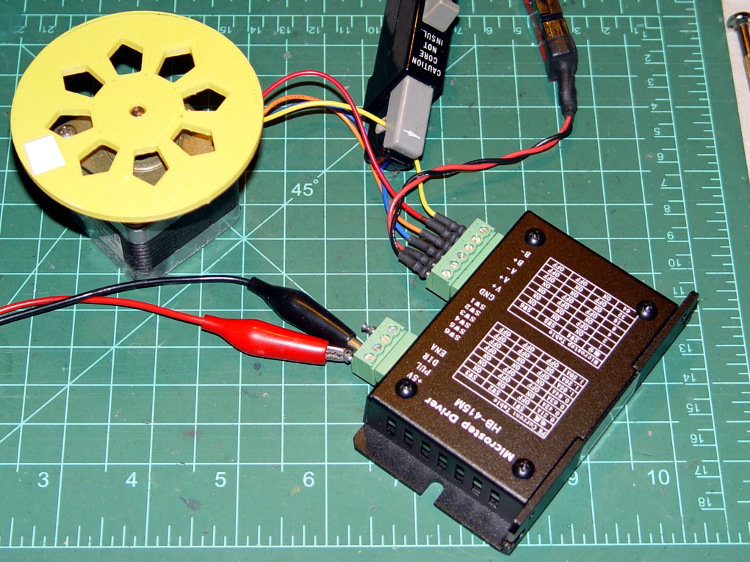
As mentioned there, the usual eBay vendor shipped HB-415M drivers instead of the advertised 2M415 drivers. Based on the Chinese datasheet and some poking around, I got a test setup working with a bench supply, a signal generator, and a NEMA 17 stepper motor with 2 Ω windings.
First observation: the ENA input is active high. Pulling it low to turn on the optocoupler disables the drive output, which is exactly the opposite of what’s shown in the datasheet, which means that the driver will run quite happily with nothing connected to the ENA pin. The optoisolator current runs about 11 mA from a 5 V supply, close enough to the 10 mA typical spec, but the signal generator thinks it’s providing a TTL pulse output.
Second observation: the driver’s actual winding current doesn’t match the DIP switch setting.
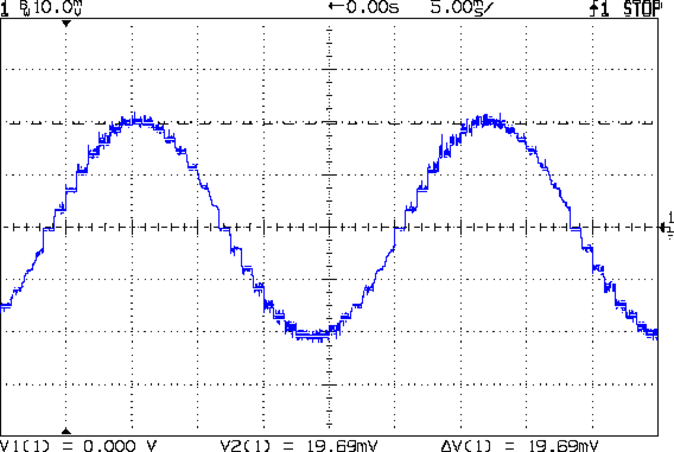
Here’s the 1/8 microstep winding current for the 1.50 A peak setting, with a 0.5 A/div vertical calibration:
HB-415M 8-step 1.5A 20V
Sure looks like 1 A peak, doesn’t it?
The ratio seems close to 0.707 and remains consistent across all current settings, so I’d lay long money that the designer confused “peak” and “RMS” values, then figured the current sense resistor or chose the internal coefficients to produce the corresponding RMS current for the peak value.
The reduced current produces not very much torque at all; negotiations are in progress for a partial refund based on eBay’s “item not as described” process…
Just got a quartet of 12 V 7 A·h lead batteries, prompted by a big Belkin UPS that instantly shut down during a power blink. It needs only two batteries, but the shipping was the same for two or four and I’m sure the spares will come in handy.
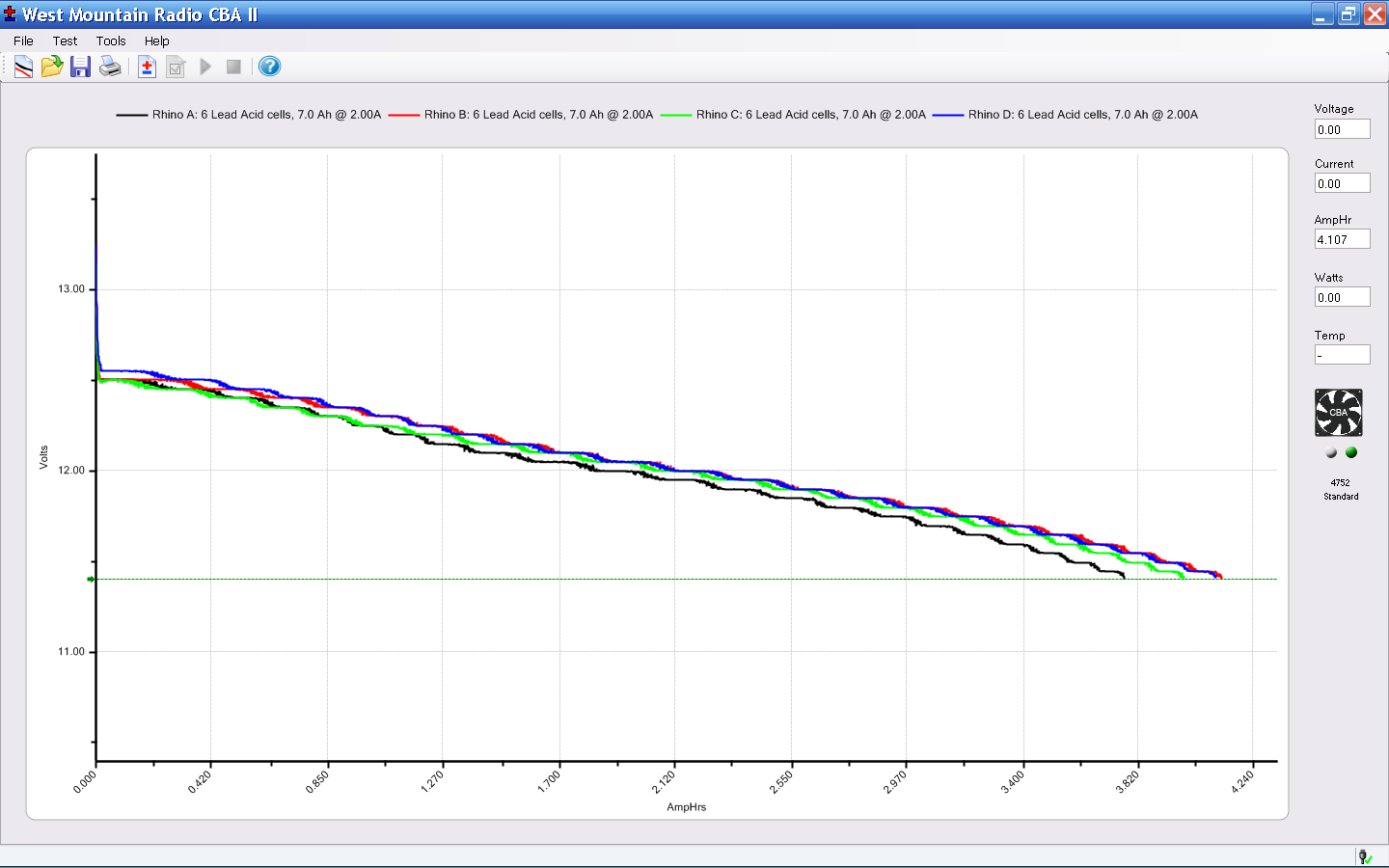
A stiff 2 A discharge test shows that SLA batteries really don’t like high currents, which is exactly what they must provide in a UPS:
Rhino SLA – 2013-01
The capacity is barely 4 A·h at 2 A, not to mention that I’m using a conservative 11.4 V cutoff.
The two batteries with the highest capacity also were the closest matches, so they’re now in the UPS.
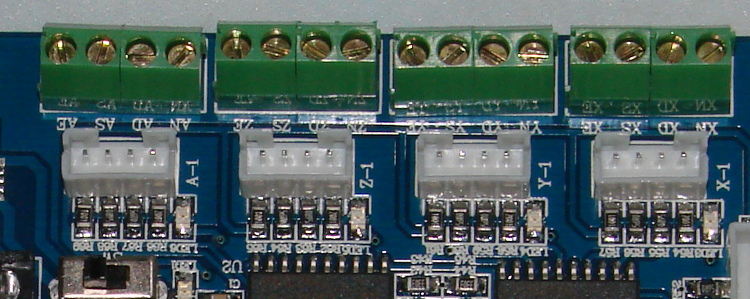
Turns out that the anonymous parallel port breakout board isn’t compatible with an optoisolated stepper driver: each output has a 1 kΩ series resistor that limits the current well below the driver optocoupler’s expectations. The driver has an internal 300 Ω resistor on each input, too, which doesn’t help in this situation.
A detailed look at the resistors lined up in front of the connectors:
Anonymous parallel breakout board – series resistors
The breakout board would work fine with non-isolated drivers, like the Pololu breakout boards, so it’s not really at fault. The fact that there’s no doc anywhere to be found means you (well, I) couldn’t discover this without buying it first, but … I suppose it’ll come in handy for something.
One could short across the resistors, but I intended to use this board for the initial bringup and all that soldering defeats the purpose.
Parallel port breakout boards of this ilk run about $14, complete with cable, on eBay:
5 axis parallel port breakout board
The PCB has no part number and the inferred URL isn’t productive. The “driver CD” accompanying it has doc for every possible board the vendor might sell and, absent a part number, the file names aren’t helpful. An exhaustive search suggests it corresponds to the HY-JK02-M 5-axis interface board manual.doc file.
Despite any implication to the contrary, the board does not have optoisolators between the parallel port pins and the outside world. The stepper driver bricks should, but the input signals from limit switches and suchlike connect directly to the guts of your PC.
This overview (from the manual) shows the physical pin layout (clicky for more dots) and reveals the hidden silkscreen legend:
HY-JK02-M Breakout Board – overview
It looks like the board I got added a spindle relay driver transistor, plus a few resistors over by the manual control connector on the right.
Notice that the fourth terminal on each axis is GND, not the positive supply required for the optoisolators on the 2M415-oid driver bricks, which means you can’t just run a section of ribbon cable from the breakout board to the brick. You’ll need a separate +5 V (or whatever) power supply wire for each brick, with a common return to the system ground for this board. Those terminals are firmly bonded to the top and bottom ground planes on the board, so there’s no practical way to re-route them.
The small switch in the upper left, just to the right of the parallel port connector, selects +5 V power from the USB port (which has no data lines) or the power connector in the lower left. The LED near the switch won’t light up until you have both the parallel port cable and the USB cable plugged in.
The doc includes a timing diagram with no numeric values. I established that it can’t keep up with a 500 kHz pulse train and seems content at 100 kHz, but that’s conjecture. Setting the timing to match whatever the stepper driver bricks prefer will probably work. The diagram suggests the setup and hold times for direction changes are whatever you use for the minimum time between step pulses.
This shows the functional labels:
HY-JK02-M Breakout Board – function labels
The parallel port connector output pins, sorted by function:
Pin
9
1
2
14
16
3
7
8
6
5
4
17
Function
Spindle
motor
Enabled
X step
X dir
Y step
Y dir
Z step
Z dir
A step
A dir
B step
B dir
The parallel port connector input functions, sorted by pin:
X -Limit
Y- Limit
Z- Limit
A- Limit
Emerg Stop
10
11
12
13
15
The table uses Chinese for Pin 15: 急停.
It’s not clear whether the pins on the manual control connector are inputs or outputs, nor what the three separate Enabled lines do:
P1
P2
P3
P4
P5
P6
P7
P8
P9
P10
P11
P12
P13
P14
P15
B step
B dir
A dir
Z step
Y step
X step
X dir
Enabled
5V/VDD
5V/GND
A step
Z dir
Y dir
Enabled
Enabled
The three white connectors in the middle drive an LED readout board that’s probably most useful as a DRO for CNC-converted manual mills using the pendant for positioning.
The small white connectors duplicate the functions of the green screw terminals. They’re probably useful in a small machine that I’m not building.
This isn’t the board I intend to use in the final setup, because I need far more I/O pins, but it’ll serve for the short term.
Collected from various spots around the Web, including evanescent eBay listings, and reformatted to make sense, these specs describe the 2M415 stepper driver: a smaller sibling of the 2M542 family.
Blurb
+15 to 40VDC Supply Voltage
H-Bridge, 2 Phase Bi-polar Micro-stepping Drive
Suitable for 2-phase, 4, 6 and 8 leads step motors, with Nema size 16 to 23
Output current selectable from 0.21 ~ 1.5A peak
Compact credit card size package
Optically isolated single ended TTL inputs for Pulse, Direction and Enable signal inputs
Selectable resolutions up to 12800 steps
Over Voltage, Coil to Coil and Coil to Ground short circuit protection.
Electrical specs
Parameters
Min
Typ
Max
Unit
Output Current (Peak)
0.21
–
1.5
Amp
Supply voltage
15
36
40
VDC
Logic Input Current
7
10
16
mA
Pulse input frequency
0
–
200
KHz
Low Level Time
2.5
µsec
Mechanical specs
Cooling
Natural Cooling or Forced Convection
Space
Avoid dust, oil, frost and corrosive gases
Ambient Temp
0 °C – 50 °C
Humidity
40 – 80 %RH
Vibration
5.9 m/s² Max
Storage Temp.
-10 °C – 80 °C
Weight
Approx. 150 gram
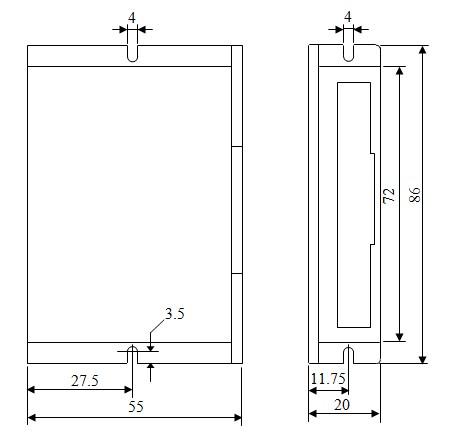
Dimensions
2M415 Footprint
Wiring diagram
2M415 Wiring
Notice that the driver requires a positive voltage for the optoisolators.
Of course, the box from halfway around the planet contained HB-415M drivers. Should you go looking with the usual keywords, you’ll find that HB-number turns up mostly “House Bill number” citations from various state legislatures. Popping the top off the drive reveals www.sikesai.com, which eventually produces a description and PDF datasheet for the driver. It turns out to be an “Ultra Low Noise” driver, whatever that means, with reasonably standard specifications that correspond more-or-less to the 2M415 drivers I thought I was getting.
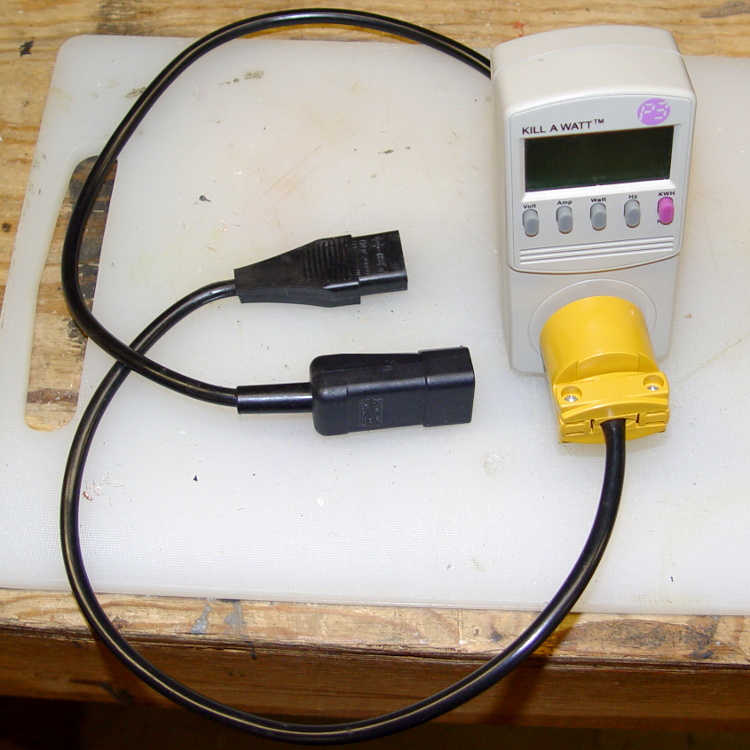
It makes measuring PC power consumption much easier!
I picked up some cheap AC plugs and sockets, cut a short IEC extender cable in half, and wired ’em up. If the IEC extender link breaks again, search amazon.com for something like “computer power cord extension” and rummage around.
US NEMA 5 plug / socket hint: the blade marked W is neutral. More expensive hardware will have dark brass = hot, light brass = neutral, but don’t bet your life on it.
According to the sticker inside, I’ve been using my RayTek IR Thermometer since 2000. At some point in the last dozen or so year, Fluke Borged RayTek, which means yellow plastic instead of gray.
The pushbutton switch behind the trigger has recently gone from intermittent to nonfunctional, but everything else still works fine: some simple surgery should suffice…
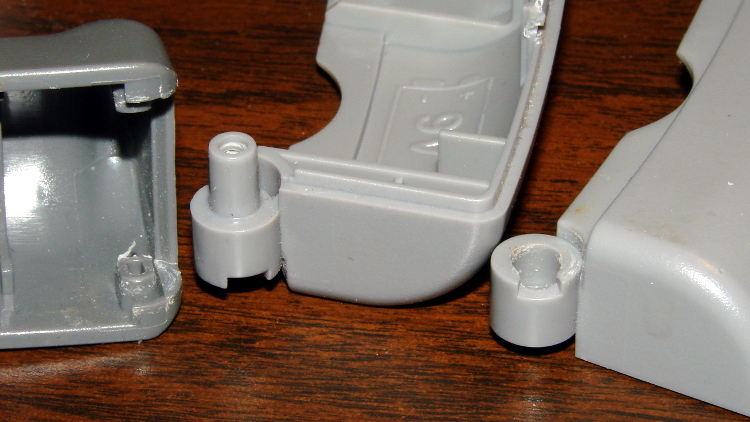
The handle has a flip-down cover, for the battery compartment and °C/°F switch, that pivots on molded hinges. The cover’s hinge pins are rectangular with a slight bevel and the case sockets have a notch that will just clear a properly aligned pin. Given this hint, you’ll get the cover off much faster than I did:
RayTek IR Thermometer – handle joint
Remove the obvious screw and press the latches while prying the two halves apart. A small screwdriver helps persuade the latches to release their death grip:
RayTek IR Thermometer – case latches
The parts heap didn’t have any suitable through-hole pushbutton switches, but I managed to solder an SMD switch in place; the original switch is parked atop the IC for reference. Yes, the white button is slightly taller than the original black one, but it doesn’t matter:
RayTek IR Thermometer – new switch installed
Then it’s just a matter of tucking everything in place:





 The Smell of Molten Projects in the Morning