Ed Nisley's Blog: Shop notes, electronics, firmware, machinery, 3D printing, laser cuttery, and curiosities. Contents: 100% human thinking, 0% AI slop.
We used Diamond K540KM truck mirror-bracket antenna mounts clamped to the top seatback rail on our Tour Easy recumbents for several years, but they weren’t entirely satisfactory. The vibration from our ordinary on-road bike rides (a TE isn’t an off-road bike!) fractured the stamped-steel base after four years.
Antenna Bracket Repair
I fixed that by screwing a steel plate across the crack. It became obvious that these mounts weren’t suited to the application when the second mount failed shortly thereafter.
Broken Diamond K540KM Antenna Mount
But we kept using them and, as you might expect, Mary’s mount failed in the middle of a 350-mile bike ride when the die-cast support dingus broke. The fresh granular metal fracture looks dead white in the picture.
I lashed the pieces together with a multitude of cable ties and we completed the mission. When I rolled our bikes into the Basement Laboratory Bike Repair Wing after returning home, the mount on my bike failed.
These mounts aren’t intended for “high vibration” applications and, it seems, bicycles produce much higher vibration than trucks. I’m certain that the frequency range is higher, although I’m not sure about the amplitude.
Obviously, it was time for something better… which meant some quality shop time. More on that tomorrow.
As I mentioned there, I originally connected my bicycle-mobile amateur radio gadget to the ICOM IC-Z1A radio using separate mic and speaker plugs. That seemed like a good idea, but bicycles vibrate a lot and the plugs apply enough leverage to the jacks inside the radio to pry them right off the PCB. That requires a protracted repair session that I never wanted to do again.
The solution is to mount both plugs rigidly on the radio so that they simply can’t move. I dithered for a while and finally decided that function trumps good looks on this project, particularly given that our radios spend their entire lives inside a bag behind the bike seats.
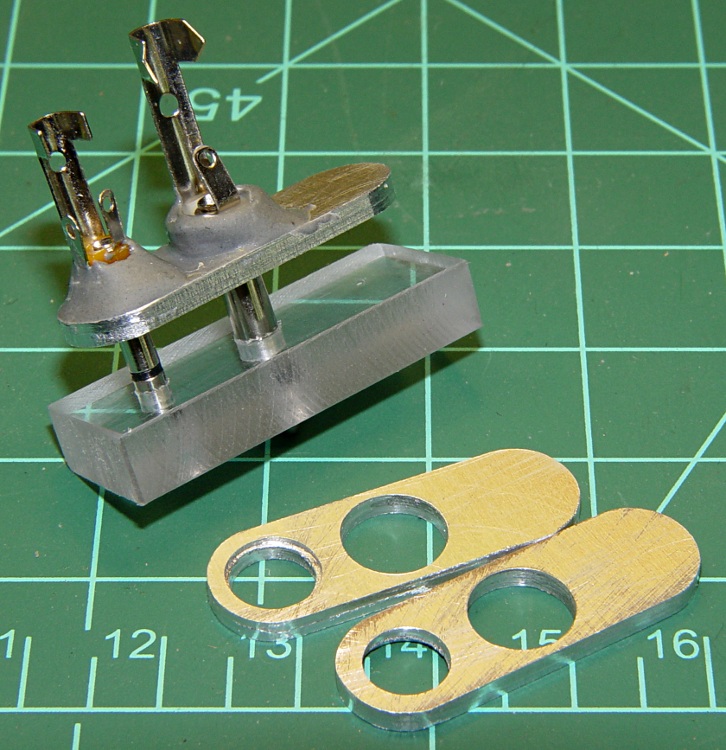
The top picture shows the small aluminum plates I made to align the plugs to the HT jacks, along with a plastic gluing fixture to hold the plugs parallel while the epoxy cures. If you just jam the plugs into the radio without an alignment fixture, you will glue the plugs together in such a way that they cannot be removed: the radio does not hold the shafts exactly parallel!
Plug stabilization – What Not To Do
How do I know? Well, I tried doing exactly that by simply epoxying the existing plugs into place, applying enough epoxy putty to stabilize the plugs against the radio. Looks reasonable, but when it came time to take them out (and you will want to take them out, trust me) they are firmly and permanently embedded. I had to carve them apart to get them out.
The mic, speaker, and coaxial power jacks are 10 mm on center. The 2.5 mm mic plug has a small shoulder that required a matching recess in the plate, while the 3.5 mm speaker plug is basically a cylinder. I don’t use the coaxial power jack, having hacked an alkaline battery pack with Anderson Powerpoles. The plate’s external contour matches the flat area atop the radio around the jacks.
You could lay out and drill close-enough holes by hand, use a step drill to make the shoulder recess, and then let the epoxy do the final alignment. However, you want the center-to-center distance exactly spot-on correct, as the plugs won’t mate properly otherwise. I turned it into a CNC project for my Sherline mill, of course, but that’s just because I have one.
HT Plugs in gluing fixture
This picture shows two plugs epoxied into the plate. While the epoxy cures, the plate rests atop the fixture with the two plugs vertical and their shell flanges flush against it. I applied the epoxy with a toothpick and worked it into the gap between the threads and the plate.
The end result will be a pair of plugs that exactly match the radio’s jacks in a plate that sits firmly atop the radio’s case. You should find that the plugs snap firmly into place and the entire assembly is absolutely rigid.
Caveat: don’t use an aluminum plate if your radio depends on separate electrical connections for the mic and speaker plug shells. The IC-Z1A has isolated shells, but remains happy when they’re connected. My Kenwood TH-F6A HT uses the shells for entirely different functions and will not work with them shorted together.
With the epoxy cured, wire the connections as usual. I had a small cable with enough tiny wires to put the mic conductors in their own shielded pair, but that’s likely overkill.
Finished plugs with epoxy blob
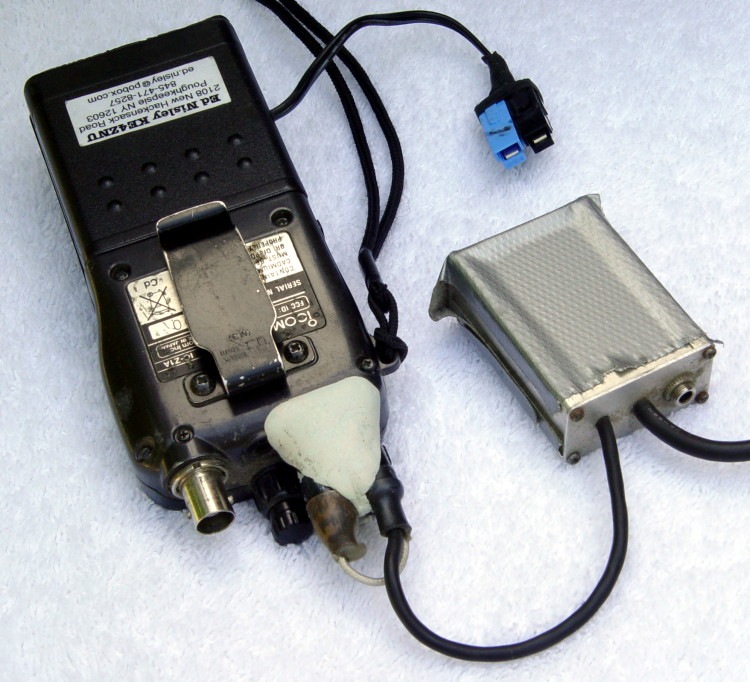
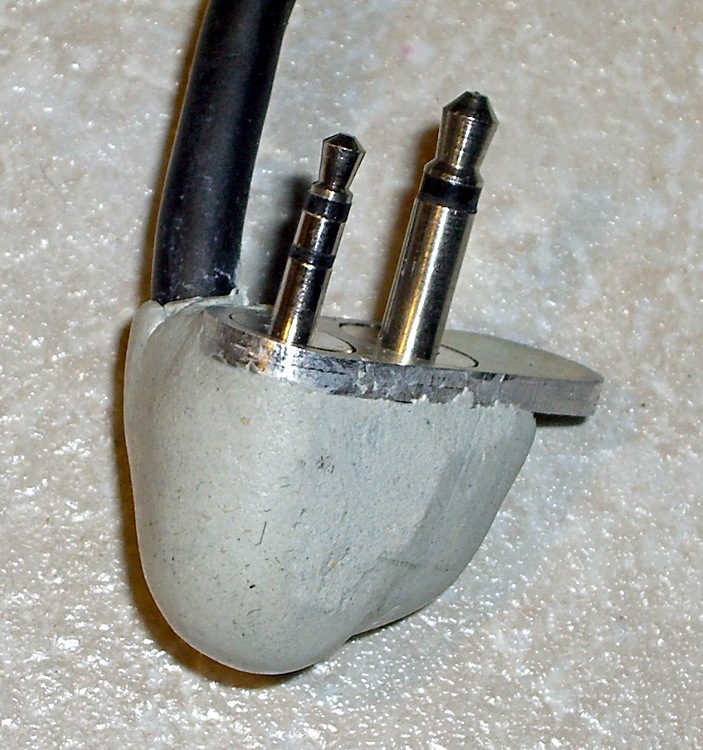
You could machine a nice enclosure, but I simply molded an epoxy putty turd around the connections, shells, and cable. The trick is to wait until it’s nearly cured, plug it into the radio, then shave off whatever gets in the way of the knobs, antenna plug, and other appurtenances.
The radio on Mary’s bike has been misbehaving over the last few months: the PTT button on the handlebars occasionally had no effect. Debugging this sort of intermittent problem is quite difficult, as it would sometimes fail and repair itself before we could get stopped in a safe place where I could poke around in the wiring.
After months of this nonsense, I narrowed the failure down to the short cable from the HT’s mic jack to the interface board: by positioning the cable just so, the radio would work fine for days or weeks at a time. I taped the thing in position and all was well, at least for a few days or weeks at a time.
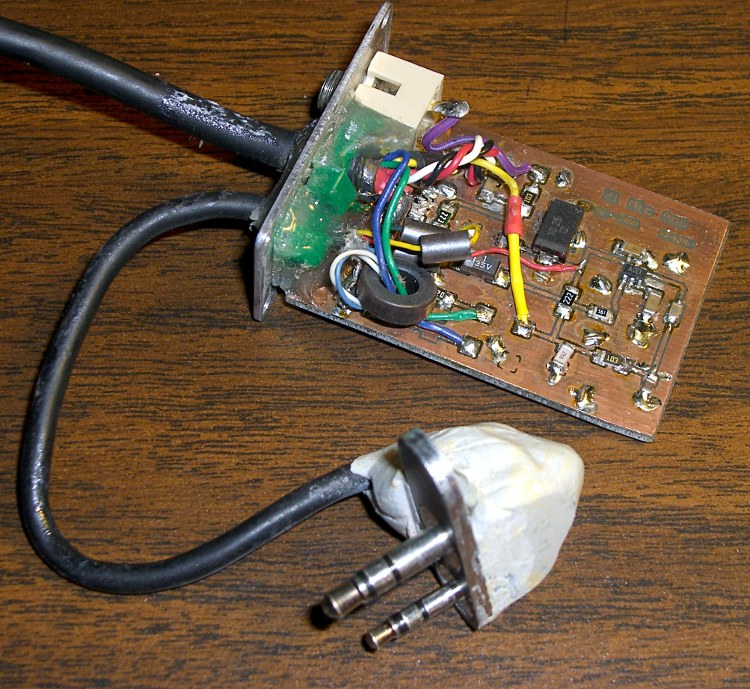
These two pictures show what the interface looked like back in 2001 when I put it together (modified from another version I did in 1997!) and what it looks like today. The most significant change is in the plugs connecting the whole affair to the HT: a CNC-machined plate holds them perfectly parallel at the proper spacing and an epoxy-putty turd fuses them into a rigid mass. More on that sub-project tomorrow…
Loose plugs, it turns out, vibrate the HT’s jacks right off the circuit board in short order and those jacks are a major pain to replace. Ask me how I know…
The wire break seemed to be precisely where the mic cable exits the epoxy turd. You’d expect a fatigue fracture to occur at that spot, so I wasn’t particularly surprised, although I was amazed that the thing hadn’t failed completely over the months I spend fiddling with it. I finally resolved to fix this once and for all, which meant either flaying the cable and patching the wire in situ or rebuilding the whole connector assembly. Either choice requires enough fiddly work to discourage even me.
Sooo, disconnect everything & haul it to the Basement Laboratory, Electronics Workbench Division…
Before cutting into the cable, I measured the mic voltage on the PCB and tried to make the thing fail on the bench. The HT (an ancient ICOM IC-Z1A) normally presents 3.5 V DC on the mic wire and the external PTT switch pulls it to ground through a 22 kΩ (or 33 kΩ or thereabouts) resistor. The mic audio is a small AC signal riding a volt or so of DC bias with the PTT active.
The wire measured maybe 0.25 volts and the PTT dragged it flat dead to ground. Yup, through that honkin’ big resistor. Well, maybe the last conductor in that mic wire had finally broken, right there on the bench?
Measured from the 2.5 mm plug tip conductor (tip = mic, ring = 3.5 V DC, sleeve = mic common) to the PCB pad on the PC, the mic wire stubbornly read 0.0 Ω, regardless of any wiggling & jiggling I applied to the cable. But no voltage got through from the radio to the board…
Sticking a bare 2.5 mm plug into the HT mic jack produced a steady 3.5 V on the tip lug. Reinstalling my epoxy-turd plug assembly produced either 0.25 or 3.5 V, depending on whether I twisted the thing this way or that way.
Ah-ha! Gotcha!
Pulled out my lifetime supply of Caig DeoxIT Red, applied a minute drop to the end of the mic plug, rammed it home & yanked it out several times, wiped off the residue, and the PTT now works perfectly. Did the same thing to the adjacent speaker plug, just on general principles, and I suspect that’ll be all good, too.
Diagnosis: oxidation or accumulated crud on the mic jack inside the radio.
Now, to try it out on the bike and see how long this fix lasts. Anything will work fine on the bench, but very few things survive for long on a bicycle.
Memo to Self: It’s always the connectors. Unless it’s the wires.
Here’s the schematic, just in case you’re wondering. I wouldn’t do it this way today, but that’s because I’ve learned a bit over the last decade or so…
Everybody seems to forget that those wonderfully precise GPS coordinates have an underlying error on the order of 20 meters, more or less, kinda sorta.
A friend took a bicycling vacation, riding about 50 miles a day, and camped overnight. Evidently his GPS tracker developed a nasty case of insomnia and wandered all over the campsite: the first two points might be actual motion, but the rest were in the wee hours of the morn when he says he was sound asleep.
It became painfully obvious over the course of his journey that you cannot depend on continuous satellite uplink coverage. Even though he was riding on rail trails and open roads, the every-ten-minute position uplink to low earth orbit would vanish for hours at a time. The GPS tracker has a 911 button, but it might be a long time before they could figure out where he was.
Memo to Self: get those GPS-to-APRS gadgets built for our bike trips…
I have a Virgin Mobile Kyocera Marbl phone, for reasons discussed there. It’s sufficiently nonstandard that the “fits most phones” headsets and chargers don’t. In particular, I have yet to see a charger with the proper adapter dingus for this phone.
Fortunately, the charger is rated at 5 V @ 350 mA… that’s easy enough.
Phone charger with Powerpoles
Cut the charger’s cable in the middle, more or less, and install Anderson Powerpole connectors. The standard color code for 5 V is white / black; don’t use red / black for fear you’ll eventually plug it into a 12 V source and toast the phone.
The charger wires are most likely a far smaller gauge than the 15 A (!) connector pins prefer, so strip the conductors twice as long, double the ’em over and perhaps add a short length of multistrand hookup wire to fill out the barrel before you crimp it.
Check the polarity before you poke the pins in the housings: you want the +5 V pin in the white housing!
I aligned the housings to match the ARES / RACES standard, as described there, as that’s what I’ve done with all my other Powerpole connectors. If your phone expects some weird-ass voltage, maybe you want to make certain it can’t possibly mate with anything that’ll kill it stone cold dead. Oh, and in that case pick a suitably different color. Blue seems to be the standard for 9 V, at least in the ham radio arena, for whatever that’s worth.
Add heatshrink tubing for strain relief (it might slip over the finished pins if you forget), wrap cold-vulcanizing rubber tape around the whole connector for more strain relief, and you’re done. It’ll make your charger cable resemble an anaconda eating a pig, but that’s OK with me.
USB charger to phone cable
Now the phone can commune with a bench power supply, a bulk 5 V supply, or nearly anything that you’ve hacked into using Powerpoles. It’s your job to make sure the voltage matches up!
Now, if you haven’t already, make a USB-to-Powerpole adapter. Alas, even though the phone uses 5 V, it draws too much current to charge directly from a standard USB port. However, I have a Black & Decker Pocket Power battery pack with a regulated USB outlet that can allegedly supply 250 mA and seems to handle the phone just fine.
So: cut a spare USB cable, verify that the red conductor is 5 V and the black is common (hell hath no fury like that of an unjustified assumption and we’re dealing with bottom-dollar suppliers here), crimp, align housings, add strain relief, and try it out.
This should work for any phone with a dumb, bulk-power charger. If you cut the cable and find three conductors, solder that devil back together again; there’s no telling what’s passing along that third rail!
We’ve been using ham radios on our bikes for years, but last year I put together an interface that connects a TinyTrak3+ GPS encoder to the helmet mic amp. This year I’m building two more, about which I’ll write later.
The problem is that listening to APRS data bursts isn’t all that pleasant, although it’s bearable, but it’ll get much worse when we use 144.39 MHz as our intercom frequency so we can both talk and be tracked: we’d hear all the APRS traffic within digipeater range.
Now, admittedly, talking on 144.39 isn’t standard. The local APRS wizards have given tentative approval, as we can’t figure out a better way to talk, give position reports, and not carry two radio / battery / antenna / electronics packages on each bike. As long as we don’t do a lot of yakking, we shouldn’t interfere with the digital traffic very much… and we don’t do a lot of talking while riding.
So I figured I’d send a 100 Hz tone under the audio and enable tone squelch, so we wouldn’t hear packets from anybody else. We’d still hear each other blatting away, but if I set the TT3+ encoders to send a position report every 10 minutes, it ought to be bearable.
The catch with this is that some receivers / APRS decoders can’t handle subaudible tones. I considered Digital Coded Squelch, but one of our radios doesn’t include that feature, alas.
To get some idea of how tone would work with the APRS setup around here (which is where we do most of our riding), I set up an HT on the bench with the TT3+ and my interface. The antenna is an HF/VHF discone, indoors, on the basement floor, beside a window. The GPS receiver can see a slice of sky from its perch just outside the basement window under an awning. That’s about as terrible a setup as we have on our bikes: low power, bad antenna, obscured line-of-sight.
Each test ran 10-14 hours, the TT3+ sent a packet every 5 minutes, and I checked the raw packet results on aprs.fi.
With tone off and the TT3+ waiting for 3 seconds of audio silence before transmitting, 39% of the packets got through to the APRS-IS backbone.
With tone on and, thus, the TT3+ unable to hear / avoid other traffic, 47% of the packets got through on one test and 42% on another. The higher rate was overnight, when (I think) there’s less traffic on 144.39.
Putting the gadgetry back on the bike, parking it beside the garage, and letting it run for 5 hours on a Saturday afternoon showed that 81% of the packets made it to the backbone. Some of the packets were received by stations over 30 miles away, which probably coincided with the the closer receivers hearing transmitters hidden from the more distant ones.
The only conclusion I can come to is that tone squelch isn’t going to hurt anything around here, where the APRS wizards have done a great job of getting the decoders to cope with subaudible tones. How it’ll work elsewhere is up for grabs, but we’ll burn that bridge when we come to it.
And it turns out that the radios take about half a second to wake up and activate the audio output with tone squelch enabled, so we don’t actually hear the data bursts: they’re almost always finished and we may hear dead air for a fraction of a second. Because the TT3+ can’t do collision avoidance, we sometimes hear other packets from other transmitters before the squelch closes again, but it’s not objectionable. Whew!
Update: with the TT3+ set to transmit every 3 minutes, it works fine!








 The Smell of Molten Projects in the Morning