The Smell of Molten Projects in the Morning

Ed Nisley's Blog: Shop notes, electronics, firmware, machinery, 3D printing, laser cuttery, and curiosities. Contents: 100% human thinking, 0% AI slop.

Category: Administrivia

Overhead

  • Cabin Fever Trip Report

    So I hauled my Sherline CNC milling machine gadgetry, an assortment of trivial projects, a stack of handouts with pix & G-code, and a pile o’ EMC2 doc to Cabin Fever Expo for two days of Performance Art…
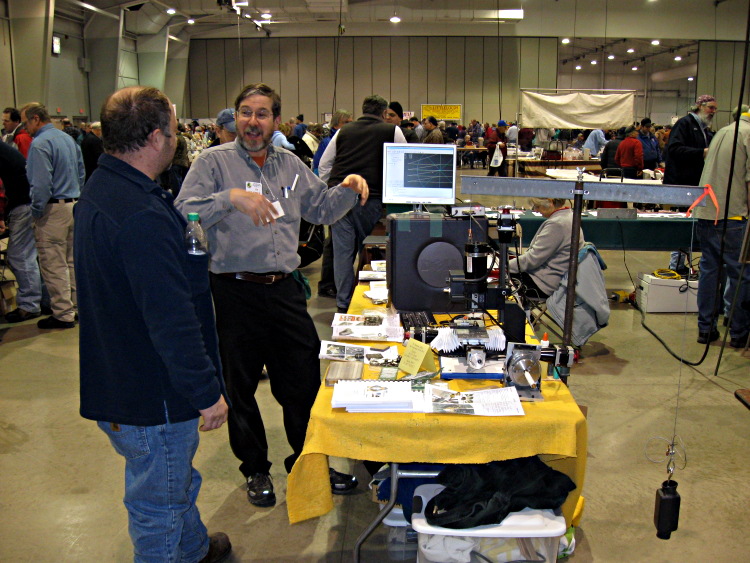
    Ed Nisley Demo-ing CNC at Cabin Fever
    Ed Nisley Demo-ing CNC at Cabin Fever. Picture courtesy of Brian Glackin.

    The key is to have the knobs turning: an inactive machine is just background clutter that everyone walks right past. It’s not nearly as interesting as miniature tools or a chuffing steam engine.

    There’s something to be said for being on the crowd side of the table, as that lets both of you see the monitor. A bigger display might be more helpful; I duct-taped a 14-inch 1024×768 LCD panel to the top of the desktop PC box.

    Although I brought some blank stock along, it quickly became obvious that live-fire milling under show conditions is a Bad Idea: far too many distractions and far too many things can go wrong. So I contented myself with cutting air; nobody really minded and I could switch programs in mid-stride to show folks the G-code program they really wanted to see.

    Plenty of folks stopped by, many of whom either have CNC running or are in the throes of getting started. A surprising number of conversations started with “I have this old Bridgeport …” and went on from there.

    There’s a crying need for a comprehensive machine design tutorial that explains how all the pieces fit together, with sort of a flowchart outlining the choices (I know it’s more complex than that, but a diagram would be a starting point for discussion). I don’t know enough of the servo end of the biz, but someone should show how the machine’s size determines the motor size and, thus, the motor driver size, with plenty of examples. There’s a misconception that you can run a big machine on little steppers or puny servos, with the controller making up the difference.

    Many people do not understand the difference between CAD, CAM, and what EMC2 provides. I described the process as three layers: CAD makes the pretty pictures, CAM digests those pictures and emits G-code, EMC2 converts G-code into motion. That seemed to help.

    The single most attention-getting part of the exhibit was, to my astonishment, my Orc Engineering counterweight (described here and here) supporting the Sherline’s milling head. I had to explain just exactly why you need a counterweight in the first place (heavy offset motor, short Z-axis ways) and how much it weighs (13 pounds, a bit too much). Some folks commented that they put similar counterweights on their much larger machines and after a while I stopped feeling inadequate.

    EMC Penguin Mascot
    EMC Penguin Mascot

    At least a dozen people picked up my EMC doc and asked if I was selling it; took me a while to realize they wanted to buy the booklets. I don’t know if you could make any money at it, but there’s a definite market for ink-on-paper books with no plot and weak character development. Now, if Chips were was way more shapely, we could have a real bodice-ripper cover. Somebody get on that, OK?

    I make booklets using Adobe Reader’s print-as-booklet feature, a printer with continuous-flow inking, and an Ibico comb binding machine, but there’s enough fiddling that doing much of it for anybody else just doesn’t make sense. Something like Lulu might work, but there’s a stiff (to me, anyway) up-front charge and the EMC doc changes often enough that you’d have to run plenty fast to stay in the same place.

    Other people picked up the books and asked if I was selling the software. They seemed puzzled when I said it was free for the download and that not only was the software free, but the GPL meant that they were, too. I need to work on that part of the schtick… should’a had a few CDs to pass out, too.

    I remembered to bring a bag of cough drops, ate ’em like candy, talked almost continuously, and wound up hoarse anyway. Probably convinced a few folks to try EMC, didn’t terrify many children, and a good time was had by all.

    Although live-fire milling is scary, it’d be fun to make something like a finger ring (as in Dan Statman’s gorgeous designs, but plastic) as a hand-out freebie. The whole process should take no more than five minutes, tops, which might be tough. Running a rotary table and the mill would be a real crowd-pleaser; my 4th axis attracted some questions. Perhaps an EMC tag-team would suffice: one to mind the mill while the other works the crowd?

    As always, Cabin Fever is stuffed with gorgeous examples of machine-shop work. Those guys actually know what they’re doing; I can write G-code, but it’ll take many more years of experience before that code actually makes passably pretty parts.

    See you next year!

  • Mobile Phone Contact List Portability, Lack Thereof

    I just finished re-typing my (admittedly limited) list of contacts, merging the lists from my ancient Virgin Mobile Nokia Shorty and my new-but-defunct Kyocera Marbl into the replacement Marbl.

    These things should be able to bag up their internal representation of my Contacts into some standard interchange format, place that file somewhere, download such a file, and poof be up and running.

    If Virgin wants me to keep buying phones, why do they make it such a pain to start up a new one? Come to think of it, I know why: they don’t make any money on the phones, so they must maximize the phone’s lifetime, while simultaneously touting new features to entice new customers.

    I’m still grumpy from driving too much, even after a mid-morning nap.

  • Cell Phone Web Browsing

    Oh, that Kyocera Marbl from Virgin Mobile I mentioned here? One of its bullet item features is “web browsing“.

    The screen is roughly the size of a large postage stamp and displays text amounting to, in round numbers, five lines of three words each. Graphics are not an appropriate use of screen real estate.

    I have not signed up for a “data pack” to enable cheaper browsing.

    There’s nothing I can say about this that doesn’t sound snarky.

  • Wireless Mouse Storage

    Wireless mice have fairly good power-saving routines; if they’re not moving, they shut down. Alas, if you’re packing a mouse to bring along with your PC, it may stay awake for the whole trip… at least until its battery goes flat.

    Isolating tab for storing a mouse
    Isolating tab for storing a mouse

    You can remove the cells, but then you’re stuck with a bunch of moving parts: mouse, receiver, a couple of AA cells. Now you need a ziplock baggie. Fooey.

    Better to take a strip of thin plastic, like a small plastic Post-It flag, and isolate one cell. Make it long enough to stick out through the slot in the case and you’ll have a reminder that the mouse won’t start up automagically.

    Mouse with battery disconnected and tabbed
    Mouse with battery disconnected and tabbed

    Some mice actually have a mechanical switch, but if it’s a pushbutton then you may as well insert the plastic strip.

    This works for cell phones, too, at least if you’re the sort who can afford to turn the phone off because you’re not expecting any calls.

  • Dell GX270 Auto-On Power Setting

    I bought an off-lease Dell Optiplex GX270 from Dell Financial Services (via the highly useful techbargains.com) to update my mother’s PC.

    For the last month I’ve been twiddling it every now & again in preparation for my next visit, plus just letting it run to get some power-on hours under my supervision. You’ll find some of the info on that process earlier in the PC Tweakage category.

    So it’s been booting up automagically at 6:15 am every morning, which is easier for Mom, but every now & again it wakes up dead. This is why I’m doing a month or two of burn-in here!

    The diagnostic LEDs (the ABCD lights on the back panel) are GYGG, which isn’t listed in their hard-to-find LED reference. [Update: maybe now at Optiplex Diagnostic Indicators]

    Dell Optiplex GX270 Auto-On Boot Failure LEDs
    Dell Optiplex GX270 Auto-On Boot Failure LEDs

    I did the usual diagnostic stuff. All the Dell diagnostic tests work fine, replugging the memory doesn’t help, and so forth & so on. Running many passes of memtest86+ (from the invaluable System Rescue CD) shows no problems at all.

    Called up 800-891-8595, the DFS warranty service number (which is different from the usual Dell route), told my story, and got a call back (!) from the tech. I related the situation, mentioned that I’d set it for auto-on, and he said “Oh, they never got that BIOS code working, it’s never been released, and I’m surprised it works at all.”

    Riiiight…

    This is a biz machine, the sort acquired in semitrailer loads by big companies with actual IT departments, the ones that automagically wake up their flock of machines for overnight updates. Maybe they trigger auto-on through the LAN port (that’s another BIOS option) these days, but the BIOS wake-up alarm clock function has been available in pretty nearly every Dell I’ve ever owned… and works fine.

    This is not rocket science.

    Indeed, if anyone’s ever had the slightest problem with Dell’s auto-on, Google shows no sign of it. There’s nothing on the normally loquacious Dell forums. Nay, verily, the GX270 manual itself touts the “advanced feature” of having it turn on at a preset time and day.

    Anyhow, he says the LED code shows the problem has something to do with the memory or video chip not starting up in time. That information is in his “internal” debugging info, which is not available to mere customers. He’s unwilling to swap memory (I tried another stick to no avail), let alone the system board.

    Conclusion: his assignment is to make me Go Away without spending any money on warranty repairs.

    Seeing as how the GX270 was a whopping 100 bucks delivered, I can sympathize with his marching orders, even if I disagree with their outcome.

    So maybe Mom’s going to have to get used to turning the box on in the morning; it seems to work perfectly that way. A straightforward crontab entry turns it off in the evening… at least that part still works.

    I’ve bought other off-lease & Dell Outlet boxes; they’ve worked fine. This one is a bit more battered than usual, but it’s otherwise in fine shape. It’s even been re-capped; the larger electrolytic caps aren’t the dreaded Nichicon popcorn caps.

    Update: It seems to be booting OK with this burn-in regimen.

  • Where to find Presentations & Handouts

    There’s now a link over in the Useful Stuff section that’ll take you to my presentation files & handouts.

  • Inkjet Refilling: Economics of the Empire

    A year ago I bought an Epson R380 printer along with a $10 piece-of-crap digital camera for 90 bucks, then got a $75 rebate. I figure the printer cost 15 bucks and the camera was free.

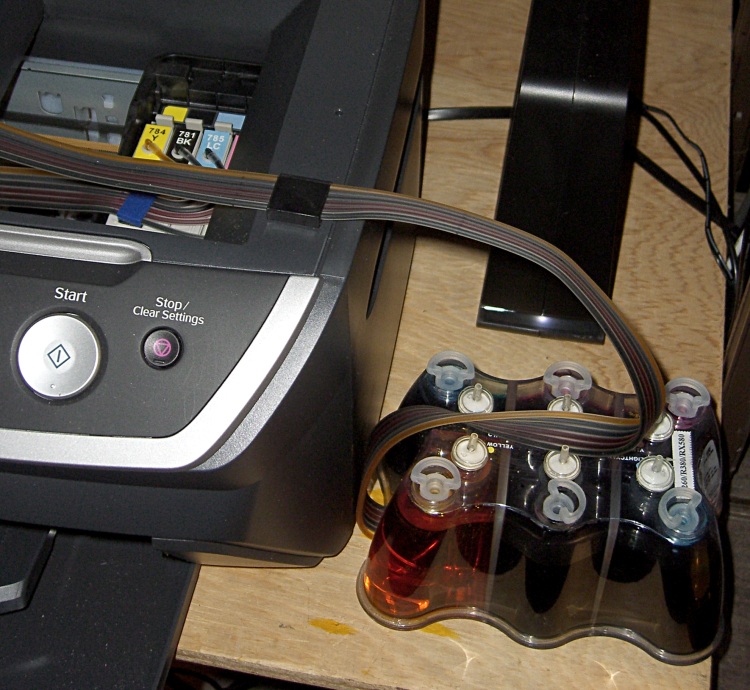
    cimg2863-continuous-ink-for-epson-r380
    Continuous inking system for Epson R380 printer

    I also bought a $55 continuous flow ink system from a place that no longer sells them. Turns out that Epson won a patent lawsuit that forced most of those vendors out of the reinking business and made the remaining systems staggeringly expensive.

    Well, maybe not.

    I print a bunch of text (I hate reading long documents on the screen), plenty of schematics & diagrams, low-quality pictures (webbish junk), relatively few photo-quality pictures, and the Annual Christmas Letter. The printer spends an inordinate amount of time blowing its nose and clearing its throat at the start of each session, so I suspect most of the ink goes directly into the diaper inside the printer.

    Genuine Epson 78-series cartridges contain 11 ml of ink and cost $20: $1.80 / ml or, in US terms, $2k per quart. In the last year, I’ve used about 200 ml of black and 110 ml of each of the five colors: $360 + 5 * $200 = $1360, if I were stupid enough to pay full price for 68 cartridges.

    That makes the $150-ish I actually paid for seven 8-ounce (250 ml) bottles of ink a downright bargain: $0.09 / ml.

    No, the color isn’t the same as the Epson inks and I’m certain it won’t last as long on the page, but that’s not what I’m using this printer for. When I need long-lasting, high-quality prints, I send ’em to an online service… which right now is running a sale on 4×6″ prints at $0.09 each. What’s not to like?

    When I hear printer companies boast about how ecological their printers are, I say bad things. If they wanted to be green, they’d make it trivially easy to connect bulk-ink tanks to their printers.

    I’ll put up with a few colorful spots on my fingers and the occasional sploosh on the table to save that much coin o’ the realm…