The Smell of Molten Projects in the Morning

Ed Nisley's Blog: Shop notes, electronics, firmware, machinery, 3D printing, laser cuttery, and curiosities. Contents: 100% human thinking, 0% AI slop.

Category: Administrivia

Overhead

  • Blog Impulse Response and Summary

    Two recent postings were mentioned on blogs with much higher readership than mine, which provides an opportunity to measure the impulse response of the blog to an external simulus.

    Views Per Day - Dec 2009
    Views Per Day – Dec 2009

    The first peak comes from the Make magazine blog: they liked the trick of holding screws in slit nuts for trimming and finishing.

    The second is from hackaday.com: they loved the Alpha-Geek Clock, although they linked to the inside circuitry.

    It looks like an external blog mention is good for 50 to 60 hours of fame. After that, the search engines take over again.

    You can tell nearly everybody arrives here from search engines, because the monthly view increases slightly more than linearly with the number of posts.

    Monthly Views - 2009
    Monthly Views – 2009

    I’d love to believe that’s the start of exponential growth, but that’s just not going to happen!

    Speaking of search engines, here are the top terms…

    Search Terms
    All Time
    Search Views
    arduino pwm frequency 235
    milling 223
    arduino pwm 212
    transformer model 99
    bellows 94
    staghorn beetle 87
    triple alert redemption 83
    chain catcher 81
    sherline 79
    arduino command line 79
    arduino fast pwm 66
    cold solder joint 66
    sherline mill 56
    hd44780 arduino 50
    cold solder 50
    cold solder joints 47
    sherline projects 46
    magnetizer 44
    avid rollamajig 43
    triple alert 43

    Obviously, Arduino, electronics, and machine-shop topics are hot.

    Who would have imagined, however, that so many people search the Internet to find pix of staghorn beetles? As of right now, though, Google gives my post two of the four image results and puts it on the first page. Evidently I give good writeup. Now, if only I were selling something, huh?

    The most-viewed pages…

    Top Posts
    All Time
    Title Views
    Alpha-Geek Clock 1836
    Changing the Arduino PWM Frequency 1324
    Arduino Command Line Programming: Avrdud 931
    Sherline Mill Counterweight Gantry 928
    Finding Transformer Pi Model Parameters 851
    Arduino Hardware-assisted SPI: Synchrono 850
    Arduino Fast PWM: Faster 740
    Dell GX270 Auto-On Power Setting 659
    Arduino LiquidCrystal Library vs Old HD4 623
    Cold & Fractured Solder Joints 493
    Kubuntu Remote Desktop via SSH Tunnel 473
    Sunglasses Repair: Half a Hinge Is Bette 420
    Sherline Bellows Covers The Cheap Way 380
    Laser Alignment for the Sherline Mill 364
    Recumbent Bicycle Amateur Radio Antenna 341
    Arduino Push-Pull PWM 336
    Tektronix 492 Spectrum Analyzer Backplan 335
    Experian Triple-Alert Signup: FAIL 312
    Holding Machine Screws for Trimming 309
    Silver-soldered Bandsaw Blade Joint 307

    The Alpha-Geek Clock isn’t representative, due to the sudden peak that slapped it to the top of the list. It’s nice to know that folks are finding (and, presumably, using) the tech info that I put together.

    A tip o’ the engineer’s cap to the two dozen of you who keep track of goings-on through the RSS feed. These posts are mostly for my own amusement and record-keeping, but I trust you find something useful every now and again.

    A Happy New Year to one & all… and keep on building stuff in your shop!

  • 7400-Family IC Stash

    Over the years I’ve accumulated a bunch of obsolete ICs; all I can say is they weren’t obsolete at the time. Sometimes I need one, so here’s a list of the jelly-bean collection where I can find & update it as parts emerge from their hidey-holes in the Heap.

    All hulking through-hole

    • 138 1-to-8 demux
    • 221 monstable (!)
    • 139 1-to-4 decoder
    • 156 2-to-4 dual demux / decoder
    • F521 8-bit comparator
    • 373 8-bit latch (transparent)
    • 374 8-bit latch (clocked)
    • 74 dual D flipflop
    • 244 8-bit buffer
    • 393 dual 4-bit counter (ripple)
    • AS869 8-bit up/down counter
    • 191 4-bit up/down counter
    • 157 quad 2-to-1 mux
    • 164 8-bit parallel output shift register
    • 245 8-bit bus transceiver
    • 151 8-in multiplexer

    Memo to Self: What horror lurks in the box labeled “Old ICs”?

  • Source Code Reformatting

    I just figured out how to use the WordPress “sourcecode” formatting and applied it to my software-related posts. It produces much nicer results than the manual formatting I was using, mostly by preventing long lines from jamming into the right column.

    The catch: WordPress imposes a round trip from my original text to the screen encoding and back, which sometimes randomly mangles special symbols. Angle brackets and double-quotes, in particular, take serious damage.

    If you happen to remember a favorite chunk of code in a previous post, please take a look at it and see if I missed any of the obvious text-replacement errors. Trawling through the Software category should turn up most of the posts.

    As is always the case with program listings, the errors will be really obvious to everyone except me.

    Thanks…

  • Credit Card Privacy Choices

    Just got a new credit card, which arrived with the usual “Privacy Policy” flyer describing how they’ll keep our sensitive bits safe & secure. Except, of course, that by default they’ll share those bits with nearly any organization that asks, if there’s even the least bit of money to be made in the process.

    The flyer explains how we can tell them of our privacy choices. Oddly, in this Internet Age, none of the banks have figured out how to put our privacy policy choices on their websites. Maybe that would be entirely too efficient.

    Anyhow, we’re supposed to either:

    • Pick up the phone to deal with their customer service apparat or
    • Pick up a pen, fill out a form, cut it out, and mail it to them

    For our joint accounts, if I forget to say “And this also applies to my wife”, well, then they’re free to share her sensitive bits.

    I’m sure they know that when they make “choosing” difficult enough, nobody will bother.

    Ya think?

    For the record:

    • Chase: press 0 to short-circuit the account info blather and get to a rep
    • Citi: press 6 for that purpose. Why not 0? Huh…

    The Chase folks tell me this may require up to 90 days to take effect. Wow, do they fill out forms and hand-carry the paperwork to Galactic HQ for further transcription?

    Memo to Self: Remember to tell the nice voice…

    • This applies to both account holders
    • Turn off all information sharing options
    • Turn off “convenience checks” (is anybody stupid enough to use those things?)
    • Turn off automatic credit line increases

    This takes about four minutes for each account on a Sunday morning.

  • Tucking Other Files into an OpenDocument Document

    WordPress doesn’t allow ZIP files, but very often I want to upload a collection of files that all relate to a common topic. For example, the three Tek 492 EPROM HEX files ought to come with a bit of documentation about how to use them.

    Fortunately, OpenDocument documents (sounds like something put out by the Department of Redundancy Department) are actually ordinary ZIP files with a different extension. There’s no good reason you can’t tuck some additional files into that container. Nay, verily, if you use a word processor file, then you can have documentation accompany your files!

    Note that the additional files don’t have any effect on the word processor document: OpenOffice simply uses the files it knows about and ignores the additional ones. You won’t see them in the word processor document; you won’t even know they’re present.

    However, because OpenOffice doesn’t know about them, it won’t transfer them to the new document when you save the file. You must add the files as the last step, after editing and saving the word processor document for the last time.

    I suppose there are pathological cases where this will cause trouble and I certainly hope that OpenDocument validators will complain vehemently about the presence of additional files. Use this knowledge wisely, OK?

    So, for example…

    Create a document and save it as the default ODT format using OpenOffice; let’s call it Tek 492 ROM Images.odt, just so you can see one in action.

    Now, to add those HEX files to it, you’d use the ordinary ZIP utility:

    zip "Tek 492 ROM Images.odt" *hex

    The quotes protect the blanks in the file name and you must type the entire file name out with the extension, because ZIP doesn’t expect to work with ODT files.

    You can list the file’s contents, which will show you all the other files that go into making an OpenDocument document work:

    unzip -l "Tek 492 ROM Images.odt"
    Archive:  Tek 492 ROM Images.odt
    Length     Date   Time    Name
    --------    ----   ----    ----
    39  07-30-09 18:09   mimetype
    0  07-30-09 18:09   Configurations2/statusbar/
    0  07-30-09 18:09   Configurations2/accelerator/current.xml
    0  07-30-09 18:09   Configurations2/floater/
    0  07-30-09 18:09   Configurations2/popupmenu/
    0  07-30-09 18:09   Configurations2/progressbar/
    0  07-30-09 18:09   Configurations2/menubar/
    0  07-30-09 18:09   Configurations2/toolbar/
    0  07-30-09 18:09   Configurations2/images/Bitmaps/
    23156  07-30-09 18:09   content.xml
    18259  07-30-09 18:09   styles.xml
    1240  07-30-09 18:09   meta.xml
    4943  07-30-09 18:09   Thumbnails/thumbnail.png
    8742  07-30-09 18:09   settings.xml
    1889  07-30-09 18:09   META-INF/manifest.xml
    4876  07-30-09 11:56   U1012 - 160-0886-04.hex
    19468  07-30-09 11:56   U2023 - 160-0838-00.hex
    19468  07-30-09 11:56   U2028 - 160-0839-00.hex
    --------                   -------
    102080                   18 files

    For obvious reasons, if you’re stuffing a bunch of files into an ODT file, you should probably ZIP them into a single ZIP file of their own, then add that single file to the ODT file. That means your victims users must also apply UNZIP twice, which may be expecting too much.

    When you want to use the HEX files, extract them:

    unzip "Tek 492 ROM Images.odt" *hex

    And there they are again:

    ls -l
    -rw-r--r-- 1 ed ed 15447 2009-08-11 20:51 Tek 492 ROM Images.odt
    -rw-r--r-- 1 ed ed  4876 2009-07-30 11:56 U1012 - 160-0886-04.hex
    -rw-r--r-- 1 ed ed 19468 2009-07-30 11:56 U2023 - 160-0838-00.hex
    -rw-r--r-- 1 ed ed 19468 2009-07-30 11:56 U2028 - 160-0839-00.hex

    That’s all there is to it…

    For what it’s worth, Microsoft DOCX files (and their ilk) are also ZIP files in disguise, so this same hack should work there, too. However, many folks (myself included) treat MS DOC files with the same casual nonchalonce as they do any other hunk of high-level radioactive waste, so stashing an additional payload in those files might not have a happy ending.

    This trick will certainly come in handy again, so I better write it down…

  • Why Friends Don’t Let Friends Use Windows: Torpig

    For those of you still using Windows, here’s a sobering look at why you shouldn’t: an analysis of the Torpig botnet by an academic group that managed to take over its command & control structure for a few days.

    The report is tech-heavy, but well worth the effort to plow through.

    Here are some of the high points…

    Why do the bad guys do this? It’s all about the money, honey:

    In ten days, Torpig obtained the credentials of 8,310 accounts at 410 different institutions.

    … we extracted 1,660 unique credit and debit card numbers from our
    collected data.

    Does an antivirus program help?

    Torpig has been distributed to its victims as part of Mebroot. Mebroot is a rootkit that takes control of a machine by replacing the system’s Master Boot Record (MBR). This allows Mebroot to be executed at boot time, before the operating system is loaded, and to remain undetected by most anti-virus tools

    In these attacks, web pages on legitimate but vulnerable web sites are modified with the inclusion of HTML tags that cause the victim’s browser to request JavaScript code from a[nother] web site under control of the attackers. This JavaScript code launches a number of exploits against the browser or some of its components, such as ActiveX controls and plugins. If any exploit is successful, an executable is downloaded from the drive-by-download server to the victim machine, and it is executed.

    What happens next?

    Mebroot injects these modules […] into a number of applications. These applications include the Service Control Manager (services.exe), the file manager, and 29 other popular applications, such as web browsers (e.g., Internet Explorer, Firefox, Opera), FTP clients (Leech-FTP, CuteFTP), email clients (e.g., Thunderbird, Outlook, Eudora), instant messengers (e.g., Skype, ICQ), and system programs (e.g., the command line interpreter cmd.exe). After the injection, Torpig can inspect all the data handled by these programs and identify and store interesting pieces of information, such as credentials for online accounts and stored passwords.

    If you think hiding behind a firewall router will save you, you’re wrong:

    By looking at the IP addresses in the Torpig headers we are able to determine that 144,236 (78.9%) of the infected machines were behind a NAT, VPN, proxy, or firewall.

    If you think you’ve got a secure password, you’re wrong:

    Torpig bots stole 297,962 unique credentials (i.e., username and password pairs), sent by 52,540 different Torpig-infected machines over the ten days we controlled the botnet

    If you think a separate password manager will save you, you’re wrong.

    It is also interesting to observe that 38% of the credentials stolen by Torpig were obtained from the password manager of browsers, rather than by intercepting an actual login session.

    Somewhat more info on Mebroot from F-Secure.

    Remember, the virus / worm / Trojan / botnet attacks you read about all the time only affect Windows machines. Linux isn’t invulnerable, but it’s certainly safer right now. If you’re running Windows, it’s only a matter of time until your PC is not your own, no matter how smart you think you are.

    If you have one or two must-gotta-use Windows programs, set up a dedicated Token Windows Box and use it only for those programs. Network it (behind a firewall) if you like, but don’t do any email / Web browsing / messaging / VOIP on it. Just Say No!

    For everything else, run some version of Linux. It’ll do what you need to get done with less hassle and far less risk. It’s free for the download, free for the installation, and includes all the functions you’re used to paying money for. Just Do It!

    If you think using Linux is too much of a hassle, imagine what putting your finances back together will be like. Remember, the bad guys will steal everything you’ve ever put on your PC, destroy your identity, and never get caught.

    Now you know… why are you still stalling?

  • Geek Scratch Paper Redux

    4x5" grid for 4.25x5.5" stock using 5x8" page
    4×5" grid for 4.25×5.5" stock using 5×8" page

    While attending a recent IEEE talk, I scored a stack of quarter-sheet flyers for a “Green Fair” that were outdated and presumably destined for recycling (or, more likely, the trash can), printed on gorgeous glare-white card stock with one blank side. Couldn’t pass ’em up…

    As described there, I’m the sort of person who thinks on grid paper.

    This being a new paper size, I went to incompetech.com again, set up a nice 4×5″ grid, fetched the PDF, then discovered that 4.25×5.5″ paper isn’t one of the R380 printer’s standard sizes. So I loaded the PDF into The GIMP and aligned it within a 5×8″ page. After a bit of to-and-fro tweakage, the grid came out neatly centered on the flyer.

    The image is the resulting PNG file, which should Just Work if you have a similar setup and print on a borderless 5×8″ page. There may be some interaction with the default 2% borderless printing expansion; I turned that off in the Turboprint driver. You (well, I) want exact 1″ grids!

    If you don’t have a full-bleed printer, some fiddling with the margins may be in order. My Epson R380 printer feeds & prints top-first and left-aligned, if that’s any help.

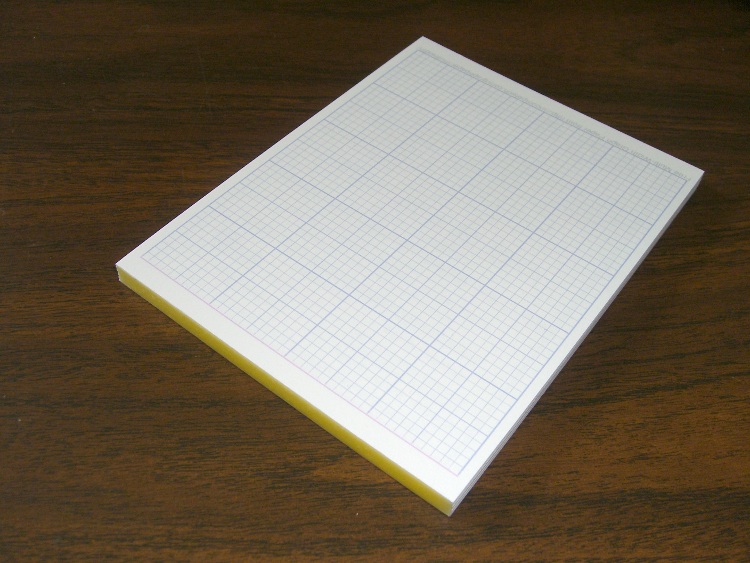
    Anyhow, I ran off two dozen grids, whacked some cereal-box cardboard to the right size, and padded everything together with Elmer’s Wood Glue to see how that works. It’s a bit stiffer than I’d like, but these flyers are more like thin cardboard than thick paper.

    Quarter-sheet grid tablet - showing binding
    Quarter-sheet grid tablet – showing binding

    My R380 has a continuous-flow ink system, which is basically the only reason this sort of geekage makes sense. At two kilobucks per liter for photo ink, it sure doesn’t…

    [Update: I wonder why somebody rated this one as “Dead Wrong”? It’d be useful to know what went wrong; the comments box works just fine.

    For what it’s worth, I just ran off another stack. Nothing wrong with the process, that’s for sure.]