The Smell of Molten Projects in the Morning

Ed Nisley's Blog: Shop notes, electronics, firmware, machinery, 3D printing, laser cuttery, and curiosities. Contents: 100% human thinking, 0% AI slop.

Author: Ed

  • Consumer Rebate Processing

    I keep track of rebates with scanned images of the forms I send in, with file names describing what’s inside. When I deposit a rebate, I move the file to the Deposited folder.

    Sometimes I forget to move ’em and sometimes I can’t tell which rebate generated the check.

    So a while back, I was cleaning out the cruft and found I never got a check from Circuit City for a rebate I sent many moons earlier. The online site didn’t have any record of the rebate, so I called That Nice Man. After I read him the receipt & rebate numbers from the form, he discovered that there wasn’t any record of the rebate, either. Duh.

    He asked if I had a copy of the rebate info I sent in. I said “Yup, that’s what I’m reading from.” He then proceeded to create the missing rebate and told me that the check would be mailed in 7-10 days. No need to send in the copies… he didn’t even mention it.

    I guess they figure if you’re the type of person to make a copy in the first place, there’s nothing to be gained by hassling you to send the info one more time.

    It’s peculiar that the USPS only loses my mail when I’m sending rebate forms…

  • Stainless Steel Band Clamps, Endurance Thereof

    cimg1422-stainless-steel-hose-clamps
    Corroded Band Clamps

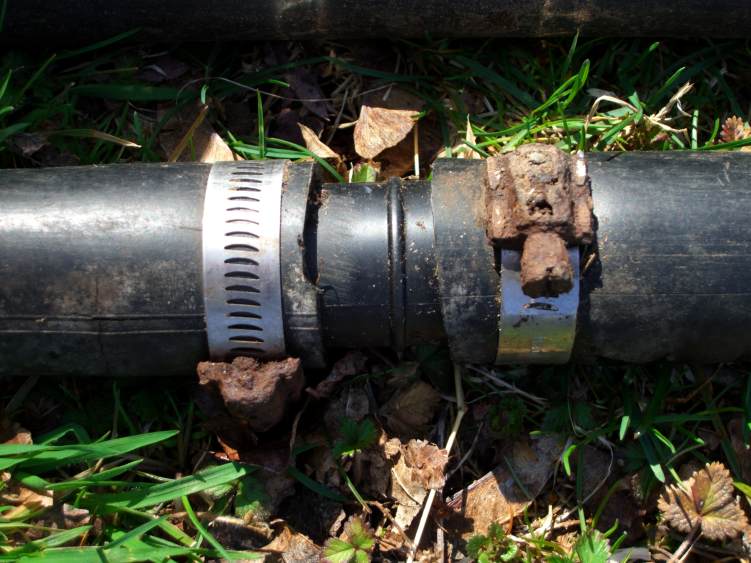
    As part of clearing the area for our fence project out back, I sawed off a few more lengths of ol’ Gene’s irrigation line and hauled them out of the battle zone. The line ran from the pump house (about 200 feet from the creek), up the hill, and about 400 feet along the property line to our house.

    Presumably the plants really liked creek water…

    Anyhow, he used a variety of hose clamps to hold the PVC pipe to the barbed fittings. They’ve been out in the weather, under the leaves, and generally left to rot for about two decades.

    I salvaged the few clamps that were all-stainless steel, because they were in great shape.

    The others have beautiful shiny bands with rotted worm screws and housings. Some are little more than rusty lumps that, if you didn’t know they were a screw, you’d never guess.

    Moral of the story: make sure the clamps are all stainless steel.

    I have no clue how you’d do that, though, because none of the clamps I’ve ever bought came with labels and I’d never trust the box on the LowePot shelf to match its contents.

    Maybe I should add a magnet to my chandelier o’ gear, right next to the credit cards in my wallet?

    Grrr…

  • Home Shops

    Found this while I was looking for something else…

    http://www.cnn.com/2007/WORLD/meast/02/22/iraq.main/index.html

    CNN being pretty much ahistorical, that’s a dead link by now. Here’s another copy:

    http://www.powermediaplus.com/news/archive.aspx?newsTypeID=1&newsID=2653

    The money quote:

    We also found the various components of a metal shop,
    including welders, burner stoves, circular saws, sanders
    and other items needed to build explosive devices.

    Remember:

    When guns are outlawed, only machinists will have guns.

    Memo to self: The Man knows that, too.

  • Windows Partitioning: MediaDirect vs Everyone Else

    This is probably more than you really want to know, but it might come in handy at some point…

    Prior to refurbishing a friend’s dog-slow XP laptop, I did some exploratory surgery on mine just to make sure I understand the parameters. I’ve long since repartitioned my laptop’s drive and done horrible things to it, so it’s an ideal testbed. Before doing that, of course, I backed up all the partitions & MBR, Just Because.

    So, to begin…

    Partitions

    Dell laptops have (at least) three partitions in addition to the one that holds XP.

    1. Dell Utilities, accessed by Ctrl-F12 during boot, then selecting the “Diagnostics” boot. The same utilities are also on the Utilities CD and you can fetch an ISO, so you really don’t need this partition, but it’s handy to have if something hardware-ish goes wrong. I think I’ve used the diagnostics once, over the course of a decade or so.
    2. Dell Restore, accessed by Ctrl-F11 during boot. This blows away whatever’s in the XP partition and reinstalls an image copy of whatever the laptop had when it shipped. This includes all the apps, bloatware, and other junk that came with your copy of XP. It is not a “reinstallation” of XP that saves your data; you must back up & restore that yourself.
    3. Dell MediaDirect, a special “embedded” version of XP that runs a Dell-branded media player so you can watch DVDs without enduring the lengthy XP boot process. W00t!

    It turns out that you cannot restore the drive to its as-shipped condition with all those functions in place and operable, at least without far more tinkering that seems worthwhile under any reasonable circumstances.

    Utilities

    This must be the first partition on the drive, with partition ID DE. It’s booted by the BIOS and seems relatively rugged; you can restore it from back up and it’ll work.

    Restore

    This must be either the third or fourth entry in the MBR partition table, with partition ID DB. It’s invoked by code in the MBR’s boot code when you hit Ctrl-F11 during boot. When you repartition the drive and install GRUB to run Linux, you destroy that loader.

    The distinguishing feature of the Dell MBR loader is that it puts a blue bar across the top of the screen with www.dell.com (or some such) while it’s booting. If you hit Ctrl-F11 (or, according to some sources, just F11) while that bar’s on the screen, you’ll reach the System Restore program.

    If you don’t see the blue bar, you’re sunk for Restore, even if there’s a Restore Partition on the hard drive. Some sources indicate you can boot into it with Grub, but I didn’t try that.

    There’s a non-Dell repair utility (search for it; I’ve lost the link) that can generally replace / repair the Dell MBR loader, which naturally kills GRUB in the process. You can tweak the Windows boot process to present you with a menu that includes Linux (!), but the procedure seems fraught with peril.

    If the Restore Partition is still on the drive and still listed properly in the MBR table, then you can repair the MBR loader and restore XP to its as-shipped condition. Of course, if you did a partition backup soon after you got the laptop, you could do that yourself.

    MediaDirect

    Recent Dell laptops have a MediaDirect button with two functions.

    1. When the laptop is off, the MD button turns it on and boots the MediaDirect partition.
    2. When the laptop is on, the MD button fires up a version of the Dell-branded media player as an ordinary Windows program; it has no obvious advantages over Windows Media Center, but, yo, it’s Dell.

    It turns out that the MediaDirect button depends on an incredibly frail structure to pull off function 1. The embedded XP + media player dingus lives in a separate, hidden partition with partition ID DD that prevents it from appearing in the normal XP’s view of the machine.

    The BIOS checks for that partition when you poke the MD button, rewrites the partition table on the fly to change the ID and make the partition active, then boots the embedded XP. As part of the MD boot, another program evidently rewrites the partition table again to hide the evidence. The reliable sources differ on this. Opinion: WTF were they thinking?

    It is thus possible (nay, likely) that Something Bad Will Happen to kill the button’s function. If the BIOS can’t find the appropriate partition ID, it boots the first bootable partition it finds in the MBR. Most often, that’s the normal XP partition and away you go: the MediaDirect partition is just not available.

    Dell provides a “MediaDirect Repair” CD with which you can fix that issue. It’s a pretty big hammer, though, as it repartitions & reformats the entire drive, destroying the existing drive contents as it goes. It then reinstalls the Dell Utility partition and replaces the MBR. You manually reinstall XP, then run a setup program from the MD Repair CD that finishes setting up the MD partition.

    En passant, MD Repair also replaces the Dell Restore boot loader in the MBR and destroys the Restore partition, so you cannot get your as-shipped XP back. You must restore from the CD… except, of course, that Dell no longer ships XP Reinstallation CDs, expecting that you’ll use the restore partition in case of trouble. Whoops.

    MD allows you to create either one or two partitions on the drive, so you may have one giant XP-and-data partition or an XP “system” partition and a “data” partition. Any attempt to change that partition structure prevents MD from finishing its installation: XP will work fine, but MD will be dead. You cannot fix MD without starting all over again from scratch by blowing the drive away.

    Oh, yeah, almost forgot. Dell has, natch, several different versions of MediaDirect floating around, each with incompatible repair / restore / update requirements. None of what you’ve just read may apply to your PC.

    What a piece of crap!

    Fresh Windows

    While discovering all this, I did a clean install of XP from the Reinstallation CD (IIRC, I paid extra to get it when I bought the laptop: me being no fool!) with drivers from the Drivers CD. That’s a bit tedious, as the network interface doesn’t work until you feed in the driver CD, so Windows gets pissy. When XP finally sees the Internet, it’s not happy until it downloads all 100+ patches from the Mother Ship; it’s been a while since the XP SP2 version that’s rolled into that CD.

    This process does not install the usual bloatware and it turns out that bone-stock Windows XP is actually pretty snappy: it starts up quickly, shuts down even faster, and is generally pretty responsive. You can’t do very much with it, as you don’t have many programs, but … that’s Windows!

    I then reinstalled the Windows programs I use with the various & sundry hardware gadgets: device programmers, data loggers, note-taking tablet, stuff like that.

    It’s worth mentioning that my well-cared for and rarely used Windows turned into the usual dog-slow lump everybody complains about over the course of two years. Bit rot is real and you need a clean install to fix it.

    Bottom line(s)

    Dell Restore will be useful if I ever give the laptop away. I’ll zero the drive, restore the Restore partition from my backup, run the fixup program to get the right boot loader, boot into the Restore partition, restore XP to its as-shipped level, do the updates, and be done with it.

    I suppose I could do the restore, do a partition backup, restore MediaDirect with one partition for XP, install a base version of XP, finish the MD install, -then- restore XP. I suspect that wouldn’t actually work, which is why I haven’t tried it.

    MediaDirect isn’t compelling enough to make me want to futz with it that much, particularly as it appears to be incompatible with any Linux installation.

    Props to SystemRescueCD from http://www.sysresccd.org, which I used for all the partition backups, restores, copies, MBR editing, hex dumping, and so forth and so on. All my backups live on the file server in the basement and SRC makes network backups a cinch. Can’t (and shouldn’t) live without it.

    At this point, words fail me…
  • Antenna Test Range

    Renaissance Faire Free Parking Lot
    Renaissance Faire Free Parking Lot

    So we went on a trip to the Renaissance Faire in Tuxedo, NY this fall for reasons that aren’t germane right now.

    Here’s what I found most interesting: the parking lot.

    We wound up in the “free” parking lot, a goodly walk from the Main Event, as all the others were full. The lot is in a valley, that being the general terrain around those parts.

    The first thing that struck me was that the lot was suspiciously level. Walking toward the path over the hill to the Faire showed that the whole thing was paved with crushed blast-furnace slag and sported many, many concrete pads and foundations that were absolutely flat and flush with the gravel. No grass, no curbs, no drains, no nothing.

    Somebody spent a lot of money making a parking lot in the middle of nowhere dead flat and perfectly level? WTF?

    Antenna Dish
    Antenna Dish

    On our way out, I spotted the reason: it’s an old antenna test range. See the dish at the far end, aimed right down the bore of the valley? No feed structure and it seems to be covered in graffiti, so it’s out of action.

    The overview from above shows the straight dope. The Faire is the tangle of junk inside the bow of the road on the left, the antenna range is the long vertical stripe to the upper right.

    Zoom in on the valley and examine the patterns!

    I took those pictures from the left side of the valley, roughly in line with the lower X, where the paving widens.

    I thought it must have something to do with Bell Labs, but apparently it’s even weirder: Tuxedo Park.

    Now, there’s a guy with a basement shop it is to die for!

  • Laying On of Hands: Trackball Repair

    I have a pair of trackballs, one on each side of the keyboard, in the interest of dividing the strain on my wrists. The right-hand trackball, a Logitech Cordless Optical Trackman, suddenly stopped working one afternoon: the ball stops moving the pointer, the half-dozen buttons stop selecting things, the scroll wheel stops scrolling.

    I poke the resync buttons, replace the batteries, generally futz around, and discover that it’s actually working fine, but with an RF range measured in inches rather than feet. Not good; it’s on a pull-out shelf in the desk leg well and there’s no place for the receiver within a few inches. Besides, it’s supposed to work better than that.

    So I take the trackball apart, admire all the little bitty parts, reseat the ribbon cables, blow the fuzz out of the optical sensors, admit there’s not else much I can do, and reassemble it.

    Works like a champ again: I love zero-dollar fixes!

    I’m pretty sure this is Yet Another Ribbon Cable failure. Those cheap tin-on-tin connections get gassy after a few years, the resistance skyrockets, and (what with No User Serviceable Components Inside) the thing get tossed in the trash. Don’t get me started on RoHS.

    As part of all this, I discovered that desktop gadgets mostly use the 27 MHz band, with a few in the low VHF and Bluetooth at 2.4 GHz. I’d have laid money saying everything except BT was UHF, which just goes to show what I (don’t) know…

  • Using DVDs for Backups and the Futility Thereof

    Early this year I made backups of a friend’s PC hard drive on DVDs (using partimage, my full-partition-backup hammer of choice) and now must recover a file for her.

    Each of the seven DVDs has two 2 GB files on it and, on every DVD, the second file is riddled with errors.

    Thousands, nay, tens of thousands of errors.

    The first file on each DVD is perfect: zero read errors.

    I’ve tried them on three different drives and, while the errors vary, the pattern is basically the same.

    Tick me right off. I’ve had a PC running ddrescue on ’em for the last few days. I’m hoping that by reading them on various drives, the recovery program can merge the good parts, but I’m not holding out a lot of hope. (Update: worked like a champ. Whew!)

    Because I’m that type of guy, I always verify the data when I write a CD or DVD, so I know these were good when they were written. Most of the DVDs seem to be visually OK, but some have dark spots in the dye layer. There aren’t any scratches or defects beyond what you’d expect for a DVD that’s been written once and handled by somebody who’s neurotically careful about that sort of thing: they’re not pristine, but they’re not far from it.

    Also because I’m that type of guy, they’re generic no-name DVDs, but so what?

    Achtung: use the GNU version of ddrescue, because it’s the one that creates & uses a log file to help retry the errors on different machines. The other non-GNU version doesn’t do that.

    Memo to self: next time, record -three- sets of DVDs and store the sets separately.