Ed Nisley's Blog: Shop notes, electronics, firmware, machinery, 3D printing, laser cuttery, and curiosities. Contents: 100% human thinking, 0% AI slop.
We’re scanning a bunch of really old photographs to assemble a book of memories for Mary’s father. Most of the images are about what you’d expect for old photos: bad exposures, poor focus, and scratched emulsion. There’s not much you can do to save ’em, but one image really surprised me.
Scanned at 600 dpi with the black and white points set to maximize the dynamic range, we got this image (reduced resolution for display here).
Original
The original image is somewhat brighter than that: there’s a figure visible in the upper-left, but you can’t see much more.
After dramatically adjusting the gamma and switching to grayscale mode, her father popped out of the shadows.
Gamma = 3
Now, it’s not a great picture, but it’s one of the few we have from that era… and it’s a much better picture than no picture at all!
A similar trick can recover dull gray snow pictures, as mentioned there.
I use the Standard edition of Cadsoft’s EAGLE schematic capture & PCB layout program, which puts a 160×100 mm upper limit on circuit boards. That meshes nicely with the capabilities of my Sherline CNC mill, which I use to drill component holes.
I’m currently making a set of PCBs that are pretty close to that maximum size. They’re awkward to clamp, difficult to peel off from double-sided tape, and require careful positioning to ensure they don’t hit the mill column. Been there, done that, time for something better.
The simple acrylic sheet platen shown here seems to work well. The PCB is a 5×8-inch sheet, clamped along three sides with some aluminum U-channel from the heap. That’s why two of the rails have random holes: it came pre-drilled for something else.
Platen with 5×8-inch PCB
The rear edge (closest to the mill column) has three screws that serve multiple purposes:
They clamp the edge of the sheet firmly to the platen
The two end screws protrude through the platen and align it along the rear edge of the mill table
The middle screw is an origin alignment marker
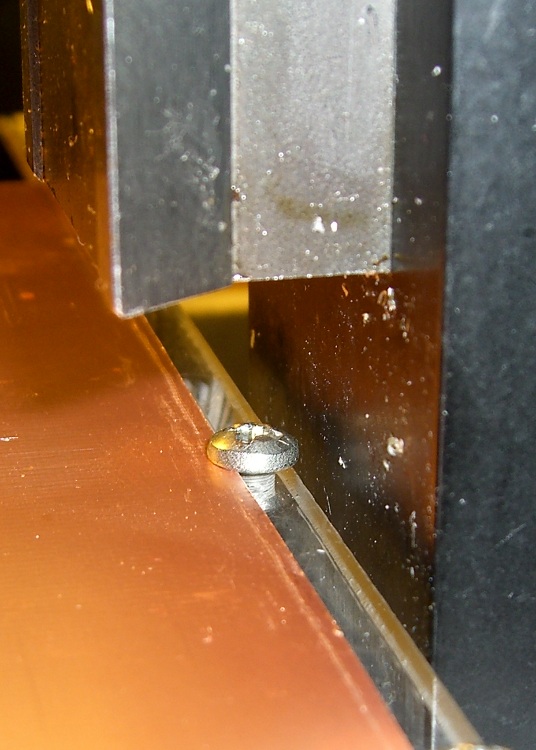
Rear clearance
My mill has slightly less than the absolute maximum Y-axis travel because I added a bushing to capture the end of the leadscrew, as described there. The picture shows the clearance between the back of the platen and the mill column: 2 mm, more or less. The 6-32 screw head is flush with the rear edge of the platen.
Alignment along the Y-axis is easy: jog rearward until the stepper motor stalls, ease away a smidge, then touch off at Y=3.8 inches. Stalling the motor is bad practice with servos or husky steppers, but on this sort of low-power machine it’s perfectly OK. (One could argue for limit switches, but in vain.)
Slap the platen on the mill table tooling plate (turns out that the Z-axis reach is marginal for the shortest carbide drill when it’s in a collet, oops), adjust more-or-less to the middle of the X-axis scale on the front of the table, line up the hold-down clamps, then crunch the U-channels down on the circuit board. That holds everything in place very firmly; the front overhang doesn’t get much torque because the mill can only reach 4 inches from the rear edge, just beyond the mill table underneath.
That center screw is eyeballometrically in the middle of the platen’s width, so X-axis alignment is also easy: put the laser dot (visible in the top picture if you squint) on the near-side edge of the screw and touch off X=3.2 inches.
That alignment puts the X=Y=0 origin at the front-left corner, about 1/4″ in from the left-side clamp and an inch behind the front clamp.
The mill’s X axis reach goes beyond the clamps, but the 160 mm = 6.30 inch extent of an EAGLE board fits neatly inside.
The Y-axis reach is barely over 3.8 inches, just shy of EAGLE’s 100 mm = 3.94 inches, but that’s close enough for what I need to do. Getting that last 0.14 inch would require a very, very thin clamp at the rear, minus the Y-axis bushing. There wouldn’t be much clearance from the holes to the edge of the board, either.
The generous Y-axis clearance on the front allows for the trickery needed to run toner-transfer sheets through the fuser; you want margins all around the drilled area. More about that there, plus search for PCB to unearth other posts.
Remember that the way I make PCBs, the holes act as alignment points for the toner transfer sheet. That means I don’t really care about absolute alignment with respect to the raw PCB sheet: just clamp it down and start drilling.
Some years back, I bought a lifetime supply of stainless steel machine screws in the usual sizes, all in 1- and 2-inch lengths. I was always cutting the things to length anyway, so why not start with nice screws?
The problem with cutting a screw is holding it securely enough that it doesn’t fly off into a far corner of the shop, but without goobering either the threads or the head.
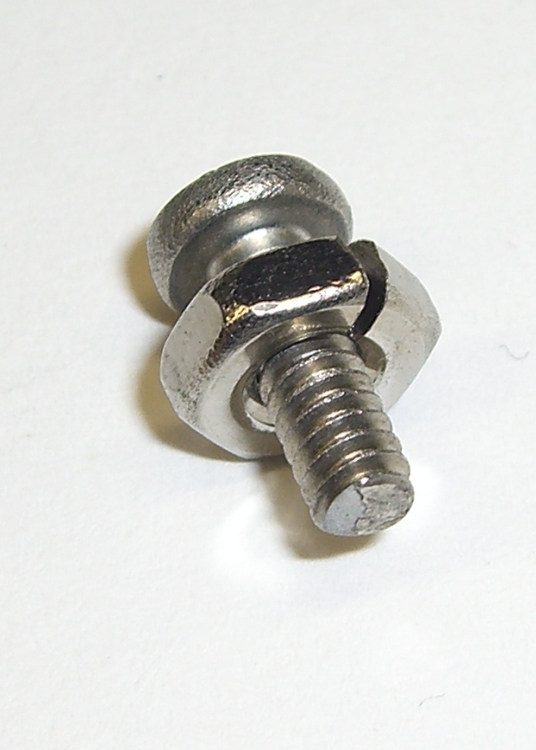
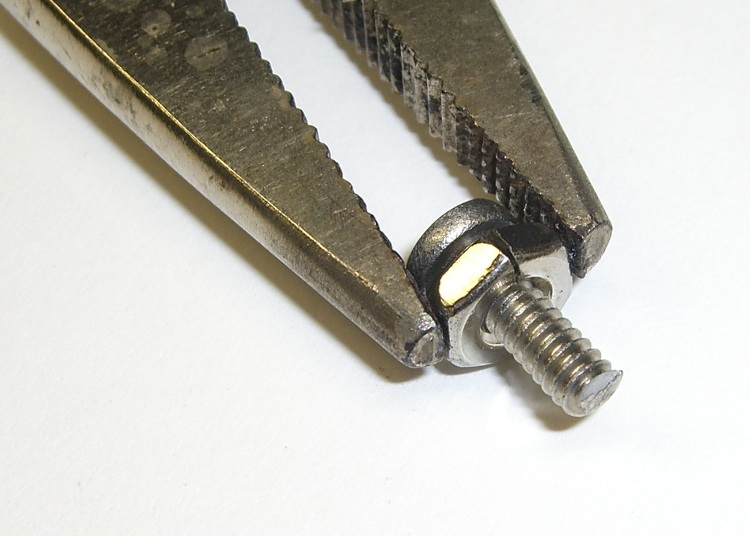
The secret, at least as far as I can tell, is slitting a nut to make a secure clamp for sawing, filing, and grinding. I ran a slitting saw through a nut to get the result you see here. Although it’s awkward, a slit through a point means grabbing the nut on two parallel sides squeezes the slot closed: exactly what you want.
Screw firmly under control
Slit a bunch of nuts whenever you get set up to do this, because those ugly thread ends on the cut screws tend to chew ’em up. If you have any foresight, you’ll thread the nut on the screw before you cut it, but that doesn’t work for really short screws.
Yeah, a lifetime supply of all different screw sizes and all different lengths would be nice, but I really don’t spend a whole lot of my life cutting screws…
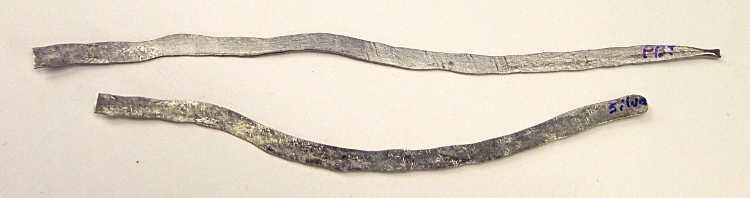
I needed more solder ribbon for resistance soldering, so I figured I should make a batch of the stuff. Put a length of silver solder between folded paper, hammered it on the vise anvil with a polished brass hammer, and it worked fine.
Flushed with success, I did the same with some ordinary rosin-core lead solder for the next time I must solder a shield or some such.
Solder Ribbons
Just snip off the appropriate length and fire up the iron…
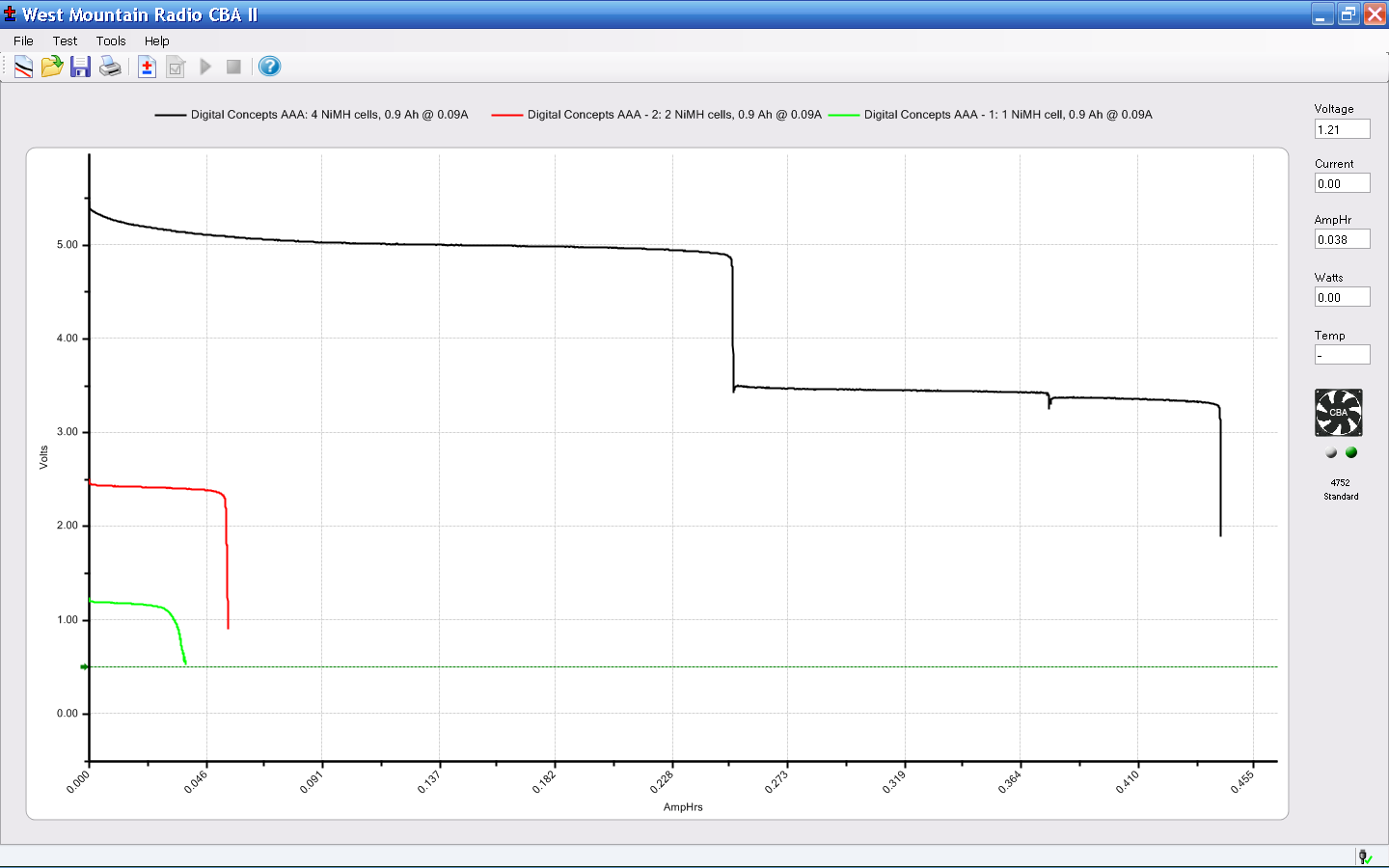
The AAA cells I mentioned there bubbled to the top of the heap on my desk again, so I charged them, let them sit around for a few days to stabilize, then ran a discharge test.
The top (black) trace is all four AAA cells in series; the two steps correspond to the two weakest cells failing. The red trace is the surviving two cells. The green trace is the strongest cell, which supplied current during all three traces.
They’re nominally 900 mAh, but the results are pretty much what you’d expect.
No-name AAA NiMH – Sequential Discharge
The most durable cell, the last one to fail with the green trace, had a capacity of a bit over 500 mAh: slightly over half the rating. The weakest cell (the first step on the black trace) failed after a mere 250 mAh.
Junk. Pure junk. I’ll give ’em another charge just to see what happens, but don’t hold your breath anticipating a resurrection.
Over the years I’ve accumulated a bunch of obsolete ICs; all I can say is they weren’t obsolete at the time. Sometimes I need one, so here’s a list of the jelly-bean collection where I can find & update it as parts emerge from their hidey-holes in the Heap.
All hulking through-hole
138 1-to-8 demux
221 monstable (!)
139 1-to-4 decoder
156 2-to-4 dual demux / decoder
F521 8-bit comparator
373 8-bit latch (transparent)
374 8-bit latch (clocked)
74 dual D flipflop
244 8-bit buffer
393 dual 4-bit counter (ripple)
AS869 8-bit up/down counter
191 4-bit up/down counter
157 quad 2-to-1 mux
164 8-bit parallel output shift register
245 8-bit bus transceiver
151 8-in multiplexer
Memo to Self: What horror lurks in the box labeled “Old ICs”?



 The Smell of Molten Projects in the Morning