Ed Nisley's Blog: Shop notes, electronics, firmware, machinery, 3D printing, laser cuttery, and curiosities. Contents: 100% human thinking, 0% AI slop.
I accidentally-on-purpose spilled some sunflower seeds when I refilled the bird feeder, just to see who was awake. Surprisingly, the seeds remained untouched for about two days, then this fellow appeared… and cleaned them up in a matter of minutes.
Spring is on its way, despite the recent storms!
Chipmunk with sunflower seeds
Taken with the Sony DSC-H5 zoomed in all the way (12x) through the 1.7x tele-adapter. It’s not a great combination, but it’s better than no picture at all. This is a crop of about the middle half of the image, with a touch of unsharp mask, then scaled down 2:1 for improved webbishness. After all that, it’s a wonder you don’t mistake the critter for a moose…
Just installed CrunchBang Linux on the old Dell Inspiron 8100 (1 GHz 512 MB Pentium III laptop) to get some experience with OpenBox and maybe make the thing usable with the Arduino IDE on my electronics workbench.
As with most distros, it features a totally useless boot progress thermometer splash screen that hides all the interesting details. Carving the splash quiet options off the kernel line in /boot/grub/menu.lst gets back to the usual torrent of text info, which I find comforting. But the default screen is 80×25, which means things scroll by at a pretty good clip…
Adding vga=ask to the kernel line lets you dump what the BIOS thinks will work. This includes:
0x345 or 0x346 = 1600x1200x16
0x315 = 800x600x32
0x31A = 1280x1024x16
Plus a whole bunch of other modes that don’t matter much these days. Anyone for 40×25 text mode?
I wanted 1600×1200, but both of the listed options caused a garbled display: double-spaced raster lines and eventual overlapping wrapped text. There’s probably a BIOS bug in there somewhere.
Choosing the 80×60 modes produced truly ugly squashed text.
After some poking around, 0x31A produced a usable display that, to my wondering eyes, appears to be 1600×1200. The kernel expects the decimal equivalent of that value: vga=794.
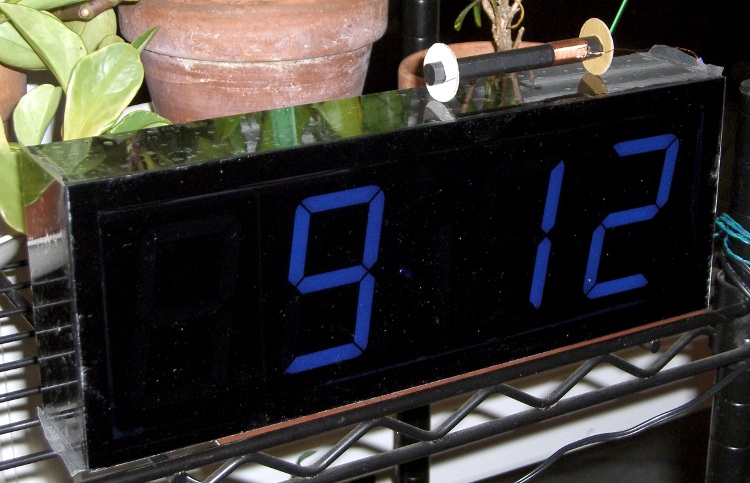
The case for the Totally Featureless Clock is exactly what you’d expect: a solid black acrylic block with a Lexan Graylite faceplate. All you see are digits… no buttons, no knobs. Just the time, all the time.
I’d hoped to just epoxy the faceplate on and be done with it, but the edges really didn’t look right. A bit of rummaging turned up a Dremel 125 “High Speed Cutter” that looked to be exactly the right hammer for the job.
Dremel conical cutter in drill chuck
The Sherline CNC mill just doesn’t have the reach for a foot-long cut, so I clamped the case to the manual mill and grabbed the cutter in an ordinary drill chuck. This is absurd, but ya gotta run with what ya got…
According to the Dremel specs, the cutter should run at 20-30 k RPM, but, trust me on this, the mill doesn’t go that fast. I set it for 2000 RPM, the fastest it’s run in years, and hoped for the best.
The runout was breathtaking.
I aligned the case against against a parallel in one of the T-slots, which got it surprisingly close. A trial cut showed it was off by a bit, but two slight realignments (loosen clamps, slide gently, reclamp) and trial cuts put it spot on. That worked fine for three sides.
The cutter is about 6.3 mm dia and just over 9 mm long, so the cutting edge is inclined at almost exactly 1:3. That means a horizontal misalignment of 10 mils causes a vertical misalignment of 30 mils. Conversely, you can measure the vertical error and then tweak the horizontal to make the answer come out right.
Tweaking the alignment
The fourth side was off enough to make the final joint to the first side pretty ugly. I measured the vertical offset at about 80 mils, set the front magnetic block as a pivot and stuck a 25-mil feeler gauge between the rear block and the case. Remove the feeler, loosen the clamps, rotate the case, reclamp, and the cut was just about perfect. Certainly within my tolerances for such a thing… you can’t see it unless you’re looking for it.
The bottom picture shows the final bevel, hot off the mill table, minus the protective plastic wrap and plus a bunch of dust and adhesive smudges from the wrap. The end plate gives the vertical line down the right side and a slight discontinuity where it’s a few mils shy of the side. There’s a hairline around the whole case where the faceplate joins the black acrylic; I used transparent epoxy and a light weight to clamp the faceplate down, so the joint is uniformly thin all around.
A few passes on a sanding block ought to get rid of the tool marks and spiff the bevel up just fine all around.
After 30-some-odd years, the X10 controller we’ve been using to turn off all the lights at bedtime finally stopped working. For the last few months it had been occasionally jamming ON, even when nobody pushed any keys, and the only way to reset it was pulling the plug.
The big silver can on the white cable is an ultrasonic mic, so perhaps the circuitry around that was getting cranky: the ultrasonic cleaner in the bathroom (which we use for eyeglasses) would reliably jam it. I think the controller was responding to the third harmonic of the 40-ish kHz cleaner power, delivered through the power line.
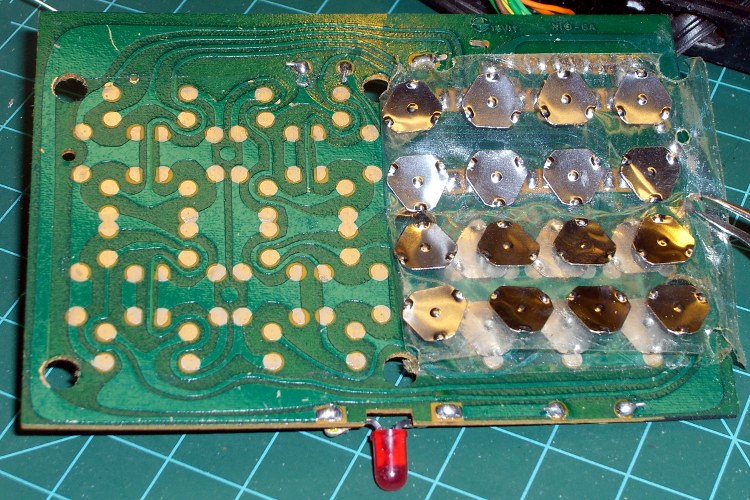
As you’d expect, all the electrolytic caps were shot; ESR for the big one was “open”, the smaller ones around 5 Ω. The capacitance values were entirely within spec, of course. I replaced all three.
X10 Controller keyboard
While I had the hood up, I cleaned the switch contacts, even though that probably had nothing to do with the problem. Back in the day, they used actual metal deformable domes, stuck under an adhesive layer that did a fine job of keeping the crud and dust out.
Put everything back together, fired it up, and it misbehaved the same way. I’d say we got our money’s worth out of it, though.
A replacement is on the order of $15 from the usual eBay suppliers, so it’s not the end of the world.
The new one probably doesn’t have the ultrasonic receiver, so it shouldn’t respond to the ultrasonic cleaner with the same enthusiasm.
I passed a few minutes in the high school lobby (while waiting for the Fencing team to return from a competition) trying to decipher the Braille signs. I’ve always had my doubts about the utility of these things, but I suppose if you’re going to have signs, they may as well have tactile lettering, too.
Anyhow, what little I knew about Braille (six dots, um, 64 symbols, um, tapers off after that) didn’t extend to actually knowing any of the letters, but how hard could a substitution cipher be? I figured out most of the letters in Stairway quickly, but some were obviously missing. Perhaps Braille includes symbols for common digraphs?
Stairway
The Library across the lobby provided more letters, with obvious mismatches that showed I wasn’t anywhere near as clever as I thought (a distressingly common situation these days). Perhaps the two leading dots indicate “Here be there text”?
Library
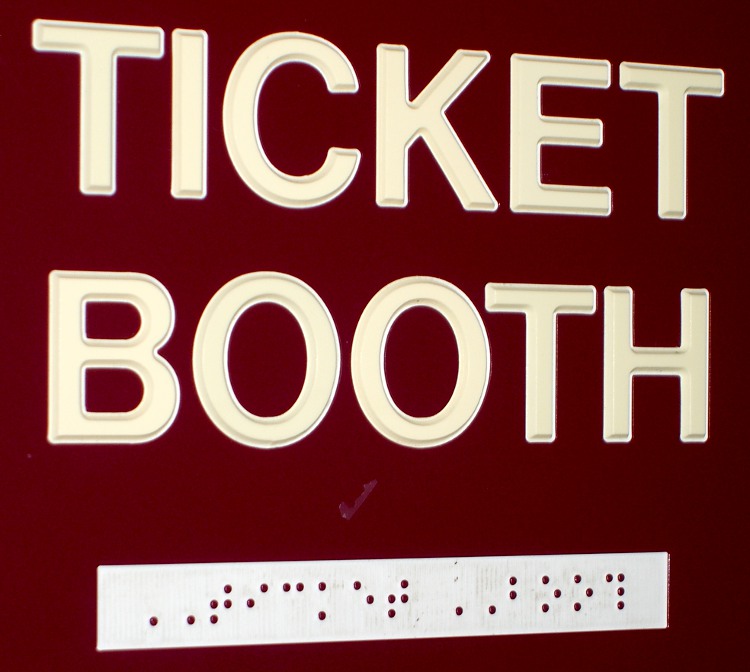
Then I found the Ticket Booth, which strongly suggested digraph symbols.
The two leading dots are a sticky uppercase shift marker
Fortunately, I didn’t encounter real contractions
There’s an 8-dot variant coming into play
Some years ago we took an introductory course in American Sign Language when one of my not-quite-a-nephew (son of a cousin, whatever that is) went deaf. Without anyone for day-to-day practice we never achieved fluency, but that was a window into another world, too. We still pass a few basic signs to each other across a noisy room …
Photography note: photograph signs from far enough off-axis that the flash hotspot on the surface is out of the image. If you must get a rectangular sign out of it, apply a perspective transformation to the image.
I attempted to assemble the Totally Featureless Clock’s case using Liquid Nails Clear Seal, figuring that it’d be easier to fixture than runny epoxy. I hoped that the joints would have enough surface area to allow curing, but was dead wrong.
Hope is not a strategy and proper fixturing is your friend.
Anyhow, I was left with eight surfaces on four dislocated panels covered with more-or-less cured sealant. I left ’em sit for a few days, then had to choose between:
Remove enough of the sealant to make the joints fit or
Machine new panels
Turns out that xylene (from my can of Goof-Off) removes cured Liquid Nails Clear Seal just fine, without affecting the surface of the acrylic panel. Soak the corner of a rag, rub vigorously, and the gunk comes right off.
Note, however, that Goof-Off comes in many different formulations. The one I have is mostly xylene, but the California “VOC Compliant” version is mostly acetone… which, I think, eats acrylic plastic for lunch.
All of that stuff eats your liver for lunch, too.
Don’t do like I did and use your bare finger in the rag. Alas, any solvent that actually works also eats any protective glove in my inventory for lunch.






 The Smell of Molten Projects in the Morning