The Smell of Molten Projects in the Morning

Ed Nisley's Blog: Shop notes, electronics, firmware, machinery, 3D printing, laser cuttery, and curiosities. Contents: 100% human thinking, 0% AI slop.

Author: Ed

  • X Server 1.18 vs Wacom: Back to the Mainline

    As mentioned there, I had to use the Arch Linux linuxwacom-bamboo-cth-ctl package because X Server 1.8 discarded all the carefully tweaked HAL baggage and the existing xf86-input-wacom package wasn’t yet compatible with the new server.

    That worked fine, until the most recent X Server tweak killed the Bamboo driver (which I hadn’t manually updated). As I expected, though, the new xf86-input-wacom package works just fine, so I can discard my manual workaround.

    Having recently tweaked the tablet coordinates to keep the pointer out of the gutter, I first thought I’d killed something… but that would happen instantly, not after a while. The key was looking in /var/log/Xorg.0.log to find this gem:

    [  3447.599] (II) LoadModule: "wacom"
    [  3447.638] (II) Loading /usr/lib/xorg/modules/input/wacom_drv.so
    [  3447.651] dlopen: /usr/lib/xorg/modules/input/wacom_drv.so: undefined symbol: dixScreenOrigins
    [  3447.652] (EE) Failed to load /usr/lib/xorg/modules/input/wacom_drv.so
    [  3447.652] (II) UnloadModule: "wacom"
    [  3447.652] (EE) Failed to load module "wacom" (loader failed, 7)
    

    Removing the bamboo package seems to have wiped out the udev rule that creates the /dev/input/wacom symlink. Adding that back in, as described there, solves that problem. Again.

    The evidence in /var/log/Xorg.0.log looked like this:

    [ 52121.754] (**) Option "Device" "/dev/input/wacom"
    [ 52121.754] (EE) xf86OpenSerial: Cannot open device /dev/input/wacom
            No such file or directory.
    [ 52121.754] (EE) Wacom - stylus: Error opening /dev/input/wacom (No such file or directory)
    [ 52121.754] (II) UnloadModule: "wacom"
    [ 52121.754] (EE) PreInit returned NULL for "Wacom - stylus"
    [ 52121.754] (**) Option "Device" "/dev/input/wacom"
    [ 52121.754] (EE) xf86OpenSerial: Cannot open device /dev/input/wacom
            No such file or directory.
    [ 52121.754] (EE) Wacom - eraser: Error opening /dev/input/wacom (No such file or directory)
    [ 52121.754] (II) UnloadModule: "wacom"
    [ 52121.754] (EE) PreInit returned NULL for "Wacom - eraser"
    

    Everything is logged somewhere: the evidence is out there!

  • C Constants Aren’t Automatically Promoted

    Quick, what’s wrong with this code snippet…

    #define MAX_INTERVAL	(60*1000)
    
    unsigned long int LoggedTime;
    unsigned long int NowTime;
    
    byte LogNeeded;
    
    ... snippage ...
    
    LogNeeded = (NowTime >= (LoggedTime + MAX_INTERVAL)); 
    

    Yeah, that constant up there should look like this:

    #define MAX_INTERVAL (60*1000ul)

    Took me a while to figure that out. Again.

  • Trinity Rules: LyX and LaTEX Setup

    The preamble turns on line numbers for proofing; remove those lines to turn them off.

    \usepackage{ragged2e}
    \usepackage{lastpage}
    \usepackage{url}
    \usepackage{dvipost}
    \usepackage{breakurl}
    \usepackage[labelfont={bf,sf}]{caption}
    \usepackage{listings}
    \usepackage{color}
    \usepackage{lineno}
    \linenumbers
    \renewcommand{\bottomfraction}{0.7}
    \pagestyle{fancyplain}
    \fancyhf{}
    \lhead{\fancyplain{}{Trinity College Home Robot Contests}}
    \rhead{\fancyplain{}{2011 Rules}}
    \lfoot{\fancyplain{Modified \today}{Modified \today}}
    \cfoot{Copyright 2010 by Trinity College}
    \rfoot{\fancyplain{\thepage\ of \pageref{LastPage}}{\thepage\ of \pageref{LastPage}}}
    \RaggedRight
    \dvipostlayout
    \dvipost{cbstart color push Blue}
    \dvipost{cbend color pop}
    

    There’s no obvious documentation for the Document → Settings  → PDF Properties → Addition Options values, but these make the crossref links look better:

    urlcolor=blue,linkcolor=blue
    

    For what it’s worth, LyX is still the right hammer for this job, although when something goes wrong, the error messages are truly oracular…

    Memo to Self: no line numbers in the final version!

  • Arduino Mega: Mounting Standoff and Screw

    The Arduino Mega has four, count them, four mounting holes in a more-or-less rectangular pattern around the edge of the board. Three of the four have enough room for standard pan-head 4-40 screws. The fourth hole is squeezed between two pin-header sockets, to the extent that no screw in my collection will fit.

    Screw on Arduino Mega board
    Screw on Arduino Mega board

    Having a lathe, however, makes this situation no big deal… and this time, I put the Sherline drill chuck in the 3-jaw because I wanted to, not because the 3-jaw was stuck. In truth, the lathe chuck simply won’t grab a 4-40 screw at all.

    Turning down the screw
    Turning down the screw

    I had that pointy right-cutting tool in the holder, so that’s how I cleared off the burr on the backside of the head.

    The chuck did grab the hex standoff just fine, though, and the final result looks like this…

    Modified standoff and screw for Arduino Mega
    Modified standoff and screw for Arduino Mega

    For future reference, the turned-down sections are 0.180 inch in diameter; call it 4.5 mm. The snout on the standoff must clear the pins,so it’s 0.100 inch or 2.5 mm long.

  • Pull Saw Blade Sheath

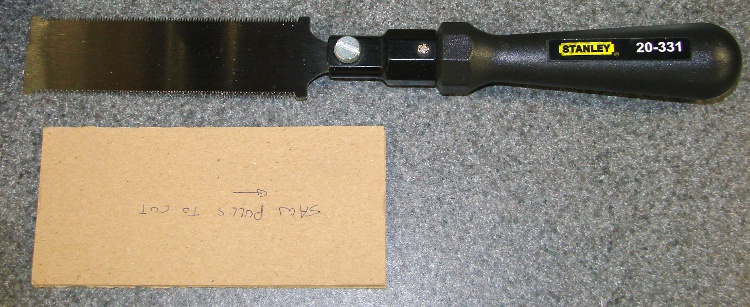
    Trimming some poster frame edges brought this useful tool out of hiding. It’s an ordinary Stanley 20-331 flush-cut flexible-blade pull saw that I’d used while installing laminate flooring in the kitchen & laundry room some years ago; it cuts the bottom of moulding like nothing else.

    Anyhow, what’s of interest here is the simple cardboard sheath I made to keep those delicate little teeth from getting bashed up in the tool drawer.

    Saw and sheath
    Saw and sheath

    Here’s a closer end view. It’s nothing more than two large sheets of thin cardboard (think cereal box or maybe consumer electronics box) separated by two narrow sheets. The blade’s thinner than any practical cardboard you’ll find, so just do it. It’s held together with yellow wood glue, because that’s what I had nearby when I built it.

    Saw sheath end view
    Saw sheath end view

    The note written on the sheath reminds both my shop assistant and me which way the cutting happens. Sometimes, we need all the help we can get.

    For what it’s worth, the new Stanley 20-331 listing shows a similar saw blade with a Fat Max handle. This is the older version, from back when thin was in.

  • Biting Through the Bite Valve

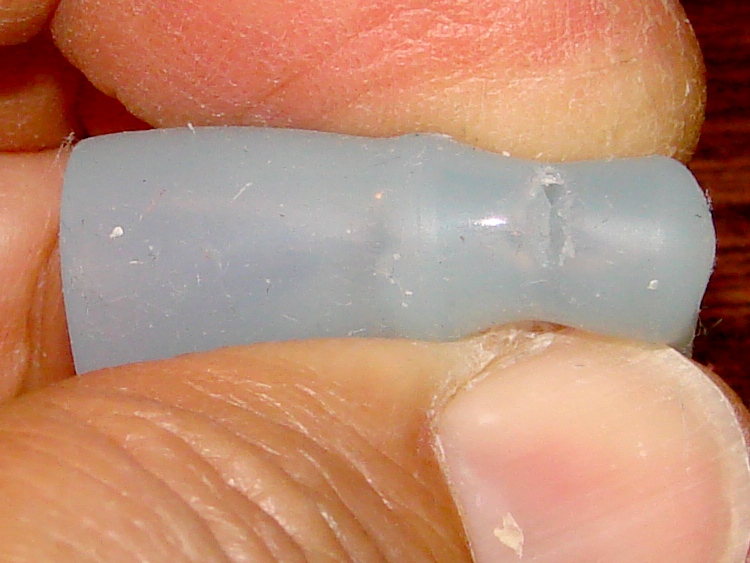
    I carry a water pack behind the seat on my Tour Easy, with the hose over my left shoulder and the valve captured by a magnetic thingie pinned to my shirt. On a recent ride I hit a substantial pothole while drinking from the tube and managed to bite completely through the miracle plastic “Bite Me” valve, mostly due to clenching my teeth in concentration rather than from the impact.

    Bitten bite valve
    Bitten bite valve

    A few days later my dim consciousness finally took note that the water kept draining down into the pack between sips: every sip came with a mouthful of air.

    A year or so ago, the original valve developed a nasty case of embedded gunk and I picked up a quartet of Genuine Nalgen valves (or a credible imitation thereof) from the usual eBay supplier. I wonder if the reservoir and tubing will outlast the remaining two valves?

  • Plastic Screw-top Flashlight Fix

    As part of my clear-off-the-workbench effort, this flashlight emerged from the dark depths. It’s a few decades old and wasn’t a good design: the “switch” is a simple contact between the end of the cell casing and the reflector rim, activated by screwing the reflector tighter on the case.

    Broken flashlight case
    Broken flashlight case

    The failure is simple: the case cracks through at the stress raiser formed where the “switch” contacts rest on a sharp inside corner. That stiff little spring maintains pressure on the cells, so the case is always under tension and eventually fractures.

    Flashlight clamped in mill
    Flashlight clamped in mill

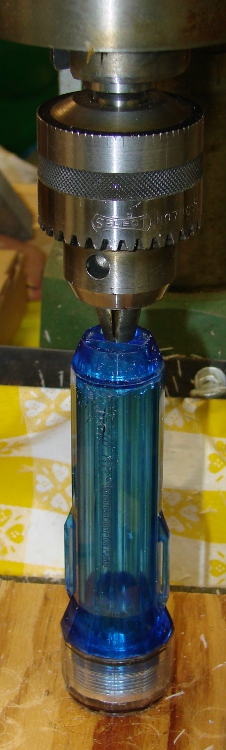
    I grabbed the broken pieces in the lathe, turned off the fractured plastic, and wound up with a pair of nicely mating surfaces (and a somewhat shorter flashlight, but it’s still long enough). Apply enough Plastruct solvent glue to soften the new faces, then clamp them together. The big manual mill knows how to apply a strong, steady vertical force to a project like this.

    It’s once again hanging by the basement door, where it gets used roughly once every other blue moon (yeah, it’s color-coordinated). This isn’t the first time this flashlight has failed that way, but it’ll be the last: next time, it’s in the trash.

    Honest, I swear it!