Ed Nisley's Blog: Shop notes, electronics, firmware, machinery, 3D printing, laser cuttery, and curiosities. Contents: 100% human thinking, 0% AI slop.
The Arduino Mega 2650 board used in the Thing-O-Matic gets its power from the +12 V ATX supply plugged into the TOM Motherboard. It will also automagically switch to +5 V from the USB connection when the +12 V external power Goes Away.
Come to find out that the Foxconn Atom I’m using doesn’t shut off the power to the USB ports when it’s “turned off”. That keeps the Arduino alive and, by a quirk of the circuitry, backfeeds +5 V into the +12 V supply, which makes its way back to the ATX power supply and keeps the fan running. Slowly, but it’s ticking over in there.
Rather than keep unplugging the USB cable, I added a diode in series with the Motherboard +12 V trace going to the Arduino connector:
USB backfeed prevention diode
The orange stuff is nail polish rejected by my Shop Assistant, which covers a slit gouged in the +12 V trace. The diode bridges the gouge and passes current only into the Arduino.
Any diode will do, as the next step in the +12 V supply chain is that poor overworked Arduino regulator responsible for shaving it down to +5 V. I used a good old 1N4001 and it’s perfectly happy.
[Update: the Arduino will remain powered up overnight, even with everything else turned off. When you turn the Thing-O-Matic on the next morning, pop the Reset button to get the Arduino’s attention.]
The NYS DOT recently spiffed up Raymond Avenue in Arlington, installing three small diameter rotary intersections and rows of street lights with lenses cunningly contrived to glare directly in your eyes. Why installing black, non-reflectorized bollards two feet away from the travel lane at each crosswalk seemed like a good idea escapes me, too.
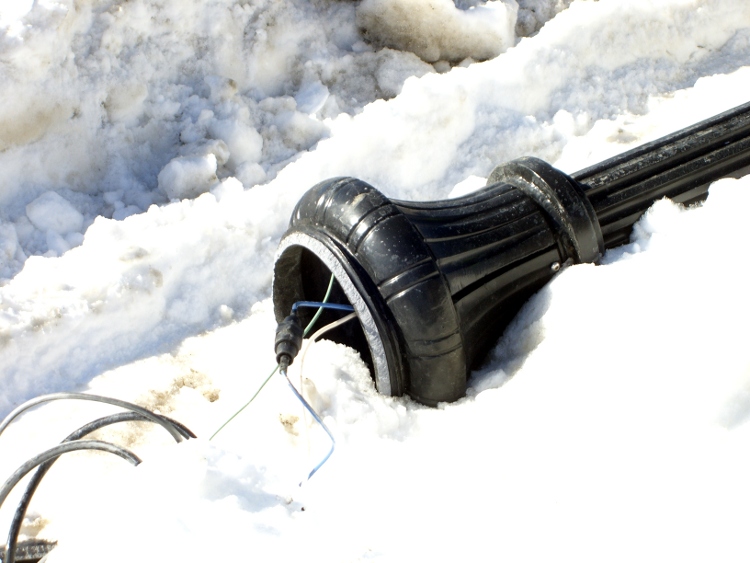
Anyhow, it seems one of those streetlights was a bit too close to the corner. The ruts across the top of the picture came from a truck that evidently clipped the pole and neatly fractured the entire aluminum (?) base casting without bending anything else.
Fractured street lamp post
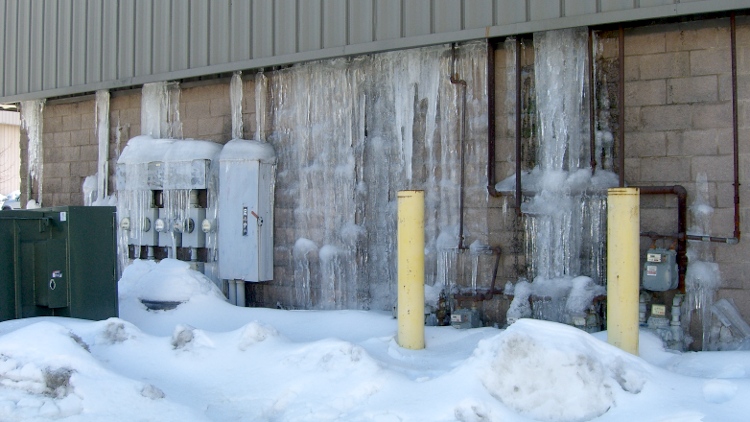
Further south, this wall in Wappingers Falls shows why flat-roof building aren’t such a great idea in snow country:
Ice flow across wall
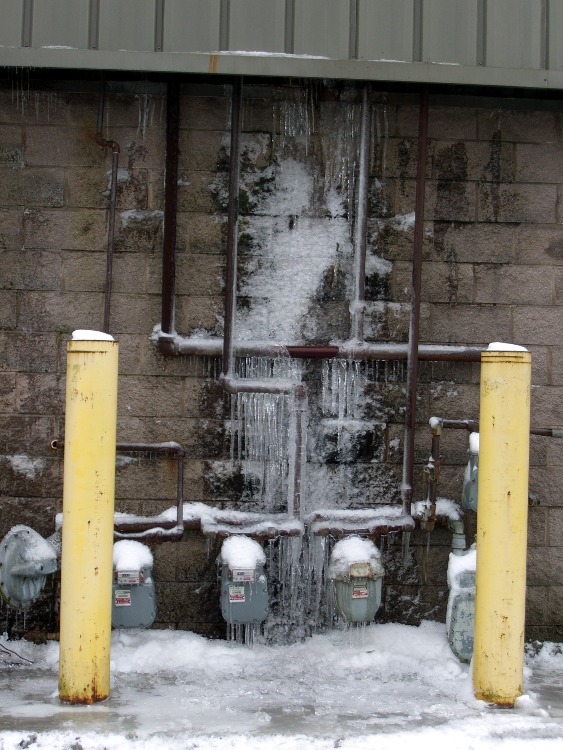
That isn’t a new problem, by the way. Last year it looked like this:
This didn’t work out, but it came close. Eventually I’ll figure out what material can replace the boot, at which point I’ll need to remember these steps…
That LED flashlight + laser pointer has a rubber boot over the push-on / push-off switch stem that makes it sorta-kinda waterproof. Although I wouldn’t trust it in more than a sprinkle, it’s my pocket flashlight and tends not to get soaked very often.
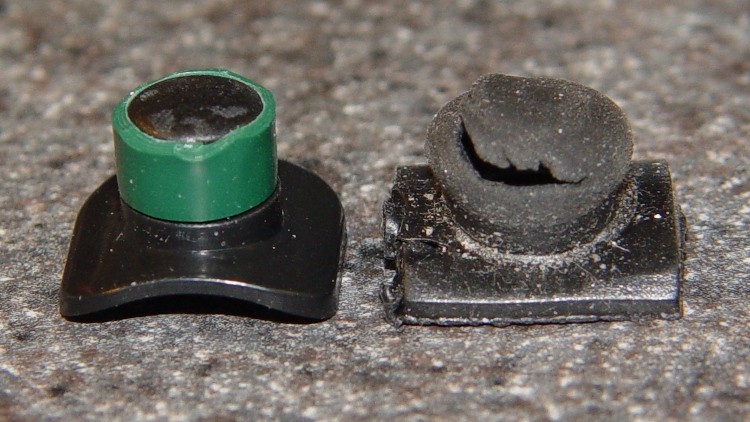
Anyhow, the rubber boot wore through:
Broken switch boot
Taking it apart, now that I know how, was easy enough:
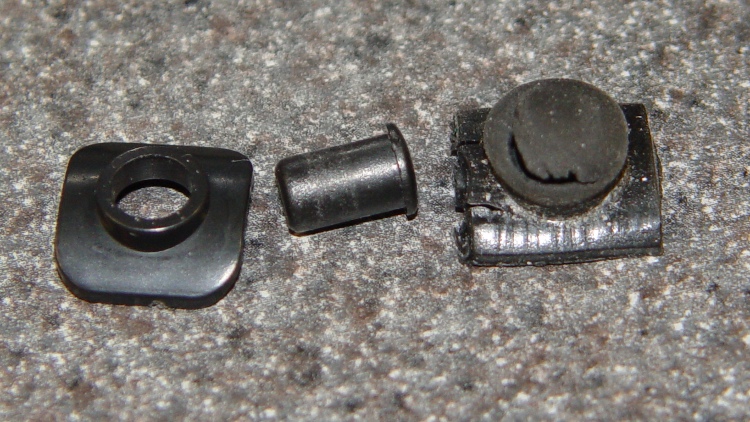
Switch button parts
Note that the mushroom part goes on the outside, which means the stem will vanish if the boot rips apart.
I planned to mold a boot from acrylic caulk, so I wrapped narrow strips of electrical tape to match the stem to the mushroom head, then wrapped a bit around that to make the final boot fit loosely:
Wrapped switch stem
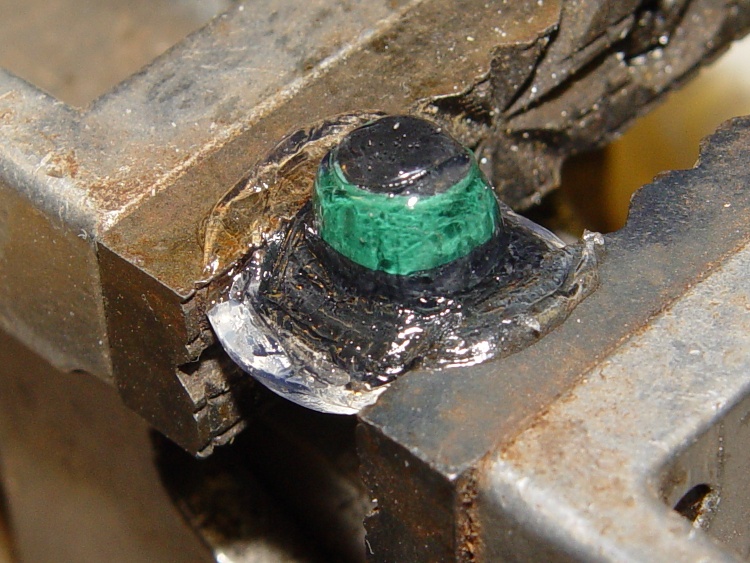
A thin layer of oil served as mold release, over which I smoothed a blob of caulk. This looks awful, but the majority of the blob at the bottom will get trimmed off:
Switch stem covered with acrylic caulk
Unfortunately, the cured caulk turned out to be remarkably fragile. Each individual blob felt tough, but it’s really not designed to form thin membranes; I got about what I expected.
Pourable silicone rubber seems like the right hammer for the job: make an outer mold to surround this thing (or a 3D printed replica) and pour it on. I must get some of that, one of these days.
So I put the flashlight back together with the mushroom on the inside to keep the stem in place… and I generally avoid getting more than knee-deep in liquids, so not having a good seal won’t matter too much.
Extruding at a rather low 200 °C with that pair of 25 W cartridge heaters in the 14 °C Basement Laboratory Machine Shop Wing, the heaters exhibit fairly consistent timing:
47-49 seconds OFF
59-66 seconds ON
So, in round numbers, a 50 W heater has a 56% duty cycle with a 111 second period, with the temperature varying ±2 °C around the setpoint. The head has a fairly substantial ceramic wool insulation blanket, not the stock ceramic tape wrap, so your results will be different. One side of the build chamber is open to the ambient air, so it’s not as warm in there as usual.
The average dissipation of 28 W is half of the original MK5 head’s 58.8 W dissipation, which agrees reasonably well with what other folks have reported for the duty cycle of stock MK5 heads. More insulation is better, but a substantial fraction now escapes up the Thermal Riser tube, so doubling the blanket thickness might not be worth the bulk.
A single 40 W heater would run at 70% duty cycle. The only downside of lower power is a longer delay from power-on to extruding; a lower stuck-on overheat temperature seems like a Better Thing.
I’m deliberately using a relatively low extrusion temperature to explore the lower bounds of what’s practical. I think another 10 °C would improve the thread’s stickiness; right now some spots seem not so well glued together..
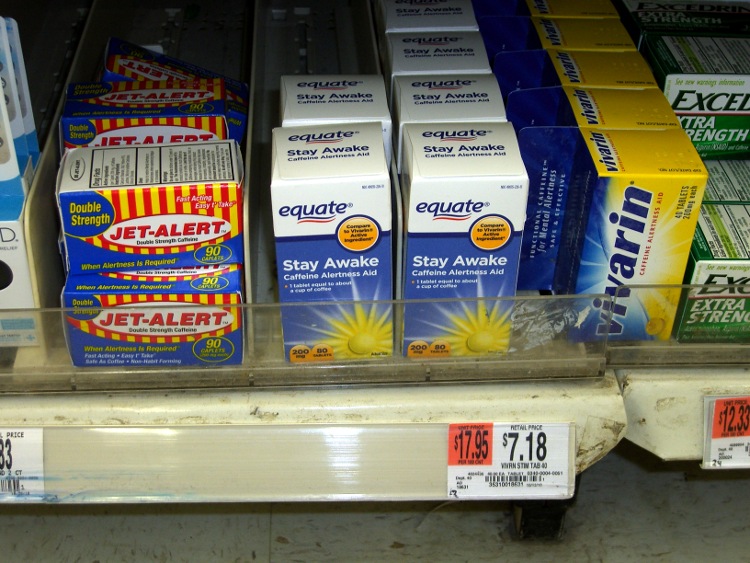
In the Mysteriously Missing Label category, we find three similar products with only one shelf label. Which one is the better deal?
Caffeine unit pricing
You might think it’d be the Wal-Mart Equate house brand. In order to find out, you’d have to haul all three offerings down the aisle and around the corner to the price scanner, which would reveal it’s the one on the far left, by a considerable margin. Oddly, that one says “Double Strength” even though it has the same 200 mg dose as the others.
In the Bizarre Units category, we have two very similar products with completely different unit-price units of measure. Seeing as how a “fluid ounce” is a unit of volume and a “pound” is a unit of weight (or, for the pedantic, force), even the dimensions aren’t compatible. Clicky for bigger pictures.
Vanilla unit pricing – 2 oz
And, just to show that wasn’t a one-off mistake that could happen to anyone, the smaller size containers continue the theme.
Vanilla unit pricing – 1 oz
Given that nothing in a Wal-Mart store happens by accident, someone was directed to remove two of those three labels and another someone deliberately chose incompatible units.
Of course, anyone I’ve ever asked has no idea why that would happen…
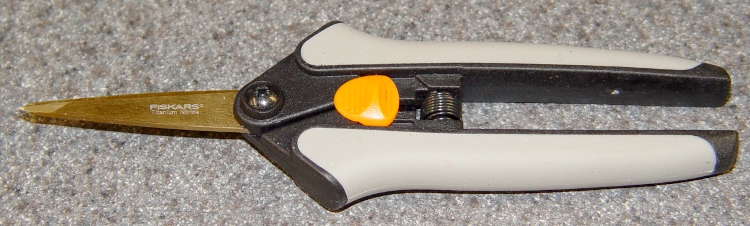
These Fiskars scissors[Update: they’ve moved to the Gardening section. Try there or there. ] seem to be intended for sewing & quilting, but they work just fine for snipping plastic filament, cutting tape, and severing hangnails…
Fiskars Softouch Scissors
The titanium nitride coating probably doesn’t add much value to the mix, but that’s what they had at JoAnne Fabric when I bought ’em.
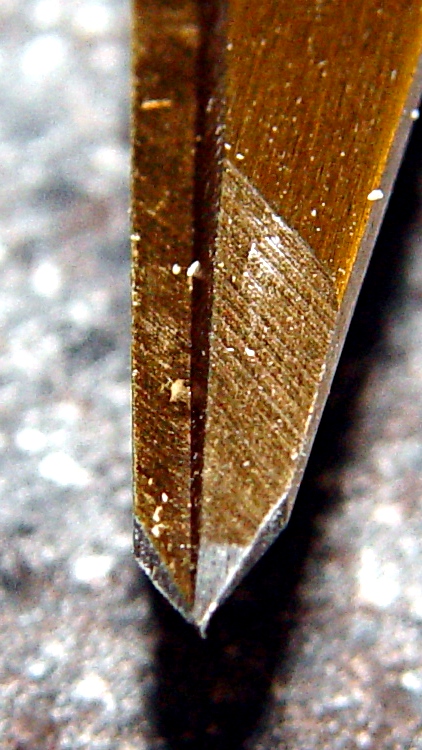
Fiskars scissors tip detail
This detail of the tip shows why they’re so great for detail work: each blade ends in a two-way taper to a genuine cutting point. Of course, that means they’ll survive exactly zero falls to the shop’s concrete floor, but they’re fine while they last.
The trick is to sign up for JoAnne sale flyers, which regularly deliver “40% off any one item” discount coupons, then make a targeted shopping expedition. Those coupons account for the green self-healing cutting mat that’s in the background of so many pictures around here, too…
The advantage of an aluminum build plate is that it’s flat, but it must also be parallel to the XY axis movements: the nozzle should have a constant altitude across the entire surface of the plate. There’s a tool for measuring that: a dial test indicator.
Measuring build plate alignment
I still don’t have solid way to mount the DTI to the Z axis stage, but the bar clamp works reasonably well. The DIT has a full-scale range of about 30 mils = 0.76 mm, with half on either size of the zero center point. Obviously the probe isn’t at right angles to the DTI body, but it’s close enough for differences of a few mils.
The G-Code routine (see below) positions the Z stage in the middle of the platform and prompts you to mount the DTI and set the reading to 0.0. That requires a bit of delicate fiddling and anything within a few mils should be fine. Don’t adjust the leadscrew by hand, because all this depends on repeatable positioning.
With that in place, the G-Code will raise the DTI, move the stage, lower the DTI, pause for five seconds while you note the reading, then repeat. For my DTI, the readings are in mils = 0.001 inch and, while I could record half-mil values, it’s not worth the effort.
You’ll get nine numbers showing the height across the plate, spaced 20 mm in X and 25 mm in Y:
0
3
6
2
2
2
1
-2
-4
Subtract the minimum number from all the rest to remove the height offset and get everything referenced to zero:
Minimum
-4
4
7
10
6
6
6
5
2
0
Looks like the plate isn’t quite a planar surface (it’s bent!) and it tilts upward to the right rear, but the total difference amounts to 10 mils = 0.010 inch = 0.25 mm. I think that’s smaller than the variation caused by jitter and vibration and general creakiness in the X and Y stages. The repeatability seems to be within two or three mils, which is probably the limit of the hardware.
Bottom line: good enough for now!
The flat aluminum plate reveals a definite front-to-back bow in the heater plate. Clamping the two tightly together would fix that and improve heat transfer, but then the aluminum plate wouldn’t be easily removable when it’s hot.
Put this G-Code routine (call it Flatness.gcode) in the ReplicatorG scripts/calibration directory and you’ll be able to run it from the menu:
(Measure surface flatness)
(MakerBot Thing-O-Matic with ABP and aluminum plate)
(Tweaked for TOM 286)
(Ed Nisley - KE4ZNU - Feb 2011)
(-- The usual setup --)
G21		(set units to mm)
G90		(set positioning to absolute)
(-- Home axes --)
G162 Z F1500	(home Z to get nozzle out of danger zone)
G161 Y F4000	(retract Y to get X out of front opening)
G161 X F4000	(now safe to home X)
(-- Set coordinate zeros --)
G92 X-53.0 Y-58.0
(G92 Z115.3)	(set Z for ABP with belt)
G92 Z112.8	(set Z for ABP with aluminum sheet platform)
(-- Get height gauge set up --)
G0 X-10 Y10 Z25	(center gauge probe on platform)
M1	(Attach gauge, set to 0.0 mm)
G92 X0 Y0 Z0.0
G0 Z2.0		(traverse height)
(-- Begin probing --)
G1 Z0.0		(denter)
G4 P5000
G0 Z2.0
G0 X-40.0	(left center)
G1 Z0.0
G4 P5000
G0 Z2.0
G0 Y-50.0	(left front)
G1 Z0.0
G4 P5000
G0 Z2.0
G0 X0.0		(mid front)
G1 Z0.0
G4 P5000
G0 Z2.0
G0 X40.0	(right front)
G1 Z0.0
G4 P5000
G0 Z2.0
G0 Y0.0		(right center)
G1 Z0.0
G4 P5000
G0 Z2.0
G0 Y50.0	(right rear)
G1 Z0.0
G4 P5000
G0 Z2.0
G0 X0.0		(mid rear)
G1 Z0.0
G4 P5000
G0 Z2.0
G0 X-40.0	(left rear)
G1 Z0.0
G4 P5000
G0 Z2.0
G0 X0.0	Y0.0	(center again)
G1 Z0.0
G4 P5000
(G0 Z5)





 The Smell of Molten Projects in the Morning