The Smell of Molten Projects in the Morning

Ed Nisley's Blog: Shop notes, electronics, firmware, machinery, 3D printing, laser cuttery, and curiosities. Contents: 100% human thinking, 0% AI slop.

Author: Ed

  • Thing-O-Matic: X and Y Stage Masses and Forces vs Stepper Rating

    While putting the HBP back together and stuffing it into the Thing-O-Matic, I did some weighing and measuring with the intent of finally putting numbers on the required motor torques.

    The X stage weighs 114 g without the HBP heater and hardware. The aluminum build plates weigh 100 g each.

    The assembled XY stages, HBP hardware, and two aluminum plates weigh about 1.1 kg.

    The individual rods slide back and forth in their bearings with essentially no force at all; it’s less than the resolution of my pull scale. Call it 1 ounce = 0.3 N = 30 g.

    After aligning the rods, I popped the X-stage HBP back in the Y stage, where I discovered I’d adapted the holes to suit the very-much-misaligned ABP’s rods. A bit of sanding freed up things up, but the final result was disappointing: sliding the X stage required about 0.75 pounds = 3.3 N = 340 g from my pull scale. Those rods remain over-constrained despite my best efforts.

    The pull scale required less than 2 ounces = 0.6 N = 60 g to haul the Y stage back and forth after it was back in the Thing-O-Matic, so those ball bearings on the left-hand rod work really well. I must doodle up something similar for the X stage, for sure!

    With the belts tensioned and the motors unplugged from the drivers, both the X and Y stages require about 2 pounds = 9 N = 0.9 kg of force to move. Those numbers depend strongly on belt tension, to the extent that the tension ought to be a measured quantity. The Y stage has some stiction that I guesstimate around 1.5 kg, but that’s not a reliable number.

    So…

    Moving a well-adjusted X stage requires 5 times more force than the Y stage. What it’s like for a built-as-shipped X stage boggles the mind.

    With the belts more-or-less properly tensioned, the force jumps dramatically for both stages. The force required to move the Y stage dwarfs the bearing resistance. The force for  a carefully adjusted X stage is about twice the bearing resistance.

    The motor drive pulley has about 5 mm radius, so the torque to (slowly) move a 1 kg = 10 N load will be about 50 mN·m = 10 N × 0.005 m.

    This torque-speed curve from the Kysan product information page for the 1123029 (aka 42BYG034-4.78) motor used in Cupcakes and Thing-O-Matics shows that the pull-in torque starts at 14 mN·m and goes downhill from there, as is customary for stepper motors:
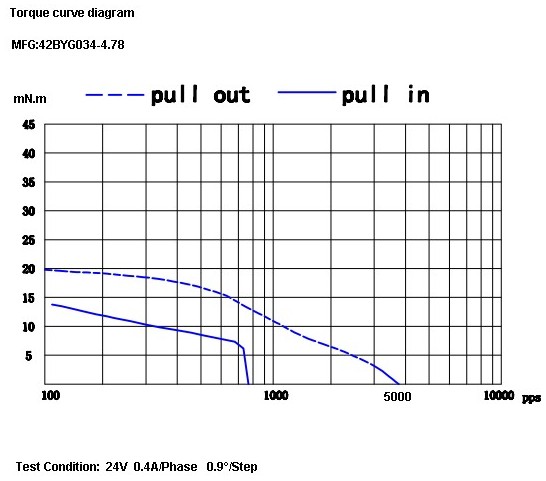
    Cupcake TOM Stepper Torque Curve
    Cupcake TOM Stepper Torque Curve

    However, the “test conditions” apply 400 mA from a 24 V source.

    In a Thing-O-Matic, the motor windings sport a 35 ohm resistance and are driven from a 12 V power supply. Ignoring voltage drops in wiring, current-sense resistors, and driver transistors, you cannot push more than 340 mA = 12 V / 35 Ω into the winding. The current is likely around 300 mA, after taking all those factors into account.

    The REF pot on the stepper driver board has no magic properties. If the REF voltage is higher than about 0.6 V = 300 mA, then the driver can’t regulate the current. Increasing REF simply eliminates the microsteps around the current peaks: their reduced current values remain higher than the maximum possible motor current.

    For example, the MBI instructions specify X and Y motor REF voltages of 1.5 V = 750 mA, a factor of 2.5 more than the motor can actually draw at 12 V. That means only microsteps that reduce the current below 40% of the maximum have any effect; in 1/8 step mode that means only 10 of the 32 microsteps reduce the current and the other 22 use 300 mA.

    By and large, the X and Y motors run in L/R mode with no microstepping; that horrible sound you hear is the motors screaming in agony. All of the touted advantage of microstepping do not apply to these motors and drivers under these conditions.

    Motor torque is roughly proportional to winding current, so the actual pull-in torque would be at most 3/4 of the amount shown in the graph: call it 10 mN·m.

    Therefore, the torque required to move a Thing-O-Matic stage against the forces described above exceeds the motor’s pull-in torque rating by a factor of 5. That ignores the torque required to accelerate / decelerate the stage mass.

    No wonder those poor motors lose steps at the slightest provocation!

    The motor’s rated holding torque is 240 mN·m, which derates to 180 mN·m at 300 mA. If the motor runs slowly enough, it can drag the stage along step-by-step.

    At 100 rev/min, the lowest speed on the torque-speed graph, the stage moves at:

    52 mm/s = (100 rev/min) × (1 min/60 s) × (π × 10 mm/rev)
    

    I’ve been running my Thing-O-Matic at 40-50 mm/s, but that’s about the upper limit even after a whole bunch of careful adjustments. Now I understand why: these are the wrong motors for the job.

    The motors operate at the ragged edge of their performance ratings even while moving at conservative feed rates. They probably produce more torque than their ratings, which is the only reason they work as well as they do. They’re certainly not suited for speeds over 50 mm/s, even if some folks have gotten them running up there; I could jog them at 70 mm/s with marginal reliability.

    In addition, the very high winding resistance dissipates a tremendous amount of power that doesn’t contribute to turning the rotor: 3.2 W = (300 mA)2 × 35 Ω in each winding, 6.4 W for both. That’s derated very slightly by the few active microsteps, but it still makes for a rather toasty motor.

    [Update: More brain fade. The motor max power spec equals a single winding at rated current times rated voltage. Derate the current in multiple windings so the total does not exceed that power.]

    What’s needed is a NEMA 17 motor with decent pull-in torque, a few ohms of resistance per coil, and maybe a 1 A rating. Sort of like the one I’m using on the geared stepper extruder

  • HBP Rod Alignment

    Having salvaged the sliding bearings from the ABP, I built up the HBP, stuck it into the Thing-O-Matic, and wasn’t in the least surprised to discover that it was mechanically jammed solid on the rods. This time, however, I wanted to measure the actual rod (mis)alignment to see what was going on.

    Remember that, as described there, the X stage overconstrains the rods by forcing them through four bearings. It would be much better to use a pair of sliding bearings on one rod and a set of ball bearings rolling on the other, much as MBI did with the Y stage. Something involving 603 or 693 bearings, perhaps… there’s a scant 12 mm clearance from the top of the rod to the bottom of the HBP.

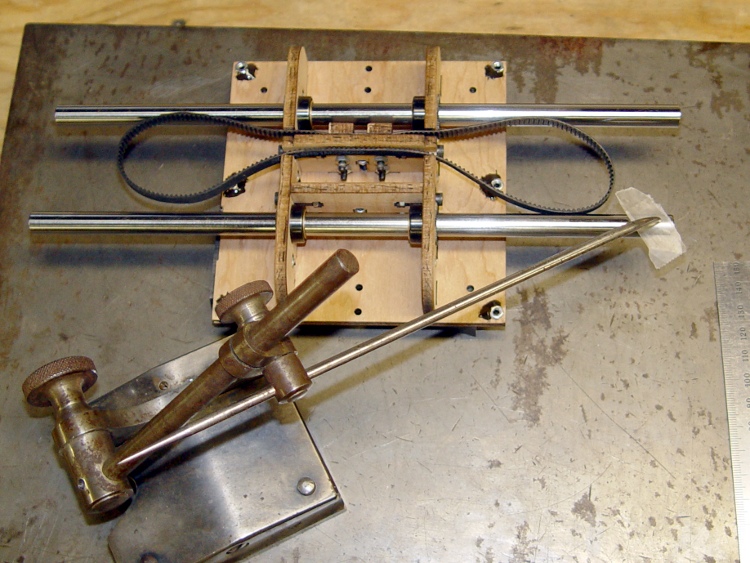
    So I laid it upside down on the surface plate and tickled it with a scribe mounted in a surface gage. Of course, I’m doing it all wrong, but the results are close enough. What you can’t see are the two half-inch chrome-steel lathe bits supporting the platform; it may be warped a bit, but that’s part of what’s being measured.

    Measuring HBP rod misalignment
    Measuring HBP rod misalignment

    I adjusted the scribe to just kiss the slip of waxed paper (0.02 mm) atop each end of each rod, which turns out to be surprisingly easy to do by feel.

    Measuring rod height
    Measuring rod height

    Then eyeball the result on a scale.

    Rod height on scale
    Rod height on scale

    One should tweak the surface gage until a dial test indicator reads zero, then stack up gage blocks to the same height. I actually hauled out my box o’ blocks before I came to my senses.

    Anyhow.

    The far rod was spot-on level and the front rod was off by 1 mm from one end to the other. They were within 0.2 mm of equal spacing horizontally, which was somewhat surprising given the amount of side sanding required to fit the ABP into Y stage.

    Height Right Center Left
    Back 42.6 42.7 42.7
    Front 43.5 43 42.5
    Separation 39.93 39.72

    I sanded out one of the holes, laid a bead of expanding urethane adhesive around the bearing housing, slid it into place, and then held the rod level with the tip of the scribe. The two random cylinders held the rods in the proper horizontal alignment.

    Setting HBP rod alignment
    Setting HBP rod alignment

    When the glue cured, the rods were basically dead parallel in both planes.

    Note the nuts epoxied on the bottom surface. That’s part of the cough precision platform alignment system…

  • Heated Build Platform Belt Clamps

    After modifying the ABP to use an aluminum build plate, I’m going to junk it and modify a Heated Build Platform to get much more precise control over the plate alignment.

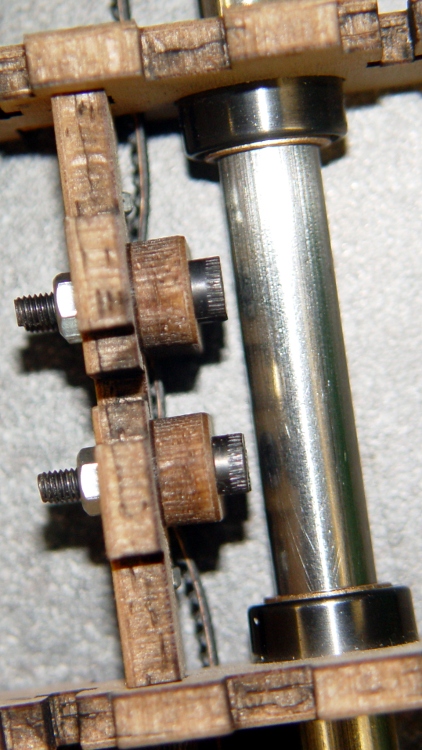
    As with the ABP, the HBP instructions tell you to use short-headed bolts to clear the guide rod. There’s no need to do that if you take the time to modify the plywood clamps, as described there, so they actually clamp across the entire width of the belt, thusly:

    Modified belt clamp
    Modified belt clamp

    The result looks like this:

    HBP modified clamps with bolt clearance
    HBP modified clamps with bolt clearance

    Plenty of clearance with better belt stability!

  • ABP Connector Chafing

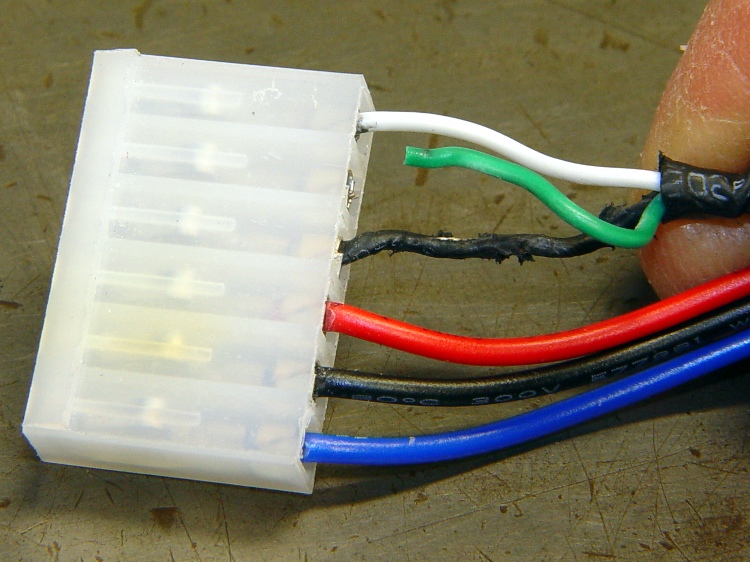
    At one point along the way, the Control Panel reported the ABP temperature as 1024 °C, which seemed excessive. A bit of poking around revealed this situation on the ABP connector:

    Overheated and chafed ABP connector
    Overheated and chafed ABP connector

    The connector just barely clears the top of the X axis homing switch board and the loose wires tended to rub on the top of the cable connector. I’d been meaning to fix that for a while, but now I had a real reason.

    A bit of soldering and some self-vulcanizing tape later:

    Strain relief on ABP connector
    Strain relief on ABP connector

    Also: notice the discoloration on the connector shell surrounding the Black wire? That’s the contact leading back to the MOSFET from the platform heater: a single pin carrying far more than its rated current. The shell around the contact on the Red wire (which carries the same current) isn’t discolored, which suggests the Black connector is a bit loose / poorly crimped / whatever. It looked OK to me, so I left it alone.

    While I had the cable on the bench, I added a set of those right-angle pins to eliminate the risk of loose wire ends getting into the wrong places.

    Terminated ABP cable
    Terminated ABP cable
  • Vacuum Cleaner Hose Disintegration

    The hose on our aging Samsung Quiet Jet (used to be a Quiet Storm, but I suspect they lost a trademark fight) vacuum cleaner has been a constant nuisance. Most recently, the end toward the handle began splitting:

    Splitting vacuum hose
    Splitting vacuum hose

    The fix consisted of a tight duct tape wrap, which has absolutely nothing to recommend it other than expediency.

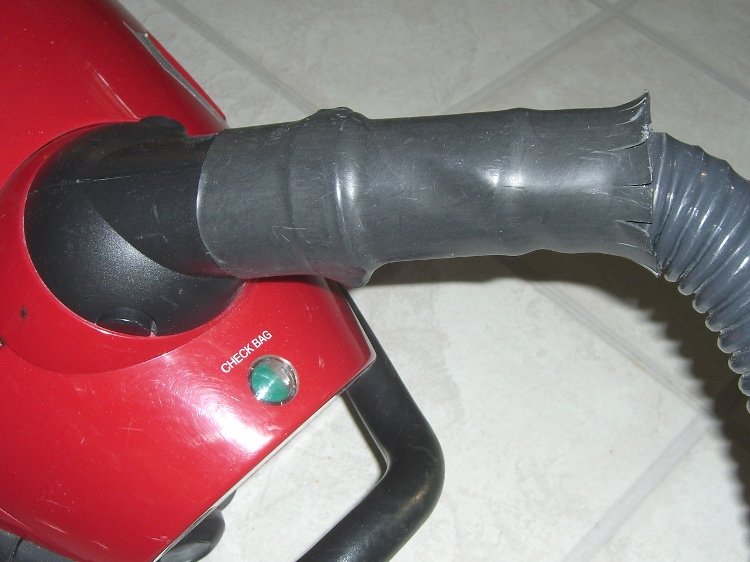
    When the same thing happened on the other end, I sealed it up and added a length of husky heatshrink tubing.

    Strain relief on vacuum hose
    Strain relief on vacuum hose

    The flared end isn’t particularly decorative, but it serves to reduce the strain on the hose. Alas, there’s no practical way to do the same thing on the handle end.

    The replacement cost for the hose roughly equals a new vacuum, so when we run out of bags, this one gets harvested for the shop’s Parts Heap.

  • Thing-O-Matic: Cool Orbiting Snots

    I tried using the Skeinforge Cool plugin in order to print the first layer at a higher temperature than the bulk of the object, with an eye toward improving the first layer’s adhesion to the build platform. Even with Reverse sucking back the filament before Cool begins, the nozzle dribbles little snots as it passes around the object’s perimeter:

    Cool snots
    Cool snots

    The nozzle orbits at exactly the top of the just-extruded layer, so the least little bit of ooze from the nozzle sticks to the layer. The spacing between snots shows that the nozzle fills up on a regular basis, even with the Extruder motor turned off.

    Running the extruder motor backwards for a bit would introduce an actual air bubble inside the nozzle, but then the plastic would ooze to the bottom, the air bubble would rise, and the nozzle would fart after starting the next layer. Not a desirable outcome.

    These tweaks to the cool_start.gcode and cool_end.gcode routines lift the nozzle during the cooling orbit and lower it at the end:

    (cool_start.gcode)
    M106    (fan on)
    G91     (incremental mode)
    G0 Z1   (up a little bit)
    G90     (absolute mode)
    ---------------
    (cool_end.gcode)
    M107  (fan off)
    G91   (incremental mode)
    G0 Z-1  (down to object)
    G90   (absolute mode)


    Alas, Skeinforge inserts those files at every layer change, which means the nozzle jumps up-and-down at the same spot on every layer… and that introduces a major blemish at what used to be a minor seam.

    Worse, if you’re building multiple copies of the same object, the G-Code file finishes a layer on the last object, does a little hop, returns to the first object, does a little hop, and then begins the cool-down orbit. Maybe that could be fixed by moving Cool after Multiply, but it’s starting to look like a hackfest instead of Just Working.

  • Thing-O-Matic: Hole Thread Separation

    Even after printing nice calibration objects, real-world projects sometimes don’t come out quite right.

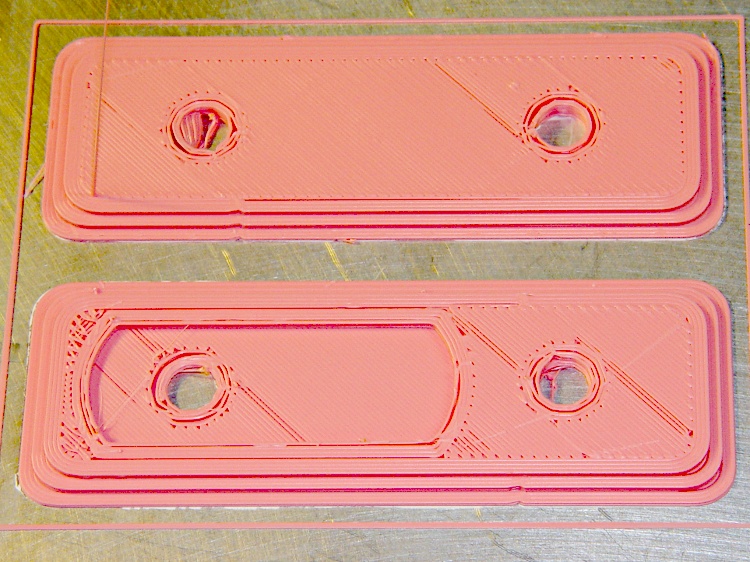
    This set of fairing plates for my Esteemed Wife’s bike was a test case to see if the hole threads would stick together better than before. As it turned out, no, they didn’t:

    Upper mount - hole separation
    Upper mount – hole separation

    The Infill w/t=1.75 setting seems to be slightly too high (meaning Skeinforge thinks the threads occupy slightly more space than they actually do), so the top isn’t quite as nicely packed as it should be.

    The threads around the holes aren’t sticking together at all. A closer look:

    Hole details
    Hole details

    The first layer of the upper-left and lower-right holes didn’t adhere to the ABS covering the aluminum plate and tangled with the remaining layers. In various combinations: the perimeter didn’t bond to the extra shells, those shells didn’t bond together, and the fill didn’t bond to the shells.

    Parameters:

    • Infill overlap = 0.3
    • Infill solidity = 0.25
    • Infill w/t = 1.75
    • Feed = 40 mm/s

    I could dial back the perimeter feed ratio a bit, but that won’t affect the infill-to-shell problem. Adhesion to the build plate depends critically on the initial height of the first layer and the speed of the nozzle across the plate; those I can adjust.

    Another mechanical cause: slightly loose drive belts. That usually shows up as backlash causing oval circles, but for small circles a pair of loose belts might just produce a too-small circle. I’m about to take the whole XY stage apart for another purpose, so adjusting the belts will come naturally.