The Smell of Molten Projects in the Morning

Ed Nisley's Blog: Shop notes, electronics, firmware, machinery, 3D printing, laser cuttery, and curiosities. Contents: 100% human thinking, 0% AI slop.

Author: Ed

  • Peltier PWM Temperature Control: Better PI Loop

    As I feared, P control can’t push the platform into the deadband all by itself at high temperatures, so I rewrote the loop the way it should have been all along:

    • PWM=1 beyond a limit well beyond the deadband, set integral=0 to avoid windup
    • Proportional + integral control inside that limit
    • Not worrying about relay chatter

    Holding PWM=1 until the PI loop kicks in ensures that the P control won’t lose traction along the way, but full throttle must give way to PI control outside the deadband to avoid a massive overshoot. Relay chatter could be a problem around room temperature where the heating/cooling threshold falls within the deadband, but that won’t shouldn’t be a problem in this application.

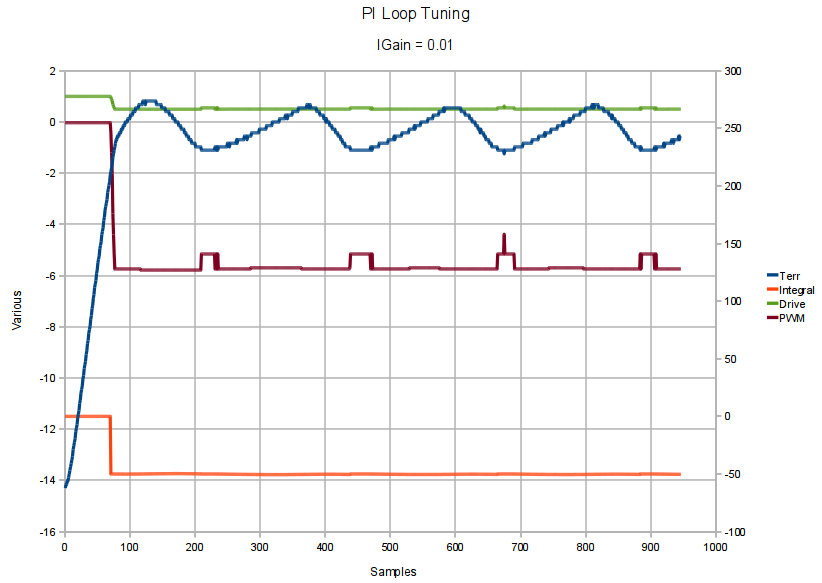
    Without much tuning, the results looked like this:

    PI-Loop-Temps
    PI-Loop-Temps

    Each temperature plateau lasts 3 minutes, the steps are 10 °C, starting at 30 °C and going upward to 50 °C, then downward to 0 °C, and upward to 20 °C. These are screenshots from OpenOffice Calc, so the resolution isn’t all that great.

    Two internal variables show what’s going on:

    PI-Loop-ErrDrive
    PI-Loop-ErrDrive

    The blue trace is the temperature error (actual – setpoint: negative = too cold = more heat needed), the purple trace is the signed PWM drive (-1.0 = full heat, +1.0 = full cool) summed from the P and I terms.

    Overlaying all the plateaus with their starting edges aligned on the left, then zooming in on the interesting part, shows the detailed timing:

    PI-Loop-ErrDrive-Overlay
    PI-Loop-ErrDrive-Overlay

    These X axis units are in samples = calls to the PI function, which happened about every 100 ms, which is roughly what the main loop will require for the MOSFET measurements.

    The Peltier module just barely reaches 0 °C with a 14 °C ambient: the drive exceeds +1.0 (output PWM = 255) as the temperature gradually stabilized at 0 °C with the module at full throttle; it’s dissipating 15 W to pump the temperature down. The heatsink reached 20 °C, with a simple foam hat surrounding the Peltier module and aluminum MOSFET mount. Any power dissipation from a MOSFET would add heat inside the insulation, but a bit more attention to detail should make 0 °C workable.

    On the high end, it looks like the module might barely reach 60 °C.

    Increasing the power supply voltage to increase the Peltier current would extend the temperature range, although a concerted stack probe didn’t produce anything like an 8 V 5A supply in the Basement Laboratory Parts Warehouse. If one turns up I’ll give it a go.

    There’s a bit of overshoot that might get tuned away by fiddling with the P gain or squelching the integral windup beyond the deadband. The temperature changes will be the most time-consuming part of the MOSFET measurement routine no matter what, so it probably doesn’t make much difference: just stall 45 s to get past most of the transient overshoot, then sample the temperature until it enters the deadband if it hasn’t already gotten there. Reducing the initial overshoot wouldn’t improve the overall time by much, anyway, as it’d just increase the time to enter the deadband. Given that the initial change takes maybe 30 seconds at full throttle, what’s the point?

    The PI loop Arduino source code, with some cruft left over from the last attempt, and some tweaks left to do:

    #define T_LIMIT         3.0                 // delta for full PWM=1 action
    #define T_ACCEPT        1.5                 // delta for good data (must be > deadband)
    #define T_DEADBAND      1.0                 // delta for integral-only control
    #define T_PGAIN         (1.0 / T_LIMIT)     // proportional control gain: PWM/degree
    #define T_IGAIN         0.001               // integral control gain: PWM/degree*sample
    
    #define sign(x) ((x>0.0)-(x<0.0))           // adapted from old Utility.h library
    
    //-- Temperature control
    //      returns true for temperature within deadband
    
    int SetPeltier(float TNow, float TSet) {
    
    float TErr, TErrMag;
    int TSign;
    float PelDrive;
    
    int EnableHeat,OldEnableHeat;
    static float Integral;
    int TZone;
    int PWM;
    int PWMSigned;
    
        TErr = TNow - TSet;                  // what is the temperature error
        TErrMag = abs(TErr);                 //  ... magnitude
        TSign = sign(TErr);                  //  ... direction
    
        if (TErrMag >= T_LIMIT)                 // beyond outer limit
          TZone = 3;
        else if (TErrMag >= T_DEADBAND)         // beyond deadband
          TZone = 2;
        else if (TErrMag >= T_DEADBAND/2)       // within deadband
          TZone = 1;
        else                                    // pretty close to spot on
          TZone = 0;
    
        switch (TZone) {
          case 3:                                   // beyond outer limit
            PelDrive = TSign;                       //  drive hard: -1 heat +1 cool
            Integral = 0.0;                         //  no integration this far out
            break;
          case 2:                                   // beyond deadband
          case 1:                                   // within deadband
          case 0:                                   // inner deadband
            PelDrive = T_PGAIN*TErr + T_IGAIN*Integral;             // use PI control
            Integral += TErr;                                       // integrate the offset
           break;
          default:                                  // huh? should not happen...
            PelDrive = 0.0;
            break;
        }
    
        EnableHeat = (PelDrive > 0.0) ? LOW : HIGH;             // need cooling or heating?
        OldEnableHeat = digitalRead(PIN_ENABLE_HEAT);           // where is the relay now?
    
        if (OldEnableHeat != EnableHeat) {          // change from heating to cooling?
          analogWrite(PIN_SET_IPELTIER,0);          // disable PWM to flip relay
          digitalWrite(PIN_ENABLE_HEAT,EnableHeat);
          delay(15);                                // relay operation + bounce
        }
    
        PWM = constrain(((abs(PelDrive) * AO_PEL_SCALE) + AO_PEL_OFFSET),0.0,255.0);
        analogWrite(PIN_SET_IPELTIER,PWM);
    
        if (true) {
          PWMSigned = (EnableHeat == HIGH) ? -PWM : PWM;
          Serial.print(TSet,1);
          Serial.print("\t");
          Serial.print(TNow,1);
          Serial.print("\t");
          Serial.print(TZone,DEC);
          Serial.print("\t");
          Serial.print(TErr);
    
          Serial.print("\t");
          Serial.print(Integral,3);
          Serial.print("\t");
          Serial.print(PelDrive,3);
          Serial.print("\t");
          Serial.print(PWMSigned,DEC);
          Serial.print("\t");
          Serial.print(NowTime - StartTime);
          Serial.println();
        }
    
        return (TZone <= 1);
    
    
  • Peltier PWM Temperature Control: First Light

    Without much tuning at all the Peltier module holds the MOSFET-under-test block within the ±1 °C deadband for heating to 30 °C:

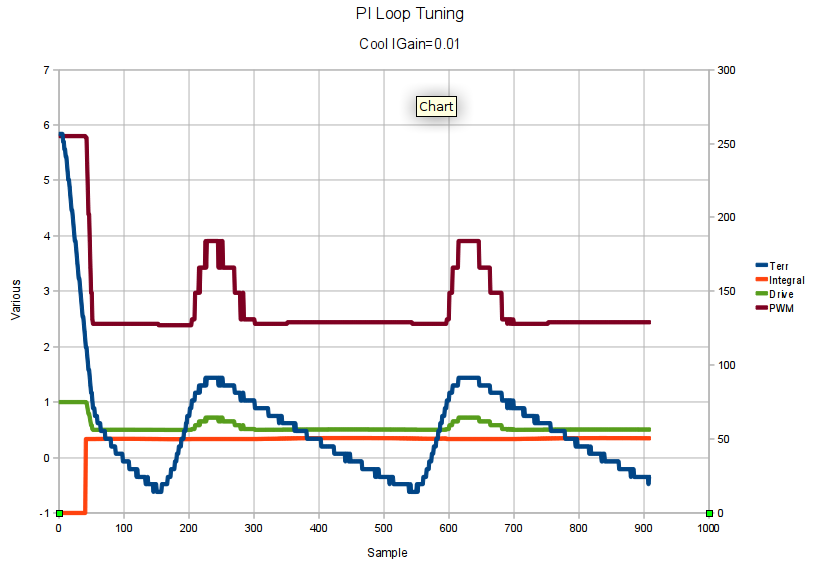
    Bringup Test - Igain 0.01
    Bringup Test – Igain 0.01

    And it’s pretty close for cooling to 10 °C:

    Bringup Test - Cool - Igain 0.01
    Bringup Test – Cool – Igain 0.01

    The PWM and Integral traces refer to the right-hand Y axis scale, the rest to the left. The total elapsed time is a bit under 3 minutes, but it’s measured in samples because I’m not going to bother with a formal timebase for this thing.

    The Basement Laboratory is around 14 °C right now, so cooling isn’t all that much of a problem.

    The code doesn’t really run a PI loop: it switches from P control outside the deadband to I control inside, preloading the integral accumulator to maintain the PWM value at the inbound switchover. That sidesteps the whole integral windup problem, which seems like a Good Idea, but a quick test at 50 °C says the P control may not have enough moxie to reach the deadband and the I control seems overenthusiastic.

    More fiddling is definitely in order.

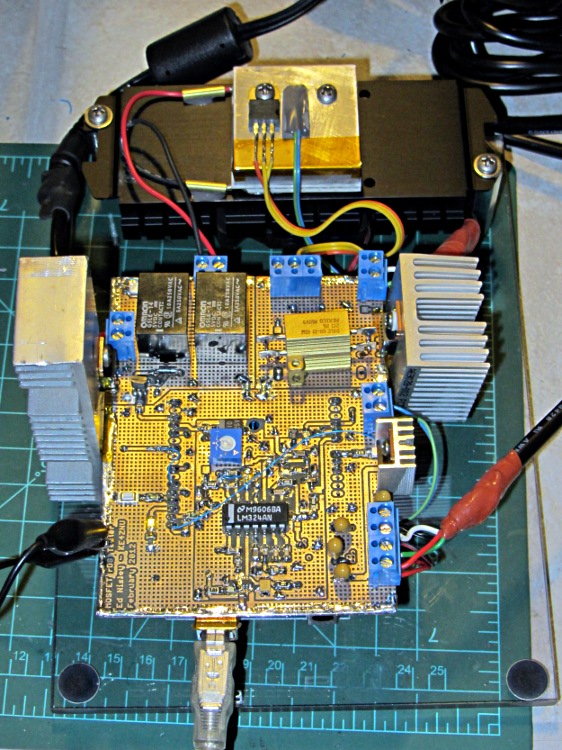
    So far, the machinery looks like this:

    rDS Tester - Peltier Tests
    rDS Tester – Peltier Tests

    The aluminum block toward the rear holds the MOSFET and the thermistor atop the Peltier module, all stuck on the black CPU cooler with the fan on the bottom. The various heatsinks are obviously scrounged from the heap and are much too large; some fine tuning is in order now that the temperature’s nailed down.

  • Peltier PWM Temperature Control: MOSFET Turn-on Time Constant

    On the other end of the Peltier driver’s PWM pulse, the MOSFET turns on with a surprisingly lengthy time constant:

    Peltier Drain - Turn-On
    Peltier Drain – Turn-On

    The upper trace shows the drain voltage drops to nearly 0 V as the transistor turns on, then rises to about 600 mV. The IRLZ14 spec says RDS is 200 mΩ max, so that’s in line with the actual 3.3 A through the Peltier module, and puts the dissipation at 2.2 W.

    The lower trace is the gate drive, showing a small Miller effect. The Channel 2 scale readout is off by a factor of 10, as I forgot to tell the scope that I was using a 10x probe. It’s really 5 V/div, not 500 mV/div.

    The cursors put the time constant at 1.3 µs. If the inductance is the 5.4 µH indicated by the turn-off resonance, then the total circuit resistance is nearly 4 Ω… which is obviously not the case, given the 5 V supply voltage and the 3.3 A current.

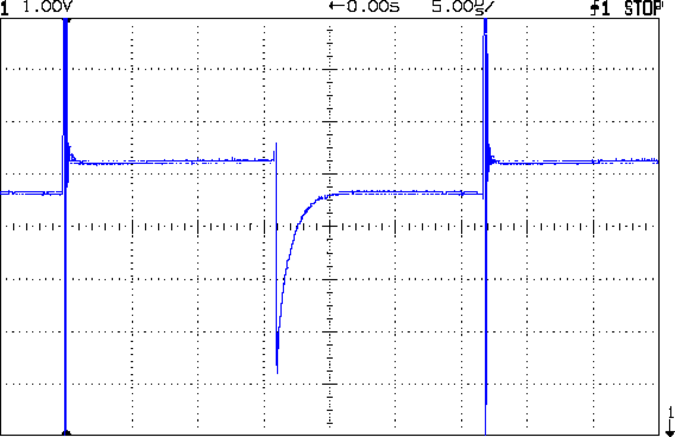
    Looking at the Peltier module’s power supply at the board terminal reveals the true cause:

    Peltier Supply Transient
    Peltier Supply Transient

    The scale is 1 V/div with 0 V at the bottom of the screen , so the switching supply produces 5.2 V with no load and 4.6 V at about 3 A. It’s rated at 5 V and 3.7 A, so the Peltier current is right up near its limit.

    The glitch when the MOSFET turns off shows that the supply can’t absorb much transient power in either direction, which is typical of switching supplies. In this day & age, there’s no bulk capacitance to smooth out line-frequency ripples from a full-bridge rectifier.

    The total circuit resistance is about 1.8 Ω, figuring the Peltier module at 1.5  Ω, the MOSFET at 0.2  Ω, and everything else at 0.1  Ω. That says the actual current is around 2.6 A, although the fancy Tek Hall Effect probe I mooched from Eks puts it at almost exactly 3 A; I’d tend to trust the Tek probe’s opinion more than my sum of small numbers. With 4.6 V and 3 A, the total resistance is spot on 1.5  Ω. The Peltier module’s resistance is temperature sensitive, so a few tenths of an ohm variation isn’t entirely unexpected.

    So that says the L/R time constant is (5.4 µH / 1.5  Ω) = 3.6 µs, which makes more sense: it’s entirely masked by the power supply transient.

    A touch of bulk capacitance may be in order. To supply 3 A for 5 µs  with 0.5 V droop:

    C = IΔT/ΔV = 3•5x10⁻⁶/0.5 = 30 µF

    Well, that’s not so bad after all… I’m sure I have a high-voltage cap along those lines.

    There’s a reason the MOSFET tester has connectors for three separate supplies: I expected nasty transients from a high-current PWM load. One supply for the Peltier, another for the MOSFET-under-test’s drain, and a triple-output supply for the Arduino and analog circuitry.

  • HelloDirect Headset Switch Cleanout

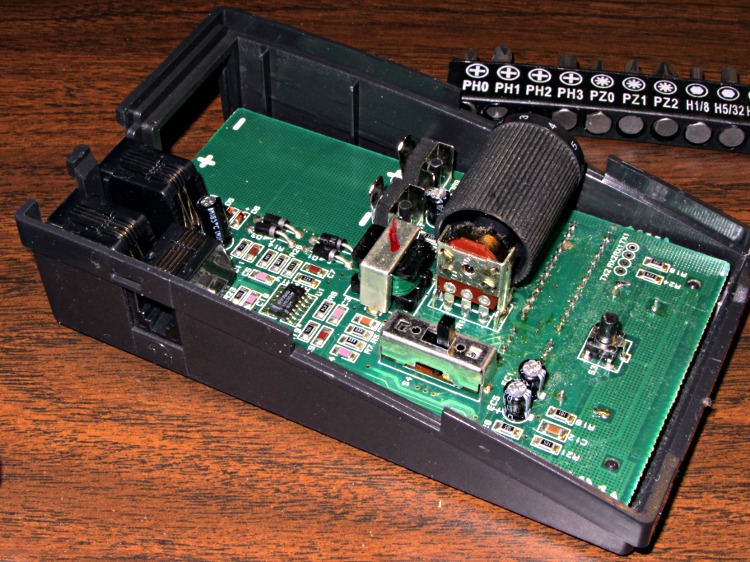
    The headset / phone switch in my ancient HelloDirect phone headset became increasingly intermittent and finally stopped switching at all, so I tore the thing apart. It has two snap latches on each side in addition to the single screw in the bottom:

    HelloDirect headset interface - top interior
    HelloDirect headset interface – top interior

    The 4PDT switch just to this side of the volume drum can’t be taken off the board without unsoldering all 12 terminals and two case anchors, so I just eased some DeOxit Red into the openings and vigorously exercised it. That seems to have done the trick.

    I cleaned out a bunch of fuzz and a spider husk while the hood was up…


  • Yellow Iron: Puzzling Placards

    The local construction equipment supplier deploys otherwise-idle yellow iron in all the parking lots in preparation for snow season. They haven’t gotten much use this year, which is OK by me.

    A Komatsu excavator behind a bank sports some puzzling warning placards:

    Komatsu excavator waiting for snow
    Komatsu excavator waiting for snow

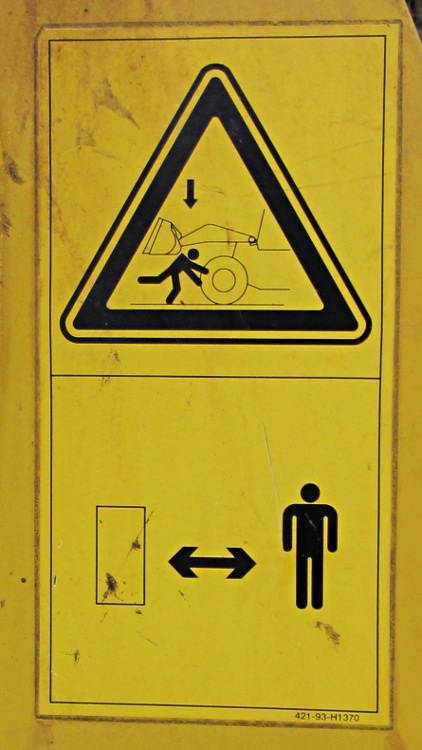
    This one seems to mean you should stay out from underneath the bucket, which makes sense:

    Komatsu warning placard 2
    Komatsu warning placard 2

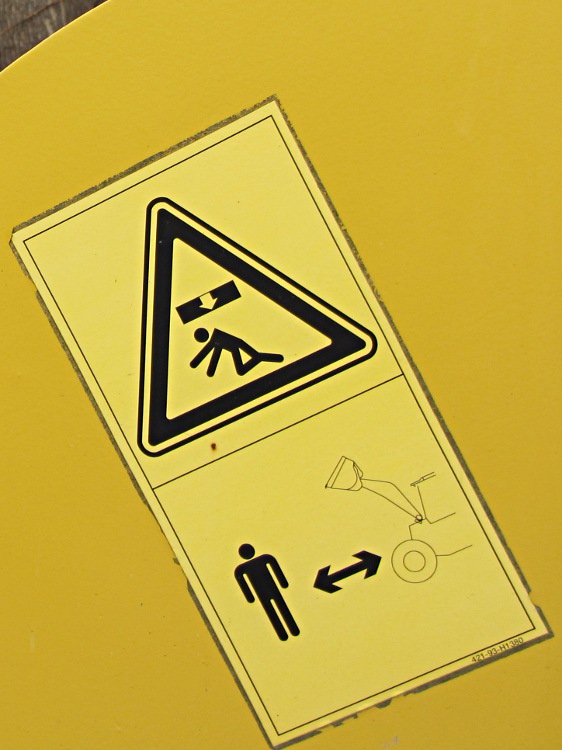
    But what’s this one mean? You may be crushed, so keep your distance from doors?

    Komatsu warning placard 1
    Komatsu warning placard 1

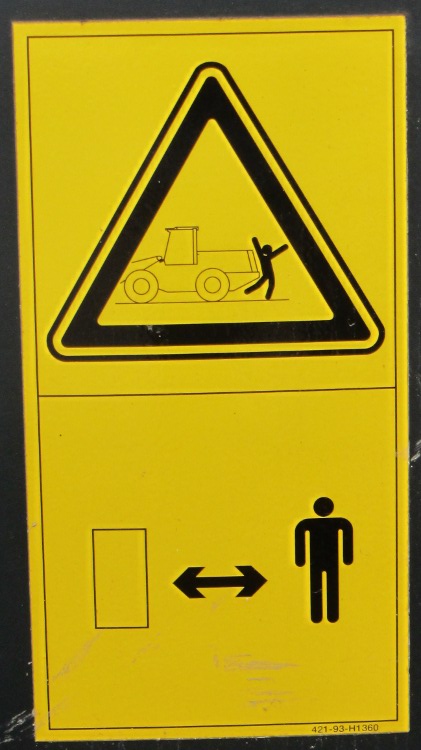
    Maybe read the manual before / while being backed over?

    Komatsu warning placard 3
    Komatsu warning placard 3

    Even though this stuff has become entirely too abstract for me, it’s just another day in the life for Stickman!

  • Red Oaks Mill Dam: Fading Fast

    A combination of neglect and last year’s storms demolished much of the Red Oaks Mill dam:

    Red Oaks Mill dam - after collapse
    Red Oaks Mill dam – after collapse

    The linear “rocks” just downstream of the dam are sections of the concrete cap:

    Red Oaks Mill dam - displaced concrete
    Red Oaks Mill dam – displaced concrete

    With the cap gone, the concrete-and-rock fill should disintegrate in short order:

    Red Oaks Mill dam - crumbled section
    Red Oaks Mill dam – crumbled section

    Upstream of the rubble, the Wappingers Creek dropped about three feet, exposing bedrock and undercutting the old shoreline:

    Red Oaks Mill dam - exposed creek bed
    Red Oaks Mill dam – exposed creek bed

    Downstream, not much changed. This wasn’t a catastrophic dam break that wiped entire towns off the map.

    In February 2005, the fishing must have been pretty good:

    Red Oaks Mill Dam - 27 Feb 2005
    Red Oaks Mill Dam – 27 Feb 2005

    It’s endured quite a few floods like this one in February 2008:

    Flood Stage in Red Oaks Mill
    Flood Stage in Red Oaks Mill

    But in June 2008, after the waters receded, you could tell things weren’t right:

    Red Oaks Mill Dam - 2008
    Red Oaks Mill Dam – 2008

    Looks like a shovel-ready project to me…

  • GPS+Voice Interface for Wouxun KG-UV3D: Brassboard

    After measuring & fiddling around with all those capacitors, the rest of the board went together fairly easily:

    GPS-HT Wouxun interface - brassboard
    GPS-HT Wouxun interface – brassboard

    It’s difficult to test from the Basement Laboratory, although the tones and audio levels sound about right.

    The next step: conjure up a box. That shape has nothing to recommend it, so I’m doodling an extrusion-like shell with endcaps that should work better and look nicer… but that’s behind some other stuff that must happen first.