Ed Nisley's Blog: Shop notes, electronics, firmware, machinery, 3D printing, laser cuttery, and curiosities. Contents: 100% human thinking, 0% AI slop.
Very recently, Youtube videos (including mine) took on a Smurf aspect: blue skin tones and other weird colors. I don’t spend a lot of time watching videos, but I’m pulling together a talk and wanted to be sure my videos still worked.
As if that, that, and that weren’t enough, Ubuntu 12.04 suffers from random crashes that occur without doing anything more challenging than turning the damned thing on and signing in to a user account.
That problem report dates back to mid-December of 2011 and investigation has been ongoing, with notes like:
Yet Canonical decided to ship 12.04 anyway, with no fix in sight.
I think disabling suspend mode reduces the number of random crashes, but it still seems to be about one a day. Resuming from suspend mode definitely messes up the network connection more often than not, so we just won’t suspend it again.
This was a test installation on the Lenovo Q150, a bone-stock consumer PC, to see if I should upgrade the creaky 10.10 setup on my desktop box. Given the weird collection of hardware on my box (left- and right-hand trackballs, tablet, dual monitors with one rotated to portrait mode, etc), I’d hoped a “Long Term Support” version of Ubuntu / Xubuntu / whatever would be stable enough for use right out of the chute. Given the pervasive nature of the problems with 12.04, it’ll be at least a few more months before the code settles down and starts flying right.
That’s not encouraging for what was supposed to be a well-tested release, with more attention paid to stability than fancy features.
Having installed Ubuntu 12.04 on that Lenovo box, which has an nVidia graphics chip, we find there’s an error somewhere inside the current 295.40 (and perhaps previous versions) of the proprietary nVidia driver that causes random video lockups which generally require rebooting that sucker. Of course, the default Unity desktop requires that driver for 3D operations like compositing, because the Free Software drivers don’t / can’t do 3D in hardware.
How is it that a (nominally) Open Source / Free Software OS requires proprietary drivers just to present the UI? Oh, right, 3D is glitzy and that’s what matters most in these degenerate days.
Anyhow.
The least-likely-to-fail solution seems to be disabling the nVidia driver, which enables the Nouveau driver, which does 2D just fine, which lets Unity stumble along. Reverting to 295.33 seems to work for some folks, but I have other things to do…
The default Grub2 video mode for Ubuntu 12.04 is 640×480, which looks rather overwhelming on a 24 inch monitor that can do 1920×1600. I’m also a fan of Old Skool scrolling text, because when something goes wrong it’s handy to get an actual hint in real time.
Thus, some Grub tweakage was in order:
GRUB_DEFAULT=saved
GRUB_SAVEDEFAULT=true
#GRUB_HIDDEN_TIMEOUT=0
GRUB_HIDDEN_TIMEOUT_QUIET=true
GRUB_TIMEOUT=5
GRUB_DISTRIBUTOR=`lsb_release -i -s 2> /dev/null || echo Debian`
#GRUB_CMDLINE_LINUX_DEFAULT="quiet splash"
GRUB_CMDLINE_LINUX=""

 ... snippage ...

# Uncomment to disable graphical terminal (grub-pc only)
#GRUB_TERMINAL=console

# The resolution used on graphical terminal
# note that you can use only modes which your graphic card supports via VBE
# you can see them in real GRUB with the command `vbeinfo'
#GRUB_GFXMODE=640x480
#GRUB_GFXMODE=1600x1200
GRUB_GFXMODE=1280x1024
AFAICT, it’s impossible to:
Page(*) the output of the Grub vbeinfo command. A blind stab at 1600×1200 turned out to be too small and painfully slow at scrolling in graphics mode.
Boot a text-mode console in anything other than 80 characters x 24 rows, so un-commenting the GRUB_TERMINAL line isn’t helpful.
This being Grub2, you must do this special dance (anybody remember when one of Grub’s advantages over Lilo was that it didn’t require a special dance?) to make it work:
sudo nano /etc/default/grub
 ... make changes & save ...
sudo update-grub
sudo reboot ; exit
That’s from an SSH session across the room, of course…
Incidentally, shutting off the graphic drivel immediately revealed that those NFS mounts weren’t happening because statd wasn’t running. Knowing that immediately would have saved some diagnostic time, yes, it would.
(*) The Official Grub2 doc suggests set pager=1, but there’s no way to discover that using help set at the Grub2 command line. Now we both know and maybe we’ll remember it for the next time.
Back in the old days, the Unix startup sequence was rigidly fixed. For a variety of reasons, that’s no longer the case; Ubuntu (and, presumably, other distros) now use upstart, which turns the startup sequence into a lightly documentedPachinko machine. This parallel processing presumably works great for most of Ubuntu’s use cases and falls flat on its face for me: I’m apparently the only person who expects NFS mounts to be in place before signing in.
Well, maybe otherfolks expect that, but the entire startup mechanism is apparently broken as designed.
The only solution seems to be stalling the user sign-on screen by jamming the display manager until the NFS client hauls itself to its feet. This takes up to a minute, for reasons I do not understand, but it’s better to let it run to completion rather than signing on and expecting one’s files to be in the right places. Email clients, in particular, have difficulty coping with missing files.
The fix involves adding a line to /etc/init/lightdm.conf, as mentioned there (albeit with incorrect syntax):
start on ((filesystem
           and runlevel [!06]
           and started dbus
           and (drm-device-added card0 PRIMARY_DEVICE_FOR_DISPLAY=1
                or stopped udev-fallback-graphics)
           and mounted MOUNTPOINT=/mnt/bulkdata)
          or runlevel PREVLEVEL=S)
I tried to check for another filesystem that should also be mounted, but, as I understand neither the syntax nor the semantics of the language, what you see is what finally worked. As it turns out, upstart's syntax error messages aren’t particularly helpful; a single line (helpfully relating, perhaps, that the parser expected a token on line 16) appears on VT 7, but if you don’t know to switch from VT 1, you’ll never get even that minimal assistance. No, such errors don’t appear in the /var/log/upstart/* logs.
For unknown reasons, waiting for the remote-filesystems event didn’t delay the startup at all. Evidently, mountall emits that event almost immediately, long before the NFS mounts happen. Perhaps the event occurs even when the mount fails, contrary to what the doc suggests?
Most of the debugging occurred through an ssh session across the room. Edit the file, try a new version, reboot, watch for the filesystems to come up, watch for the sign-in screen to appear. Or not, as the case may be.
Grumpy though I may seem, the great thing about Open Source / Free Software is that when it breaks, you have access to all the pieces and can actually fix the problem. That makes up for nearly everything, I’d say.
No, I didn’t update any of those bug reports or start another one. It’s obvious this isn’t getting any attention, so what’s the point? If you’re also having the problem, you’ll eventually wind up here…
FWIW, I knew the NFS mounts weren’t working because I always set the screen background to an image on the file server: no mount = no picture = fix-the-problem-now. This image seemed appropriate:
The plastic handle for the rear hatch snapped as I opened it to load some groceries. I slapped some tape over the opening to keep the loose parts from falling out on the way home: if you lose the parts, you’ve lost the game.
It turns out that the hatch doesn’t have an interior handle:
Sienna van hatch – interior
So we unloaded the groceries through the side doors, crawling over the middle seats. We don’t use the van all that much, but this was the height of the Vassar Farms garden setup season and we needed the back end for fenceposts, deer fencing, and suchlike.
Searching with the obvious keywords shows that this is a common problem for Toyota Sienna vans, many people experience it just a few years after buying a new van, it’s an extremely expensive dealer repair ($75-ish for the handle and $300-ish for labor half a decade ago), and that the Genuine Toyota replacement handle is made of the same plastic and tends to break the same way in short order. I ordered a metal handle from the usual eBay supplier for $20 and it should arrive shortly.
But an expedient repair is in order…
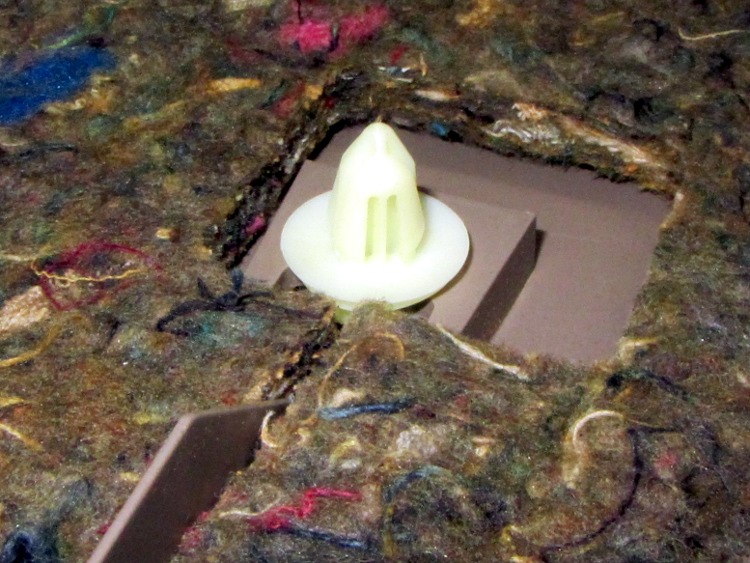
Pull the trim plates off the grab handle and dangling strap, apply a 10 mm socket to the three bolts thus exposed, work fingers under the cover near the latch near the center bottom, pull hard, and work your fingers around the cover as the dozen-or-so expanding button rivet fasterer thingies pop free with alarming sounds:
Sienna hatch – trim fasteners
The handle / latch handle assembly fits neatly between the exterior bodywork and the interior hatch frame, where it’s barely visible. The claw-like doodad sticking up from the left should pull down on the metal (!) lever just above it, which pivots on a pin and pulls upward on a cable (the round button visible near the top of the assembly) that actually does the unlatching:
broken latch
Remove the three nuts (one visible in that picture), squeeze the expanding plastic snap with pliers, and push it through the hole. Then you can loosen the bezel holding the handle assembly and the two license plate lamps:
Sienna hatch – bezel released
Disconnect the lamp cable connector, push the sealing button through the hole with a screwdriver, and then you can pull the entire bezel off the hatch. That exposes the problem:
Sienna hatch – latch parts
You can’t quite see the two screws that secure the handle assembly to the bezel, but they’re just inboard of the two bolts that hold it to the hatch. Undo those, remove the Jesus Clip from the long rod, slide it out, and extract the handle. That claw-like doodad snapped off the plastic handle:
Sienna hatch – handle
Of course, it’s an engineering plastic that shrugs off ordinary solvent glue, which you wouldn’t trust for a permanent repair anyway. The general ideal is to reposition the broken part, epoxy it in place, drill a hole through it and the handle, run a long 4-40 screw through the mess, and butter it up with more epoxy.
The first step is to put the two pieces in the right alignment and secure them well enough to permit drilling. Other folks swear by cyanoacrylates, but for a job like this I invoke the mantra The Bigger the Blob, the Better the Job. Believe it or not, the broken part stands on its own amid the epoxy around its base:
Sienna hatch – handle epoxy
Unfortunately, it tilted slightly, but not enough to matter, as the epoxy cured. I couldn’t figure out how to both hold it in position and hold it in exact alignment on the handle; maybe positioning a few clamps around it would have been better. In any event, the result was close enough.
Grab the handle in the drill press, align the claw vertically, face it with an end mill to let a twist drill start properly, and drill right down the middle:
Sienna hatch – handle drilling
Flip it over, use the same drill to align the bore, and mill a counterbore for the screw head:
Sienna hatch – handle counterboring
That may not be strictly necessary, but there’s not much clearance between the handle and the rest of the frippery in the assembly. Reduce the diameter of the screw head to fit the counterbore, do the same for the nut that’ll go on the other end:
Sienna hatch – nut shaping
Butter up the counterbore with epoxy, slide the screw in place, secure with the nut, and butter up that end, too. Reassemble everything and you can see how far off-center the claw is:
Sienna hatch – latch rebuilt
You can just barely make out the epoxy blob covering the nut below the claw, but it still engages the metal lever that will pull the cable:
Sienna hatch – latch assembly
Reassemble everything in reverse order and it works fine. I left the interior trim cover off, pending installing the metal replacement handle, and discovered that the brake lights spill plenty of light inside the van after dark.
Memo to Self: The fixtures are the hardest part of any adhesive repair. Get those right and the rest is easy!
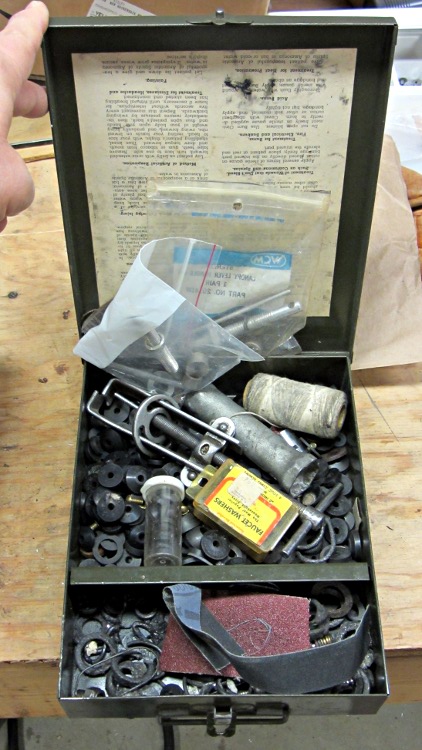
As part of replacing that frostproof faucet, I had recourse to some tools & hardware that Came With the House: the previous owner had a well-stocked supply of stuff and we bought the place “with contents.”
This box of assorted washers, screws, and tools has already been more than a lifetime supply for one person:
Box of faucet washers and tools
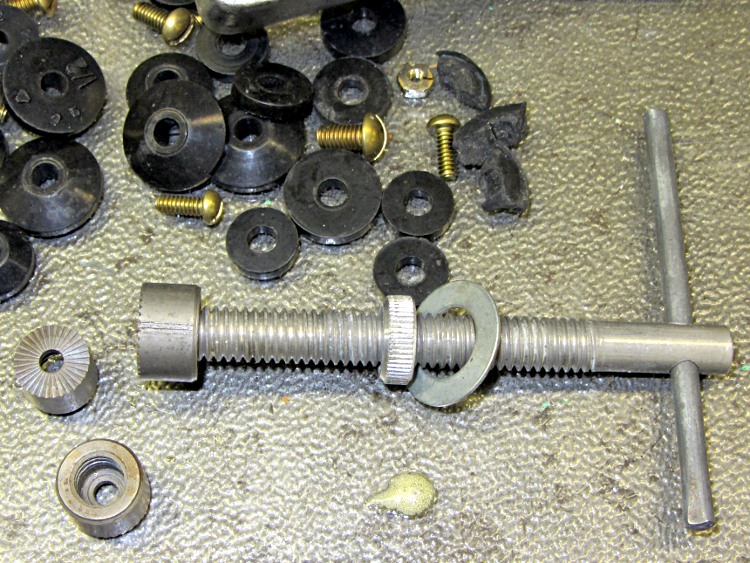
I already had a faucet seat reamer that came in handy in our previous houses and now I have two:
Faucet seat reamer
The threaded shaft isn’t nearly long enough for a frostproof faucet, but it’s a standard thread and I have enough all-thread rod to cobble up something. When I get around to fixing the other outdoor faucets, I’ll give that a try.
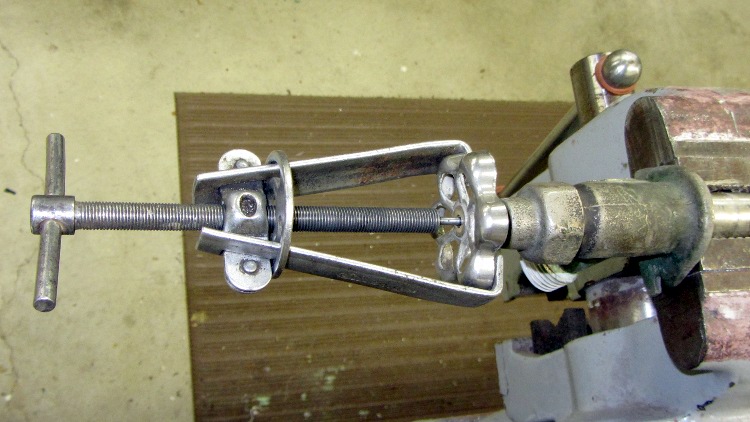
Although I didn’t need a handle puller to dismantle the old valve (this is a staged photo op), it’s been vital elsewhere:




 The Smell of Molten Projects in the Morning