The Smell of Molten Projects in the Morning

Ed Nisley's Blog: Shop notes, electronics, firmware, machinery, 3D printing, laser cuttery, and curiosities. Contents: 100% human thinking, 0% AI slop.

Month: February 2010

  • ALSA Sound Samples Are Monaural

    The Arch Linux setup guide uses the ALSA sound samples in /usr/share/sounds/alsa to verify that everything’s working:

    aplay /usr/share/sounds/alsa/Front_Center.wav

    Which, as it turned out, worked perfectly: a female voice front-and-center.

    Flushed with success, I tried some of the other samples:

    cd /usr/share/sounds/alsa/
    ls -l
    total 1212
    -rw-r--r-- 1 root root 137134 2009-10-20 05:26 Front_Center.wav
    -rw-r--r-- 1 root root 142128 2009-10-20 05:26 Front_Left.wav
    -rw-r--r-- 1 root root 146990 2009-10-20 05:26 Front_Right.wav
    -rw-r--r-- 1 root root 135202 2009-10-20 05:26 Noise.wav
    -rw-r--r-- 1 root root 130096 2009-10-20 05:26 Rear_Center.wav
    -rw-r--r-- 1 root root 126064 2009-10-20 05:26 Rear_Left.wav
    -rw-r--r-- 1 root root 146480 2009-10-20 05:26 Rear_Right.wav
    -rw-r--r-- 1 root root 134868 2009-10-20 05:26 Side_Left.wav
    -rw-r--r-- 1 root root 129966 2009-10-20 05:26 Side_Right.wav
    

    All of which played front-and-center.

    Come to find out that they’re all recorded in Monaural mode, so the file names don’t really mean anything.

    soxi Front_Left.wav 
    
    Input File     : 'Front_Left.wav'
    Channels       : 1
    Sample Rate    : 48000
    Precision      : 16-bit
    Duration       : 00:00:01.48 = 71042 samples ~ 111.003 CDDA sectors
    File Size      : 142k
    Bit Rate       : 768k
    Sample Encoding: 16-bit Signed Integer PCM
    

    Definite disappointment, that… it’s not Arch’s fault, they’re monaural in Ubuntu,too.

  • Cutting Pin Header Strips

    Slitting dual-row connector
    Slitting dual-row connector

    I needed a few strips of single-row pin headers, but the parts bin was empty.

    I hate it when that happens.

    The heap disgorged a handful of double-row strips and, of course, I Have A Machine Shop.

    So: no problem.

    This is, I admit, not cost-effective, but it took about 15 minutes to slit the aforementioned handful of strips right down the middle and get back to soldering.

    The trick is to use an ultra-thin slitting saw, rather than a regular saw. The one here is 4 mils thick and the better part of 7/8″ in diameter; call it 0.1 mm x 22 mm. I think it came with one of the Dremel tool kits a long while ago.

    Cut about 1 mm deep on the first pass, then cut through on the return to avoid having the saw deflect too much. Run about 100 mm/min, 1000 rpm, and no coolant. Line it up by eye, type manual CNC commands into EMC2, and it’s all good.

    The trick is finding a mandrel that doesn’t collide with the vise; my larger saws have a rather thick screw-and-washer arrangement that doesn’t fit. I think some padding (chopped-up credit cards?) between the longer pins, mounting the vise vertically, and grabbing the longer pins would fix that. The catch might be clearance between the top of the vise and the bottom of the spindle motor.

    Better to just buy some single-row strips. Sheesh… but if all you have is a CNC mill, you have plenty of solutions.

    Another slitting saw repair is there

  • Digikey Full-Line Catalog

    For the first time ever, Digikey sent me a full-line catalog.

    Digikey catalog
    Digikey catalog

    It’s 2778 pages long, three inches thick, and weight 2 kg.

    Some time ago I made the mistake of replacing our large rusted-out mailbox with a much smaller one: the catalog presented a solid wall of paper when I opened the door.

    Here’s a closeup…

    Digikey catalog vs Arduino Duemilanovae
    Digikey catalog vs Arduino Duemilanovae

    Now, I’d love to have you believe I’m such a high-rollin’ kind of engineer that Digikey spares no expense on my behalf, but the only explanation for this embarassing situation I can come up with is that their customer service system blew a gasket in my general direction…

    What makes it even more ironic is that they’d recently sent me a survey asking how I’d like to get their catalog. I’d emphatically replied that I did not need a paper catalog or a USB stick with the PDFs. Just let me do the on-line searching and occasionally refer to the appropriate PDF pages and I’ll be fine.

    The damned thing is basically useless; I hate to just toss it in the recycling, but I can’t think of any reason to keep it around.

    I just removed my mailing address from their list, presumably leaving my account info intact; we’ll see if that sticks.

  • Disabling OpenOffice 3.1 Word Completion

    I type well enough that OpenOffice’s default word completion isn’t helpful, so the first thing I do in the first document I open after a new installation is turn word completion off. Having just installed Xubuntu 9.10 with OpenOffice 3.1, I rummaged through the menus and couldn’t find that option. OK, I’ll let my fingers do the walking through the online Help.

    Huh. For some inexplicable reason, the OOo help files aren’t installed by default in Kubuntu 9.10 or Xubuntu 9.10. I install them, only to find:

    Word Completion
    Set the options for completing frequently occurring words while you type.
    To access this command…
    Choose Tools – AutoCorrect Options – Word Completion tab
    Enable word completion
    Stores frequently used words, and automatically completes a word after you type three letters that match the first three letters of a stored word.

    Which is absolutely correct, should you happen to be editing a text document at the time. Oddly enough, the Word Completion tab doesn’t appear in that dialog box when you’re editing a spreadsheet… but the setting applies to spreadsheets.

    So.

    • Save and close the spreadsheet
    • Open a new, blank text document
    • Do the menu dance just like the Help text describes
    • Un-check the mumble Enable word completion box.
    • Discard the text document
    • Re-open the spreadsheet

    There, now, wasn’t that obvious?

  • TLC5916 Minimum LED Current

    The TLC5916 datasheet seems to say that the minimum regulated LED current is 5 mA, but that’s painfully bright at, say, 12:08 in the early morning. Indeed, those 3-inch blue LED digits lit up the entire house from the living room… sometimes, a high-efficiency LED isn’t what you need.

    This graph from the datasheet suggests that the current can be somewhat lower:

    TLC5916 Current vs Rext
    TLC5916 Current vs Rext

    With that in mind, I replaced the 1 KΩ resistors with 3.9 KΩ parts.

    The graph says the maximum current should be around 5 mA and, indeed, the formulas indicate 4.7 mA. The minimum current is a paltry 0.4 mA: lo and behold, the early morning illumination became bearable. After I put the LEDs behind some dark-gray polycarbonate, it’ll be just about perfect.

    If it’s too dark, I can always solder another SMD resistor atop the 3.9 KΩ chips.

    I figured out how to compute Rext somewhat more easily than the datasheet would have you believe and documented the process there.

  • Kitchen Sink Strainer De-gunking

    Skimming the strainer
    Skimming the strainer

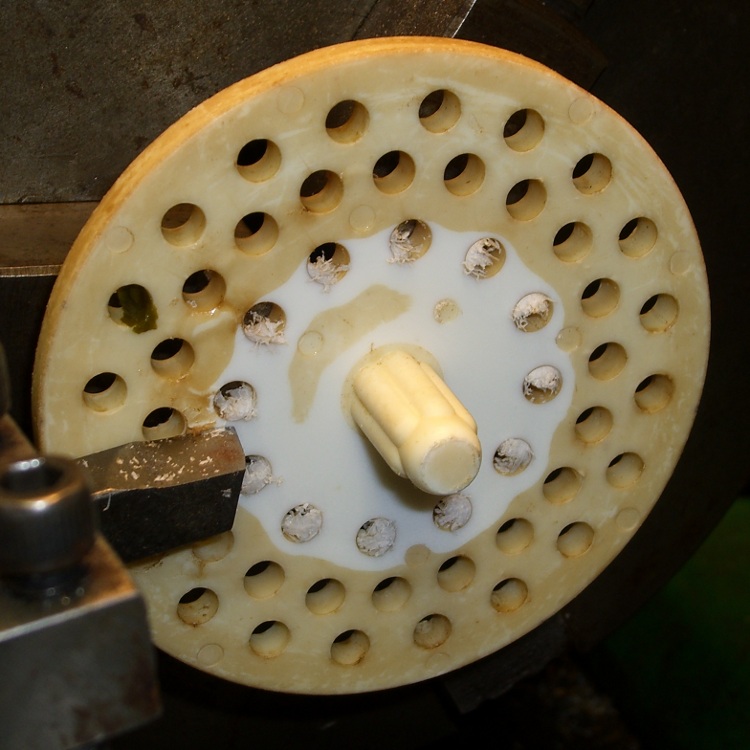
    We have a (formerly) white plastic strainer in the kitchen sink that has acquired a brown biofilm layer. Bleach is moderately effective, but the surface is just ooky.

    Green tea is suspected, but the evidence is not, at least according to me, conclusive. More research is in order.

    Took the evidence to the Basement Laboratory’s Machine Shop WIng and skim-cut both faces, cleaned up the rim, drilled out the holes, countersunk the holes to get rid of the chaff, and it’s all good. The surface is probably too rough, but we’ll see what happens.

    I figure I can do that maybe twice more before I must make a new one; looks like a perfect match for CNC, doesn’t it?

  • Tour Easy Recumbent: Amateur Radio HT Mount

    Mary sewed up a new seat cover for her Tour Easy, so I dismantled the seat and cleaned things up. This is a good opportunity to show how I mounted an amateur radio HT on the bike…

    Bottle holder on seat frame
    Bottle holder on seat frame
    Clamp mount detail
    Clamp mount detail

    The general idea is simple: a water bottle holder attached to the lower seat rail with a circumferential clamp made from a chunk of half-inch aluminum plate. An aluminum spreader adapts the wider hole spacing on the bottle holder to the teeny little clamp.

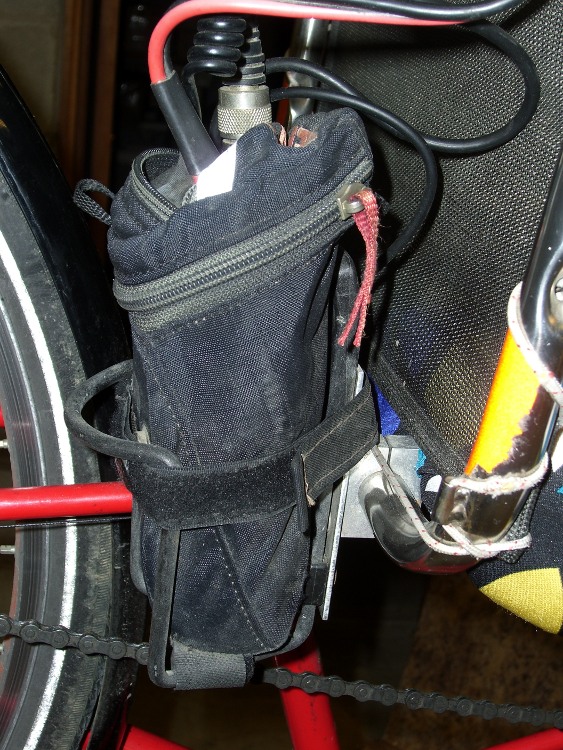
    With the bottle holder in place, I put the radio in a wedge seat pack, atop a block of closed-cell foam to more-or-less cushion some of the bumps. The wedge pack seatpost strap secures it to the bottom of the holder and the rail straps wind their way through the holder and lash around the aluminum spreader plate. It doesn’t move very much at all.

    The radio is a long-obsolete ICOM IC-Z1A, bought specifically for this purpose: it has a remote head on the end of a coily cord. That puts the power, volume, and channel buttons out where you can actually use them.

    Radio in seat wedge pack in bottle holder
    Radio in seat wedge pack in bottle holder

    The lump behind the seat looks moderately suspicious in this day & age: a black package with wires! The grossly oversized red-and-black pair in the foreground is the power coming from a 6-AA pack attached to the rack with a Velcro strap; it’s a jumper with Anderson PowerPoles on both ends. Coily cord to the HT head, BNC-to-UHF adapter to the mobile antenna mount, one skinny cord to the headset and the other to the PTT button on the handlear.

    Other pieces of the puzzle: