The Smell of Molten Projects in the Morning

Ed Nisley's Blog: Shop notes, electronics, firmware, machinery, 3D printing, laser cuttery, and curiosities. Contents: 100% human thinking, 0% AI slop.

Year: 2009

  • Anchoring Sherline Stepper Motor Wires

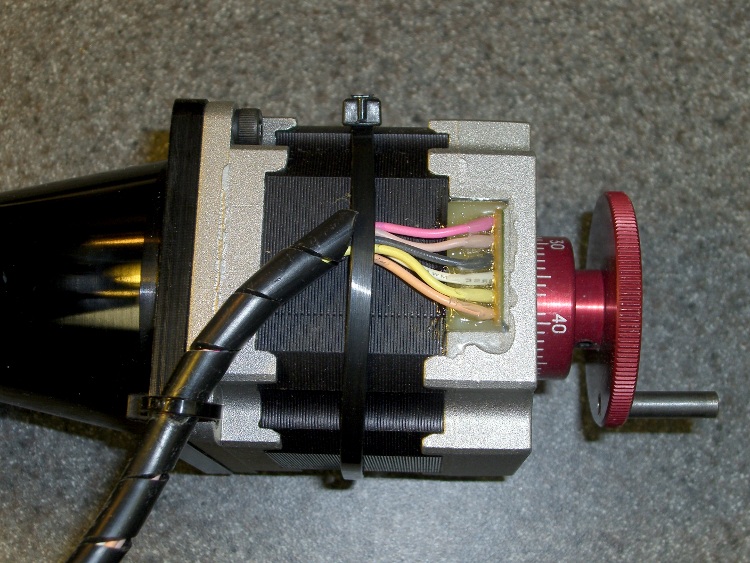
    Anchoring stepper motor wires with cable ties
    Anchoring stepper motor wires with cable ties

    The wires coming out of Sherline CNC milling machine stepper motors, as with most small stepper motors, emerge from an epoxy-filled opening. As a result, whenever the motor or wires move, all the stress concentrates right at that epoxy surface.

    Which is exactly where the wires will break…

    There’s no good way to add strain relief to that point (more adhesive isn’t helpful), but you can anchor the cable to the motor frame so that the individual wires do not move relative to the motor.

    Cable ties will suffice. Add one around the entire motor to hold the wires in place, then lash the spiral sheath to one of the unused mounting holes in the motor frame.

    Pull those ties until they squeak! You can grab the tabs with flush-cutting diagonal cutters to get some traction, then rotate the cutters against the ratchet housing to pull another notch past the ratchet. When it’s so tight you’re stretching the tie, then it’s tight enough; clip the end off with the cutters.

    To cross-check, wiggle the connector end of the cable. If the wires move at the epoxy, then you haven’t done a sufficiently good job. Repeat until satisfied.

    This works for the milling machine and, as shown in the picture, the rotary table. Just do it!

  • Recovering JPG Images From Damaged Flash Memory

    My DSC-F717 just crashed as I took a picture in the Basement Laboratory; it stalled while writing a picture to the memory stick. This camera is known to have problems with its ribbon cables and I’ve fixed it a few times before, but right now I have other things to do. Who knows? Maybe it’s a different problem altogether.

    Thus, the pertinent question is how to grab the image files from the Memory Stick, even with a damaged filesystem. This trick will work with any memory device, so it’s not just a Memory Stick thing.

    The camera crashed with the Memory Stick activity LED stuck on. Turning the camera off didn’t work: it jammed in the power-down sequence. So I poked the Reset button, which snapped the camera back to 1 January 2002, just after midnight. Alas, it now couldn’t read the Memory Stick, which meant either the filesystem is pooched or the camera’s card socket has gone bad again.

    Mmm, do you know where your camera’s Reset button is? It might not even have one, in which case you just yank the battery. If you can yank the battery, that is.

    Anyhow…

    With the camera turned off: extract the memory card, poke it into a suitable USB card reader, and poke that into your PC (running Linux, of course).

    If the filesystem isn’t too badly damaged, you’ll probably get a popup asking what to do with the new drive (the memory card). Dismiss that, as you don’t want anything writing to the memory without your explicit permission, which you won’t give.

    Figure out which device corresponds to the card and which partition to use:

    dmesg | tail
    [29846.600524] sd 5:0:0:2: [sdd] 1947648 512-byte hardware sectors (997 MB)
    [29846.606022] sd 5:0:0:2: [sdd] Write Protect is off
    [29846.606030] sd 5:0:0:2: [sdd] Mode Sense: 23 00 00 00
    [29846.606033] sd 5:0:0:2: [sdd] Assuming drive cache: write through
    [29846.608748]  sdd: sdd1
    

    In this case, the Memory Stick was intact enough to have a valid partition table, so it could be successfully mounted. However, you don’t want any attempt to write the data, just to keep a bad situation from getting worse. You do that by mounting the device read-only:

    sudo mount -o ro /dev/sdd1 /mnt/part

    You’ll need a suitable mount point; I created /mnt/part early on to hold manually mounted disk partitions.

    The FAT filesystem seemed to point to valid files, but attempting to display them didn’t work. So unmount the device before proceding:

    sudo umount /dev/sdd1

    Switch to /tmp or anywhere you have enough elbow room for a few files the size of the memory card.

    Run dd to make a bit-for-bit copy of the entire drive:

    sudo dd if=/dev/sdd of=memstick.bin bs=1M

    The bs=1M should dramatically speed up the transfer; the default is, IIRC, 512 bytes.

    After this, everything you do uses memstick.bin, not the memory card itself. If you’re paranoid like me, you’ll make a copy of the file before you do anything hazardous. You could even make two copies directly from the memory card and compare them, which might be instructive.

    To find your precious JPG images among the rubble, look for their magic Exif headers:

    strings -t x memstick.bin | grep Exif
      68006 Exif
     258006 Exif
     680006 Exif
     848006 Exif
     a18006 Exif
     bf0006 Exif
     e00006 Exif
     fe8006 Exif
    11e8006 Exif
    1420006 Exif
    ... snippage ...
    

    Because the strings search ignores the (presumably broken) FAT directory structure, you’ll find all the image files on the drive, whether or not they’ve been deleted, partially overwritten, or whatever. This is great for forensics and terrible if you’ve got something to hide. You have been warned.

    The -t x parameter returns the string’s starting offset in hex, which you need to find the actual starting offset of the file: it’s 6 bytes lower! Your mileage may vary, so be prepared to fiddle around a bit.

    You could write a bunch of code to parse the JPG header and extract exactly the number of bytes required, but this is no time for subtle gestures. I just yank out whatever the largest possible image file could be, because image-processing programs only process the valid stuff anyway. So, knowing that this camera produces images in the 2.4 MB range, this extracts the first image:

    dd if=memstick.bin of=image.jpg bs=$((16#1000)) count=1K skip=$((16#68))
    

    The $(( … )) notation evaluates the numeric expression within and the 16#… notation expresses a hexadecimal value.

    Soooo, bs=$((16#1000)) says that the blocksize is 4096 bytes, which you can deduce from the fact that all the Exif headers start 6 bytes from a multiple of 0x1000. Again, your camera may do things differently, but the general notion should get you started.

    If you’re fussy, you’ll note that the headers are actually on multiples of 0x8000 bytes, but using 0x1000 means you can read the high-order digits right off the strings dump. Why make things more complicated than necessary?

    Given a 4K blocksize, count=1K extracts a 4MB chunk: 1024 blocks of 4096 bytes each. That’s larger than the largest possible image file from this camera; adjust it to suit whatever you expect to find. Don’t be stingy, OK?

    The skip=$((16#68)) says to begin extracting data 0x68 blocks into memstick.bin. You read that value directly from the strings output, which is easy enough.

    You could write a tidy Bash script to eat the strings values and spit out the corresponding file chunks. I had few enough images this time to just do it manually, which beats having to debug some code…

    Good luck!
  • Devil’s Pie for Xubuntu

    I have six workspaces set up on my left monitor (and, perforce, six on the right, where I need only two) with more-or-less ritualized contents: email, browser, terminals, simulation, graphics, and whatever else comes to mind.

    While I’m not attached to the notion of a particular program being on a specific workspace, I really don’t want to arrange all the programs every time this thing lights up. Alas, Xubuntu’s XFCE desktop doesn’t offer much control over where windows appear, particularly for KDE programs that don’t seem to play nicely with the rest of the desktop.

    Devil’s Pie (installable with package devilspie) solves some of that problem. It doesn’t handle dual monitors with separate X sessions, is utterly undocumented, requires more than a little patience to get working, and produces baffling error messages. But it does essentially everything I need doing.

    So…

    Install devilspie, which is at 0.22 -1 in the Xubuntu 8.10 universe repository.

    Create ~/.devilspie to hold configuration files and create the following files therein:

    firefox.ds

    ; Force Firefox to workspace 2
    (if
    (is (application_name) "Firefox")
    (set_workspace 2)
    )

    gimp.ds

    ; Force Gimp windows to workspace 6
    (begin
    (if
      (matches (application_name) "GNU Image Manipulation Program" )
      (begin
        (set_workspace 6)
      )
    )
    )

    kmail.ds

    ; Force Kmail windows to workspace 1
    (begin
    (if
      (matches (application_name) "^KMail$" )
      (begin
        (set_workspace 1)
        (geometry "960x1200+0+0")
      )
    )
    )

    The syntax is fairly obvious, the semantics rather less so. The man page is basically useless and has been that way forever, but a true heroine has already dug through the source code and documented what you need to know. Go there and read.

    If you’re doing system-wide configs for all users, you can allegedly put those files in /etc/devilspie, but I haven’t tried it out yet.

    The (matches string regex) conditional allows you to do regular expression matching, which is more flexible than string equality (is string string) or substring (contains string substring) matching. What you see above represents cruft from figuring out what works.

    Use the (begin …) syntax to wrap multiple statements in a single file; the parser seems to choke on anything more than one.

    Put (debug) in whatever new config file you create, (re-)start devilspie from a terminal, then start the program you’re trying to control. You’ll get a torrent of information about all the various & sundry windows; pluck readable bits from them and hammer out some regex matches. Tuck one of these into a (begin …) stanza along with stuff you’re trying to make work.

    Attempting starting devilspie before X comes up causes great discomfort, so you can’t start it from /etc/rc.local.

    Instead, add it to XFCE’s Autostarted Applications list: System Settings -> Session and Startup -> Application Autostart, then click the Add button to put /usr/bin/devilspie in the list.

    Memo to Self: this will be ideal for Mom’s PC beyond 8.04, assuming KDE continues to favor foo-foos over basic functionality.

  • Tour Easy Coily Lock Holder

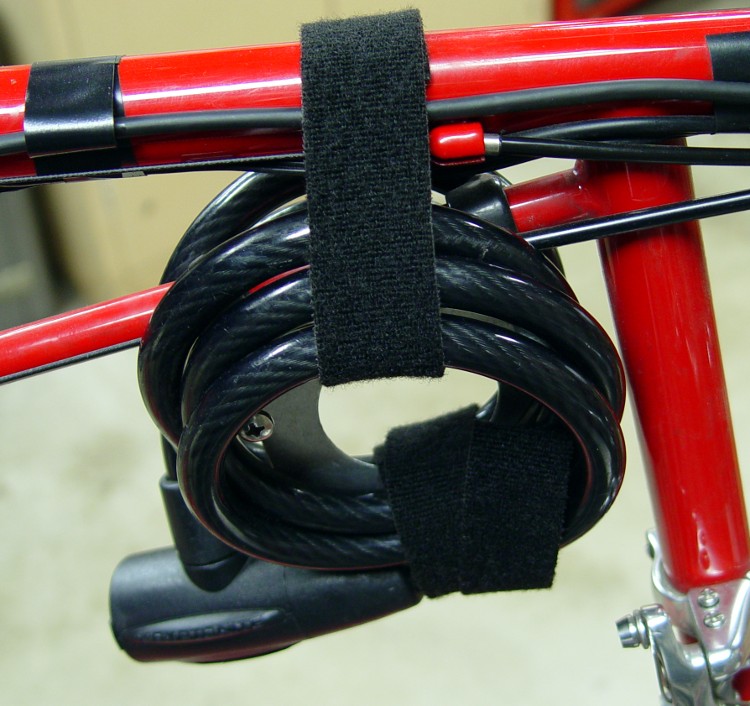
    Coily-cable bike lock holder
    Coily-cable bike lock holder

    Although I’m pretty sure nobody would think of stealing my Tour Easy (“How long did it take you to learn to ride that thing?”), it’d be a shame to be wrong. So I carry a coily-cord lock and lash the bike to a post or, for lack of anything better, the front wheel to the frame.

    If they can figure out how to get the back wheel out in less than ten minutes without a work stand, they’re a damn sight better mechanic than I!

    Anyhow, the trouble with a coily lock is that it’s far too heavy and sinks to the bottom of whatever pack you put it in, crushing the groceries on the way down.

    So I built a small plate, tucked into the corner above the bottom bracket, to hold the lock out of the way and within easy reach.

    dsc03596-lock-holder-right
    Lock holder – right side

    It’s a 1/16-inch aluminum plate held to the bike frame with a pair of padded clamps. I applied a hole saw to the middle to get a way to lash the lock to the plate with two more of those ubiquitous Velcro straps.

    The 2.5-inch 10-32 machine screws support the cable coils; the lock already has a plastic coating, so I didn’t bother putting any padding on the screws. Nuts on both sides compress the clamps and support the plate.

    The small aluminum plate sticking up prevents the lock coils from pressing the brake cable against the frame. If you forget that, your back brake won’t release completely.

    Lock holder - left side
    Lock holder – left side

    There’s nothing fancy on the left side…

    Put Loctite on the threads under the nuts to ensure nothing rattles loose!

    The black cable taped to the top frame tube carries the push-to-talk button back to the amateur radio behind the seat. That’s a story for another time.

  • Recumbent Bicycle Chain Catcher

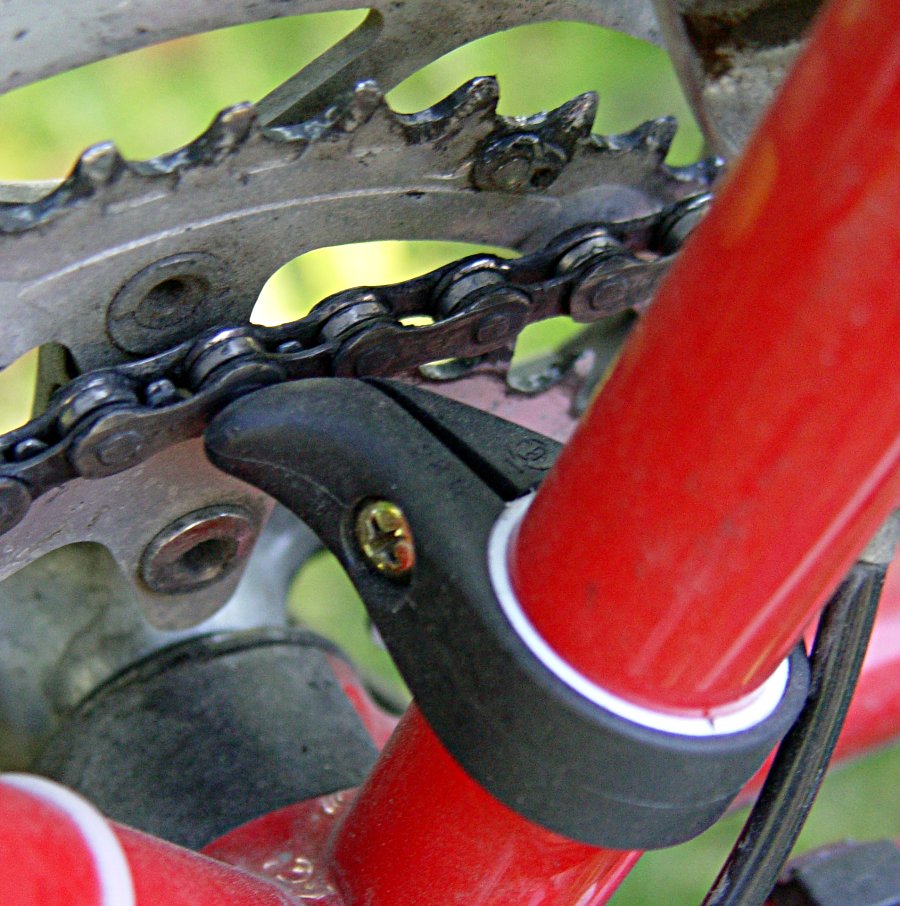
    Chain catcher
    Chain catcher

    You’re puffing up a serious hill, finally downshift to the smallest chainring, and the chain falls off on the inside. You’re already at stalling speed, so you stop abruptly and gracelessly. If you haven’t used up your weekly luck allotment, you neither fall over nor get rammed by the rider behind you.

    Not to be endured, sez I.

    The solution is the Chain Catcher from Bike Tools Etc. It normally attaches to the seat tube of diamond-frame bikes and prevents the chain from falling off inside the smallest chainring, but it works fine on ‘bents, too.

    Alas, their smallest Chain Catcher, part number CC-04A, fits a 28.6 mm seat tube: it’s much too large for the 1-inch tube on a Tour Easy.

    Never fear! Go to your local home-repair store with ruler in hand and examine the plumbing aisle’s plastic fittings. I used a sink drain tailpiece, but any tube with an outside diameter over 1-1/4” and 1/16” walls will work. Buy one, take it home, cut off a ring as wide as the Chain Catcher with a saw or a razor knife, and smooth the edges. Cut the ring lengthwise, slip it over the bike tube, mark the spot where the ends cross, remove it, and trim to fit neatly on the tube.

    If you make a mistake, you have spares aplenty…

    (This is trivially easy with a lathe, but you need not go full-on geek for this project.)

    Install the Chain Catcher over your shim with its thumb pointing forward and align it with the chain’s rivets, not quite touching the chain on the smallest ring. Firmly tighten the Catcher’s mounting screw.

    This won’t fix a badly adjusted front shifter, but it does eliminate those occasional glitches.

    Ride on!

  • Tour Easy Handlebar Hydration Mount

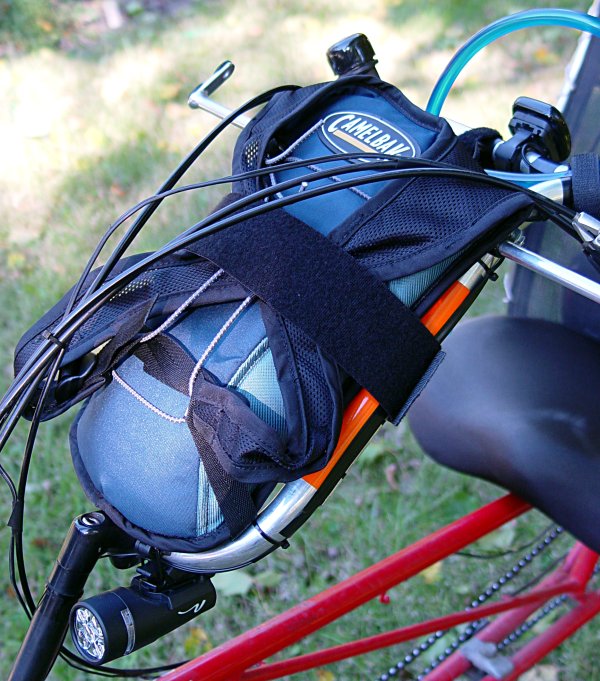
    Handlebar-mounted hydration pack
    Handlebar-mounted hydration pack (fairing removed for visibility)

    My esteemed wife returned from a shopping expedition with the crushed remains of a water bottle that fell out of her Tour Easy’s under-handlebar cage. Fortunately, the truck flattened the bottle, not her, but Something Had To Be Done. She also had trouble maneuvering those newfangled long-body bottles around the rear edge of the Zzipper fairing.

    My TE has a hydration pack attached behind the seat with the hose passing around my arm to a Velcro (nah, it’s generic hook-and-loop) strip safety-pinned to my shirt. Mary didn’t like that arrangement, because it required some fiddling when she sat down and poked pinholes in her shirt. She wanted an arrangement that Just Worked.

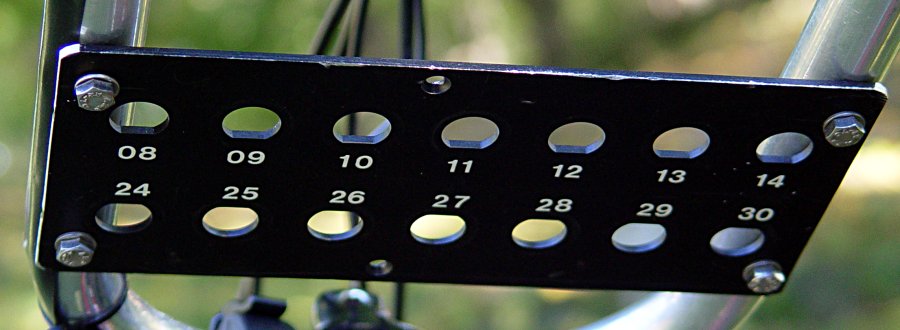
    Recycle pack support plate
    Recycled pack support plate

    I removed the under-the-handlebar bottle cages from her bike and bolted a salvaged aluminum plate to the four tapped ferrules. The numbered holes on the plate originally held coaxial cable connectors, but I think they give the plate that snooty, high-tech, drilled-out, weight-weenie look.

    A 50-ounce hydration pack (“Styled for women!”) fits neatly atop the plate, below the cables, and between the handlebars. We wrapped a two-inch-wide Velcro bellyband around the pack, Velcroed the bag’s top loop to the handlebar’s crosspiece, and secured the valve with another Velcro strap that doubles as her parking brake. The whole affair looks quite tidy under the fairing.

    Now she simply picks up the hose and takes a sip: no acrobatics, no dropped bottles, no hassle. Life is good!

  • Recumbent Bike Kickstand Ground Plate

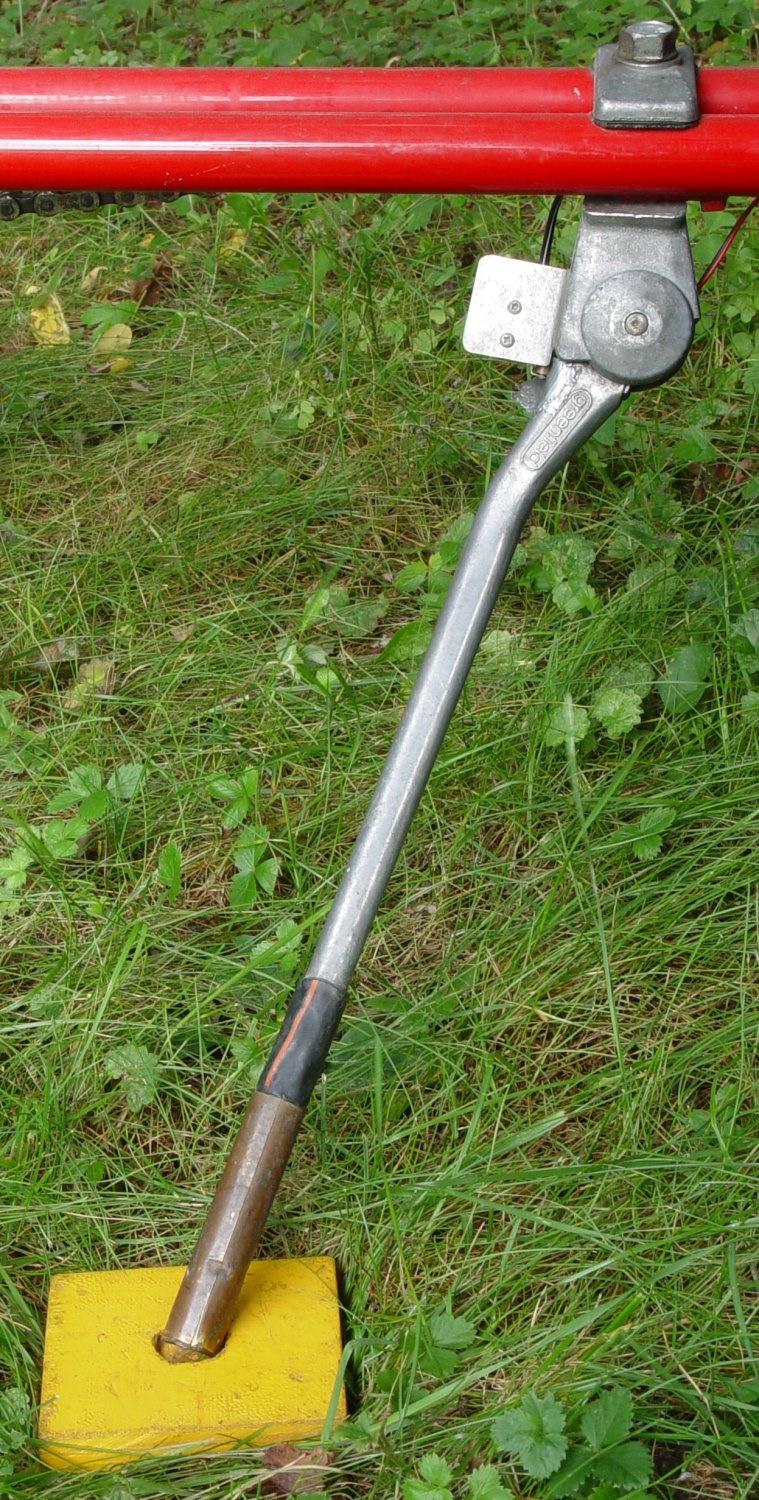
    Kickstand ground plate in action
    Kickstand ground plate in action

    Have you ever done this? You pull up to a rest stop, flip down the kickstand, walk off to snarf some snackage, and crash your ‘bent falls over behind your back. Not only is it tough to look cool when that happens, even a zero-mph drop can scuff up your bike.

    A long recumbent leaning heavily on its kickstand will inexorably push that spike right into mowed turf, bike-tour mire, or sun-softened asphalt. The small plywood square shown in the first photo solves that problem: the kickstand fits into a shallow recess and the plate spreads the bike’s weight so it simply can’t penetrate the ground.

    The plate is a 3-inch square of 1/2” plywood, painted bright forget-me-not yellow. I used a 3/4” Forstner bit to drill a flat-bottomed recess through the top veneer layer, but you can poke several shallow holes with a 1/4” drill and then carve out the rest with a knife or chisel. The recess captures the end of the kickstand so the bike can’t slide off the block.

    The parking brake shown in the second photo will keep your bike firmly in place even when you park on a slope. It’s a hook-and-loop (a.k.a Velcro) strip pulling the brake lever to the handgrip. Your nearby big-box retail store’s computer department mislabels these as “cable organizers” and a single package will provide enough parking brakes for your entire fleet.

    Bicycle parking brake strap
    Bicycle parking brake strap

    Notice that dark extension on the kickstand? Just after I got my Tour Easy, I decided that the kickstand was about an inch too short. Rather than buy a new kickstand, I jammed a few inches of 1/2” copper water pipe on the end, trimmed it to the proper length, and sealed the top with glue-filled heatshrink tubing. Aluminum plus copper equals corrosion, but that lasted for about five years before the entire kickstand failed.

    The small plate on the kickstand hinge holds a switch that lights an LED on the handlebars when the kickstand is down. It’s surprising how far you can slide on your forearms along a steep downhill asphalt road when you forget to flip the kickstand up, but that’s a story for another time.

    A slightly different version of this note appeared in Recumbent Cyclist News back in early 2006, more or less, but everybody keeps asking me about that little yellow plate when we’re on organized rides.