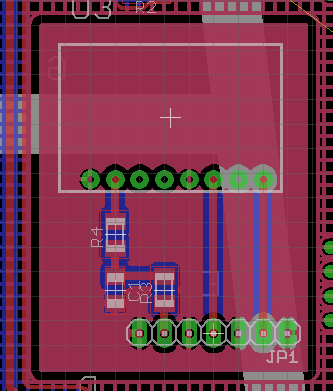
Had to look this up again…
Problem: I needed a shielding plane under a sensitive gizmo that was separated from the ground plane covering the rest of the board. EAGLE poured the ground plane atop the smaller shield polygon, despite the two signals having different names.
Solution: set the ground plane’s Rank to 2, which means it’s less “important” than the smaller plane. Thus, the smaller plane gets drawn first and the ground plane surrounds it.
A good ground-plane tutorial is there.
[Update: That’s a new link location, per the comment below.]
Memo to Self: The default Rank is, of course, 1 for all polygons.
 The Smell of Molten Projects in the Morning
Comments
3 responses to “Eagle Polygon Rank Separates Pours”
[…] happens, I built a little shield enclosure around the receiver board. The clock board has a pair of solid planes isolated from everything else, with a header matching the receiver’s pinout, for this very […]
When i initially gathered info for this tutorial it was of great help during the development of my first PCB.
Since people are still clicking through to the document via this page, i decided to reupload the deleted file.
Its new location is here: http://www.bjornroesbeke.be/downloads/docs/Eagle%20PCB%20ontwerp%20-%20Groundplanes.pdf
Oops… I’ll fix that link.
It’s been getting clicked every few days, so you’ve obviously filled a need.
Thanks for the update!