The Smell of Molten Projects in the Morning

Ed Nisley's Blog: Shop notes, electronics, firmware, machinery, 3D printing, laser cuttery, and curiosities. Contents: 100% human thinking, 0% AI slop.

Month: February 2009

  • MAX4372 Sense Input Protection: Results

    Solar Photovoltaic Panel Maximum Power Point Cloud
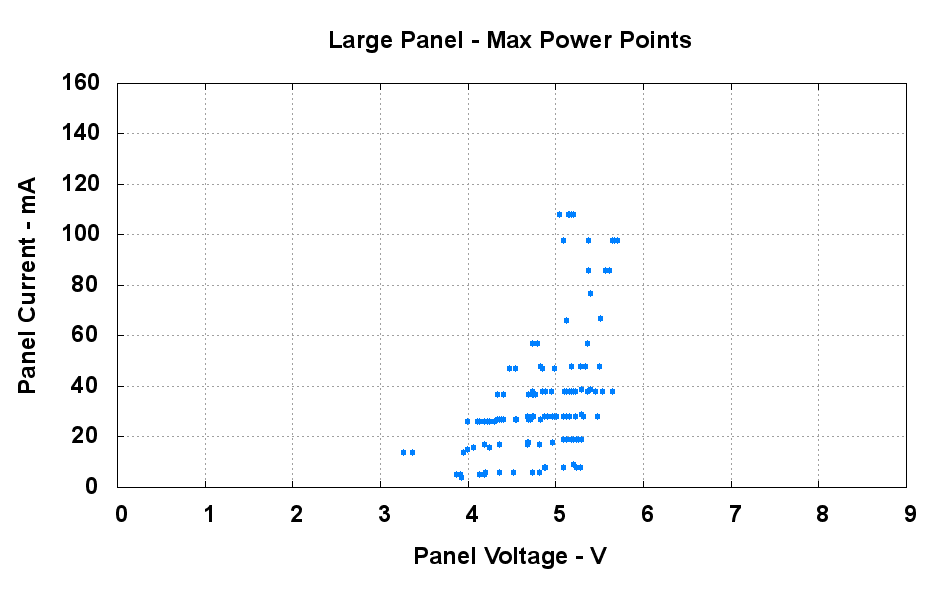
    Solar Photovoltaic Panel Maximum Power Points

    Here’s the result of using the Schottky diode input protection circuit I proposed there. I used 10 and 5 ohm resistors, twice the values shown in that schematic.

    The circuit runs a load test and determines the maximum power point (MPP) of a solar photovoltaic panel every minute. The points represent the results of about two hours of winter-afternoon sunlight.

    The test program applies an increasing load in steps of 10 mA (it’s a small panel, OK?) and records the corresponding panel voltage. One combination of current and voltage extracts the most power from the panel; that’s the MPP.

    Obviously, the MPP varies with the amount of sunlight falling on the panel, so the result of the test is a cloud of points. That’s what you see in the graph: the highest points represent the most intense sunshine, the lower points come from shadows and changing sun angle.

    The load is applied through a current sink that draws 100 mA per volt, as generated from a microcontroller PWM output. That’s pretty well calibrated by twiddling a gain pot, so I think it’s quite close.

    The graph shows that the 10 mA steps recorded by the now-well-protected MAX4372 high-side current amp are low by about 10%, regardless of the absolute current level. That’s more error than predicted by the SPICE model (even with the larger resistors) and may represent contributions from something other than the protection network.

    However, it does look as though a simple calibration routine could compensate for the error. That’s a simple matter of software, right?

    Most important of all, the MAX4372 has survived the usual mistreatment. The load test is essentially DC, where the inductor counts as a piece of wire. Under those conditions, the combination of a stiff voltage source and an imposed load exceeding 600 mA produces a lethal differential voltage across the current-sense resistor. The diode clamps that voltage to 300 mV or so, which is enough to protect the MAX4372.

    Rumor from my source at Maxim says the protection circuitry inside the MAX4372 can withstand maybe 50 mA, so the high-value external resistor approach (without the diode) may be the better way to go. Getting rid of the nonlinear diode should be a win…

    Update: A different plot shows a different result. I think the offset comes from something other than the protection circuitry.

  • They’re Getting Bolder!

    Turkey on the Patio
    Turkey on the Patio

    Got up this morning, looked out the kitchen window, and there stands a turkey on the patio!

    They’ve been edging closer and closer for the last week or so; we think the snow cover is making the seeds under the feeder look more attractive. As nearly as we can tell, though, they have yet to venture across the patio to the feeder: no tracks in the snow.

    What would be really impressive: a row of turkeys lined up on the patio railing, just like they do on our neighbor’s split-rail wooden fence.

  • Logitech Trackball: Tilting Thereof

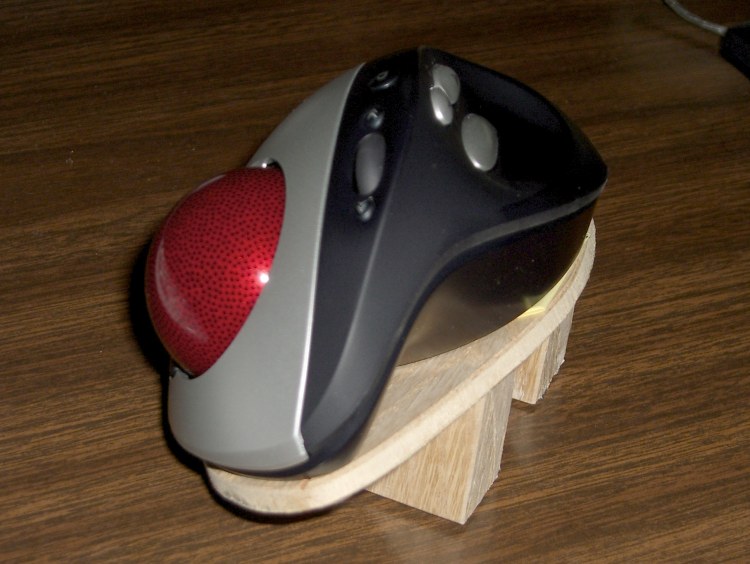
    Trackball platform
    Trackball platform

    The right-hand trackball by my keyboard is a Logitech Cordless Optical Trackman, which I fixed a while ago with a laying-on-of-hands repair. If you do a lot of typing and want to save your wrists, a trackball might be just what you need.

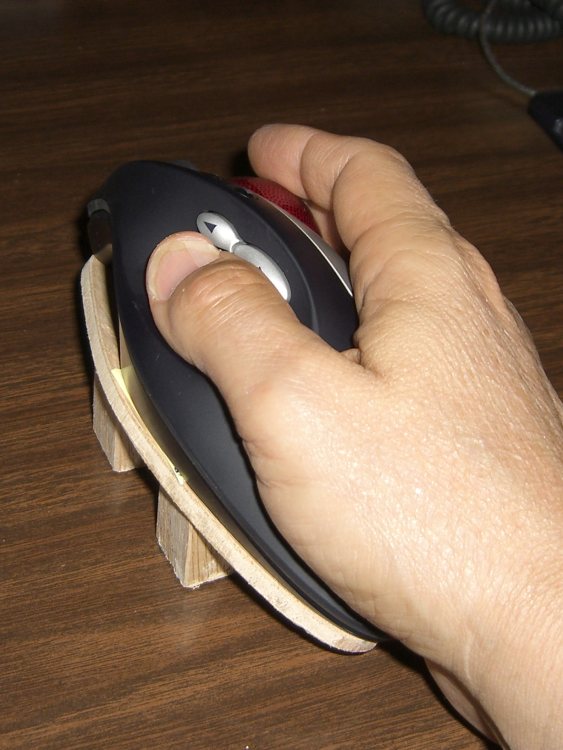
    This trackball’s shape is strongly right-handed and I found that my wrist was happier when I tilted the trackball about 30 degrees to the right, making the ball almost vertical and the thumb buttons to the upper left. Evidently my wrist wants to work at a more clockwise angle, not at whatever Logitech found suitable.

    I made the platform from thin oak-veneer plywood left over from a bookshelf project, with oak wedges holding it up. Polyurethane glue, my favorite wood adhesive, holds everything together. I presented the bottom to the belt sander to get a nice flat surface and bevel the down-side edge of the platform, then applied non-skid rubber stair tread tape to the wedges.

    Conveniently, Logitech held the trackball’s case together with four plastic-tapping screws. I removed a screws at each end, drilled two matching holes in the platform, and used similar-size machine screws. The threads don’t quite match, but it’s close enough.

    Rotated trackball in use
    Rotated trackball in use

    Here’s what it looks like in use…

    The platform makes battery replacement a bit more tedious. Much to my surprise, the two AA cells run for half a year at a time, so that’s not a big issue.

    However, the trackball occasionally (every few weeks) loses sync with its base receiver, requiring a poke of buttons on both units. I think that’s partly due to the Logitech wireless mouse on my esteemed wife’s desk ten feet away.

    On the whole, I like it a lot. If Logitech made one for southpaws, too, I’d get a bookend set, but they don’t.

    Oh, yeah, if only evdev allowed button reconfiguration, without using a bunch of batshit kludges, I’d be ecstatic. As of the last time I fiddled with it, the standard mouse xorg driver couldn’t handle the number of buttons and evdev didn’t allow button mapping. Mostly, it works, but I’d like to reassign a few of the buttons.

  • Unsolderable Header Pins

    Unsolderable pin headers
    Unsolderable pin headers

    Speaking of things that don’t work, these header pins from my stash have developed some sort of rot. They’re genuine Brand Name pins, albeit a few decades old, and have been stored in the original bag in various basements along the way.

    What’s supposed to happen: you touch a pin with a soldering iron and some solder, the solder melts and wets the pin. If the pin is in a circuit board at the time, the solder bonds it to the pad surrounding the hole. Nothing exciting here, except that when I tried to use these pin headers, that didn’t happen.

    The symptom is that the headers are unsolderable: the solder doesn’t wet the pins.

    Non-solderable header pin detail
    Unsolderable header pin detail

    The detail view shows what does go on. When I touch a the pin, the original solder plating scoots out of the way, exposing the underlying metal (or whatever it is). Neither tin-lead nor tin-silver solder wets the surface, so the pin can’t be soldered.

    The flux forms a layer over the new surface and doesn’t do its usual job of cleaning the metal. Scraping the pin clean doesn’t seem to help, either. In fact, nothing helps: that whole bag of headers is a dead loss.

    I’m sure these things worked when they were fresh, but that was a long time ago. I’m not sure what sort of change could occur underneath the original solder plating.

    So I picked up some new headers with what passes for gold plating these days and they work fine.

    The pix come from my pocket camera on the binocular microscope, using my homebrew adapter.

  • NOAA N-Prime is Up at Last!

    Not that anybody pays attention to these things, but NOAA’s N-Prime earth observatory had a successful launch today.

    There’s a bit of backstory to this bird: Lockheed-Martin manged to drop the satellite during the final phase of its assembly, causing all manner of damage. Basically, they forgot to bolt the booster adapter down before trying to tilt the satellite over.

    It seems L-M ate the rebuild costs, which was a nice gesture on their part.

    I wrote about the event in my Dr Dobb’s Journal column some years back, in the context of how we do error checking in our projects. Bottom line: no matter how good you think your development process might be, alas, you’ll always miss something. The trick is to miss only small problems, not project-killers.

    Now, if only the bird works correctly…

  • Defective PCB-mount Switches

    Defective PCB Option Switches
    Defective PCB Option Switches

    This type of switch is a nice alternative to the ordinary pin-header option jumpers: pull the white plunger up to open the switch, push it down to close. Nothing to lose or (worse) drop into the machinery.

    Being that sort of bear, I test most components, particularly surface-mount parts, before soldering them onto the board. Switches, however… well, what could go wrong?

    Unfortunately, both of these switches were defective.

    The gutted switch at the top of the pictures stuck open after I soldered it in place: pushing the plunger down didn’t do anything at all. Leaning rather hard on it didn’t get its attention, so I unsoldered and tore it apart. The parts looked OK: no obvious corrosion or deformity.

    I tested the second switch, found it worked perfectly, and soldered it in place, whereupon it failed just like the first: stuck open.

    Perhaps the soldering iron’s heat (immeasurably) reshaped the plastic or (invisibly) oxidized the contact point? Maybe the design is close enough to not working that installing it pushes the tolerances over the edge? I’ll never know.

    These were surplus parts, so there’s no recourse, but I’m pretty sure they’d misbehave the same way if I’d paid full retail for them. If you see any inside your widgets, this may be why you can’t select an option… or why the widget suddenly enters a mysterious new mode.

    I tossed the rest of my supply in the trash.

  • Spam Proposition

    This flotsam recently washed over the railing. I added the bold highlight:

    Ladies and Gentleman.

    In order to have your company inserted into the registry of World Businesses for 2009/2010, please print, complete and return the enclosed form (PDF file) to the following address:

    WORLD BUSINESS GUIDE
    P.O. Box 2021
    3500 GA Utrecht
    The Netherlands

    register@ — .biz
    FAX: ++31 — — 8107

    Updating is free of charge

    Treating the attached PDF with the same casual nonchalance I use with any lump of high-level radioactive waste, I opened it in The GIMP (to strip any interesting PDF malware) and found an ordinary printable PDF form.

    Surprisingly, it didn’t have any slots for charge card or bank account info, but, down at the bottom, there’s a dense block of fine print.

    I ran it through pdftotext to get the raw text and here’s the kick in the head, boldified for your reading convenience.

    THE SIGNING OF THIS DOCUMENT REPRESENTS THE ACCEPTANCE OF THE FOLLOWING CONDITIONS AND THE CONDITIONS STATED IN “THE TERMS AND CONDITIONS FOR INSERTION” ON WEBPAGE: WWW.WORLD-BUSINESSGUIDE.COM. THE SIGNING IS LEGALLY BINDING AND GIVES YOU THE RIGHT OF AN INSERTION IN THE ONLINE DATA BASE OF THE WORLD BUSINESS GUIDE, WHICH CAN BE ACCESSED VIA THE INTERNET. A CD ROM WITH WORLDWIDE BUSINESSES IS GRANTED, ALL IN ACCORDANCE WITH THE CONTRACT CONDITIONS STATED IN “THE TERMS AND CONDITIONS FOR INSERTION” ON WEBPAGE: WWW.WORLDBUSINESSGUIDE.COM. THE VALIDATION TIME OF THE CONTRACT IS THREE YEARS AND STARTS ON THE EIGHTH DAY AFTER SIGNING THE CONTRACT. THE INSERTION IS GRANTED AFTER SIGNING AND RECEIVING THIS DOCUMENT BY THE SERVICE PROVIDER. I HEREBY ORDER A SUBSCRIPTION WITH SERVICE PROVIDER INTERNATIONAL DIRECTORIES LTD “WORLD BUSINESS GUIDE”. I WILL HAVE AN INSERTION INTO ITS DATA BASE FOR THREE YEARS. THE PRICE PER YEAR IS EURO 995. THE SUBSCRIPTION WILL BE AUTOMATICALLY EXTENDED EVERY YEAR FOR ANOTHER YEAR, UNLESS SPECIFIC WRITTEN NOTICE IS RECEIVED BY THE SERVICE PROVIDER OR THE SUBSCRIBER TWO MONTHS BEFORE THE EXPIRATION OF THE SUBSCRIPTION. YOUR DATA WILL BE RECORDED. THE PLACE OF JURISDICTION IN ANY DISPUTE ARISING IS THE SERVICE PROVIDER’S ADDRESS. THE AGREEMENT BETWEEN THE SERVICE PROVIDER AND THE SUBSCRIBER IS GOVERNED BY THE CONDITIONS STATED IN “THE TERMS AND CONDITIONS FOR INSERTION” ON WEBPAGE: WWW.WORLD-BUSINESSGUIDE.COM

    I haven’t checked out the full T&C, as I doubt I’ll benefit from such a listing.

    This probably works best in large organizations, where one sucker responds to the spam and then the billing department responds automatically to incoming invoices. The two-month advance notice is a really nice touch, isn’t it?

    Why do people continue to fall for this crap? If it didn’t pay off, the spammers would dry up and blow away, so there must be a fresh crop of suckers every day.

    People, stop doing that!

    Update: More on spam and what (not) to do: http://www.spamprimer.com/