Ed Nisley's Blog: Shop notes, electronics, firmware, machinery, 3D printing, laser cuttery, and curiosities. Contents: 100% human thinking, 0% AI slop.
The default PWM frequency for PWM 3, 9, 10, & 11, at least for the Diecimila running at 16 MHz, is 488 Hz. That’s OK for dimming LEDs where you’re depending on persistence of vision, but it’s much too low when you must filter it down to DC.
The relevant file is hardware/cores/arduino/wiring.c, which is buried wherever your installation put it.
Turns out that the Arduino runtime setup configures the timer clock prescalers to 64, so the timers tick at 16 MHz / 64 = 250 kHz.
You can fix that by setting the Clock Select bits in the appropriate Timer Control Register B to 0x01, which gets you no prescaling and a 62.5 ns tick period:
If you’re finicky, you’ll bit-bash the values rather than do broadside loads. However, it probably doesn’t matter, because Timer 0 runs in Fast PWM mode and Timers 1 & 2 run in Phase-Correct PWM mode, so WGMx2 = 0 in all cases.
Fast PWM mode means Timer 0 produces PWM at 250 kHz / 256 = 976 Hz. However, the Arduino runtime runs the millis() function from the Timer 0 interrupt, so changing the Timer 0 prescaler poochesmillis(), delay(), and any routines that depend on them.
Phase-correct PWM mode means that Timers 1 & 2 count up to 0xff and down to 0x00 in each PWM cycle, so they run at 250 kHz / 512 = 488 Hz.
Adroit TCCRxB setting can prescale by 1, 8, 64, 256, or 1024. Or stop the Timer stone cold dead, if you’re not careful.
Before you fiddle with this stuff, you really should read the timer doc in the ATmega168 datasheet there.
As the snow cover melts away in the spring, you discover how much activity has been going on.
The mice make elaborate tunnels with spaces for seed stores, latrines, and numereous secret entrances near the bushes. For a few months, at least, they can scamper all over the yard without worrying about becoming snacks for owls and hawks.
This kind of picture requires a bit of tweakage, because the default camera settings deliver an essentially gray picture with no contrast. The usual auto-exposure settings assume a more-or-less neutral background, so the camera adjusts the exposure to deliver a neutral result. Unfortunately, you really want most of the background to be white, so the default snow image will be grossly underexposed.
Set the camera to overexpose the picture by 1 or 2 EV; if your camera has a histogram display, adjust the exposure to put that huge bump on the white end close to the right side of the histogram. It helps if you frame the picture before doing this, as the LCD monitor will be pretty much retina-burn white.
Take the picture and get it into your PC.
GIMP Level Adjustment Window
Now, in your favorite photo-editing software (The GIMP on our desktops), adjust the photo’s levels & contrast. This screen shot shows the logarithmic histogram; the linear one is basically just one peak 3/4 of the way to the right side with a little grass on the rest of the chart. The two little buttons in the upper-right choose linear or log.
Drag the white point (the teeny white triangle on the right, just below the histogram) until it’s just a bit to the right of the abrupt dropoff’s foot. That sets the whitest part of the picture to real white, not half-a-stop-down light gray.
You can do the same with the black point (the black triangle on the left), setting it to just left of the black dropoff. In this case, we have some genuinely dark areas, so leave it alone.
Now, the key part: drag the middle triangle to adjust the gamma. Move it rightward to darken the overall image by decreasing the gamma and emphasize small differences on the bright end of the histogram. That makes the tunnels pop out of the image, although it also tends to make the snow look very contrasty.
Don’t go overboard with this sort of thing, but a little adjustment can reveal details and bring pictures back to life. It’s not for Ansel Adams quality pix, that’s for sure.
Here’s possibly more than you want to know about levels & gamma & contrast, but with much better illustrations and more descriptions: Unai Garro’s Blog. He has other useful tutorials, too.
Over the last several years, more or less coincident with the switch from MTBE to ethanol, all of my small internal-combustion engines have stopped working with stored gasoline, even when it’s treated with StaBil, even for just a few months.
After plenty of putzing around, pouring in fresh gasoline has solved the problem in every engine.
For example, I’d left the snow thrower’s tank empty after tracking down the bad gas problem in 2007. I filled it with gas from about November when we did the last of the leaf shredding; I think I’d dosed it with Sta-Bil, but in any event that’s relatively young gas by my standards.
The blower didn’t even cough when I leaned on the starter button; not a single pop. I fired a dose of starting fluid up its snout and it still didn’t fire. At all. Period. As a friend puts it, starting fluid should wake the dead.
Pulled the plug, blew compressed air into the cylinder to dry it out, went out for a can of New Gas, drained the Old Gas, filled the tank, and it fired right up. Surges a bit at idle with no choke, but I can deal with that.
Lessons learned:
You cannot store ethanol-treated New Gas for more than a month or maybe two, tops, at least for use in small engines.
Sta-Bil doesn’t work on New Gas. I’d love to be proven wrong, but this whole bad running thing began with well-treated gasoline stored in a closed container.
There is no longer any way to have an emergency gasoline stash on hand so you don’t have to go out in the FFC (that’s Freezing obscene-gerund Cold) dawn for a fresh tank.
Even with fresh gas, the engines surge under light load, which is a classic symptom of an air leak around the carburetor: lean running. But in all the engines? And with no detectable leaks? Even after replacing the gaskets?
As nearly as I can tell, the problem stems from the 10% ethanol added as an oxygenate. The additional oxygen reduces pollution in modern engines, but causes small engines (at least the ones without electronic mixture control, which are all of mine) to run very very lean.
The cheap solution seems to be setting the engine at about 1/3 choke for normal running. That richens the mixture enough to make the engine happy, but without farting black smoke out the muffler.
Although I no longer keep a 5-gallon can of gas for emergencies (which I’m sure will come back to haunt me one of these days), I do keep a gallon with dose of StaBil for the yard equipment.
Update: As of late-Feb 2009, that entire Cornell website has been dead since I posted the link. If it never comes up again or the link stays broken, here’s the punchline. The link pointed you to their evaluation of Cherokee Trail Of Tears beans, with this review from someone with *cough* experience:
This is my favorite dry bean for black bean soup. It’s not called “Trail of Tears” for nothing. If you walk behind someone who’s eaten a mess of these beans, your eyes will be burning. It’s a very gassy bean.
This Internet thing isn’t ready for prime time; stuff just softly and suddenly vanishes away.
Update 2: Cornell is back online again. It seems their servers got pwned… after their desktops got infected. But, eh, they’re running Windows, what do they expect?
In addition to building a Spice model for a transformer, it’s also important to know whether the core can support the flux generated by the primary winding. This is similar to the inductor problem I mentioned there.
Small HV transformer with test winding
Measure the core’s area and path length. One can reasonably expect all cores to have hard metric measurements these days: Yankees set those calipers to millimeters and get over it. Besides, you need metric units for everything that follows.
This transformer has two E-shaped core halves, so the center leg (the one with the windings on it) has twice the area of the outside legs, which are 7 mm thick and 5 mm wide. The central leg is twice that width: 10 mm.
Figure the stacking factor for a ferrite core is, oh, say, 0.9, making the effective core are:
Ac = 0.9 · 7 · 10 = 63 mm^2 = 0.63 cm^2
You need cm^2 here to get gauss later on.
The core is square, 30 mm on each side. Divide it in half, right down the middle of the center leg, then figure the mean path length around the middle of that rectangle:
MPL = 2 · (30 – 5) + 2 · (15 – 5) = 70 mm = 7 cm
Again, you need cm here to get oerstead down below.
Put a few turns Nt of fine wire around the core, outside all the other windings. This particular transformer has three small imperfections where the varnish / sealant didn’t quite bridge from the bobbin to the outer core legs, so I managed to sneak 20 turns of wire through the holes. Call this the test winding: Nt = 20.
Incidentally, that’s why you should always buy at least three units from surplus outlets: one to sacrifice, one to use, and one for a spare. I usually get five of anything.
Connect the transformer primary to a signal generator & oscilloscope Channel 1, connect the test winding to Channel 2, set the channels to maybe 100 mV/div. Set the signal generator for sine wave at maybe 1 kHz, crank on a few hundred millivolts, then read RMS voltages from both channels: Chan 1 = Vp, Chan 2 = Vt.
Knowing Vp and Vt and the number of turns Nt in the just-added extra winding, find the number of primary turns Np:
Vp / Vt = Np / Nt
136 / 40 = Np / 20
So Np = 68
Repeat that exercise, stuffing voltage into the transformer’s actual secondary winding (the HV winding):
4000 / 46 = Ns / 20
So Ns = 1739
Comfortingly, the turns ratio works out to what you’d expect from the voltage ratio measured while extracting those pi model parameters:
N = Np / Ns = 68 / 1739 = 0.039 = 1/25.6
(You may want the turns ratio as Ns/Np = 25.6. Either will work if you make the appropriate adjustments in the equations.)
Having measured the primary inductance as about 15 mH, the reactance at 60 Hz is:
5.6 Ω = 2 · π · 60 ·15e-3
So it’s reasonable to use a 100 mΩ current sensing resistor.
Plug a 6 VAC (not DC!) wall wart into the Variac and wire it to the primary through the resistor. Connect the oscilloscope X axis across the resistor, set the gain to maybe 10 mV/division.
Connect a 220 kΩ resistor in series with a 1 μF non-polarized capacitor, connect that to the normal HV secondary winding, connect the Y axis across the capacitor, set it for maybe 50 mV/div.
The capacitor voltage is the integral of the secondary voltage, scaled by 1/RC. The RC combination has a time constant of 220 ms, far longer than the 16.7 ms power-line period, so it’s a decent integrator.
Small HV transformer BH curve
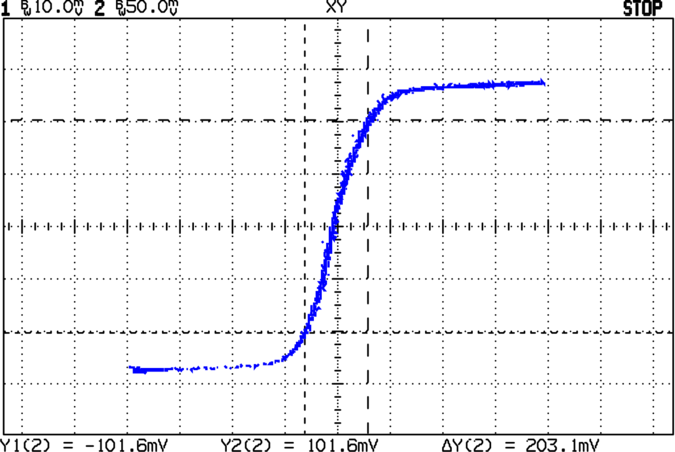
Fire up the scope, set it for XY display, turn on the Variac, slowly crank up the voltage, and see something like this on the scope:
Tweak the offsets so the middle of the curve passes through the center of the graticule, maybe turn on the bandwidth limiting filters, adjust the gains as needed, then measure the point at the upper right at the end of the straightest section in the middle.
That point, as marked by the cursors, is more or less:
X = 6.5 mV
Y = 100 mV
Now plug all those numbers into the equations and turn the crank…
Finally, at that point where the cursors meet in the upper right part of the curve:
H = 122 · 6.5e-3 = 0.8 Oe
B = 14e3 · 0.1 = 1400 G
Assuming there’s a straight line from the origin to that point (which is close to the truth), the B/H ratio gives the slope of the line and, thus, the core’s permeability:
µ = B / H = 1400 / 0.8 = 1700
It’s allegedly a ferrite core, so that’s in the right ballpark given the rough-and-ready approximations in the measurements.
The answer to the key question comes right off the scope without any fancy math, though. Just beyond the upper-right point the BH curve becomes horizontal, which means the slope is zero, which means the core is saturated, which means the circuit stops working.
Sooo, the maximum value of the primary current is pretty nearly:
Imax = 6.5 mV ·10 A/V = 65 mA
My back of the envelope for the high-voltage DC supply is that a peak of 30 mA will pretty much do the trick, so I’m in good shape. Might be a bit higher during startup, but it’ll sort itself out in short order.
Whew!
Correction: I did a total arithmetic faceplant in the previous version. I think this is now correct, but you should always cross-check anything you find on the InterWeb, fer shure!
A friend rides herd on a college data center and reports that one of the hot spares in a drive array started complaining about errors. By the time he got to it, things had gone from bad to worse to worst: the drive was spinning, but its data was gone.
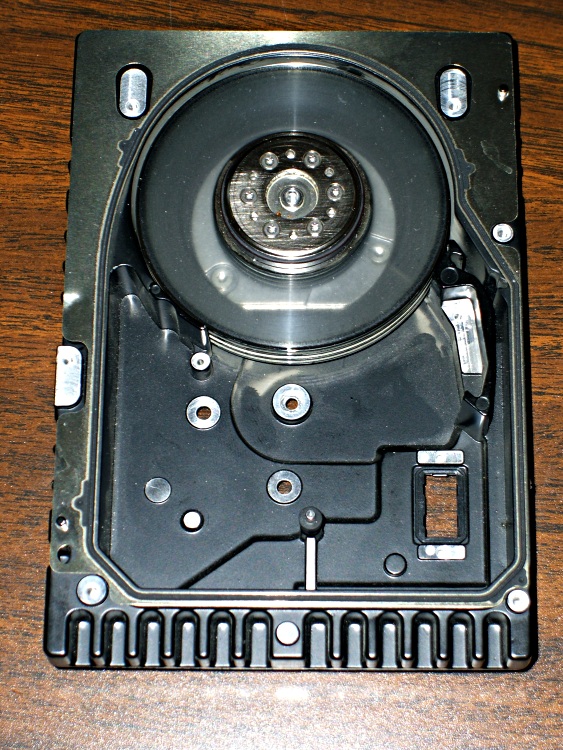
He removed all the head frippery before giving me the carcass, but the platters are exacty as they were when he ripped through those “Warranty Void If Removed” stickers.
Even though disk platters are now made of glass in order to achieve adequate flatness tolerances, you’re not supposed to be able to see through the things. There’s a bare millimeter of untouched plating on the inner and outer rims; everything else is finely ground glass.
Evidently the drive suffered a head crash or some part of the plating peeled off, after which the debris acted as grinding compound under the heads on the rest of the platters. Eventually the internal filters clogged and the ensuing dust storm scrubbed the glass platters clean.
He said the inside of the drive was filled with impalpable silvery dust. Another friend deadpanned “Oh, so all the data was still in the drive, right?
We decided that sorting all those dust grains into the right order would tax even Iranian “students”.
More than you likely want to know about hard drive platters resides there.
Every gadget comes with its own battery charger wall wart, every single one of which dissipates a watt or two even when it’s not charging. Add ’em up, multiply by $2 per watt per year (check your electric bill; that’s closer than you think!), and realize that you could afford some nice new tools just by unplugging the things between charges.
But that’s too much trouble and, really, AC outlets aren’t meant for that many mate/unmate cycles. I had one contact fall loose inside a power strip a while ago and the carnage was spectacular.
What to do?
Recharging Corner
Find an otherwise unoccupied flat spot (or build a shelf near an outlet), buy two or three Power Squid adapters (you don’t need surge suppression for this assignment, so get ’em on sale cheap), plug all your chargers into the Squids, and turn everything off with a single switch when you’re not charging anything.
Bonus: You certainly have some low duty cycle power tools that always have dead batteries when you need them. Plug ’em into the Squid you use most often for other batteries. That way, they’ll get a boost whenever you charge something else, which should keep ’em up to speed.
I set this tangle up before Power Squids existed, so I just plugged a bunch of Y-splitters into an ordinary power strip. It makes for a fearsome tangle of cords, but at least it’s out of the way atop the never-sufficiently-to-be-damned radon air exchanger in the basement.



 The Smell of Molten Projects in the Morning