The Smell of Molten Projects in the Morning

Ed Nisley's Blog: Shop notes, electronics, firmware, machinery, 3D printing, laser cuttery, and curiosities. Contents: 100% human thinking, 0% AI slop.

Tag: Arduino

All things Arduino

  • Deriving the Logarithm of Photoresistor Resistance From Voltage

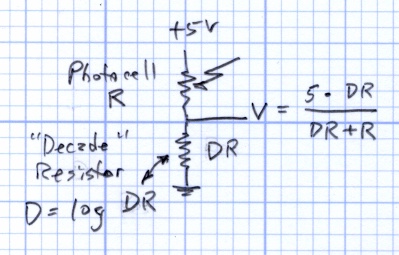
    Photoresistor circuit and equation
    Photoresistor circuit and equation

    The general idea is a simple light sensor that can cope with typical indoor illumination, brightening and dimming the digits on a clock so that it’s both visible in the daylight and doesn’t light up the room at night.

    This circuit produces a voltage that varies more-or-less inversely with the photoresistance R. The “decade resistor” DR acts as a range selector: the output voltage will be 2.5 V when DR = R.

    Yesterday I doodled about the voltage-vs-resistance curves and how DR works, showing the equations that spit out V when you know R, which is handy from a circuit-analysis standpoint (if you can say that with a straight face for a two-resistor circuit).

    What you want is the equation that spits out R when you know V, because you can actually measure V. Rearranging the equation in the doodle above produces that equation

    R = DR * (5 – V) / V

    Actually, what you really want is log R, because your sensation of brightness varies logarithmically with the illumination intensity: each doubling of intensity makes the scenery twice as bright. So you could find R, apply a floating-point math package to it, and come up with log R.

    There’s a better way.
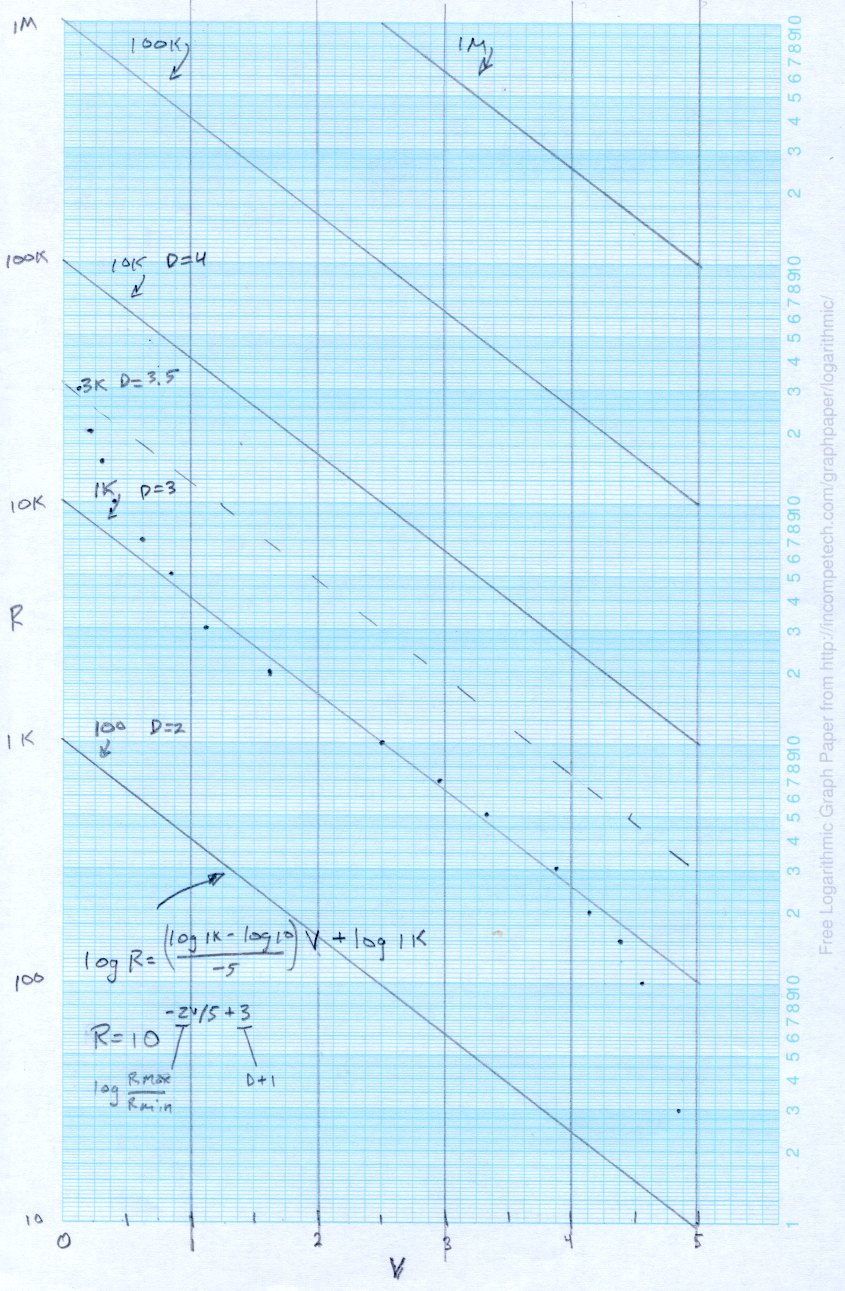
    CdS Resistance vs Voltage
    CdS Resistance vs Voltage

    Stand yesterday’s graph on its ear and flip it side-to-side to get this view of the same data points. It’s plotted with a log scale on the Y axis, because the resistance varies over such a huge range.

    The dots represent the values of R produced by the equation above with DR = 1 kΩ. Those are the actual resistance values, at least according to the circuit model.

    The midsection of those dots is pretty straight, so the diagonal line second from the bottom is a straight line “curve fit” with intercepts at

    (0 V, log 10000)

    and

    (5 V, log 100)

    The y = mx + b equation fitting that line is

    log R = (-2/5) * V + 4

    where the (-2/5) comes from the slope of the line:

    (log 10000 – log 100) / (0 – 5)

    and the (+ 4) comes from the intercept at (log 10000), as set by the value of DR. In fact, the intercept is 1+ (log DR), because it’s always a factor of 10 higher than the value of DR.

    Now, what’s nice about that is the equation spits out log R directly, with just some multiply-divide-add action.

    Changing DR by factors of 10 produces the other lines, so (as before) switching DR gives you a low-budget, wide-dynamic-range output.

    DR need not be a power of 10, of course. The dashed line near the middle is DR = 3 kΩ, which puts the more-or-less linear region between about 20 kΩ (fairly dim) and 500 Ω (rather bright). That’s a useful range in my house and it might be close enough for my friend.

    The dashed line approximating those points has an intercept at 1 + log 3000 = 4.5, so the overall equation is

    log R = (-2/5) * V + 4.5

    The approximation gets progressively worse below, say, V = 0.5 and above V = 4.5, so the outline of the algorithm is:

    • V < 0.5 = pretty dark: lowest digit intensity
    • V between 0.5 and 4.5: puzzle over log R
    • V > 4.5 = lots o’ light: max digit intensity

    The Arduino ADC produces a 10-bit integer: 0 through 1023. Call that Vb (“V binary”), which you can scale to V like this

    V = (5/1024) * Vb

    Plugging that into the equation produces

    log R = (-2/5) * (5/1024) * Vb + 4.5

    log R = (-2/1024) * Vb + 4.5

    The useful limits on Vb for the linear approximation are

    • V = 0.5 -> Vb = 1024 * 0.5/5 = 102
    • V = 4.5 -> Vb = 1024 * 4.5/5 = 922

    Checking those limits against the actual formula for R

    • Vb = 102 -> log R = 4.3 (instead of 4.43)
    • Vb = 922 -> log R = 2.7 (instead of 2.52)

    That’s about what you’d expect from the graph: the line is lower than the dots on the dim end (left) and higher on the bright end (right). On the other paw, getting log R without the floating-point math package makes up for that.

    Now, given that you’re going to use a table lookup anyway, you don’t need any arithmetic on Vb at all. Shove all the stuff surrounding Vb to the other side of the equation

    (log R – 4.5) * (-1024 / 2) = Vb

    (4.5 – log R) * 512 = Vb

    Precompute the left side for useful values of R, fill in the corresponding bit pattern to get the desired brightness, then index into the table with the measured Vb: shazam, log R -> brightness bits in one step!

    If you’re exceedingly lucky, the brightness bits will be more-or-less in a binary sequence, in which case you can just right-shift Vb to get that number of bits and send ’em directly to the LED drivers. No table needed: one shift and you’re done!

    So, for example, suppose you want eight brightness levels controlled by three Brightness Bits BB

    BB = Vb >> 7

    What’s not to like?

    Maybe you already knew that and were wondering why it took me so long to get there…

  • Arduino: Bit Fields Start Low

    The first bit in an Arduino bit field is the lowest-order bit.

    Set up a bit field to hold, oh, say, the data bits from the WWVB radio time code:

    struct WWVB_bits_ {
     unsigned char Minute_10:3;
     unsigned char Minute_1:4;
     unsigned char Hour_10:2;
     unsigned char Hour_1:4;
     unsigned char DOY_100:2;
     unsigned char DOY_10:4;
     unsigned char DOY_1:4;
    // unsigned char UT1_SIGN:3;
    // unsigned char UT1_CORR:4;
    // unsigned char Year_10:4;
    // unsigned char Year_1:4;
     unsigned char LY:1;
     unsigned char LS:1;
     unsigned char DST57:1;
     unsigned char DST58:1;
    };
    

    [Update: Remember, that struct is bass-ackwards. You want the most-significant fields on the bottom, rather than the top, so the bits fill them in properly. This is how I found out that’s true…]

    Coerce the bits into an unnatural union with an unsigned long int and create a variable:

    union WWVB_code_ {
     uint32_t WWVB_ul;
     struct WWVB_bits_ WWVB_bits;
    };
    
    union WWVB_code_ ReceivedBits;
    

    Then set a few bits to find out how the compiler arranges things:

     ReceivedBits.WWVB_bits.DST57 = 1;
     ReceivedBits.WWVB_bits.DST58 = 1;
     ReceivedBits.WWVB_bits.Hour_1 = 9;
     ReceivedBits.WWVB_bits.Minute_1 = 4;
    
     sprintf(PrintBuffer,"Bit field: %08lX",ReceivedBits.WWVB_ul);
     Serial.println(PrintBuffer);
    

    Which produces this informative line:

    Bit field: 03001220


    Soooo, rats, the DST bits are on the left and the Minute bits are on the right. That doesn’t tell you how they’re actually laid out in memory, but if you’re doing the interrupt handler in C, then you just stuff the incoming MSB-first bits from the radio directly into the right side of the int and let them slide leftward.

    If you count ’em up, you’ll find that the commented-out bits allow the remainder to fit into an unsigned long int, which is all of 32 bits on the Arduino. You can actually use an unsigned long long int to get 64 bits, but it seems Arduino bit fields can’t extend beyond 32 bits.

    There are ways around that, particularly seeing as how I’m using a simpleminded interpreter to parse the incoming bits, but I’ll doodle about that later.

    Insert the usual caveats about portability and interoperability and maintainability and … well, you know why bits fields are such a bad idea.

  • Calculating the Current Setting Resistor for a TLC5916 LED Driver

    The Official TI TLC5916 Datasheet is far more confusing on the subject of calculating the external current-setting resistor than it really needs to be.

    The basic relations appear on page 17, but the detailed discussion on page 22 will make your head explode. Here’s how I see it …

    VRext, the voltage across Rext, the reference resistor, is controlled by a 1.26 V band gap reference multiplied by VG, the voltage gain of a 7-bit DAC.

    VRext = 1.26 V * VG
    

    The DAC produces VG from the HC (High Current) bit and the six CC0..CC5 (Configuration Code register) bits. HC selects a range and CC0..CC5 are a binary multiplier.

    VG = ((1 + HC) * (1 + CC/64) ) / 4

    The minimum VG value for HC = 0 is 1/4 and the max is 1/4 + 63/256 = 127/256:

    VG = (1 + CC/64)/4 = 1/4 + CC/256

    The minimum VG value for HC = 1 is 1/2 and the max is 1/2 + 63/128 = 127/128:

    VG = (1 + CC/64)/2 = 1/2 + CC/128

    The  absolute minimum VG = 0.25 happens when HG and CC0..5 are all zero. Conversely, absolute maximum VG = 0.992 happens when they’re all one.

    That means VRext varies from

    VRext (min) = 1.26 * 0.25 = 0.315 V

    to

    VRext (max) = 1.26 * 0.992 = 1.25 V

    There’s a kink in the middle of that range, as shown in the graph on page 23, where HC shifts gears to the high range.

    Rext then converts that voltage into Iref, the LED reference current:

    Iref = VRext / Rext
    

    The CG (Current Gain) multiplies Iref to set the actual LED current. The CM bit controls CG. You can either use the weird exponential formula in the datasheet or just remember:

    • CM = 0 selects CG = 5
    • CM = 1 selects CG = 15

    Sooo, finally, Iout (LED current) is just:

    Iout = CG * Iref

    Knowing all that, you can choose Rext so that the absolute maximum current doesn’t exceed the LED rating:

    Iout (max) = 20 mA = 15 * (1.25 V / Rext)

    Which tells you that Rext must be no less than

    Rext = (15 * 1.25 V) / (0.02 A) = 938 Ω

    Then you can find the minimum current through the LEDs:

    Iout (min) = 5 * (0.315 V / 938 Ω) = 1.68 mA

    Now, given that the chip’s specs seem to indicate that the minimum regulated current is 5 mA, I suspect that all bets are off as regards linearity and matching and all that. Given that my friend wants a really dim clock, I think this will work out just fine…

    Memo to Self: For whatever reason (and it must be a real stinker), TI numbers the CC bits backwards. CC0 is the Most Significant Bit, CC5 is the Least Significant Bit.

    And because CC5 is the first bit shifted into the TLC5916’s shift register, you must run the Arduino hardware-assisted SPI in LSB-first mode.

  • Arduino: Remember the Ampersand with PROGMEM Variables!

    Got burned by this one again…

    The pgm_read_whatever() functions/macros require the address of the variable stored in PROGMEM (the program Flash ROM), not the variable’s value. More on that in the Arduino doc there.

    So, for example, this does not work, no matter how easy it might be to type:

    #include <avr/pgmspace.h>
    #define TZ_INDEX     3     // hardcoded for simplicity
    PROGMEM prog_char TimeZone[8] = {0,-3,-4,-5,-6,-7,-9,-10};
    char TZOffset;
    TZOffset = pgm_read_byte(TimeZone[TZ_INDEX]);
    

    What you really want looks like this:

    TZOffset = pgm_read_byte(&TimeZone[TZ_INDEX]);
    

    See the difference?

    Maybe next time I’ll remember that…

  • Converting Day-of-Year to Month and Day-of-Month, Then Back Again

    I needed the conversions for a WWVB simulator, so it knows when to twiddle the leap-year and leap-second bits.

    The general notion is a table with the Day-of-Year values for the last day of each month. The most expedient way of doing this is with two columns: one for normal years and the other for leap years, thusly…

    Month EOM EOM-LY DOY DOY-LY
    0 0 0 0 0
    1 31 31 31 31
    2 28 29 59 60
    3 31 31 90 91
    4 30 30 120 121
    5 31 31 151 152
    6 30 30 181 182
    7 31 31 212 213
    8 31 31 243 244
    9 30 30 273 274
    10 31 31 304 305
    11 30 30 334 335
    12 31 31 365 366

    Hint: even if you can recite the “Thirty days hath November …” jingle, it’s much better to build a spreadsheet so the additions all work out. It’s even better if you don’t attempt any of this with a late-summer head cold. You might want to check all my work, because I’m still stuffy.

    With table in hand, the code is straightforward.

    Define a structure with all the various bits & pieces of the current time, much of which isn’t used here. It’s all needed in the WWVB simulator:

    enum EVENTSTATE {EVENT_INACTIVE,EVENT_PENDING,EVENT_ACTIVE};
    
    struct timecode_ {			// The current moment in time...
      byte Year;				// 0 - 99
      word DayOfYear;			// 1 - 366
      byte Hour;				// 0 - 23
      byte Minute;				// 0 - 59
      byte Second;				// 0 - 60 (yes!)
      byte Tenth;				// 0 - 9
      enum EVENTSTATE LeapYear;		// 0 = no, 1 = pending, 2 = active
      enum EVENTSTATE LeapSecond;		// 0 = no, 1 = pending, 2 = active in this minute
      enum EVENTSTATE DaylightSavingTime;	// 0 = no, 1 = pending, 2 = active
      char UT1Correction;			// 100 ms units, -10 to +10 range (+/- 1 second)
      byte MinuteLength;			// 60 or 61
      byte Month;				// 1 - 12 (not sent in frame)
      byte DayOfMonth;			// 1 - 28..31	(not sent in frame)
    };
    

    That’s obviously overspecified, because DayOfYear with LeapYear uniquely determines Month and DayOfMonth. It’s handy to have both forms around, sooo there they are.


    Then set up the table, glossing over the quick matrix transposition that turns the entries for each year into rows rather than columns:

    prog_uint16_t PROGMEM MonthEnds[2][13] = {
      0,31,59,90,120,151,181,212,243,273,304,334,365,
      0,31,60,91,121,152,182,213,244,274,305,335,366
    };
    

    Conversion from DayOfYear to Month and DayOfMonth requires searching backwards through the appropriate table row until you find the entry that’s smaller than the DayOfYear value, at which point you’ve found the right month.

    void ConvertDOYtoDOM(struct timecode_ *pTime) {
    byte Index,LY;
    word EndOfMonth;
      LY = (EVENT_INACTIVE != pTime->LeapYear) ? 1 : 0;
      Index = 12;
      while ((EndOfMonth = pgm_read_word(&MonthEnds[LY][Index])) >= pTime->DayOfYear) {
    	--Index;
      };
      pTime->Month = Index + 1;									// months start with 1, not 0
      pTime->DayOfMonth = (byte)(pTime->DayOfYear - EndOfMonth);
    }
    

    Converting from Month and DayOfMonth to DayOfYear is much easier, as it’s pretty much just a table lookup:

    word ConvertDOMtoDOY(struct timecode_ *pTime) {
    word EndOfMonth;
      EndOfMonth = pgm_read_word(&MonthEnds[(EVENT_INACTIVE != pTime->LeapYear) ? 1 : 0][pTime->Month - 1]);
      return EndOfMonth + pTime->DayOfMonth;
    }
    

    This code might actually work, but if I were you, I’d test it pretty thoroughly before lashing it into your project…


    The PROGMEM and pgm_read_word() stuff is the Arduino mechanism that puts the lookup table into Flash program memory rather than the ATMega168’s exceedingly limited RAM space. The definitive word about that process resides there.

    Memo to Self: Using const simply makes the variable kinda-sorta read-only, but still initializes RAM from Flash. The PROGMEM routines delete the RAM copy entirely.

  • Arduino: Dividing an External Frequency

    A friend asked for a Totally Featureless Clock (it’s a long story) and in order to build that, I must concoct a WWVB simulator. Not needing really precise atomic time, I can use ordinary bench-grade crystals and suchlike; microsecond-level jitter isn’t a big problem.

    Anyhow, I must divide down an external 60 kHz signal to produce a 10-Hz interrupt to drive the modulator. The 60 kHz comes from a 12 MHz crystal, through a divide-by-200 counter, and feeds the ATmega T1 input (aka Arduino pin 5, normally the PWM5 output).

    The key is setting up Timer1 to divide T1 inputs by 6000 (count 0 through 5999), then have it produce an interrupt when the maximum count occurs. You’ll want to read Chapter 15 of The Fine Manual to learn how the hardware works.

    I used CTC Mode 12, so that the counts occur on the falling edge of the signal on T1 with the maximum value stored in ICR1. That causes the Input Capture Interrupt to occur when ICR1 == TCNT1.

    Review the avr-lib interrupt doc to get the proper interrupt vector names. You want the ICF interrupt, enabled with ICIE1.

    Note that Table 15-4 is misleading. The TOV1 Flag may be set when TCNT == MAX, but unless ICR1 == MAX it’ll never get there. You (well, I) can spend a distressing amount of time figuring out why TOV1 doesn’t happen.

    With that in mind, Timer1 setup is straightforward:

    TCCR1B = 0;                // stop Timer 1 by shutting off the clock
    TCNT1 = 0;                 // force count to start from scratch
    TCCR1A = 0;                // no compare outputs to OC1A OC1B, WGM1 1:0 = 00
    TCCR1C = 0;                // no forced compares
    ICR1 = 5999;               // count 0 through 5999 = divide by 6000
    TIMSK1 = 1 << ICIE1; // allow interrupt on capture event (TCNT == ICF)
    TCCR1B = B00011110;        // start Timer 1: CTC mode = 12, TOP=ICR1, ext clock on T1, falling edge
    

    The interrupt handler can do whatever you want. This one just flips an output bit (ultimately connected to the modulator) to show it’s arrived:

    ISR(TIMER1_CAPT_vect) {
       PINB |= _BV(1);
    }
    

    That weird-looking line takes advantage of an Arduino hardware feature: if you write a 1 to a bit in the PIN register, the corresponding PORT value toggles. It’s documented in The Fine Manual on page 74, section 13.2.2 and mentioned there.

    Then the rest of the simulator is just a simple matter of software…

  • Arduino vs. ATMega168 Chip Pinouts

    The Arduino pin names are silkscreened right on the board, but sometimes you must know the corresponding ATMega168 pin name. I printed out The Fine Manual and penciled in the Arduino names, but that’s getting smudgy.

    Herewith, the ATmega168 pinout with neatly printed Arduino pin names.

    Arduino vs ATMega168 chip pinouts
    Arduino vs ATMega168 chip pinouts

    [Update:Turns out there’s an Official Version.]

    Sometimes, you also must know the relation between hardware Timers and PWM output pins:

    OC0A PWM6 PWM3 OC2B
    OC0B PWM5 PWM5 OC0B
    OC1A PWM9 PWM6 OC0A
    OC1B PWM10 PWM9 OC1A
    OC2A PWM11 PWM10 OC1B
    OC2B PWM3 PWM11 OC2A