The Smell of Molten Projects in the Morning

Ed Nisley's Blog: Shop notes, electronics, firmware, machinery, 3D printing, laser cuttery, and curiosities. Contents: 100% human thinking, 0% AI slop.

Tag: Arduino

All things Arduino

  • Arduino Mega: Showstopper Workaround

    The discussion following that post gave me enough impetus to figure this out. What I have here is not a complete solution, but it seems to solve the immediate problem.

    Downside: this will not survive the next regular system update that touches the gcc-avr package (yes, it’s the avr-gcc compiler and the gcc-avr package). Hence, I must write down the details so I can do it all over again…

    To review:

    The problem is that the avr-gcc cross-compiler produces incorrect code for Atmega1280-class chips with more than 64 KB of Flash space: a register isn’t saved-and-restored around a runtime routine that alters it. Simple sketches (seem to) run without problems, but sketches that instantiate objects crash unpredictably. Because Arduino sketches depend heavily on various objects (like, oh, the Serial routines), nontrivial sketches don’t work.

    The workaround is to patch the library routine that invokes the constructors, as detailed in that gcc bug report, to push / pop r20 around the offending constructors. The patch tweaks two spots in the libgcc.S source file, which then gets built into an assortment of chip-specific libgcc.a files during the compile.

    I was highly reluctant to do that, simply I’ve already installed the various gcc packages using pacman (the Arch Linux package manager) and really didn’t want to screw anything up by recompiling & reinstalling gcc from source. It’s certainly possible to update just the avr portion, but I don’t know exactly how to do that and doubt that I could get it right the first time… and the consequences of that catastrophe I don’t have time to deal with.

    So I elected to build the avr cross-compiler from source, verify that the as-built libgcc.a file was identical to the failing one, apply the patch, recompile, then manually insert the modified file in the right spot(s) in my existing installation. This is less manly than doing everything automagically, but has a very, very limited downside: I can easily back out the changes.

    Here’s how that went down…

    The instructions there (see the GCC for the AVR target section) give the overview of what to do. The introduction says:

    The default behaviour for most of these tools is to install every thing under the /usr/local directory. In order to keep the AVR tools separate from the base system, it is usually better to install everything into /usr/local/avr.

    Arch Linux has the tools installed directly in /usr, not /usr/local or /usr/local/avr, so $PREFIX=/usr. Currently, they’re at version 4.5.1, which is typical for Arch: you always get the most recent upstream packages, warts and all.

    Download the gcc-g++ (not gcc-c++ as in the directions) and gcc-core tarballs (from there or, better, the gnu mirrors) into, say, /tmp and unpack them. They’ll both unpack into /tmp/gcc-4.5.1, wherein you create and cd into obj-avr per the directions.

    I opted to feed in the same parameters as the Arch Build System used while installing the original package, rather than what’s suggested in the directions. That’s found in this file:

    /var/abs/community/gcc-avr/PKGBUILD
    

    Which contains, among other useful things, this lump of command-line invocation:

    ../configure --disable-libssp \
                   --disable-nls \
                   --enable-languages=c,c++ \
                   --infodir=/usr/share/info \
                   --libdir=/usr/lib \
                   --libexecdir=/usr/lib \
                   --mandir=/usr/share/man \
                   --prefix=/usr \
                   --target=avr \
                   --with-gnu-as \
                   --with-gnu-ld \
                   --with-as=/usr/bin/avr-as \
                   --with-ld=/usr/bin/avr-ld
    

    Yes, indeed, $PREFIX will wind up as /usr

    Feeding that into ./configure produces the usual torrent of output, ending in success after a minute or two. Firing off the make step is good for 15+ minutes of diversion, even on an 11-BogoMIPS dual-core box. I didn’t attempt to fire up threads for both cores, although I believe that’s a simple option.

    The existing compiler installation has several libgcc.a files, each apparently set for a specific avr chip:

    [ed@shiitake tmp]$ find /usr/lib/gcc/avr/4.5.1/ -name libgcc.a
    /usr/lib/gcc/avr/4.5.1/libgcc.a
    /usr/lib/gcc/avr/4.5.1/avr35/libgcc.a
    /usr/lib/gcc/avr/4.5.1/avr3/libgcc.a
    /usr/lib/gcc/avr/4.5.1/avr51/libgcc.a
    /usr/lib/gcc/avr/4.5.1/avr4/libgcc.a
    /usr/lib/gcc/avr/4.5.1/avr6/libgcc.a
    /usr/lib/gcc/avr/4.5.1/avr5/libgcc.a
    /usr/lib/gcc/avr/4.5.1/avr31/libgcc.a
    /usr/lib/gcc/avr/4.5.1/avr25/libgcc.a
    

    The key to figuring out which of those files need tweaking lies there, which says (I think) that the Atmega1280 is an avr5 or avr51. Because I have an Arduino Mega that’s affected by this bug, I planned to tweak only these files:

    /usr/lib/gcc/avr/4.5.1/libgcc.a
    /usr/lib/gcc/avr/4.5.1/avr51/libgcc.a
    /usr/lib/gcc/avr/4.5.1/avr5/libgcc.a
    

    I have no idea what the top-level file is used for, but … it seemed like a good idea.

    Now, I innocently expected that the libgcc.a files for a 4.5.1 installation would match the freshly compiled files for a 4.5.1-from-source build, but that wasn’t the case. I don’t know what the difference might be; perhaps there’s an embedded path or timestamp or whatever that makes a difference?

    The Arch Linux standard installation of gcc 4.5.1 has these files:

    $ find /usr/lib/gcc/avr/4.5.1/ -iname libgcc.a -print0 | xargs -0 ls -l
    -rw-r--r-- 1 root root 2251078 Sep  4 16:26 /usr/lib/gcc/avr/4.5.1/avr25/libgcc.a
    -rw-r--r-- 1 root root 2256618 Sep  4 16:26 /usr/lib/gcc/avr/4.5.1/avr31/libgcc.a
    -rw-r--r-- 1 root root 2252506 Sep  4 16:26 /usr/lib/gcc/avr/4.5.1/avr35/libgcc.a
    -rw-r--r-- 1 root root 2256310 Sep  4 16:26 /usr/lib/gcc/avr/4.5.1/avr3/libgcc.a
    -rw-r--r-- 1 root root 2250930 Sep  4 16:26 /usr/lib/gcc/avr/4.5.1/avr4/libgcc.a
    -rw-r--r-- 1 root root 2251846 Sep 27 12:58 /usr/lib/gcc/avr/4.5.1/avr51/libgcc.a
    -rw-r--r-- 1 root root 2251550 Sep 27 12:58 /usr/lib/gcc/avr/4.5.1/avr5/libgcc.a
    -rw-r--r-- 1 root root 2252458 Sep  4 16:27 /usr/lib/gcc/avr/4.5.1/avr6/libgcc.a
    -rw-r--r-- 1 root root 2251474 Sep 27 12:57 /usr/lib/gcc/avr/4.5.1/libgcc.a
    

    The compilation-from-source using the gcc 4.5.1 tarballs has these files:

    $ pwd
    /tmp/gcc-4.5.1/obj-avr
    $ find -iname libgcc.a -print0 | xargs -0 ls -l
    -rw-r--r-- 1 ed ed 2250258 Sep 27 15:51 ./avr/avr25/libgcc/libgcc.a
    -rw-r--r-- 1 ed ed 2255798 Sep 27 15:51 ./avr/avr31/libgcc/libgcc.a
    -rw-r--r-- 1 ed ed 2251686 Sep 27 15:51 ./avr/avr35/libgcc/libgcc.a
    -rw-r--r-- 1 ed ed 2255490 Sep 27 15:51 ./avr/avr3/libgcc/libgcc.a
    -rw-r--r-- 1 ed ed 2250110 Sep 27 15:51 ./avr/avr4/libgcc/libgcc.a
    -rw-r--r-- 1 ed ed 2251838 Sep 27 15:51 ./avr/avr51/libgcc/libgcc.a
    -rw-r--r-- 1 ed ed 2251550 Sep 27 15:51 ./avr/avr5/libgcc/libgcc.a
    -rw-r--r-- 1 ed ed 2251638 Sep 27 15:52 ./avr/avr6/libgcc/libgcc.a
    -rw-r--r-- 1 ed ed 2251474 Sep 27 15:52 ./avr/libgcc/libgcc.a
    -rw-r--r-- 1 ed ed 2250258 Sep 27 15:51 ./gcc/avr25/libgcc.a
    -rw-r--r-- 1 ed ed 2255798 Sep 27 15:51 ./gcc/avr31/libgcc.a
    -rw-r--r-- 1 ed ed 2251686 Sep 27 15:51 ./gcc/avr35/libgcc.a
    -rw-r--r-- 1 ed ed 2255490 Sep 27 15:51 ./gcc/avr3/libgcc.a
    -rw-r--r-- 1 ed ed 2250110 Sep 27 15:51 ./gcc/avr4/libgcc.a
    -rw-r--r-- 1 ed ed 2251838 Sep 27 15:51 ./gcc/avr51/libgcc.a
    -rw-r--r-- 1 ed ed 2251550 Sep 27 15:51 ./gcc/avr5/libgcc.a
    -rw-r--r-- 1 ed ed 2251638 Sep 27 15:52 ./gcc/avr6/libgcc.a
    -rw-r--r-- 1 ed ed 2251474 Sep 27 15:52 ./gcc/libgcc.a
    

    The top-level files have the same size, but are not identical:

    $ diff ./avr/libgcc/libgcc.a ./gcc/libgcc.a
    Binary files ./avr/libgcc/libgcc.a and ./gcc/libgcc.a differ
    

    Haven’t a clue what’s going on with different files in different spots, but I saved the existing files in the installed tree as *.base and copied the new ones from ./gcc/avr* into place. While there are many ways to crash a program, the AnalogInOutSerial demo program ran correctly on a Duemilanova (presumably with the existing libgcc.a) and failed on the Mega (with the recompiled libgcc.a). Save those files as *.rebuild just in case they come in handy.

    Manually change the libgcc.S source file (it’s only four lines, I can do this), recompile, and the build process recompiles only the affected files; that’s comforting. Copy those into the installed tree and, lo and behold, the demo program now runs on both the Duemilanova and the Mega.

    While it’s too soon to declare victory, the hardware bringup program I’m writing also works, so the initial signs are good.

    Thanks to Mark Stanley for blasting me off dead center on this. I didn’t do a complete install, but he got me thinking how to make the least disruptive change…

    And a tip o’ the cycling helmet to the whole Free Software collective for making a mid-flight patch like this both feasible and possible: Use The Source!

  • Arduino Mega: Showstopper!

    I planned to use an Arduino Mega for an upcoming Circuit Cellar project, but … it doesn’t work. Well, it works, but under very limited circumstances.

    The problem manifests itself as a complete crash / lockup under very straightforward conditions: attempting to use the serial output will suffice. This unmodified example sketch fails: AnalogInOutSerial.

    After considerable Googling, there’s the showstopper: the gcc-avr compiler fails to save-and-restore a register that gets clobbered by the object constructors. Simple code doesn’t instantiate any objects, so it works fine. The serial failure is just a symptom, which means the various workarounds suggested in the forums don’t fix the general case.

    The patch offered for gcc-avr is basically four lines (a pair of save / restores on R20), but requires recompiling what seems to be the entire AVR toolchain from source. That, alas, lies far beyond my capabilities… I could probably figure out enough to recompile it, but I’m very uncertain I could accomplish that without screwing up the main gcc compiler or the setup thereof.

    It is not clear to me that the many claims of “it works on this version” are correct. From the nature of the problem, the failures depend critically on addresses occupied, final layout of the program / data in Flash, and (most likely) the execution path. The “working” configurations / systems may simply not fail using the sample programs.

    This is on Arch Linux, for what it’s worth, with gcc-avr 4.5.1.

    If anybody can walk me through the process of rebuilding whatever must be rebuilt, preferably in a safe place, perhaps I can manually stuff the new file(s) into the proper spots(s) to replace the incorrect ones…

  • Arduino Mega 1280: PWM-to-Timer Assignment

    The Arduino Mega has five hardware Timers, each with up to three PWM outputs. Most of the outputs go to headers, but the correspondence between Timer hardware and Arduino PWM number is not obvious.

    Herewith…

    PWM Hardware
    13 OC1C
    12 OC1B
    11 OC1A
    10 OC2A
    9 OC2B
    8 OC4C
    7 OC4B
    6 OC4A
    5 OC3A
    4 OC0B
    3 OC3C
    2 OC3B

    Although the Mega schematic shows PWM0 and PWM1, they don’t really exist; they’re actually the serial I/O bits for the FT232 USB converter.

    PWM4 uses Timer 0: OC0B. Don’t mess with Timer 0’s prescaler to get higher speeds; it’ll wreck the millis() function and the firmware’s timekeeping in general.

    Timer 5 doesn’t come to a header. If you desperately need three more PWM outputs (that aren’t supported by the Arduino runtime), you could affix three fine wires to pins 38, 39, and 40 of that TQFP. Good luck with that…

    Some notes about fiddling with the Arduino PWM setup: changing the frequency and going much faster. The new Timers have different numbers, but the same considerations apply. As before, Thou Shalt Not Mess with Timer 0!

    Consult the Fine Manual for the ATmega1280 chip to get all the details.

  • Arduino Connector & Hole Coordinates: Mega 1280 board

    The Arduino Mega uses the ATMega 1280 chip to get more memory and far more analog & digital & PWM I/O pins, but remains more-or-less header-pin-compatible with the older Duemilanove and Diecimila boards (notes on the header coordinates for those boards is there).

    Arduino Mega - ATmega1280 chip
    Arduino Mega – ATmega1280 chip

    Herewith, some useful coordinates for the Mega board in (X,Y) format using the default 0.001 grid: 1 unit = 0.001 inch (a.k.a 1 mil). Values are taken directly from the Eagle PCB layout.

    The board outline is bounded by (2100,4000) on the upper right, with (0,0) at the lower left by the power jack. It’s not rectangular, but a conversation with Mr Belt Sander could remove the tab sticking out to the right beyond JP1/JP2 if that were really important.

    The header names are not the same as on the old boards. Bolded values seem unusual.

    • PWMH 1×8 @ (1300,2000) ← X is not 1290 as before!
    • PWML 1×8 @ (2150,2000)
    • COMMUNICATION 1×8 @ (3050,2000)
    • JP1 2×8 @ (3750,1550)
    • JP2 2×8 @ (3750,750)
    • POWER 1×6 @ (1550,100)
    • ADCL 1×8 @ (2350,100)
    • ADCH 1×8 @ (3250,100)
    • ICSP 2×3 @ (2555,1100) ← +5 X offset
    • Reset switch @ (2920,1100) ← -30 X offset

    The PWMH header is 10 mils to the right of its position on the older boards, but still not on the same grid used by the other headers: it’s now offset by a nice, even 50 mils. This probably doesn’t matter for most headers, given the sloppy fit. If you have a finicky board setup, you’re in trouble.

    Here’s what the PWMH and PWML headers look like, measured against a Duemilanove board on the top. The offset is not due to perspective!

    Arduino Mega PWMH header offset
    Arduino Mega PWMH header offset

    The Mega board has four 0.125-inch diameter mounting holes (they use 125.984, which is a hard-metric 3.2 mm). The first one is at the same position as on the Duemilanove board.

    • (600,2000)
    • (600,100)
    • (3550,2000)
    • (3800,100)

    Three fiducials:

    • 1 @ (780,2000)
    • 2 @ (2319,1603) ← deliberately offset from the grid?
    • 3 @ (3800,100)

    Memo to Self: As always, verify these numbers before you start drilling!

  • Dell Inspiron 8100: VGA Kernel Options

    Just installed CrunchBang Linux on the old Dell Inspiron 8100 (1 GHz 512 MB Pentium III laptop) to get some experience with OpenBox and maybe make the thing usable with the Arduino IDE on my electronics workbench.

    As with most distros, it features a totally useless boot progress thermometer splash screen that hides all the interesting details. Carving the splash quiet options off the kernel line in /boot/grub/menu.lst gets back to the usual torrent of text info, which I find comforting. But the default screen is 80×25, which means things scroll by at a pretty good clip…

    Adding vga=ask to the kernel line lets you dump what the BIOS thinks will work. This includes:

    • 0x345 or 0x346 = 1600x1200x16
    • 0x315 = 800x600x32
    • 0x31A = 1280x1024x16

    Plus a whole bunch of other modes that don’t matter much these days. Anyone for 40×25 text mode?

    I wanted 1600×1200, but both of the listed options caused a garbled display: double-spaced raster lines and eventual overlapping wrapped text. There’s probably a BIOS bug in there somewhere.

    Choosing the 80×60 modes produced truly ugly squashed text.

    After some poking around, 0x31A produced a usable display that, to my wondering eyes, appears to be 1600×1200. The kernel expects the decimal equivalent of that value: vga=794.

    It’s plenty dense enough for all the boot text…

  • Ambient Room Light Intensity

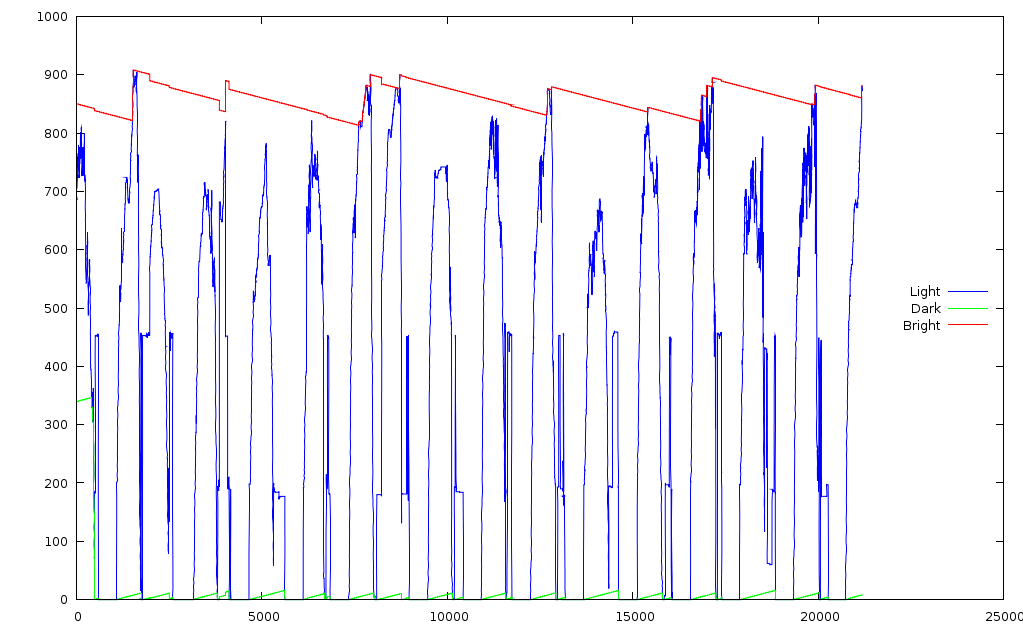
    The Totally Featureless Clock has been running continuously for the last few months, with a laptop dutifully recording its trace output. Occasionally the USB link will disconnect, but on the whole it works pretty well; the clock continues to run even when the USB link fails.

    Here’s about three weeks of light intensity record. The red trace is the max value, green is minimum, and blue the current intensity. The min and max tend toward the middle, one count per hour, so they don’t stick at the extremes.

    Light Intensity
    Light Intensity

    The peaks represent daylight hours, zeros are overnight, and the overall scale is roughly logarithmic, more or less, kinda-sorta.

    The general idea is that the LED brightness matches the room illumination, with the min & max values tracking the actual ambient light range to get the most benefit out of the TLC5916’s limited dynamic range.

    You can spot the data dropouts where the red trace steps abruptly; it should decline smoothly from each peak and the peaks should be evenly spaced about 24 hours (1440 minutes) apart. Each minute generates three lines with the exact time, so it would be possible to futz around and timestamp each record, but …

    The clock dumps the ADC values in hexadecimal, which gnuplot can’t handle, so a bit of preprocessing is in order.

    cat *log > 0.txt
    grep Light 0.txt > 1.txt
    sed 's/Light: /0x/g;s/Min=/0x/g;s/Max=/0x/g' 1.txt > 2.txt
    gnuplot
    set key on right center
    plot "2.txt" using 1 with lines lt 3 title "Light", (and so forth)
    

    All in all, it seems to be working as intended. When I put it inside the case, I’ll probably have to increase the resistor to account for the dark-gray faceplate.

  • WWVB Synch Reliability

    I have the WWVB clock set to synch after receiving four consecutive valid time frames, which is pretty restrictive. The question is: can it still synch every night?

    Here’s six days with the antenna sitting 3 cm above the receiver board, in front of our living room window, aimed more-or-less broadside to Colorado. We’re in the Eastern Time Zone, which is currently UTC-5, so our midnight corresponds to UTC 0500.

    Set: 10 015 05:14:59.9 Loc=12 Age=0     LY=0 LS=0 DST=0 Chg=0 UT1=1 Mon=1 DOM=15
    Set: 10 015 05:25:59.9 Loc=12 Age=0     LY=0 LS=0 DST=0 Chg=0 UT1=1 Mon=1 DOM=15
    Set: 10 015 05:28:59.9 Loc=12 Age=0     LY=0 LS=0 DST=0 Chg=0 UT1=1 Mon=1 DOM=15
    Set: 10 015 06:15:59.9 Loc= 1 Age=0     LY=0 LS=0 DST=0 Chg=0 UT1=1 Mon=1 DOM=15
    Set: 10 015 07:05:59.9 Loc= 2 Age=0     LY=0 LS=0 DST=0 Chg=0 UT1=1 Mon=1 DOM=15
    Set: 10 015 11:30:59.9 Loc= 6 Age=0     LY=0 LS=0 DST=0 Chg=0 UT1=1 Mon=1 DOM=15
    Set: 10 015 13:41:59.9 Loc= 8 Age=0     LY=0 LS=0 DST=0 Chg=0 UT1=1 Mon=1 DOM=15
    Set: 10 015 13:44:59.9 Loc= 8 Age=0     LY=0 LS=0 DST=0 Chg=0 UT1=1 Mon=1 DOM=15
    Set: 10 015 15:22:59.9 Loc=10 Age=0     LY=0 LS=0 DST=0 Chg=0 UT1=1 Mon=1 DOM=15
    Set: 10 015 15:29:59.9 Loc=10 Age=0     LY=0 LS=0 DST=0 Chg=0 UT1=1 Mon=1 DOM=15
    Set: 10 016 07:49:59.9 Loc= 2 Age=0     LY=0 LS=0 DST=0 Chg=0 UT1=1 Mon=1 DOM=16
    Set: 10 016 09:46:59.9 Loc= 4 Age=0     LY=0 LS=0 DST=0 Chg=0 UT1=1 Mon=1 DOM=16
    Set: 10 016 14:06:59.9 Loc= 9 Age=0     LY=0 LS=0 DST=0 Chg=0 UT1=1 Mon=1 DOM=16
    Set: 10 017 04:54:59.9 Loc=11 Age=0     LY=0 LS=0 DST=0 Chg=0 UT1=1 Mon=1 DOM=17
    Set: 10 017 05:15:59.9 Loc=12 Age=0     LY=0 LS=0 DST=0 Chg=0 UT1=1 Mon=1 DOM=17
    Set: 10 017 05:20:59.9 Loc=12 Age=0     LY=0 LS=0 DST=0 Chg=0 UT1=1 Mon=1 DOM=17
    Set: 10 017 09:42:59.9 Loc= 4 Age=0     LY=0 LS=0 DST=0 Chg=0 UT1=1 Mon=1 DOM=17
    Set: 10 017 10:04:59.9 Loc= 5 Age=0     LY=0 LS=0 DST=0 Chg=0 UT1=1 Mon=1 DOM=17
    Set: 10 017 10:37:59.9 Loc= 5 Age=0     LY=0 LS=0 DST=0 Chg=0 UT1=1 Mon=1 DOM=17
    Set: 10 017 10:42:59.9 Loc= 5 Age=0     LY=0 LS=0 DST=0 Chg=0 UT1=1 Mon=1 DOM=17
    Set: 10 017 10:45:59.9 Loc= 5 Age=0     LY=0 LS=0 DST=0 Chg=0 UT1=1 Mon=1 DOM=17
    Set: 10 017 11:38:59.9 Loc= 6 Age=0     LY=0 LS=0 DST=0 Chg=0 UT1=1 Mon=1 DOM=17
    Set: 10 017 11:56:59.9 Loc= 6 Age=0     LY=0 LS=0 DST=0 Chg=0 UT1=1 Mon=1 DOM=17
    Set: 10 017 20:44:59.9 Loc= 3 Age=0     LY=0 LS=0 DST=0 Chg=0 UT1=1 Mon=1 DOM=17
    Set: 10 018 01:26:59.9 Loc= 8 Age=0     LY=0 LS=0 DST=0 Chg=0 UT1=1 Mon=1 DOM=18
    Set: 10 018 03:49:59.9 Loc=10 Age=0     LY=0 LS=0 DST=0 Chg=0 UT1=1 Mon=1 DOM=18
    Set: 10 018 08:30:59.9 Loc= 3 Age=0     LY=0 LS=0 DST=0 Chg=0 UT1=1 Mon=1 DOM=18
    Set: 10 018 09:47:59.9 Loc= 4 Age=0     LY=0 LS=0 DST=0 Chg=0 UT1=1 Mon=1 DOM=18
    Set: 10 018 11:11:59.9 Loc= 6 Age=0     LY=0 LS=0 DST=0 Chg=0 UT1=1 Mon=1 DOM=18
    Set: 10 018 11:34:59.9 Loc= 6 Age=0     LY=0 LS=0 DST=0 Chg=0 UT1=1 Mon=1 DOM=18
    Set: 10 018 12:10:59.9 Loc= 7 Age=0     LY=0 LS=0 DST=0 Chg=0 UT1=1 Mon=1 DOM=18
    Set: 10 018 12:13:59.9 Loc= 7 Age=0     LY=0 LS=0 DST=0 Chg=0 UT1=1 Mon=1 DOM=18
    Set: 10 018 16:10:59.9 Loc=11 Age=0     LY=0 LS=0 DST=0 Chg=0 UT1=1 Mon=1 DOM=18
    Set: 10 019 05:52:59.9 Loc=12 Age=0     LY=0 LS=0 DST=0 Chg=0 UT1=1 Mon=1 DOM=19
    Set: 10 019 05:55:59.9 Loc=12 Age=0     LY=0 LS=0 DST=0 Chg=0 UT1=1 Mon=1 DOM=19
    Set: 10 019 06:59:59.9 Loc= 1 Age=0     LY=0 LS=0 DST=0 Chg=0 UT1=1 Mon=1 DOM=19
    Set: 10 019 07:48:59.9 Loc= 2 Age=0     LY=0 LS=0 DST=0 Chg=0 UT1=1 Mon=1 DOM=19
    Set: 10 019 08:06:59.9 Loc= 3 Age=0     LY=0 LS=0 DST=0 Chg=0 UT1=1 Mon=1 DOM=19
    Set: 10 019 08:12:59.9 Loc= 3 Age=0     LY=0 LS=0 DST=0 Chg=0 UT1=1 Mon=1 DOM=19
    Set: 10 019 09:08:59.9 Loc= 4 Age=0     LY=0 LS=0 DST=0 Chg=0 UT1=1 Mon=1 DOM=19
    Set: 10 019 09:33:59.9 Loc= 4 Age=0     LY=0 LS=0 DST=0 Chg=0 UT1=1 Mon=1 DOM=19
    Set: 10 019 10:08:59.9 Loc= 5 Age=0     LY=0 LS=0 DST=0 Chg=0 UT1=1 Mon=1 DOM=19
    Set: 10 019 10:32:59.9 Loc= 5 Age=0     LY=0 LS=0 DST=0 Chg=0 UT1=1 Mon=1 DOM=19
    Set: 10 019 12:34:59.9 Loc= 7 Age=0     LY=0 LS=0 DST=0 Chg=0 UT1=1 Mon=1 DOM=19
    Set: 10 019 13:49:59.9 Loc= 8 Age=0     LY=0 LS=0 DST=0 Chg=0 UT1=1 Mon=1 DOM=19
    Set: 10 020 05:22:59.9 Loc=12 Age=0     LY=0 LS=0 DST=0 Chg=0 UT1=1 Mon=1 DOM=20
    Set: 10 020 05:37:59.9 Loc=12 Age=0     LY=0 LS=0 DST=0 Chg=0 UT1=1 Mon=1 DOM=20
    Set: 10 020 07:41:59.9 Loc= 2 Age=0     LY=0 LS=0 DST=0 Chg=0 UT1=1 Mon=1 DOM=20
    Set: 10 020 09:47:59.9 Loc= 4 Age=0     LY=0 LS=0 DST=0 Chg=0 UT1=1 Mon=1 DOM=20
    Set: 10 020 10:15:59.9 Loc= 5 Age=0     LY=0 LS=0 DST=0 Chg=0 UT1=1 Mon=1 DOM=20
    Set: 10 020 10:26:59.9 Loc= 5 Age=0     LY=0 LS=0 DST=0 Chg=0 UT1=1 Mon=1 DOM=20
    Set: 10 020 10:46:59.9 Loc= 5 Age=0     LY=0 LS=0 DST=0 Chg=0 UT1=1 Mon=1 DOM=20
    Set: 10 021 07:44:59.9 Loc= 2 Age=0     LY=0 LS=0 DST=0 Chg=0 UT1=1 Mon=1 DOM=21
    

    As you’d expect, WWVB synch is an overnight thing, with occasional synchs during the morning hours.

    Winter has the absolute best RF propagation, so demanding four good frames probably isn’t going to work during the summer…