The Smell of Molten Projects in the Morning

Ed Nisley's Blog: Shop notes, electronics, firmware, machinery, 3D printing, laser cuttery, and curiosities. Contents: 100% human thinking, 0% AI slop.

Tag: Arduino

All things Arduino

  • Stepper Sync Wheel: Current Waveform First Light

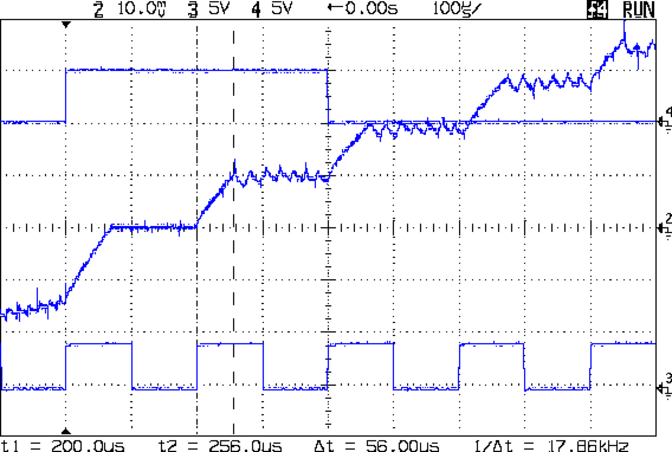
    Eks loaned me a Tek AM503 Current Probe Amplifier, one of those gorgeous instruments that Just Works: a clamp-on DC to 50 MHz Hall Effect current meter. Because it’s electrically isolated from all the hideous electrical hash that surrounds any stepper motor driver circuit, it doesn’t see much of the garbage that pollutes any current sensor depending on a series resistance and a differential amplifier.

    Which lets you take pix like this:

    Stepper Test
    Stepper Test

    From top to bottom:

    The initial ramp occupying the first third of each step comes from the motor’s L/R time constant coupled with the 9 V supply I was using. Back of the envelope: 2 mH / 2 Ω = 1 ms. With 8 V (9 V less MOSFET drops &c) applied, the initial slope = 8 V / 2 mH = 2500 A/s, so in 75 ms it rises 187 mA: close enough.

    The small ripples show the A4988 chopping the current to maintain the proper value for each microstep.

    Looks just like the pretty pictures in the datasheet, doesn’t it?

  • Thing-O-Matic: Thermal Runaway!

    Well, it finally happened: the Extruder Controller jammed the extruder heater full on and the Thermal Core temperature went on an uncontrolled rise.

    This changes the thermal runaway scenario from “It can’t happen here” to “Once is happenstance“.

    I’d been tweaking an OpenSCAD model, slicing it, not liking the results shown in Skeinlayer, re-tweaking, re-slicing, and iterating around that loop for quite some time. When I figured I was close to having a good model & G-Code, I turned on the heaters to get the printer ready; heating from a cold start requires about 12 minutes due to the double aluminum build plates and hulking cartridge heater adapters.

    I made several (well, many) more iterations through OpenSCAD and slicing, flipped to the Control Panel, and discovered the Thermal Core temperature was passing through 285 °C on the way up. Now, the temperature doesn’t rise abruptly, but it was already far higher than the original 210 °C setpoint; you cannot set an Extruder temperature over 260 °C (!) without passing through a confirmation dialog.

    Oddly, the setpoint temperatures for both the Extruder and HBP showed 9 °C. The build platform was cooling off, as you would expect for a setpoint far below the actual temperature, but the Thermal Core heater was jammed on.

    An LED indicator on the Z stage shows when the EC switches the cartridge heater on. That LED was lit, so I knew the EC had gone nuts: the heater was on, even though the Thermal Core temperature was far above the setpoint.

    I passed up an opportunity for Science by punching the Emergency Shutdown button on the Thermal Lockout: the Thing-O-Matic went dark. Turned it back on, reconnected RepG, and ran a few yards of smoking hot filament out of the nozzle. Yes, the Thermal Core really was that hot… I ran the filament drive at 25 rev/min for 10 seconds and it sprayed filament like crazy.

    The Thermal Lockout had not tripped, very much as expected. Back when I was figuring out where to mount the thermal switches, those measurements suggested that the Thermal Core would probably exceed 325 °C before the 100 °C NC switch at the top of the Thermal Rise opened. The Core hadn’t gotten close to that temperature, but it was on the way!

    The 40 °C NO switch glued to the base of the filament drive had long since closed and lit the yellow LED, but even I agree that’s an absurdly low temperature for such a warning. I have no idea what the actual temperatures were, but I’m thinking of putting a pair of thermocouples in the obvious spots.

    I’ve devoted considerable time and energy to eliminating erratic operation and glitchy behavior, to the extent that the printer has behaved flawlessly up to this point. Obviously, something glitched the Extruder Controller, which is basically an Arduino-class microcontroller monitoring two temperature sensors and driving two MOSFETs, while chatting with the Arduino Mega that lives under the Motherboard.

    A power glitch will hard-reset the Mega (because I connected +Power Good to -Reset), but the (2.7, anyway) MB firmware has the disturbing property of not resetting the EC when it restarts. You can confirm this by turning the heaters on using the Control Panel, closing it, then blipping the Motherboard Reset button: the heaters remain on. I’ll connect +Power Good to the EC’s -Reset the next time I open the box.

    The Thing-O-Matic worked fine (again) after the shutdown, but, as far as I’m concerned, all the effort I put into the Thermal Lockout on the Extruder Heaters has been justified. If the EC ran away once, it will run away again.

    I don’t have an MBI MK6+ Thermal Core or their Safety Cutout Switch circuit, but a look at the schematic suggests a heads-up if you use that hardware. The Safety Cutout Switch has (IMO, anyway) several design flaws:

    • The relay is not energized during normal operation. If it fails to energize when the thermal switch activates, the heater remains active.
    • By design, the 12 V relay sees only 9 V when the thermal switch operates. The usual wiring resistance and MOSFET resistances, in combination with a sagging power supply,  can reduce the available voltage below the relay’s 8.4 V must-operate voltage: it may not cut off the heater.
    • The relay cannot operate when the ground connection in the Alarm cable isn’t connected, as is the case in a Cupcake without a matching E-Stop jack. In any printer, a disconnected Alarm cable or a broken ground wire will silently prevent the relay from operating.

    I’m willing to be proven wrong on any of those points, but as nearly as I can tell, the cartridge heater in a MK6+ can operate with a completely non-functional “Safety Cutout” and you’ll never know there’s a problem. When installed exactly as directed and with the entire printer working properly, it’ll probably work… but if everything worked properly, you wouldn’t need it.

    [Update: MBI recently issued a slipstream update that put the Safety Circuit at Rev B. The relay now attaches to the Extruder Controller MOSFET, thus eliminating the requirement for the Alarm cable’s ground.  However, the relay now sees the heater’s high-current voltage drop on both terminals. Measure the actual voltage at the Safety Circuit’s input terminals with both heaters running. If that voltage is less than 11.2 V, the relay must operate below its must-operate voltage in order to cut off the Extruder heater.]

    The rant at the bottom of that post gave some features that I considered vital when I was designing the Thermal Lockout for my printer. I thought it went without saying that a safety circuit should fail safe: if the safety circuit does not operate, the protected equipment must not operate. As long as the Thermal Switch functions correctly, my Thermal Lockout will fail safe: an inoperative relay, a broken wire, a disconnected switch, or a weak power supply will prevent the printer from starting.

    My circuit is not completely fail-safe, of course, but the most common problems cause a hard shutdown.

    It really does matter…

    I’m now thinking that a thermal switch on the heated build platform is a Good Thing. I suspect the solder will melt and the connector will fall off before melting the acrylic in an ABP or charring the plywood in an HBP, but it’d be interesting to test that assumption, wouldn’t it?
  • Thing-O-Matic: USB Power Backfeed Prevention

    The Arduino Mega 2650 board used in the Thing-O-Matic gets its power from the +12 V ATX supply plugged into the TOM Motherboard. It will also automagically switch to +5 V from the USB connection when the +12 V external power Goes Away.

    Come to find out that the Foxconn Atom I’m using doesn’t shut off the power to the USB ports when it’s “turned off”. That keeps the Arduino alive and, by a quirk of the circuitry, backfeeds +5 V into the +12 V supply, which makes its way back to the ATX power supply and keeps the fan running. Slowly, but it’s ticking over in there.

    Rather than keep unplugging the USB cable, I added a diode in series with the Motherboard +12 V trace going to the Arduino connector:

    USB backfeed prevention diode
    USB backfeed prevention diode

    The orange stuff is nail polish rejected by my Shop Assistant, which covers a slit gouged in the +12 V trace. The diode bridges the gouge and passes current only into the Arduino.

    Any diode will do, as the next step in the +12 V supply chain is that poor overworked Arduino regulator responsible for shaving it down to +5 V. I used a good old 1N4001 and it’s perfectly happy.

    [Update: the Arduino will remain powered up overnight, even with everything else turned off. When you turn the Thing-O-Matic on the next morning, pop the Reset button to get the Arduino’s attention.]

  • Thing-O-Matic: Arduino Mega Heatsinking

    The Thing-O-Matic Motherboard rides atop an Arduino Mega (with the auto-reset option disabled), drawing most of its power from the hulking ATX connector at one end. The Mega draws power from the ATX +12 V supply and produces +5 V through its on-board regulator.

    As I noted there, that regulator runs surprisingly hot when fed from +12 V, even without any additional current flowing to the Mega’s pins. The solution here required another search through the parts heap, which eventually disgorged a small heatsink that was, I think, intended for a 16-pin DIP, although I obviously added the hole for some other, long-forgotten purpose.

    Motherboard regulator heatsink
    Motherboard regulator heatsink

    A bit of fin-bending to clear the (unused) power entry jack, a dab of JB Kwik epoxy, and a clamp to keep it in place while the epoxy cures:

    Clamping the Motherboard regulator heatsink
    Clamping the Motherboard regulator heatsink

    You won’t have such a heatsink, but any similarly shaped chunk of metal, even without fins, should suffice. Nothing critical about it, as long as it clears the Motherboard that will be plugged atop the Mega; you’re just increasing the surface area for heat dissipation.

    The Motherboard and Mega sit in the large opening across the Thing-O-Matic’s baseplate from the ATX supply’s fan intake, where they get plenty of cooling air. Do a before-and-after test with a fingertip on the regulator to feel the improvement for yourself.

    This is, admittedly, just a feel-good tweak, but a cool regulator is a happy regulator. Spread the joy…

  • Arduino Mega: Voltage Regulator Heatsink

    The Arduino Mega has an SMD voltage regulator soldered to a copper pad connected with thermal vias to a similar pad on the bottom surface. The datasheet says the (roughly) 10×10 mm copper pad sets RθJA=55 °C/W, more or less; probably a bit less with the double-sided setup.

    It’s the chubby black slab snuggled up just to the right of coaxial power input jack. The four vias on each side go to an isolated copper pad under the solder mask on the other side.

    Arduino Mega voltage regulator
    Arduino Mega voltage regulator

    The board draws about 75 mA with nothing fancy on the I/O pins, so the regulator dissipates half a watt with a 12 VDC input supply. Figuring an ambient of 30 °C, the junction temperature is ticking along at 50-60 °C.

    That’s all well and good, but my rule of thumb for semiconductors is:

    • If you can’t hold your thumb on it for any length of time, it’s too damn hot.

    That regulator fails my rule of thumb even before I start adding LEDs and other doodads.

    A bit of rummaging turned up an old Thermalloy sample box with a DIP heatsink. A dab of quick-setting epoxy and there it is:

    Arduino Mega regulator with heatsink
    Arduino Mega regulator with heatsink

    Now, I’ll grant you there are a number of things wrong with that approach, but my thumb is much happier. If it gets unhappy, I’ll just crack that puppy off and stick something larger in its place.

  • C Constants Aren’t Automatically Promoted

    Quick, what’s wrong with this code snippet…

    #define MAX_INTERVAL	(60*1000)
    
    unsigned long int LoggedTime;
    unsigned long int NowTime;
    
    byte LogNeeded;
    
    ... snippage ...
    
    LogNeeded = (NowTime >= (LoggedTime + MAX_INTERVAL)); 
    

    Yeah, that constant up there should look like this:

    #define MAX_INTERVAL (60*1000ul)

    Took me a while to figure that out. Again.

  • Arduino Mega: Mounting Standoff and Screw

    The Arduino Mega has four, count them, four mounting holes in a more-or-less rectangular pattern around the edge of the board. Three of the four have enough room for standard pan-head 4-40 screws. The fourth hole is squeezed between two pin-header sockets, to the extent that no screw in my collection will fit.

    Screw on Arduino Mega board
    Screw on Arduino Mega board

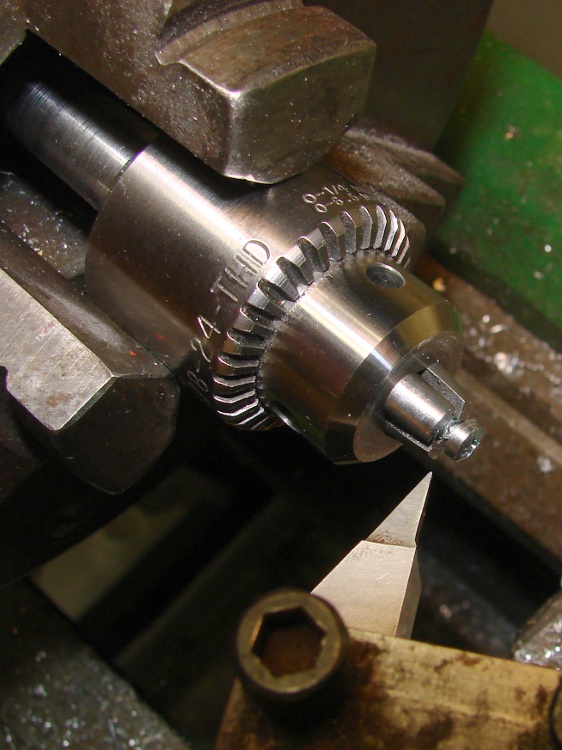
    Having a lathe, however, makes this situation no big deal… and this time, I put the Sherline drill chuck in the 3-jaw because I wanted to, not because the 3-jaw was stuck. In truth, the lathe chuck simply won’t grab a 4-40 screw at all.

    Turning down the screw
    Turning down the screw

    I had that pointy right-cutting tool in the holder, so that’s how I cleared off the burr on the backside of the head.

    The chuck did grab the hex standoff just fine, though, and the final result looks like this…

    Modified standoff and screw for Arduino Mega
    Modified standoff and screw for Arduino Mega

    For future reference, the turned-down sections are 0.180 inch in diameter; call it 4.5 mm. The snout on the standoff must clear the pins,so it’s 0.100 inch or 2.5 mm long.