Ed Nisley's Blog: Shop notes, electronics, firmware, machinery, 3D printing, laser cuttery, and curiosities. Contents: 100% human thinking, 0% AI slop.
An LED bargraph display comes in handy for displaying a tuning center point, monitoring a sensor above-and-below a setpoint, and suchlike.
Given the number of output bits, this requires a pair of ‘595 shift registers. There’s no particular need for speed, so the shiftOut() function will suffice. That means the register control bits don’t need the dedicated SPI pins and won’t soak up the precious PWM outputs required by, say, the RGB LED strip drivers.
LED Bargraph Display
It’s Yet Another Solderless Breadboard Hairball:
LED Bargraph Display – breadboard
The upper LED bargraph is an HPSP-4836 RRYYGGYYRR block, the lower one is an all-green GBG1000. The bottom four LEDs aren’t connected; you could add another ‘595 shift register, but then you’d have four bits left over and you’d be forced to add more LEDs. Four bricks and five ‘595 chips would come out even, if you’re into that.
The LEDs run at about 4 mA, which would be enough for decoration in a dim room and seems about the maximum the poor little 74HC595 chips can supply. If you need more juice, you need actual LED drivers with dimming and all that sort of stuff.
You need not use LED bargraphs, of course, and discrete LEDs for the lower six bits make more sense. They’ll be good for mode indicators & suchlike.
The demo code loads & shifts out alternating bits, then repeatedly scans a single bar upward through the entire array. Note that the bar is just a bit position in the two bytes that get shifted out every time the array updates (which is every 100 ms); the array is not just shifting a single position to move the bar. Verily, the bar moves opposite to the register shift direction to demonstrate that.
The Arduino source code:
// LED Bar Light
// Ed Nisley - KE4ANU - November 2012

//----------
// Pin assignments
// These are *software* pins for shiftOut(), not the *hardware* SPI functions

const byte PIN_MOSI = 8;			// data to shift reg
const byte PIN_SCK  = 6;			// shift clock to shift reg
const byte PIN_RCK  = 7;			// latch clock

const byte PIN_SYNC = 13;			// scope sync

//----------
// Constants

const int UPDATEMS = 100;				// update LEDs only this many ms apart

#define TCCRxB 0x02						// Timer prescaler

//----------
// Globals

word LEDBits;

unsigned long MillisNow;
unsigned long MillisThen;

//-- Helper routine for printf()

int s_putc(char c, FILE *t) {
  Serial.write(c);
}

//-- Send bits to LED bar driver register

void SetBarBits(word Pattern) {

	shiftOut(PIN_MOSI,PIN_SCK,MSBFIRST,Pattern >> 8);
	shiftOut(PIN_MOSI,PIN_SCK,MSBFIRST,Pattern & 0x00ff);

	digitalWrite(PIN_RCK,HIGH);
	digitalWrite(PIN_RCK,LOW);

}

//------------------
// Set things up

void setup() {
	pinMode(PIN_SYNC,OUTPUT);
	digitalWrite(PIN_SYNC,LOW);	// show we arrived

//	TCCR1B = TCCRxB;					// set frequency for PWM 9 & 10
//	TCCR2B = TCCRxB;					// set frequency for PWM 3 & 11

	pinMode(PIN_MOSI,OUTPUT);
	digitalWrite(PIN_MOSI,LOW);

	pinMode(PIN_SCK,OUTPUT);
	digitalWrite(PIN_SCK,LOW);

	pinMode(PIN_RCK,OUTPUT);
	digitalWrite(PIN_RCK,LOW);

	Serial.begin(9600);
	fdevopen(&s_putc,0);				// set up serial output for printf()

	printf("LED Bar Light\r\nEd Nisley - KE4ZNU - November 2012\r\n");

	LEDBits = 0x5555;
	SetBarBits(LEDBits);
	delay(1000);

	MillisThen = millis();

}

//------------------
// Run the test loop

void loop() {

	MillisNow = millis();

	if ((MillisNow - MillisThen) > UPDATEMS) {

		digitalWrite(PIN_SYNC,HIGH);
		SetBarBits(LEDBits);
		digitalWrite(PIN_SYNC,LOW);

		LEDBits = LEDBits >> 1;
		if (!LEDBits) {
			LEDBits = 0x8000;
			printf("LEDBits reset\n");
		}

		MillisThen = MillisNow;
	}

}
The MOSFETs must have logic-level gates for this to work, of course. The tiny ZVNL110A MOSFETs have a channel resistance of about 3 Ω that limits their maximum current to around 300 mA, so the LED strip can have maybe a dozen segments, tops. If you use logic-level power MOSFETs, then the sky’s the limit. This also works with a single RGB LED on the +5 V supply with dropping resistors; you probably shouldn’t drive it directly from the port pins, though, particularly with an Arduino Pro Mini’s tiny regulator, because 60-ish mA will toast the regulator.
You may want gate pulldown resistors, 10 kΩ or so, to prevent the gates from drifting high when the outputs aren’t initialized. No harm will come with the single LED segment I’m using, but if the MOSFET gates float half-on with a dozen segments, then the transistor dissipation will get out of hand.
The usual LED test code seems pretty boring, so I conjured up a mood light that drives the PWM outputs with three raised sinusoids having mutually prime periods: 9, 11, and 13 seconds. That makes the pattern repeat every 21 minutes, although, being male, I admit most of the colors look the same to me. The PdBase constant scales milliseconds of elapsed time to radians for the trig functions:
const double PdBase = 1.00 * 2.0 * M_PI / 1000.0;
For an even more mellow mood light, change the leading 1.00 to, say, 0.01: the basic period becomes 100 seconds and the repeat period covers 1.5 days. You (well, I) can’t see the color change at that rate, but it’s never the same when you look at it twice.
All the pins / periods / intensity limits live in matching arrays, so a simple loop can do the right thing for all three colors. You could put the data into structures or classes or whatever, then pass pointers around, but I think it’s obvious enough what’s going on.
Rather than bothering with scaling integer arithmetic and doping out CORDIC trig functions again, I just used floating point. Arduinos are seductive that way.
The main loop runs continuously and updates the LEDs every 10 ms. There’s no good reason for that pace, but it should fit better with the other hardware I’m conjuring up.
You can see the individual intensity steps at low duty cycles, because the 8 bit PWM step size is 0.4%. So it goes.
Despite my loathing of solderless breadboards, it works OK:
RGB LED Strip Driver – breadboard
The MOSFETs stand almost invisibly between the drain wires to the LEDs and the gate wires to the Arduino.
The Arduino source code:
// RGB LED strip mood lighting
// Ed Nisley - KE4ANU - November 2012

//#include <stdio.h>
//#include <math.h>

//----------
// Pin assignments

const byte PIN_RED = 9;				// PWM - LED driver outputs +active
const byte PIN_GREEN = 10;
const byte PIN_BLUE = 11;

const byte PIN_HEARTBEAT = 13;		// DO - Arduino LED

//----------
// Constants

const int UPDATEMS = 10;						// update LEDs only this many ms apart

const double PdBase = 1.00 * 2.0 * M_PI / 1000.0;		// scale time in ms to radians

const byte Pins[] = {PIN_RED,PIN_GREEN,PIN_BLUE};
const float Period[] = {(1.0/9.0) * PdBase,(1.0/11.0) * PdBase,(1.0/13.0) * PdBase};
const float Intensity[] = {255.0,255.0,255.0};

#define TCCRxB 0x02						// Timer prescaler

//----------
// Globals

unsigned long MillisNow;
unsigned long MillisThen;

//-- Helper routine for printf()

int s_putc(char c, FILE *t) {
  Serial.write(c);
}

byte MakePWM(float MaxValue,double SineWave) {
	return trunc((SineWave + 1.0) * MaxValue/2.0);
}

//------------------
// Set things up

void setup() {
  pinMode(PIN_HEARTBEAT,OUTPUT);
  digitalWrite(PIN_HEARTBEAT,LOW);	// show we arrived

  TCCR1B = TCCRxB;					// set frequency for PWM 9 & 10
  TCCR2B = TCCRxB;					// set frequency for PWM 3 & 11

  pinMode(PIN_RED,OUTPUT);
  analogWrite(PIN_RED,0);			// force gate voltage = 0

  pinMode(PIN_GREEN,OUTPUT);
  analogWrite(PIN_GREEN,0);

  pinMode(PIN_BLUE,OUTPUT);
  analogWrite(PIN_BLUE,0);

  Serial.begin(9600);
  fdevopen(&s_putc,0);				// set up serial output for printf()

  printf("RGB LED Mood Lighting\r\nEd Nisley - KE4ZNU - November 2012\r\n");
}

//------------------
// Run the test loop

void loop() {

	MillisNow = millis();

	if ((MillisNow - MillisThen) > UPDATEMS) {
		digitalWrite(PIN_HEARTBEAT,HIGH);

		for (byte i = 0; i < 3; i++)
			analogWrite(Pins[i],MakePWM(Intensity[i],sin(MillisNow * Period[i])));

		digitalWrite(PIN_HEARTBEAT,LOW);

		MillisThen = MillisNow;
	}
}
Our Larval Engineer reports that the current techie-thing-to-do involves having a tattoo artist or other unlicensed medical technician implant a tiny bar magnet in one’s finger, a process that adds a sixth sense to one’s built-in repertoire after the anesthetic shot of whiskey wears off. Evidently, converting magnetic field variations into mechanical force tweaks those little nerve endings wonderfully well, provided that your finger doesn’t subsequently rot off.
I point out that a magnet epoxied to a fingernail would probably get you within a few dB of the same result, minus the back-alley surgery thing. She counters that’s tacky and lacks style.
I point out that her medical insurance (for which, harumph, we are currently paying) probably doesn’t cover self-inflicted damage. She counters that most victims people have no problems at all.
I point out that a steampunk-style wristband incorporating a Hall effect sensor, LEDs, and maybe a vibrating pager motor would be at least as cool and probably marketable, to boot. She returns broadside fire by observing such a device requires power and she knows how I feel about batteries.
Game, set, and match.
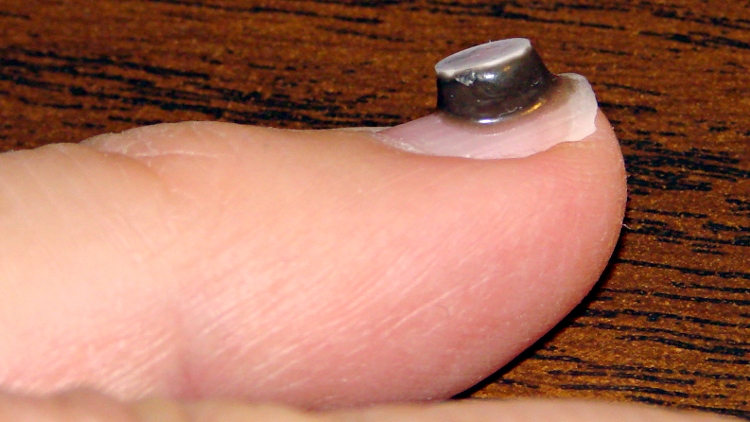
In the interest of science and so as to not be rendered completely obsolete, I’ve epoxied a small neodymium magnet to my left little finger to discover what the world feels like. It’s surrounded by epoxy, which ought to prevent corrosion & deterioration until it eventually falls off or the nail grows out. It came with a white ceramic layer on one pole, which means it’s completely encapsulated:
Neodymium magnet on fingernail
She’s absolutely right: it’s tacky and lacks style.
I used JB KwikWeld fast-setting epoxy. The magnet attracted a tendril of uncured epoxy, so the “steel filled” part of the description seems accurate, and the magnetic field produced a nice smooth coat over the entire side of the disk.
It buzzes gently inside a Sonicare toothbrush handle, snaps firmly to steel surfaces. and is otherwise inoffensive. I must run some calibration tests to figure out what sort of magnetic field intensity a fingernail can detect. I’m certain it’s less sensitive than an implanted magnet, but I’m down with that.
Memo to Self: If you should occasionally use your little finger to ream out your ear or nose, that’s just not going to work any more…
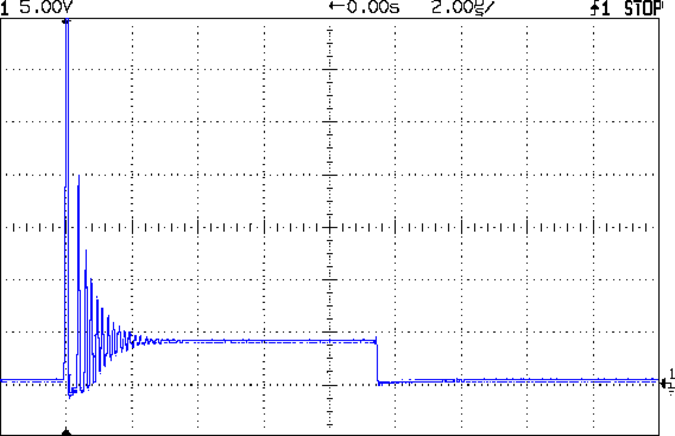
The tech reviewer for my Circuit Cellar columns on the MOSFET tester commented that the 32 kHz PWM frequency I used for the Peltier module temperature controller was much too high:
Peltier Noise – VDS – PWM Shutdown
He thought something around 1 Hz would be more appropriate.
Turns out we were both off by a bit. That reference suggests a PWM frequency in the 300-to-3000 Hz range. The lower limit avoids thermal cycling effects (the module’s thermal time constant is much slower) and, I presume, the higher limit avoids major losses from un-snubbed transients (they still occur, but with a very low duty cycle).
Peltier Turn-Off Transient
The Peltier PWM drive comes from PWM 10, which uses Timer 1. The VDS and ID setpoints come from PWM 11 and PWM 3, respectively, which use Timer 2. So I can just not tweak the Timer 1 PWM frequency, take the default 488 Hz, and it’s all good. That ever-popular post has the frequency-changing details.
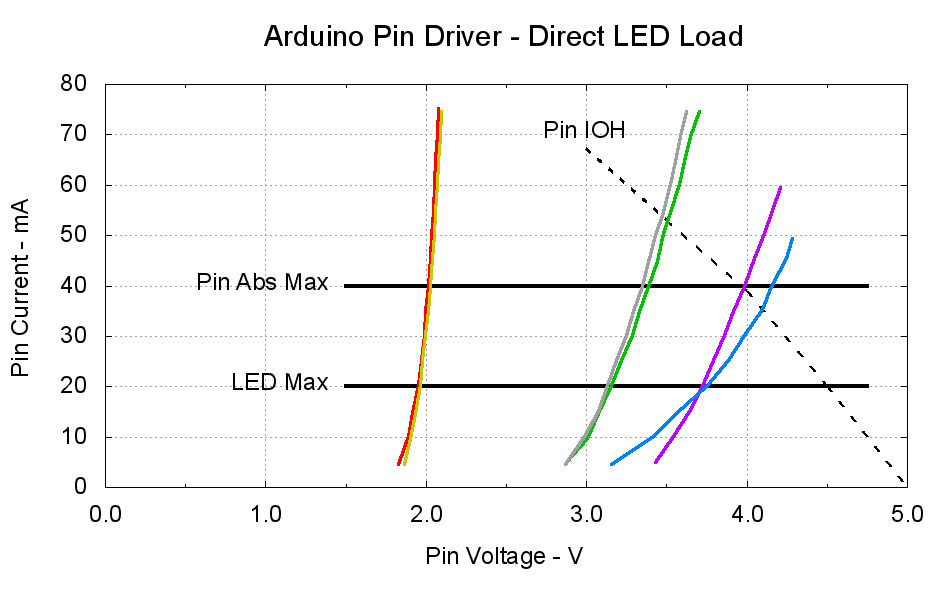
The dotted curve comes from Figure 29-22 of the ATmega168 datatsheet and shows the typical source current vs. voltage for a digital output pin on your favorite Arduino.
The cheerful colored curves show the current vs. voltage characteristics of some random LEDs, with data from the same curve tracer setup as those.
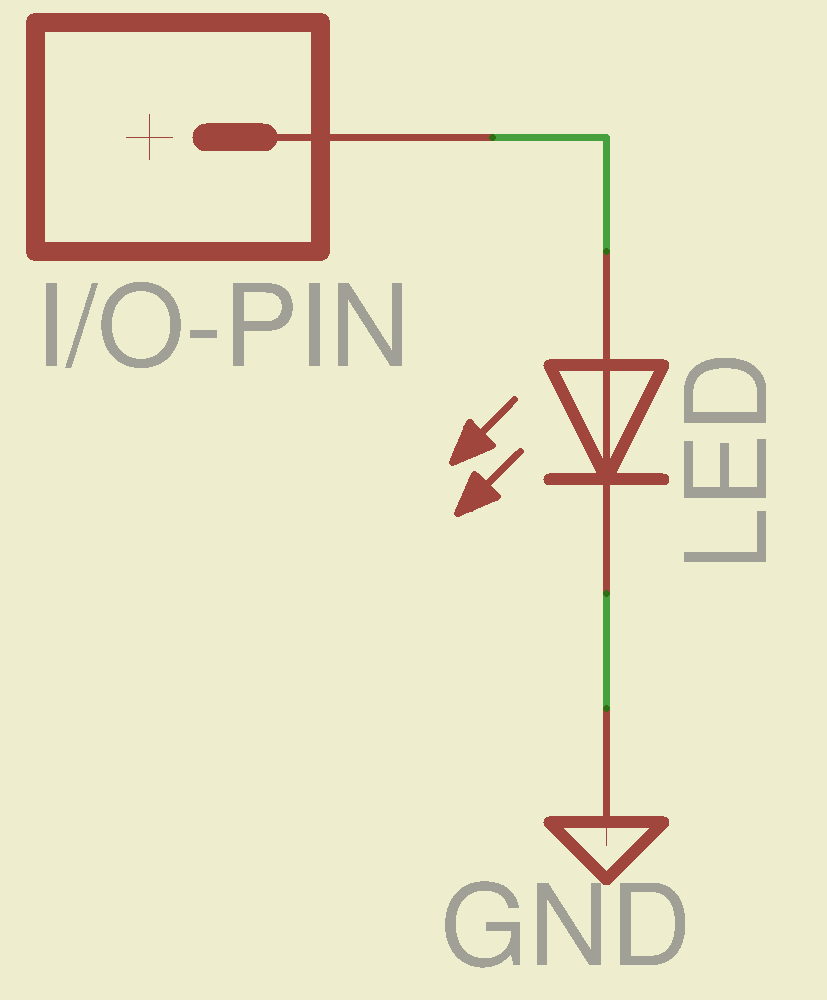
Given a particular LED directly connected between an Arduino output pin and circuit common (without the formality of a current-limiting ballast resistor), the intersection of the dotted output pin curve with the colored LED curve gives you the current & voltage at the pin. For example, the violet LED would operate at 4 V and 40 mA.
Some gotchas:
Typical 5 mm LEDs, of the sort one might use for this experiment, have a maximum DC current limit of 20 mA
Arduino output pins have an absolute maximum current limit of 40 mA
So all of the direct solutions drive too much current through the LED. Although the blue and violet LEDs don’t quite exceed the output pin limit, the others certainly do. Those old standby red & amber LEDs would have absurdly high intercepts, well beyond the limit of sanity, in the region where the data you see here breaks down, where the pin driver gives up and goes poof, not that that ever stopped anybody from trying.
You’ve probably seen somebody do it. Next time, aim ’em here in a non-confrontational manner… [grin]
My Arduino Survival Guide presentation has other info that may help that poor sweating Arduino survive. You don’t get my performance-art patter, but the pictures and captions should carry the tale…
As part of conjuring up this plot, I discovered that, for whatever reason, Gnuplot’s TrueType font rendering (via gdlib) no longer works in Xubuntu 12.04: the font name has no effect whatsoever, but the point size does.
The Gnuplot source code:
#!/bin/sh
#-- overhead
export GDFONTPATH="/usr/share/fonts/truetype/msttcorefonts"
Pinfile="ATmega Pin Driver Data - Source.csv"
LEDfile="LED Data.csv"
base="Arduino Pin Driver - Direct LED Load"
Outfile="${base}.png"
echo Output file: ${Outfile}
fontname="Arial"
echo Font: ${fontname}
#-- do it
gnuplot << EOF
#set term x11
set term png font "${fontname},18" size 950,600
set output "${Outfile}"
set title "${base}" font "${fontname},22"
set key noautotitles
unset mouse
set bmargin 4
set grid xtics ytics
set xlabel "Pin Voltage - V"
set format x "%4.1f"
set xrange [0:${vds_max}]
#set xtics 0,5
set mxtics 2
#set ytics nomirror autofreq
set ylabel "Pin Current - mA"
#set format y "%4.1f"
set yrange [0:80]
#set mytics 2
#set y2label "Drain Resistance - RDS - mohm"
#set y2tics nomirror autofreq ${rds_tics}
#set format y2 "%3.0f"
#set y2range [0:${rds_max}]
#set y2tics 32
#set rmargin 9
set datafile separator "\t"
set label "Pin IOH" at 3.0,70 center font "${fontname},18"
set label "Pin Abs Max" at 1.4,40 right font "${fontname},18"
set arrow from 1.5,40 to 4.75,40 lw 4 nohead
set label "LED Max" at 1.4,20 right font "${fontname},18"
set arrow from 1.5,20 to 4.75,20 lw 4 nohead
plot \
"${Pinfile}" using 1:3 with lines lt 0 lw 3 lc -1 ,\
"${LEDfile}" using (\$5/1000):((\$1>0)?\$2/1000:NaN) index 0:0 with lines lw 3 lc 1 ,\
"${LEDfile}" using (\$5/1000):((\$1>0)?\$2/1000:NaN) index 1:1 with lines lw 3 lc 2 ,\
"${LEDfile}" using (\$5/1000):((\$1>0)?\$2/1000:NaN) index 2:2 with lines lw 3 lc 0 ,\
"${LEDfile}" using (\$5/1000):((\$1>0)?\$2/1000:NaN) index 3:3 with lines lw 3 lc 4 ,\
"${LEDfile}" using (\$5/1000):((\$1>0)?\$2/1000:NaN) index 4:4 with lines lw 3 lc 3 ,\
"${LEDfile}" using (\$5/1000):((\$1>0)?\$2/1000:NaN) index 5:5 with lines lw 3 lc 7
EOF
A few early risers got to see a completely broken listing, with all the quotes and brackets and suchlike reduced to the usual HTML escaped gibberish…
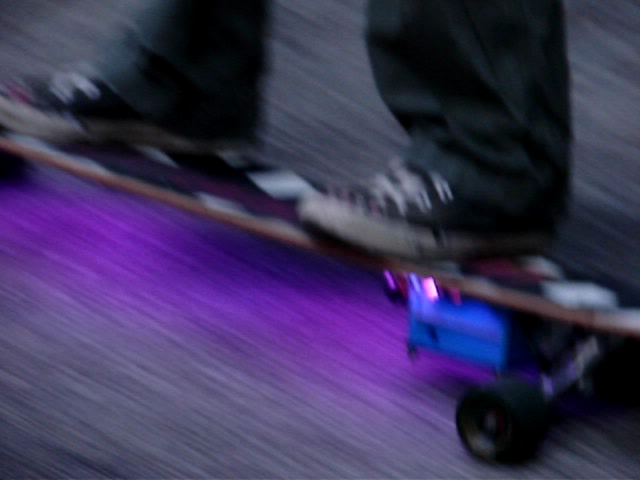
After our Larval Engineer tweaked the code to track the maximum speed for the current run, so that the color always hits pure blue at top speed and red near standstill, we can prove it happened: we have a video! It’s much less awful than the First Light video, but with plenty of cinéma-vérité camera shake, lousy focus, and bloopers:
Longboard In Action
That’s a frame extracted from one of the raw videos files using ffmpegthumbnailer:
for t in `seq 0 10 100` ; do ffmpegthumbnailer -i mov07117.mpg -o Longboard-$t.jpg -t $t% -q 10 -s 640 ; done
This view of the 3D printed case shows the power switch and the Hall effect sensor cable snaking out of the truck just below the near axle:
Longboard RGB LED Electronics – right front view
She filled the case corners that pulled up from the build platform with a thin layer of epoxy, getting a plane surface by curing it atop waxed paper on the shop’s surface plate, to keep the polycarbonate sheet flat. I didn’t have any acorn nuts to top those nylon lock nuts, alas.
The 4-cell Li-ion battery lives in the slice between the white aluminum plates, where it takes about four hours to charge from 3.0 V/cell. The Arduino Pro Mini lives behind the smoked polycarb sheet, where its red LED adds a mysterious touch. Maybe, some day, she’ll show the 1/rev pulse on the standard Arduino LED for debugging.
A view from the other side shows the hole for the charger above the circuit board, with the Hall sensor out of sight below the far axle:
Longboard RGB LED Electronics – left front view
Yes, the cable to the LEDs deserves better care. She learned that you must provide strain relief at cable-to-component junctions, which we achieved by pasting the wires to the board beside the LED strip with double-stick tape. The rest of the LED strip interconnections live atop similar tape strips. There’s nothing much protecting the LEDs or their delicate SMD resistors, butit works!
Actually, one red LED in an RGB package went toes-up and wasn’t revived by resoldering its leads. So we jumpered around the package, subjecting the remaining two red LEDs in that string to a bit more current than they’d prefer, and that’s that.
There’s a whole bunch not to like one could improve in both the mechanics and electronics, butit works! If you’ll grant it alpha prototype status, then I’d say it’s Good Enough; this is her project and she’ll learn a lot from how it works and how it fails, just like we all do.
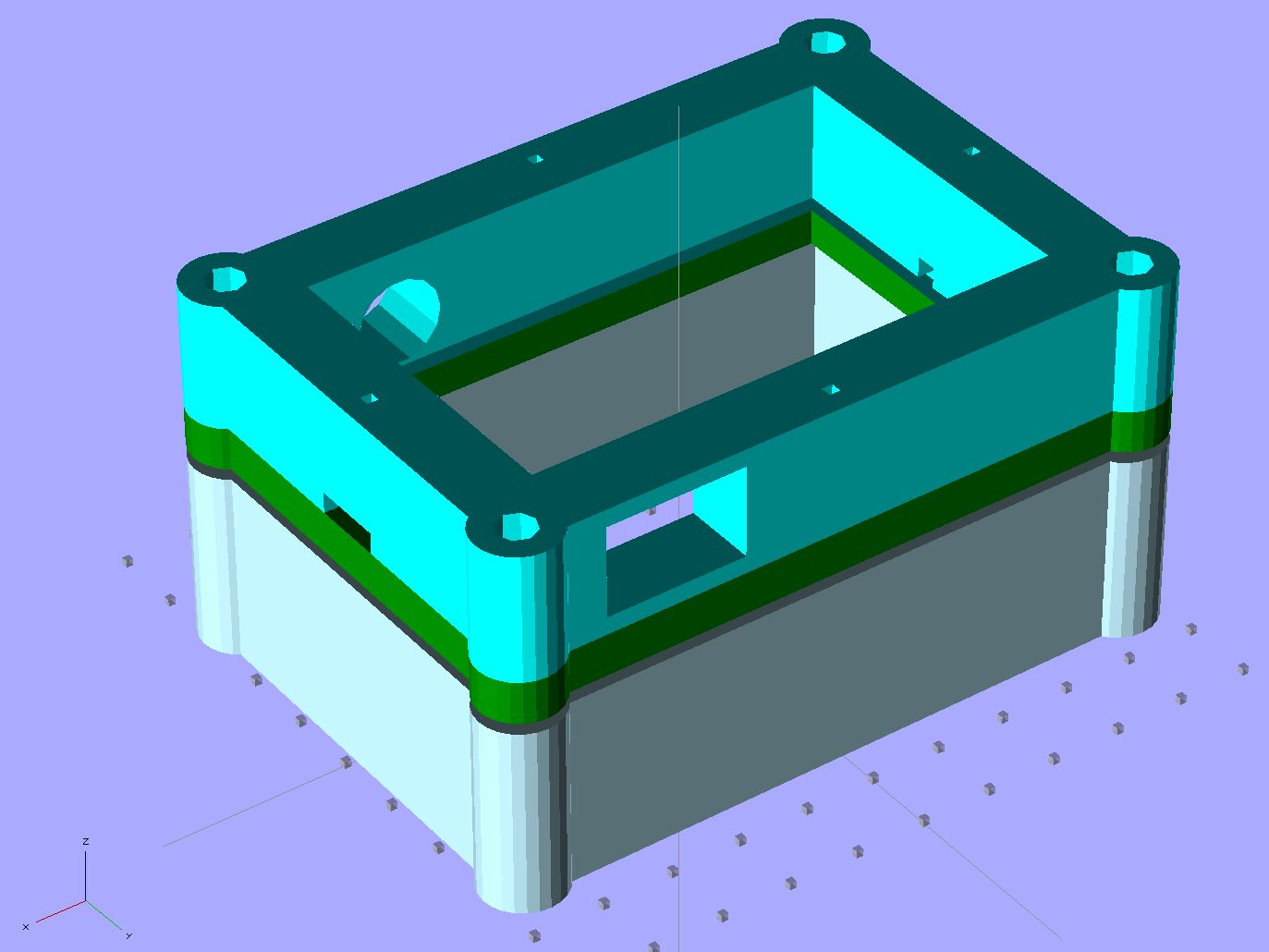
After our Larval Engineer allowed as how OpenSCAD’s learning curve was rather too steep, I punched a few holes in the solid model of the case for the Longboard Ground Effect Lighting controller:
Longboard Case Solid Model – with holes
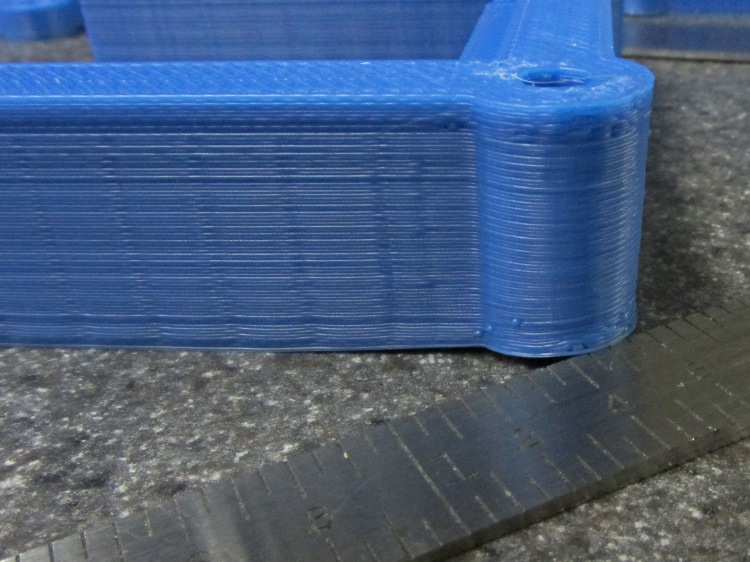
Those rounded corners sucked the Kapton tape right off the build platform as the massive shape shrank. The top layer was the worst offender, with 1.4 mm of clearance (shown with that tapered scale) under one corner:
Longboard case – warped corner
The warping doesn’t matter much, because the case will be compression-loaded by screws and wave washers in the corners. We may need to fill or level the warp to keep the polycarbonate cover flat, though.
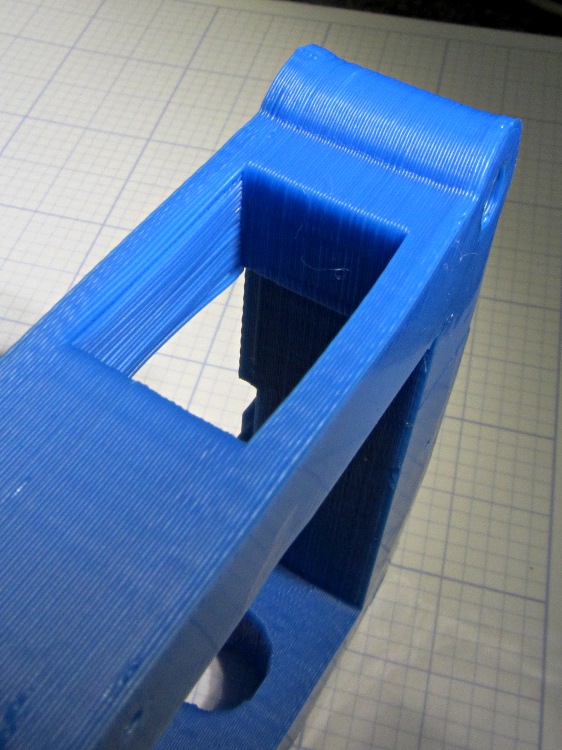
I thought about putting a support structure in the rectangular power switch opening, then decided to just try it and see what happens. It turned out fine; this view looks up toward the as-printed top of the opening (the camera’s barrel distortion makes the curve on the bottom surface look worse than it is):
Longboard case – switch hole overhang
Four stacked lithium cells produce upwards of 14.8 V, considerably more than those poor 12 V LED strips prefer to see, so I had her take some current vs. voltage data. She figured out how to convert 10-bit ADC values into battery voltage, after which she could, if she wanted to, beat her Arduino sketch into limiting the maximum PWM duty cycle to hold the LED power dissipation down to a reasonable number. Right now, it’s set to a fixed 25% and is way bright.
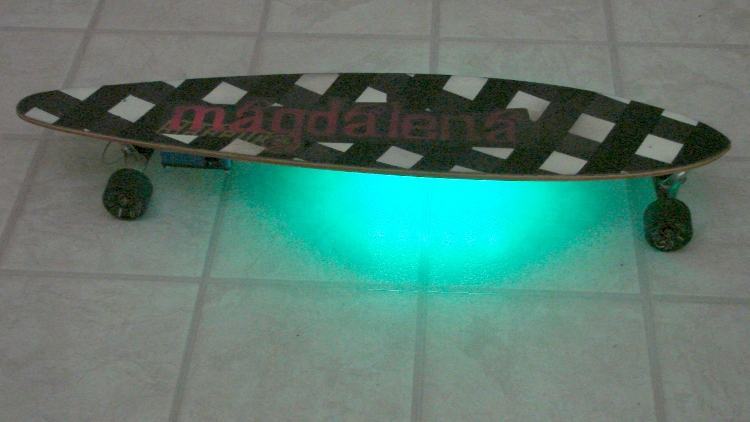
Longboard with variable RGB LED Ground Effect lighting
A truly crappy First Light video taken in the driveway is there. She’s been doing the Happy Dance all day… and promises to document the whole project in gruesome detail.






 The Smell of Molten Projects in the Morning