-
CPAP Hose Dryer: MVP Overview
For all the usual reasons, we’re now confronted with the need to dry a freshly washed CPAP hose:
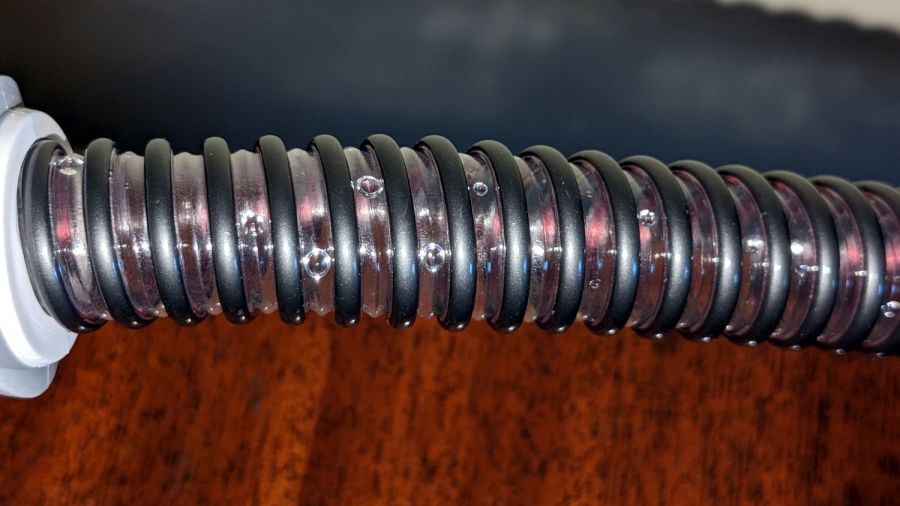
CPAP Dryer – water droplets in hose Those droplets might not seem like much, but I am reliably informed they produce over-humid air and sprinkle when they migrate into the mask during the night.
Commercial drying machines are available, but seem grossly overqualified and require proprietary foam filters. I wondered if simply pulling air through the hose for a few hours would work:

CPAP Dryer – dried hose Why, yes, it does.
That test took two hours and another with a different hose required about five, but simply “hanging the hose up to dry” consistently produced poor results after three days, so we count a few hours as a win.
I cut the first minimally viable prototype CPAP Hose Dryer from MDF:
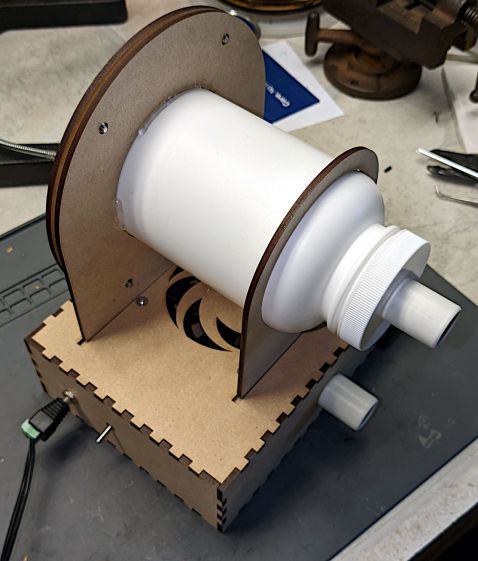
CPAP Dryer – overview Stipulated: MDF is absolutely the wrong material for an air-handling project, because laser-cut MDF stinketh unto high heaven. This was the first pass using cheap material to see how well, if at all, the idea worked.
The CPAP hose goes between the fittings on the bottle and box, with air entering the bottle through a hole drilled in what was its bottom:

CPAP Dryer – filter bottle cutout An air filter seemed like a Good Idea™, if only to keep ordinary room fuzz out of the bottle and hose. In this Third Pandemic Year, I could simply pull a least-favorite N95 mask from the stockpile and fit a clamp ring around it:

CPAP Dryer – filter clamp installed The motivation for pulling air through the tube, rather than pushing it, came when I realized I could build a much cleaner intake structure by starting with an ordinary HDPE bottle than I could possibly assemble from random parts.
So the fan in the box pulls air through the fitting on the side of the box and blows it out the swirl on top:

CPAP Dryer – fan box The box contains a coaxial power jack, the switch, and an 80 mm fan extricated from the Box o’ MostlyFans. I briefly considered an LED, but it’s obvious when the fan runs. The box and swirl cutting patterns come from the invaluable festi.info.
The two slots give the bottle somewhere to stand while idle. In use, the hose is sufficiently unwieldy to require standing the bottle wherever it wants to be, rather than insisting on putting it anywhere in particular.
More details to follow …
-
Subscribe
Subscribed
Already have a WordPress.com account? Log in now.
 The Smell of Molten Projects in the Morning