-
Displaying Variables in Gnuplot
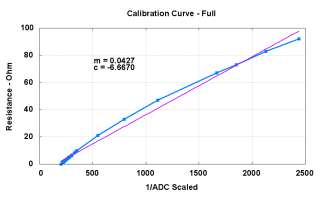
Sample plot with curve-fit line & variables Gnuplot can do curve fitting (of all kinds) and parks the coefficients in variables. In general, you’d like to display those values on the final plot for later reference…
The trick is using the sprintf() function, which behaves largely like the C version, to insert the variable into a formatted string for use in the label command.
I drive Gnuplot with shell scripts, which simplifies introducing parameters & suchlike. That’s conspicuous by its absence here, but when you need it, you need it bad.
The script to generate that plot looks like this, with some key points in the highlighted lines:
#!/bin/sh
export GDFONTPATH="/usr/share/fonts/truetype/msttcorefonts/"
gnuplot << EOF
set term png font "arialbd.ttf" 18 size 950,600
set output "Calibration Curve - Full.png"
set title "Calibration Curve - Full"
set key noautotitles
unset mouse
set bmargin 4
set grid xtics ytics
set xlabel "10^5/ADC"
set format x "%3.0f"
set ylabel "Resistance - Ohm"
set format y "%3.0f"
set yrange [0:100]
set datafile separator "\t"
f(x) = m*x + c
fit f(x) "Measurements/Calibration.csv" using 3:1 via m,c
set label 1 sprintf("m = %3.4f",m) at 510,75 font "arialbd,18"
set label 2 sprintf("c = %3.4f",c) at 510,70 font "arialbd,18"
plot    \
 "Measurements/Calibration.csv" \
 using 3:1 with linespoints lt 3 lw 3 pt 3 , \
f(x) lt 4 lw 2
EOF
The dataset for that plot is tucked into the obvious file and looks like this, with tabs between the columns:
# ESR Calibration Curve
# Resistance    ADC Decimal    Reciprocal
0.0    492    203
0.1    489    204
1.0    461    217
1.2    456    219
1.5    447    224
1.8    440    227
2.0    432    231
2.3    428    234
2.4    423    236
2.7    414    242
3.3    400    250
3.8    387    258
4.3    378    265
4.7    367    272
5.0    360    278
5.5    350    286
6.3    332    301
6.7    329    304
8.1    306    327
9.1    293    341
9.9    284    352
21.0    182    549
33.0    126    794
47.0    90    1111
67.0    60    1667
73.0    54    1852
83.0    47    2128
92.0    41    2439
There is no denying that a straight line is not the best fit to that dataset, but that’s not the point.
Memo to Self: the set label commands go between the fit and the plot. Remember to add the f(x) to the plot function…

-
Subscribe
Subscribed
Already have a WordPress.com account? Log in now.
 The Smell of Molten Projects in the Morning