-
Digital Camera Battery Runtime
My Sony DSC-H5 uses a pair of AA NiMh cells and, it seems, drains them rather rapidly. I’ve been cycling a motley assortment of paired cells through the thing and figured some measurements were in order.
Click on the graph to get a bigger image with readable labels:
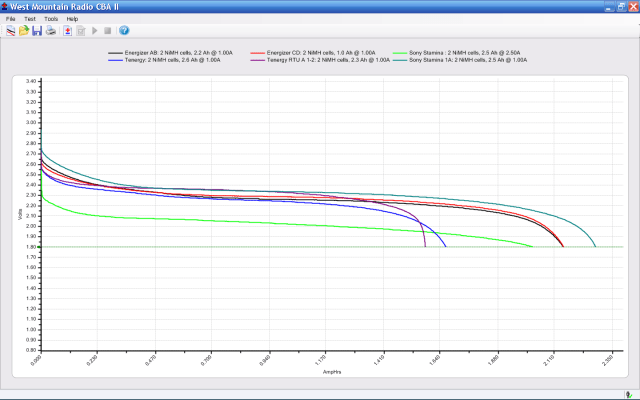
DSC-H5 Battery – Old NiMh AA Cells Some observations…
All of the cells, except for the Tenergy RTUs, have been cycled through the camera many times over the last few years. I charged the cells before testing, so these are hot-from-the-charger values without the usual self-discharge that afflicts all NiMh cells.
I picked a 1 A load for convenience. I think the camera presents a much heavier, although intermittent, load to the cells, as the actual runtime is far less than the 1.5 to 2.3 hours you see on the graph. In round numbers, the camera rejects the weaker cells in about 15 minutes, which means its load is much heavier.
The topmost blue-gray line is from the original pair of Sony Stamina cells that came with the camera, which still deliver decent runtime. Rated at 2.5 Ah and delivering very nearly that much into a 1-A load.
The green line is the same pair of cells loaded at 2.5 A, just to see what happens. They still work pretty well; the lower voltage is to be expected. A mere 0.14 Ω of lead resistance will account for that entire difference and I’m not sure how much the cells contribute.
The red and black lines are from the quartet of 2.2 Ah Energizer cells that came with an Energizer 15-minute (!) charger. They’re rated at “Min 2.05 Ah” and are still well within that spec. However, they deliver a relatively short runtime. I just noticed that the graph legend has the wrong capacity values for the red trace (cells C&D): oops.
The short purple line that dunks down in the middle of the graph is a new pair of the disappointing Tenergy Ready-to-Use cells, with a nominal capacity of 2.3 Ah and delivering barely 1.5 Ah.
The blue line is a pair of Tenergy 2.6 Ah cells with a similarly low actual capacity at a much lower voltage. They give a very brief runtime.
As nearly as I can tell, the only thing that matters for camera runtime is the battery voltage. Large currents cause a correspondingly large voltage drop, so even cells with good open-circuit voltage will fail early.
Internal cell resistance is probably the determining factor, as that increases with age. Even though the Energizers have plenty of capacity, they deliver it with a terminal voltage that’s too low for the camera.
The Tenergy RTU cells have a pitifully small capacity compared to their ratings, but they last much longer in the camera than I expected. Their output voltage stays above 2.3 V until fairly late in their discharge, so the camera remains happy.
I’ll continue using the Sony cells, along with a quartet of the Tenergy RTUs. The rest are destined for flashlights and such…

-
Subscribe
Subscribed
Already have a WordPress.com account? Log in now.
 The Smell of Molten Projects in the Morning