-
Maxwell 10 F Ultracapacitor: First Charge

Maxwell PC10 Ultracapacitors My buddy Mark One dropped off a pair of Maxwell PC10 10 farad Ultracapacitors. We both recall our respective professors saying that a farad is an impractical unit, there’d never be such a thing as a 1 F capacitor, and it would be the size of a barn anyway…
These are 25x30x3 mm.
The downside, of course, is that they’re rated at 2.5 V DC with an absolute maximum of 2.7 V.
On the other paw, they have a maximum current of 2.5 A and a whopping 19 A short-circuit current. Serious risk of fire & personal injury there…
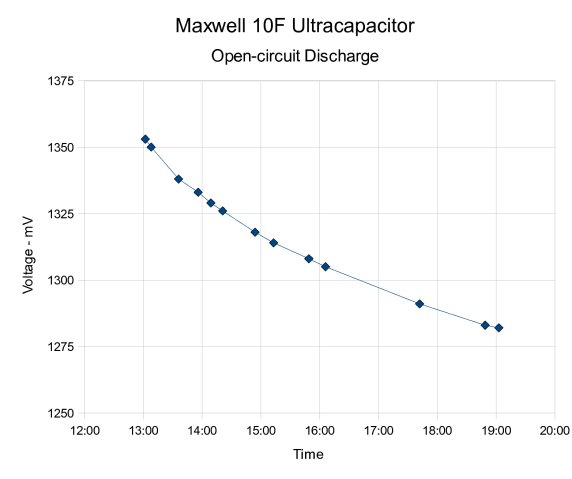
Charged one up from an AA NiMH cell I had lying around on the desk, which took a while, then let it discharge all by itself while taking notes. The results look like this:
 Time Voltage – mV
13:02 1353
13:08 1350
13:36 1338
13:56 1333
14:09 1329
14:21 1326
14:54 1318
15:13 1314
15:49 1308
16:06 1305
17:42 1291
18:49 1283
19:03 1282Now, maybe that’s not exactly the extreme top left end of an exponential drop, but it looks close enough:
V(t) = V0 * exp (-t/τ)
Pick any two points on the curve to find τ, the time constant:
V(t1) / V(t2) = exp (-t1/τ) / exp (-t2/τ)
Take the log of both sides and remember that the log of a ratio is the difference of the logs:
log V(t1) – log V(t2) = (-t1 + t2) / τ
Plug in the first and last data points to get:
0.02341 = 21.6 ks / τ
Reshuffle and τ = 923 ks. Close enough to a megasecond for my purposes.
How to find the capacitance? Charge the cap up fram a pair of NiMH cells, discharge it at a constant current using a battery tester, thusly:
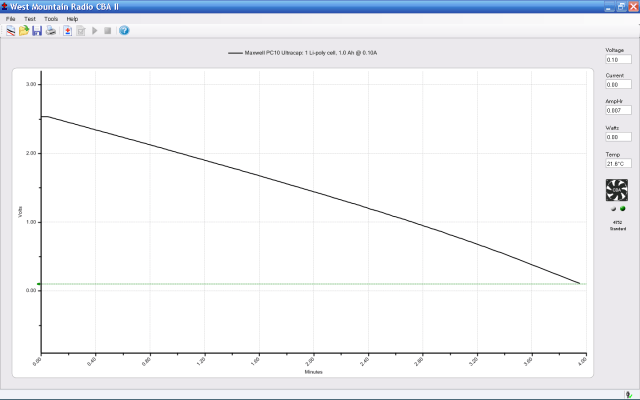
10 uF Ultracap – 100 mA Load That curve isn’t exactly linear, but it’s close enough that we can use the familiar capacitor equation:
ΔV/ΔT = I/C
Reshuffle to get capacitance over there on the left side:
C = I * ΔT / ΔV
The lower axis is minutes, not seconds, with truly poor grid values. Eyeballometrically, call it 4 min * 60 = 240 seconds.
Plug in the appropriate numbers and find that
C = 0.1 A * 240 s / 2.5 V = 9.6 F.
Close enough.
Knowing τ and C, find the self-discharge resistance R = τ/C = 96 kΩ. That seems pretty low, but at 2 V it amounts to 25 µA. The cap’s self-discharge current is rated at 40 µA, so that’s well within spec.
Now, admittedly, the cap doesn’t hold much energy:
- NiMH 2 x AA = 1 Ah @ 2.4 V = 2.4 Wh = 8600 Ws = 8600 J
- Ultracap 10 F @ 2.4 V = 1/2 * C * V^2 = 29 J
But, heck, it’s pretty slick anyway… it’ll make a dandy backup power source for a clock I’m thinking of making.
Memo to Self: Datasheet says to add balancing resistors that carry 10x the self-discharge current when stacking in series. That’d be 10 kΩ, more or less, which seems scary-low.


-
Subscribe
Subscribed
Already have a WordPress.com account? Log in now.
 The Smell of Molten Projects in the Morning