-
Bike Lighting: Automotive Specs
Having recently taken a thorough drubbing on the ‘Bentrider forums for having a rear-facing white light on my bike, I should accelerate my plans for a red / amber taillight.
This Philips LumiLED app note gives some specs on automotive lighting. The one we bikies all tend to ignore is the surface area: greater than 37.5 square centimeters for rear combination stop-turn fixtures. Call it a scant 4 inches in diameter. You’ve never seen a bike light that large, have you?
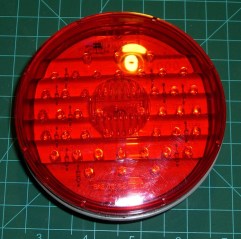
LED combo tail stop light Maybe the right thing to do is start with a street-legal truck light and build some electronics around it. This is a 4 inch diameter, 44 LED rear light with both taillight and brake light terminals. At 12 V, the taillight draws 10 mA and the brake light is 250 mA. Got it from Gemplers with a recent order, but they’re certainly not the optimum supplier if that’s all you’re buying.
Obviously, it’s unreasonable to run a 3 watt taillight on a bike, as the most recent crop of single-LED killer headlights are merely a watt or three. Battery life remains a problem.
At 10% duty cycle the brake LEDs would average 300 mW. That might be roughly comparable to the running lights on some cars these days.
With the taillight constantly energized and the brake flashing at 4 Hz, it’d be 120 + 0.5 * 300 = 270 mW.
That’s more reasonable. With a 50% efficient upconverter to 12 V, that’s half a watt. Start with 4 AA cells, triple the voltage, draw 100 mA, runtime is 1500 / 100 = 15 hours. Good enough.
And it ought to be attention-getting enough for anybody! The only trouble will be fitting the damn thing on the back of the bike; fortunately, ‘bents have plenty of room behind the seat, so maybe attaching it below the top seat rail will work.
Memo to Self: The rear reflector must be something like 3 inches in diameter, too. We ignore that spec, too.

-
Subscribe
Subscribed
Already have a WordPress.com account? Log in now.
 The Smell of Molten Projects in the Morning