-
Tea Ball Revival
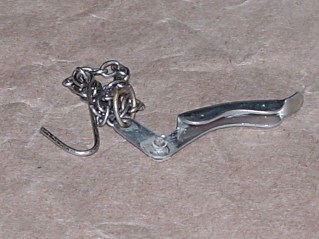
Defunct tea-ball rivet The latch closing my tea ball consists of a nice stainless steel dingus held on by a grotty rivet of unknown provenance that I’ve repeatedly staked over the years. It finally came undone this morning, so I had a few minutes of Quality Shop Time right after breakfast.
My tiny-screw box (left over from the long-gone Leichtung Workshops) has some stainless 0-80 screws that I found somewhere, but only brass nuts. Ah, well, we used to use brass water fixtures and lead pipe, so an 0-80 nut in hot water isn’t going to kill me.
The ball rim has a recess for the rivet head, but the screw head was slightly larger. I braced the rim of the ball across the vise jaws and give the recess a few shots with a fat punch to enlarge it.

Stainless screw and brass nut Then…
- A dot of Loctite on the threads
- Assemble everything
- Take it apart to put the latch on the correct side of the rim
- Reassemble
- Attempt to close
- Gently bend the rim to flatten it out
- Close
- Attempt to latch
- Brace closed rim on vise opening with screw head up
- A few shots with a drift punch to settle recess around screw head
- Success!
It seems I ain’t worth a damn in the morning without a hot cuppa. The rituals must be preserved.
I tossed the ball in the dishwasher and opted for a tea bag today…


-
Subscribe
Subscribed
Already have a WordPress.com account? Log in now.
 The Smell of Molten Projects in the Morning