-
Thing-O-Matic: X Axis Rod Follower
This represents the first pass at un-constraining the X stage, so the poor little X axis stepper motor doesn’t have such a hard time of it and we can all get out of the sand-the-plywood-to-fit mindset. The Y stage has a similar mechanism, albeit with three bearings on the rod.
As seen from the front, the rear guide rod constrains the X stage in roll and yaw, while this Follower constrains pitch. The bearings turn in X, slide very slightly as needed in Y, and prevent motion in Z. Slight angle and distance mismatches between the rods no longer matter; I think the as-built (pre-sanding) rods will be sufficiently parallel for all practical purposes.
I have yet to install this, as I have a few other thing to do before tearing the entire XY assembly apart again; this is just a see-if-it-fits prototype:
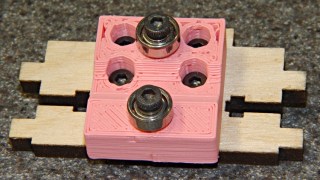
Prototype X Axis rod follower The front view:
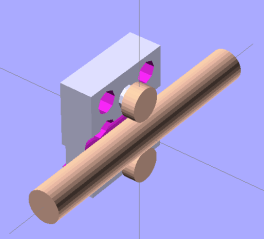
X Axis follower – model front view I wanted to mount it on the rear face of the X stage Idler plate, but there’s simply not enough room between the rod and the plywood Idler plate. Indeed, this version may be slightly too chubby for the space available in front of the Drive plate.
The OpenSCAD code produces a recess that clamps the belt into the drive serrations; the prototype doesn’t have that. The rear view shows the recess; I don’t know if that will build successfully. The dimple just below the top bearing bolt hole fits around the nut holding the build platform in place.
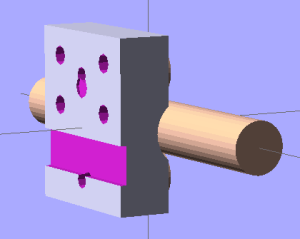
X Axis follower – model rear view My Little Box o’ Tiny Bearings disgorged a pair of hard-inch bearings, but something along the lines of a 603 or 693 bearing would be better. Having shields on both sides would be a nice touch. The recently expanded table there gives some useful bearing dimensions.
The M3x12 bolts on the bearings cut their own threads on the way into the slightly undersized holes. I think that will be adequate, but you could sink nuts into the back.
The OpenSCAD source code
willshould auto-size the Follower around the bearings and your own measured / guesstimated clearances. Obviously, smaller bearings are better and there’s precious little clearance to the Y stage even with 3/8 inch OD bearings.Make sure the extrusion settings near the top match your actual build values and that both collections match what the printer actually produces, because there’s not much room around the features for fill.
The top fits flush underneath the HBP stage to maintain proper alignment. That’s not really necessary, given the four bolts holding the Follower to the Drive plate, but there it is.
The Preload value adjusts the Z position of the lower bearing: + up, – down. It’s at zero for the prototype and the as-built Follower has 0.16 mm of preload: the bearings are 0.16 mm too close together. I think that’s OK, although I might dial it back a little bit by setting Preload=-0.1. For all I know, it’ll relax to fit and eventually wind up being marginally rattly.
The Build value at the top controls whether the model has the rods & bearings to show how it fits together (as above) or just the Follower block laid on its back for exporting to the STL file.
The OpenSCAD source:
// Thing-O-Matic X Stage rear guide rod follower
// Ed Nisley - KE4ZNU - Mar 2011

include </home/ed/Thing-O-Matic/lib/MCAD/units.scad>

Build = false;						// set true to generate buildable layout

$fn = 8;							// default for holes

// Extrusion values
// Use 2 extra shells behind the perimeter
//  ... and 3 solid shells on the top & bottom

ThreadThickness = 0.33;
ThreadWT = 1.75;
ThreadWidth = ThreadThickness * ThreadWT;

HoleWindage = ThreadWidth;			// enlarge hole dia by extrusion width

Protrusion = 0.1;					// extend holes beyond surfaces for visibility

// Bearing dimensions

BearingOD = (3/8) * inch;			// I used a hard-inch bearing -- try a 603 or 693
BearingID = (1/8) * inch;
BearingThick = (5/32) * inch;

BearingBoltDia = 3.0;				// allow this to shrink: drill & tap the threads!
BearingBoltRadius = BearingBoltDia/2;

BearingStemOD = BearingBoltDia + 6*ThreadWidth;
BearingStemRadius = BearingStemOD/2;
BearingStemLength = 2.0;

// X guide rod dimensions

RodDia = (3/8) * inch;				// hard inch rod
RodRadius = RodDia/2;
RodLength = 75;						// for display convenience

RodClearTop = 12.6;					// clearance from HBP to rod
RodClearSide = 9.0;					//  ... idler to rod
RodClearBottom = 10.7;				//  ... rod to Y stage

RodClearCirc = 1.5;					//  ... around circumference

// Drive mounting piece (from ABP teardown)

DriveHolesX	= 16.0;					// on-center distance
DriveHolesZ = 9.0;					// on-center distance
DriveHoleZOffset = -5.0;			// below bottom of HBP platform

DriveHeight = 28.0;

DriveBoltDia = 3.0 + HoleWindage;	// bolt dia to hold follower in place
DriveBoltRadius = DriveBoltDia/2;

DriveBoltHeadDia = 6.0 + HoleWindage;
DriveBoltHeadRadius = DriveBoltHeadDia/2;
DriveBoltWeb = 4.5;					// leave this on block for 12 mm bolts

HBPNutDia = 4.0;					// HBP mounting nut in middle of idler
HBPNutRadius = HBPNutDia/2;
HBPNutRecess = 0.5;					//  ... pocket for corner of nut
HBPNutZOffset = -10.0;				//  ... below bottom of HBP platform

BeltWidth = 7.0;					// drive belt slots
BeltThick = 1.2;					//  ... backing only, without teeth
BeltZOffset = -22.5;				//  ... below bottom of HBP platform

// Bearing locations

Preload = 0.0;						// positive to add pressure on lower bearing

TopZ = RodRadius + BearingOD/2;
BottomZ = Preload - TopZ;

// Follower dimensions

BlockWidth = 28.0;					// along X axis, must clear bolts in idler
BlockHeight = RodDia + 2*BearingOD - Preload;
BlockThick = (RodClearSide + RodRadius) - BearingThick/2 - BearingStemLength;

BlockHeightPad =  RodClearTop - BearingOD;

echo(str("Block Height: ",BlockHeight));
echo(str("Block Height Pad: ",BlockHeightPad));
echo(str("Block Thick: ",BlockThick));

BottomPlateWidth = 10.0;
BottomPlateThick = 5.0;

BlockTop = RodRadius + RodClearTop;

BlockOffset = BlockThick/2 + BearingThick/2 + BearingStemLength;

// Construct the follower block with

module Follower() {

  difference() {
	union() {
	  translate([0,BlockOffset,0])
		difference() {
		  union(){
			cube([BlockWidth,BlockThick,BlockHeight],center=true);
			translate([0,0,(BlockHeight + BlockHeightPad)/2])
			  cube([BlockWidth,BlockThick,BlockHeightPad],center=true);
		  }
		  for(x=[-1,1]) for(z=[0,1])
			  translate([x*DriveHolesX/2,
						Protrusion/2,
						(BlockHeight/2 + BlockHeightPad + DriveHoleZOffset - z*DriveHolesZ)])
				rotate([90,0,0])
				  cylinder(r=DriveBoltRadius,
							h=(BlockThick + Protrusion),
							center=true);
			for(x=[-1,1]) for(z=[0,1])
			  translate([x*DriveHolesX/2,
						(-(DriveBoltWeb + Protrusion)/2),
						(BlockHeight/2 + BlockHeightPad + DriveHoleZOffset - z*DriveHolesZ)])
				rotate([90,0,0])
				  cylinder(r=DriveBoltHeadRadius,
							h=(BlockThick - DriveBoltWeb + Protrusion),
							center=true);
		  translate([0,
					((BlockThick - BeltThick + Protrusion)/2),
					(BlockHeight/2 + BlockHeightPad + BeltZOffset)])
			cube([(BlockWidth + 2*Protrusion),
				 (BeltThick + Protrusion),
				 BeltWidth],center=true);
		  }

	  translate([0,BearingStemLength/2 + BearingThick/2,TopZ])
		rotate([90,0,0])
			cylinder(r=BearingStemRadius,h=BearingStemLength,center=true,$fn=10);
	  translate([0,BearingStemLength/2 + BearingThick/2,BottomZ])
		rotate([90,0,0])
		  cylinder(r=BearingStemRadius,h=BearingStemLength,center=true,$fn=10);
	}

	translate([0,(BlockOffset - BearingStemLength/2),TopZ])
	  rotate([90,0,0])
		cylinder(r=BearingBoltRadius,
				h=(BlockThick + BearingStemLength + 2*Protrusion),
				center=true);
	translate([0,(BlockOffset - BearingStemLength/2),BottomZ])
	  rotate([90,0,0])
		cylinder(r=BearingBoltRadius,
				h=(BlockThick + BearingStemLength + 2*Protrusion),
				center=true);

	translate([0,
			  (BlockThick + BearingStemLength + BearingThick/2 - (HBPNutRecess - Protrusion)/2),
			  (BlockHeightPad + BlockHeight/2 + HBPNutZOffset)])
	  rotate([90,0,0])
		cylinder(r=HBPNutRadius,h=(HBPNutRecess + Protrusion),center=true);

	rotate([0,90,0])
	  cylinder(r=(RodRadius + RodClearCirc),h=RodLength,center=true,$fn=32);

  }
}

// Arrange things for construction

if (Build)
	translate([0,(-BlockHeightPad/2),(BlockOffset + BlockThick/2)])
	  rotate([-90,0,0])
		Follower();

// Arrange things for convenient inspection

if (!Build) {

  Follower();

  translate([0,0,TopZ])
	rotate([90,0,0])
	  #cylinder(r=BearingOD/2,h=BearingThick,center=true,$fn=32);

  translate([0,0,BottomZ])
	rotate([90,0,0])
	  #cylinder(r=BearingOD/2,h=BearingThick,center=true,$fn=32);

  rotate([0,90,0])
	  #cylinder(r=RodDia/2,h=RodLength,center=true,$fn=32);

}
[Update: It’s installed and works wonderfully!]
[Update: You should use carmiac’s version, which prints better.]


-
Subscribe
Subscribed
Already have a WordPress.com account? Log in now.
 The Smell of Molten Projects in the Morning