-
LinuxCNC HAL Pin Names: Belkin Nostromo N52 SpeedPad
A (formerly Belkin, now Razer, which is evidently unrelated to Mazer Rackham) Nostromo N52 SpeedPad might not be a perfect CNC pendant, but it does have plenty of buttons and an (oddly oriented) XY joypad that might be useful for, say, a 3D printer controller running LinuxCNC.
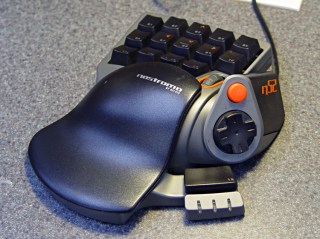
Belkin Nostromo N52 SpeedPad Following the same path as with the Logitech Dual Action Gamepad that became the Joggy Thing, we find that the N52 reports itself as a keyboard and a mouse:
less /proc/bus/input/devices

... snippage ...
I: Bus=0003 Vendor=050d Product=0815 Version=0110
N: Name="Honey Bee  Nostromo SpeedPad2 "
P: Phys=usb-0000:00:02.0-10/input0
S: Sysfs=/devices/pci0000:00/0000:00:02.0/usb2/2-10/2-10:1.0/input/input3
U: Uniq=
H: Handlers=kbd event3
B: EV=100013
B: KEY=e080ffdf 1cfffff ffffffff fffffffe
B: MSC=10

I: Bus=0003 Vendor=050d Product=0815 Version=0110
N: Name="Honey Bee  Nostromo SpeedPad2 "
P: Phys=usb-0000:00:02.0-10/input1
S: Sysfs=/devices/pci0000:00/0000:00:02.0/usb2/2-10/2-10:1.1/input/input4
U: Uniq=
H: Handlers=mouse1 event4
B: EV=20017
B: KEY=70000 0 0 0 0 0 0 0 0
B: REL=103
B: MSC=10
B: LED=7
The corresponding device files belong to the root user:
ll /dev/input
... snippage ...
crw-r-----  1 root root 13, 67 2013-02-08 11:06 event3
crw-r-----  1 root root 13, 68 2013-02-08 11:06 event4
... snippage ...
crw-r-----  1 root root 13, 33 2013-02-08 11:06 mouse1
Which calls for some udev trickery to change the owner & permissions during boot / hotplugging so that it becomes available to mere mortals such as I.
First, get the bus connection information:
lsusb
... snippage ...
Bus 002 Device 004: ID 050d:0815 Belkin Components Nostromo n52 HID SpeedPad Mouse Wheel
... snippage ...
Then dump the attributes:
udevadm info --query=all --attribute-walk --name=/dev/bus/usb/002/004

Udevadm info starts with the device specified by the devpath and then
walks up the chain of parent devices. It prints for every device
found, all possible attributes in the udev rules key format.
A rule to match, can be composed by the attributes of the device
and the attributes from one single parent device.

  looking at device '/devices/pci0000:00/0000:00:02.0/usb2/2-10':
    KERNEL=="2-10"
    SUBSYSTEM=="usb"
    DRIVER=="usb"
    ATTR{configuration}==""
    ATTR{bNumInterfaces}==" 2"
    ATTR{bConfigurationValue}=="1"
    ATTR{bmAttributes}=="80"
    ATTR{bMaxPower}==" 90mA"
    ATTR{urbnum}=="1354"
    ATTR{idVendor}=="050d"
    ATTR{idProduct}=="0815"
    ATTR{bcdDevice}=="0210"
    ATTR{bDeviceClass}=="00"
    ATTR{bDeviceSubClass}=="00"
    ATTR{bDeviceProtocol}=="00"
    ATTR{bNumConfigurations}=="1"
    ATTR{bMaxPacketSize0}=="8"
    ATTR{speed}=="1.5"
    ATTR{busnum}=="2"
    ATTR{devnum}=="4"
    ATTR{version}==" 1.10"
    ATTR{maxchild}=="0"
    ATTR{quirks}=="0x0"
    ATTR{authorized}=="1"
    ATTR{manufacturer}=="Honey Bee "
    ATTR{product}=="Nostromo SpeedPad2 "

... snippage ...
Note the trailing blank in the
manufacturerandproductvalues.Create a new rules file
/etc/udev/rule/90-Nostromo.rulesto change the group and permissions:# Belkin Nostromo N52 SpeedPad controller for LinuxCNC # Ed Nisley - KE4ZNU - February 2013 ATTRS{product}=="Nostromo SpeedPad2",GROUP="plugdev",MODE="0660"Note that the file name must start with a number around
90-to avoid being clobbered by a rule in/lib/udev/rules.d/50-udev-default.rulesthat (re)sets the permissions to0640; the doc suggests that rules without numbers happen after all the number rules, so perhaps you could just use meaningful names. That took an embarrassingly long time to figure out…There’s no need for the trailing blank in that rule, as the match proceeds left-to-right and stops at the end of the test string.
You must, perforce, be in the
plugdevgroup. If not, add yourself.You need not unplug the N52 to test the rule. Just use:
sudo udevadm trigger
Which produces the desired result:
crw-rw----  1 root plugdev 13, 67 2013-02-08 15:09 event3
crw-rw----  1 root plugdev 13, 68 2013-02-08 15:09 event4
... snippage ...
crw-rw----  1 root plugdev 13, 33 2013-02-08 15:09 mouse1
Poking around using, among other things,
xevreveals:- Main keypad is the left half of a standard QWERTY keyboard
- Joypad returns cursor keys, center push = nothing
- Orange button is, weirdly, the Left-Alt key
- Wheel is a mouse scroll wheel
- Push wheel = middle mouse button
- Thumb pad = space
- RGB LEDs are, respectively, num-, caps-, and scroll-lock
Then load HAL:
halrun
loadusr -W hal_input -K +Nostromo:0 -KRL +Nostromo:1
show pin input.*
loadusr halmeter
The + prefix tells HAL to capture the named device and prevent its events from reaching X. The
KRLcodes suggest which functions you’re interested in for that particular device. The suffix digit selects successive devices for multiple gadgets matching the same name string.Apparently, the N52 reports it can produce all the usual keyboard and mouse values & buttons, even if they’re not connected to physical hardware. I suspect it has generic keyboard / mouse controllers inside, with just a few of the usual matrix crosspoints connected to switches.
The basic key mapping, sorted by the Nostromo functions:
Type Dir Name Nostromo key bit OUT input.0.key-tab F1 bit OUT input.0.key-q F2 bit OUT input.0.key-w F3 bit OUT input.0.key-e F4 bit OUT input.0.key-r F5 bit OUT input.0.key-capslock F6 bit OUT input.0.key-a F7 bit OUT input.0.key-s F8 bit OUT input.0.key-d F9 bit OUT input.0.key-f F10 bit OUT input.0.key-leftshift F11 bit OUT input.0.key-z F12 bit OUT input.0.key-x F13 bit OUT input.0.key-c F14 bit OUT input.0.key-space F15 bit OUT input.0.key-leftalt Orange button bit OUT input.0.key-right Pad bottom bit OUT input.0.key-down Pad front bit OUT input.0.key-up Pad rear bit OUT input.0.key-left Pad top bit OUT input.1.btn-middle Wheel press s32 OUT input.1.rel-wheel-counts Scroll wheel bit IN input.1.led-numl Red LED bit IN input.1.led-capsl Green LED bit IN input.1.led-scrolll Blue LED The
bitpins also have inverted values available on the corresponding-notpins. The LEDs have an-invertthat flips the sense of the input pin. Therel-wheelpin has other useful tidbits as suffixes; thecountchanges by ±1 for each wheel detent.The
Tabkey and all the letters auto-repeat, the variousShiftandAltkeys do not. That seems to make no difference to the bit values reported by HAL.The complete table, sorted by HAL pin name:
Type Dir Name Nostromo key bit OUT input.0.key-0 bit OUT input.0.key-0-not bit OUT input.0.key-1 bit OUT input.0.key-1-not bit OUT input.0.key-102nd bit OUT input.0.key-102nd-not bit OUT input.0.key-2 bit OUT input.0.key-2-not bit OUT input.0.key-3 bit OUT input.0.key-3-not bit OUT input.0.key-4 bit OUT input.0.key-4-not bit OUT input.0.key-5 bit OUT input.0.key-5-not bit OUT input.0.key-6 bit OUT input.0.key-6-not bit OUT input.0.key-7 bit OUT input.0.key-7-not bit OUT input.0.key-8 bit OUT input.0.key-8-not bit OUT input.0.key-9 bit OUT input.0.key-9-not bit OUT input.0.key-a F7 bit OUT input.0.key-a-not bit OUT input.0.key-apostrophe bit OUT input.0.key-apostrophe-not bit OUT input.0.key-b bit OUT input.0.key-b-not bit OUT input.0.key-backslash bit OUT input.0.key-backslash-not bit OUT input.0.key-backspace bit OUT input.0.key-backspace-not bit OUT input.0.key-c F14 bit OUT input.0.key-c-not bit OUT input.0.key-capslock F6 bit OUT input.0.key-capslock-not bit OUT input.0.key-comma bit OUT input.0.key-comma-not bit OUT input.0.key-compose bit OUT input.0.key-compose-not bit OUT input.0.key-d F9 bit OUT input.0.key-d-not bit OUT input.0.key-delete bit OUT input.0.key-delete-not bit OUT input.0.key-dot bit OUT input.0.key-dot-not bit OUT input.0.key-down Pad left bit OUT input.0.key-down-not bit OUT input.0.key-e F4 bit OUT input.0.key-e-not bit OUT input.0.key-end bit OUT input.0.key-end-not bit OUT input.0.key-enter bit OUT input.0.key-enter-not bit OUT input.0.key-equal bit OUT input.0.key-equal-not bit OUT input.0.key-esc bit OUT input.0.key-esc-not bit OUT input.0.key-f F10 bit OUT input.0.key-f-not bit OUT input.0.key-f1 bit OUT input.0.key-f1-not bit OUT input.0.key-f10 bit OUT input.0.key-f10-not bit OUT input.0.key-f11 bit OUT input.0.key-f11-not bit OUT input.0.key-f12 bit OUT input.0.key-f12-not bit OUT input.0.key-f2 bit OUT input.0.key-f2-not bit OUT input.0.key-f3 bit OUT input.0.key-f3-not bit OUT input.0.key-f4 bit OUT input.0.key-f4-not bit OUT input.0.key-f5 bit OUT input.0.key-f5-not bit OUT input.0.key-f6 bit OUT input.0.key-f6-not bit OUT input.0.key-f7 bit OUT input.0.key-f7-not bit OUT input.0.key-f8 bit OUT input.0.key-f8-not bit OUT input.0.key-f9 bit OUT input.0.key-f9-not bit OUT input.0.key-g bit OUT input.0.key-g-not bit OUT input.0.key-grave bit OUT input.0.key-grave-not bit OUT input.0.key-h bit OUT input.0.key-h-not bit OUT input.0.key-home bit OUT input.0.key-home-not bit OUT input.0.key-i bit OUT input.0.key-i-not bit OUT input.0.key-insert bit OUT input.0.key-insert-not bit OUT input.0.key-j bit OUT input.0.key-j-not bit OUT input.0.key-k bit OUT input.0.key-k-not bit OUT input.0.key-kp0 bit OUT input.0.key-kp0-not bit OUT input.0.key-kp1 bit OUT input.0.key-kp1-not bit OUT input.0.key-kp2 bit OUT input.0.key-kp2-not bit OUT input.0.key-kp3 bit OUT input.0.key-kp3-not bit OUT input.0.key-kp4 bit OUT input.0.key-kp4-not bit OUT input.0.key-kp5 bit OUT input.0.key-kp5-not bit OUT input.0.key-kp6 bit OUT input.0.key-kp6-not bit OUT input.0.key-kp7 bit OUT input.0.key-kp7-not bit OUT input.0.key-kp8 bit OUT input.0.key-kp8-not bit OUT input.0.key-kp9 bit OUT input.0.key-kp9-not bit OUT input.0.key-kpasterisk bit OUT input.0.key-kpasterisk-not bit OUT input.0.key-kpdot bit OUT input.0.key-kpdot-not bit OUT input.0.key-kpenter bit OUT input.0.key-kpenter-not bit OUT input.0.key-kpminus bit OUT input.0.key-kpminus-not bit OUT input.0.key-kpplus bit OUT input.0.key-kpplus-not bit OUT input.0.key-kpslash bit OUT input.0.key-kpslash-not bit OUT input.0.key-l bit OUT input.0.key-l-not bit OUT input.0.key-left Pad top bit OUT input.0.key-left-not bit OUT input.0.key-leftalt Orange button bit OUT input.0.key-leftalt-not bit OUT input.0.key-leftbrace bit OUT input.0.key-leftbrace-not bit OUT input.0.key-leftctrl bit OUT input.0.key-leftctrl-not bit OUT input.0.key-leftmeta bit OUT input.0.key-leftmeta-not bit OUT input.0.key-leftshift F11 bit OUT input.0.key-leftshift-not bit OUT input.0.key-m bit OUT input.0.key-m-not bit OUT input.0.key-minus bit OUT input.0.key-minus-not bit OUT input.0.key-n bit OUT input.0.key-n-not bit OUT input.0.key-numlock bit OUT input.0.key-numlock-not bit OUT input.0.key-o bit OUT input.0.key-o-not bit OUT input.0.key-p bit OUT input.0.key-p-not bit OUT input.0.key-pagedown bit OUT input.0.key-pagedown-not bit OUT input.0.key-pageup bit OUT input.0.key-pageup-not bit OUT input.0.key-pause bit OUT input.0.key-pause-not bit OUT input.0.key-q F2 bit OUT input.0.key-q-not bit OUT input.0.key-r F5 bit OUT input.0.key-r-not bit OUT input.0.key-right Pad bottom bit OUT input.0.key-right-not bit OUT input.0.key-rightalt bit OUT input.0.key-rightalt-not bit OUT input.0.key-rightbrace bit OUT input.0.key-rightbrace-not bit OUT input.0.key-rightctrl bit OUT input.0.key-rightctrl-not bit OUT input.0.key-rightmeta bit OUT input.0.key-rightmeta-not bit OUT input.0.key-rightshift bit OUT input.0.key-rightshift-not bit OUT input.0.key-s F8 bit OUT input.0.key-s-not bit OUT input.0.key-scrolllock bit OUT input.0.key-scrolllock-not bit OUT input.0.key-semicolon bit OUT input.0.key-semicolon-not bit OUT input.0.key-slash bit OUT input.0.key-slash-not bit OUT input.0.key-space F15 bit OUT input.0.key-space-not bit OUT input.0.key-sysrq bit OUT input.0.key-sysrq-not bit OUT input.0.key-t bit OUT input.0.key-t-not bit OUT input.0.key-tab F1 bit OUT input.0.key-tab-not bit OUT input.0.key-u bit OUT input.0.key-u-not bit OUT input.0.key-up Pad right bit OUT input.0.key-up-not bit OUT input.0.key-v bit OUT input.0.key-v-not bit OUT input.0.key-w F3 bit OUT input.0.key-w-not bit OUT input.0.key-x F13 bit OUT input.0.key-x-not bit OUT input.0.key-y bit OUT input.0.key-y-not bit OUT input.0.key-z F12 bit OUT input.0.key-z-not bit OUT input.1.btn-middle Wheel press bit OUT input.1.btn-middle-not … inverted bit OUT input.1.btn-mouse bit OUT input.1.btn-mouse-not bit OUT input.1.btn-right bit OUT input.1.btn-right-not bit IN input.1.led-capsl Green LED bit IN input.1.led-capsl-invert bit IN input.1.led-numl Red LED bit IN input.1.led-numl-invert bit IN input.1.led-scrolll Blue LED bit IN input.1.led-scrolll-invert s32 OUT input.1.rel-wheel-counts Scroll wheel float OUT input.1.rel-wheel-position =count/scale bit IN input.1.rel-wheel-reset Clear pos’n float IN input.1.rel-wheel-scale count→pos’n s32 OUT input.1.rel-x-counts float OUT input.1.rel-x-position bit IN input.1.rel-x-reset float IN input.1.rel-x-scale s32 OUT input.1.rel-y-counts float OUT input.1.rel-y-position bit IN input.1.rel-y-reset float IN input.1.rel-y-scale

-
Subscribe
Subscribed
Have a WordPress.com account? Log in now.

