-
Renaming Files With Sequential Numbers, Plus Moviemaking Therefrom
The avconv (formerly ffmpeg) image-to-video programs expect sequentially numbered files, with the numbers in a fixed-width part of the file name, thusly:
dsc00001.jpg.Given a set of files (previously normalized to lowercase) like this:
ll | head
total 286576
-rwxr-xr-x 1 ed ed 595708 Jan 23 19:14 dsc00940.jpg
-rwxr-xr-x 1 ed ed 515561 Jan 23 19:14 dsc00941.jpg
-rwxr-xr-x 1 ed ed 580190 Jan 23 19:14 dsc00942.jpg
-rwxr-xr-x 1 ed ed 571387 Jan 23 19:14 dsc00943.jpg
-rwxr-xr-x 1 ed ed 573207 Jan 23 19:14 dsc00944.jpg
-rwxr-xr-x 1 ed ed 571086 Jan 23 19:14 dsc00945.jpg
-rwxr-xr-x 1 ed ed 571600 Jan 23 19:14 dsc00946.jpg
-rwxr-xr-x 1 ed ed 571547 Jan 23 19:14 dsc00947.jpg
-rwxr-xr-x 1 ed ed 565706 Jan 23 19:15 dsc00948.jpg
A Bash one-liner loop does the renumbering:
sn=1 ; for f in *jpg ; do printf -v dn 'dsc%05d.jpg' "$(( sn++ ))" ; mv $f $dn ; done
The results look pretty much like you’d expect:
ll | head
total 286556
-rwxr-xr-x 1 ed ed 595708 Jan 23 19:14 dsc00001.jpg
-rwxr-xr-x 1 ed ed 515561 Jan 23 19:14 dsc00002.jpg
-rwxr-xr-x 1 ed ed 580190 Jan 23 19:14 dsc00003.jpg
-rwxr-xr-x 1 ed ed 571387 Jan 23 19:14 dsc00004.jpg
-rwxr-xr-x 1 ed ed 573207 Jan 23 19:14 dsc00005.jpg
-rwxr-xr-x 1 ed ed 571086 Jan 23 19:14 dsc00006.jpg
-rwxr-xr-x 1 ed ed 571600 Jan 23 19:14 dsc00007.jpg
-rwxr-xr-x 1 ed ed 571547 Jan 23 19:14 dsc00008.jpg
-rwxr-xr-x 1 ed ed 565706 Jan 23 19:15 dsc00009.jpg
Because you’re renaming the files anyway, don’t bother to normalize ’em:
sn=1 ; for f in *JPG ; do printf -v dn 'dsc%05d.jpg' "$(( sn++ ))" ; mv $f $dn ; done
And, of course, you can fetch ’em from the camera while doing that:
sn=1 ; for f in /mnt/part/DCIM/100MSDCF/*JPG ; do printf -v dn 'dsc%05d.jpg' "$(( sn++ ))" ; cp -a $f $dn ; done
That leaves the DSC*JPG original files on the camera, where you can delete all of them in one operation when you’re happy with the results.
If you don’t need the full resolution, reserialize and resize each picture on the fly:
sn=1 ; for f in /mnt/part/DCIM/100MSDCF/*JPG ; do printf -v dn 'dsc%05d.jpg' "$(( sn++ ))" ; convert $f -resize 50% $dn ; done
That’s based on combining several hints turned up by the usual Google search.
To assemble a quick-and-simple movie from the images:
avconv -r 30 -i dsc%05d.jpg -q 5 movie.mp4
The image quality certainly isn’t up to what you (well, I) would expect from a 1920×1080 “HD” file, but the Sony HDR-AS30V Zeiss camera lens seems to be a fisheye pinhole (170° view angle, 2.5 mm f/2.8) backed with relentless image compression:
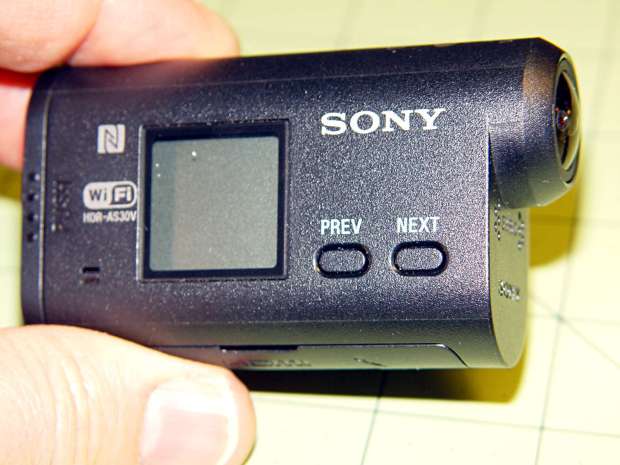
Sony HDR-AS30V Action Camera Memo to Self: It’s not worth creating and remembering Yet Another Script.

-
Subscribe
Subscribed
Have a WordPress.com account? Log in now.

