-
Extracting Frames From A Video File
Using avconv (formerly ffmpeg):
avconv -ss 00:07:05 -i MAH00016.MP4 -t 2 -f image2 -q 1 Image-%03d.jpeg
The options:
- -ss starting time in hh:mm:ss (or seconds)
- -i input file
- -t duration in seconds (or hh:mm:ss)
- -f mux/demux for still images
- -q quality (1 = best)
Use a video player to find the interesting section, then bracket it with the starting time and duration. Putting the
-ssstarting time before the-iinput file lets the decoder skip through the file, rather than grinding through everything preceding the specified frames.The
-q 1setting wrings the best quality out of the input video file. That’s why the camera captures 1920×1080 video @ 60 fps; I wish I could dial its compression back a bit, but that’s not an option.So.
Do you think he didn’t quite kill me between bites or is that a K-Mart bag and he was yakking on a phone like everybody else?
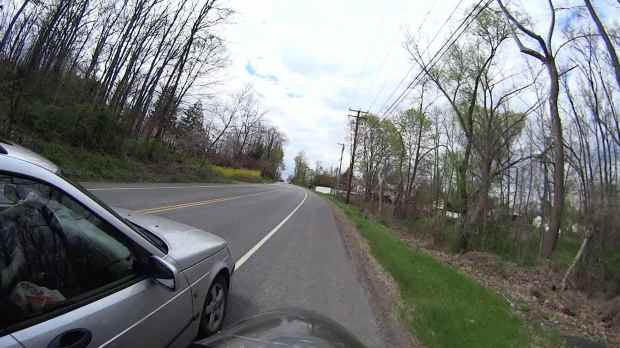
Near Miss – Jackson Drive – 2014-05-03 – car interior Clicky for more dots. I compressed the image from the
avconvoutput file, but it’s good enough.

-
Subscribe
Subscribed
Have a WordPress.com account? Log in now.

