-
Kenmore 158 UI: Button Framework Data Structures
The trouble with grafting a fancy LCD on an 8 bit microcontroller like an Arduino is that there’s not enough internal storage for button images and barely enough I/O bandwidth to shuffle bitmap files from the SD card to the display. Nevertheless, that seems to be the least awful way of building a serviceable UI that doesn’t involve drilling holes for actual switches, indicators, and ugly 2×20 character LCD panels.
Rather than hardcoding the graphics into the Arduino program, though, it makes sense to build a slightly more general framework to handle button images and overall UI design, more-or-less independently of the actual program. I haven’t been able to find anything that does what I need, without doing a whole lot more, sooooo here’s a quick-and-dirty button framework.
Calling it a framework might be overstating the case: it’s just a data structure and some functions. It really should be a separate library, but …
After considerable discussion with the user community, the first UI can control just three functions:
- Needle stop position: up, down, don’t care
- Operating mode: follow pedal position, triggered single-step, normal run
- Speed: slow, fast, ultra-fast
That boils down into a simple nine-button display, plus a tiny tenth button (in brown that looks red) at the top right:
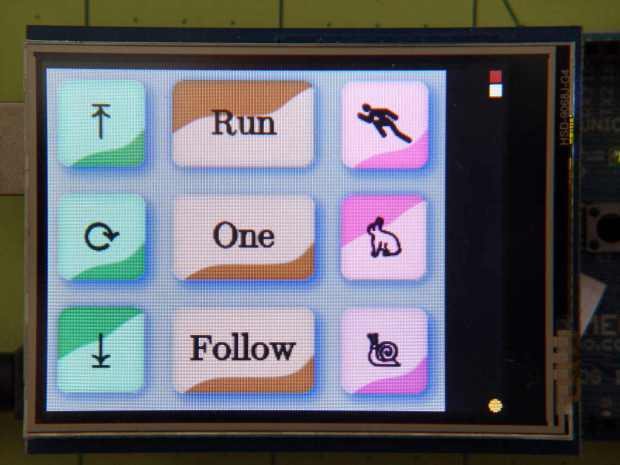
Kenmore 158 UI buttons – first pass The viciously skeuomorphic button shading should show the button status. For example, in the leftmost column:
- The two upper button are “up”, with light glinting from upward-bulging domes
- The lower button is “down”, with light glinting from its pushed-in dome
Frankly, that works poorly for me and the entire user community. The whole point of this framework is to let me re-skin the UI without re-hacking the underlying code; the buttons aren’t the limiting factor right now.
Anyhow.
The three buttons in each column are mutually exclusive radio buttons, but singleton checkbox buttons for firmware switches / modes would also be helpful, so there’s motivation to be a bit more general.
A
structdefines each button:enum bstatus_t {BT_DISABLED,BT_UP,BT_DOWN}; typedef void (*pBtnFn)(byte BID); // button action function called when hit struct button_t { byte ID; // button identifier, 0 unused byte Group; // radio button group, 0 for none byte Status; // button status word ulX,ulY; // origin: upper left word szX,szY; // button image size pBtnFn pAction; // button function char NameStem[9]; // button BMP file name - stem only };The
IDuniquely identifies each button in the rest of the code. That should be anenum, but for now I’m using an unsigned integer.The
Groupinteger will be zero for singleton buttons and a unique nonzero value for each radio button group. Only one button in eachGroupcan be pressed at a time.The
Statusindicates whether the button can be pushed and, if so, whether it’s up or down. Right now, the framework doesn’t handle disabled buttons at all.The next four entries define the button’s position and size.
The
pActionentry contains a pointer to the function that handles the button’s operation. It gets invoked whenever the touch screen registers a hit over the button, with anIDparameter identifying the button so you can use a single function for the entire group. I think it’ll eventually get another parameter indicating the desiredStatus, but it’s still early.The
NameStemstring holds the first part of the file name on the SD card. The framework prefixes the stem with a default directory (“/UserIntf/”), suffixes it with theStatusvalue (an ASCII digit ‘0’ through ‘9’), tacks on the extension (“.bmp”), and comes up with the complete file name.An array of those
structsdefines the entire display:struct button_t Buttons[] = { { 1, 0, BT_UP, 0,0, 80,80, DefaultAction, "NdUp"}, { 2, 0, BT_UP, 0,80, 80,80, DefaultAction, "NdAny"}, { 3, 0, BT_DOWN, 0,160, 80,80, DefaultAction, "NdDn"}, { 4, 2, BT_DOWN, 80,0, 120,80, DefaultAction, "PdRun"}, { 5, 2, BT_UP, 80,80, 120,80, DefaultAction, "PdOne"}, { 6, 2, BT_UP, 80,160, 120,80, DefaultAction, "PdFol"}, { 7, 3, BT_UP, 200,0, 80,80, DefaultAction, "SpMax"}, { 8, 3, BT_DOWN, 200,80, 80,80, DefaultAction, "SpMed"}, { 9, 3, BT_UP, 200,160, 80,80, DefaultAction, "SpLow"}, {10, 0, BT_UP, 311,0, 8,8, CountColor, "Res"} }; byte NumButtons = sizeof(Buttons) / sizeof(struct button_t);Those values produce the screen shown in the picture. The first three buttons should be members of radio button group 1, but they’re singletons here to let me test that path.
Contrary to what you see, the button ID values need not be in ascending order, consecutive, or even continuous. The IDs identify a specific button, so as long as they’re a unique number in the range 1 through 255, that’s good enough. Yes, I faced down a brutal wrong-variable error and then fixed a picket-fence error.
The file name stems each refer to groups of BMP files on the SD card. For example,
NdUp(“Needle stop up”) corresponds to the three filesNdUp0.bmp,NdUp1.bmp, andNdUp2.bmp, with contents corresponding to thebstatus_tenumeration.The constant elements of that array should come from a configuration file on the SD card: wrap a checksum around it, stuff it in EEPROM, and then verify it on subsequent runs. A corresponding array in RAM should contain only the Status values, with the array index extracted from the EEPROM data. That would yank a huge block of constants out of the all-too-crowded RAM address space and, even better, prevents problems from overwritten values; a trashed function pointer causes no end of debugging fun.
A more complex UI would have several such arrays, each describing a separate panel of buttons. There’s no provision for that right now.
Next: functions to make it march…

-
Subscribe
Subscribed
Have a WordPress.com account? Log in now.

