-
UDEV Rules for Cheap Numeric Keypads
I’m thinking of numeric keypads as control panels for Raspberry Pi projects like a simpleminded streaming radio player, so:
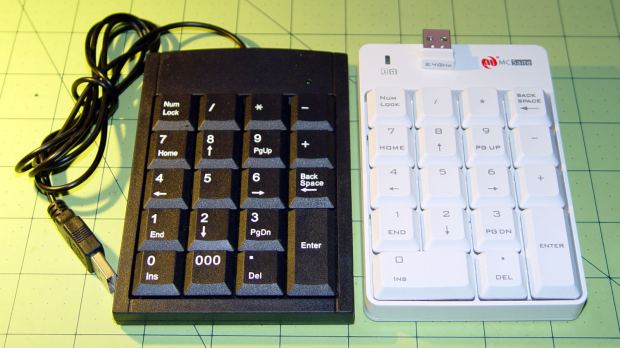
Numeric keypads Sorta like wedding pictures: you can expose for the groom-in-black or the bride-in-white, but not both at the same time.
The wireless keypad does not have a slot for the USB radio: put ’em in a bag to keep ’em together when not in use.
The general idea is to create a standard name (
/dev/input/keypad) for either keypad when it gets plugged in, so the program need not figure out the device name from first principles. This being an embedded system, I can ensure only one keypad will be plugged in at any one time.The wired keypad has an odd name that makes a certain perverse sense:
cat /proc/bus/input/devices
... snippage ...
I: Bus=0003 Vendor=13ba Product=0001 Version=0110
N: Name="HID 13ba:0001"
P: Phys=usb-20980000.usb-1.4/input0
S: Sysfs=/devices/platform/soc/20980000.usb/usb1/1-1/1-1.4/1-1.4:1.0/0003:13BA:0001.0007/input/input6
U: Uniq=
H: Handlers=sysrq kbd event0
B: PROP=0
B: EV=120013
B: KEY=10000 7 ff800000 7ff febeffdf f3cfffff ffffffff fffffffe
B: MSC=10
B: LED=7
It’s a single-function device, so this rule in
/etc/udev/rules.d/KeyPad.rulessuffices:ATTRS{name}=="HID 13ba:0001", SYMLINK+="input/keypad"Using the Vendor and Device ID strings (13ba:0001) might make more sense.
The wireless keypad isn’t nearly that easy, because it reports for duty as both a keyboard and a mouse:
cat /proc/bus/input/devices
... snippage ...
I: Bus=0003 Vendor=062a Product=4101 Version=0110
N: Name="MOSART Semi. 2.4G Keyboard Mouse"
P: Phys=usb-20980000.usb-1.4/input0
S: Sysfs=/devices/platform/soc/20980000.usb/usb1/1-1/1-1.4/1-1.4:1.0/0003:062A:4101.0008/input/input7
U: Uniq=
H: Handlers=sysrq kbd event0
B: PROP=0
B: EV=120013
B: KEY=10000 7 ff9f207a c14057ff febeffdf ffefffff ffffffff fffffffe
B: MSC=10
B: LED=7

I: Bus=0003 Vendor=062a Product=4101 Version=0110
N: Name="MOSART Semi. 2.4G Keyboard Mouse"
P: Phys=usb-20980000.usb-1.4/input1
S: Sysfs=/devices/platform/soc/20980000.usb/usb1/1-1/1-1.4/1-1.4:1.1/0003:062A:4101.0009/input/input8
U: Uniq=
H: Handlers=kbd mouse0 event2
B: PROP=0
B: EV=1f
B: KEY=3f 3007f 0 0 0 0 483ffff 17aff32d bf544446 0 0 1f0001 130f93 8b17c000 677bfa d941dfed 9ed680 4400 0 10000002
B: REL=1c3
B: ABS=1f01 0
B: MSC=10
That may be because the 0x06a2 Vendor ID was cloned (that’s pronounced “ripped-off”) from Creative Labs. My guess is they ripped the entire chipset, because the 0x4101 device ID came from a Creative Labs wireless keyboard + mouse:
lsusb
... snippage ...
Bus 001 Device 011: ID 062a:4101 Creative Labs
... snippage ...
Because it’s a dual-mode wireless device, we need more information to create the corresponding udev rule. The keyboard part appears (on this boot) as
event0, which we find thusly:ll /dev/input/by-id total 0 lrwxrwxrwx 1 root root 9 Feb 5 17:39 usb-Burr-Brown_from_TI_USB_Audio_CODEC-event-if03 -> ../event1 lrwxrwxrwx 1 root root 9 Feb 5 17:39 usb-MOSART_Semi._2.4G_Keyboard_Mouse-event-kbd -> ../event0 lrwxrwxrwx 1 root root 9 Feb 5 17:39 usb-MOSART_Semi._2.4G_Keyboard_Mouse-if01-event-mouse -> ../event2 lrwxrwxrwx 1 root root 9 Feb 5 17:39 usb-MOSART_Semi._2.4G_Keyboard_Mouse-if01-mouse -> ../mouse0
Some spelunking suggests using the environment variables set up by the default udev rules, which we find thusly:
udevadm test /sys/class/input/event0
... vast snippage ...
.INPUT_CLASS=kbd
ACTION=add
DEVLINKS=/dev/input/by-id/usb-MOSART_Semi._2.4G_Keyboard_Mouse-event-kbd /dev/input/by-path/platform-20980000.usb-usb-0:1.4:1.0-event-kbd
DEVNAME=/dev/input/event0
DEVPATH=/devices/platform/soc/20980000.usb/usb1/1-1/1-1.4/1-1.4:1.0/0003:062A:4101.0012/input/input17/event0
ID_BUS=usb
ID_INPUT=1
ID_INPUT_KEY=1
ID_INPUT_KEYBOARD=1
ID_MODEL=2.4G_Keyboard_Mouse
ID_MODEL_ENC=2.4G\x20Keyboard\x20Mouse
ID_MODEL_ID=4101
ID_PATH=platform-20980000.usb-usb-0:1.4:1.0
ID_PATH_TAG=platform-20980000_usb-usb-0_1_4_1_0
ID_REVISION=0108
ID_SERIAL=MOSART_Semi._2.4G_Keyboard_Mouse
ID_TYPE=hid
ID_USB_DRIVER=usbhid
ID_USB_INTERFACES=:030101:030102:
ID_USB_INTERFACE_NUM=00
ID_VENDOR=MOSART_Semi.
ID_VENDOR_ENC=MOSART\x20Semi.
ID_VENDOR_ID=062a
MAJOR=13
MINOR=64
SUBSYSTEM=input
... more snippage ...
So when that vendor and device appear with
ID_INPUT_KEYBOARDset, we can create a useful symlink using this rule in/etc/udev/rules.d/KeyPad.rules:ATTRS{idVendor}=="062a", ATTRS{idProduct}=="4101", ENV{ID_INPUT_KEYBOARD}=="1", SYMLINK+="input/keypad"Because only one keypad will be plugged in at any one time, the
/etc/udev/rules.d/KeyPad.rulesfile can contain both rules:ATTRS{name}=="HID 13ba:0001", SYMLINK+="input/keypad" ATTRS{idVendor}=="062a", ATTRS{idProduct}=="4101", ENV{ID_INPUT_KEYBOARD}=="1", SYMLINK+="input/keypad"Reload the rules and fire them off:
sudo udevadm control --reload
sudo udevadm trigger
And then It Just Works:
ll /dev/input/by-id
total 0
lrwxrwxrwx 1 root root 9 Feb  5 17:39 usb-Burr-Brown_from_TI_USB_Audio_CODEC-event-if03 -> ../event1
lrwxrwxrwx 1 root root 9 Feb  5 19:03 usb-MOSART_Semi._2.4G_Keyboard_Mouse-event-kbd -> ../event0
lrwxrwxrwx 1 root root 9 Feb  5 19:03 usb-MOSART_Semi._2.4G_Keyboard_Mouse-if01-event-mouse -> ../event2
lrwxrwxrwx 1 root root 9 Feb  5 19:03 usb-MOSART_Semi._2.4G_Keyboard_Mouse-if01-mouse -> ../mouse0ll /dev/input

ll /dev/input
total 0
drwxr-xr-x 2 root root     120 Feb  5 19:03 by-id
drwxr-xr-x 2 root root     120 Feb  5 19:03 by-path
crw-rw---- 1 root input 13, 64 Feb  5 19:03 event0
crw-rw---- 1 root input 13, 65 Feb  5 17:39 event1
crw-rw---- 1 root input 13, 66 Feb  5 19:03 event2
lrwxrwxrwx 1 root root       6 Feb  5 19:03 keypad -> event0
crw-rw---- 1 root input 13, 63 Feb  5 17:39 mice
crw-rw---- 1 root input 13, 32 Feb  5 19:03 mouse0
My configuration hand is strong…
Note: Once again, I manually restored the source code after the WordPress “improved” editor shredded it by replacing all the double-quote and greater-than symbols inside the “protected” sourcecode blocks with their HTML-escaped equivalents. Some breakage may remain and, as always, WP can shred sourcecode blocks even if I don’t edit the post. They’ve (apparently) banned me from contacting Support, because of an intemperate rant based on years of having them ignore this (and other) problems. I didn’t expect any real help, so this isn’t much of a step backwards in terms of actual support …

-
Subscribe
Subscribed
Have a WordPress.com account? Log in now.

