-
Sandisk 64 GB High Endurance Video Monitoring Card: Verification
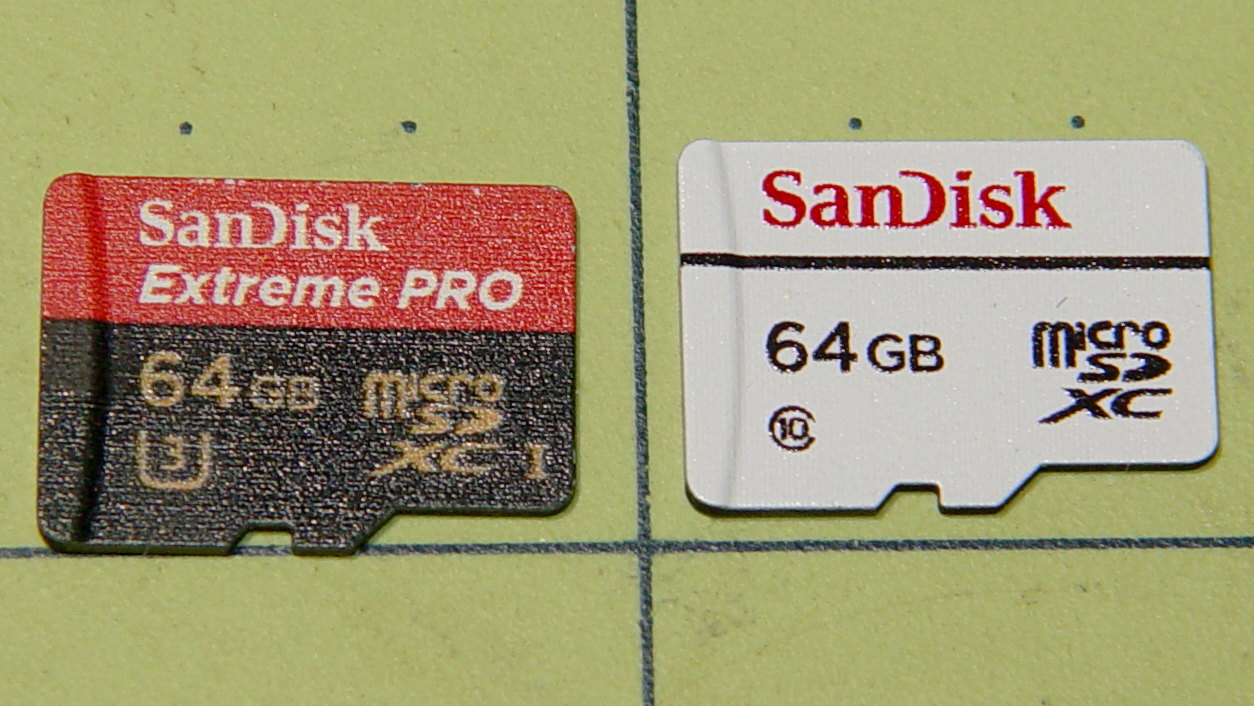
The Sandisk Extreme Pro 64 GB MicroSDXC (whew) card in the Sony HDR-AS30V had been working fine, but recently the camera crashed in mid-ride after spitting out an unreadable video file. I reformatting the card, which seemed to restore its good humor, and preemptively dropped $36 on a fancy Sandisk High Endurance Video Monitoring Card from a Nominally Reputable Amazon seller:

Sandisk – 64 GB MicroSDXC cards The package & card production values seem high enough to make me think it’s genuine, despite the white-label thing SanDisk has goin’ on; it matches their website pix closely enough.
Popping it into a USB 3.0 adapter, plugging that into the new-to-me Dell Optiplex 9010’s front-panel USB 3.0 port, and unleashing
f3probeproduced encouraging results:sudo f3probe -t /dev/sde [sudo] password for ed: F3 probe 6.0 Copyright (C) 2010 Digirati Internet LTDA. This is free software; see the source for copying conditions. WARNING: Probing normally takes from a few seconds to 15 minutes, but it can take longer. Please be patient. Probe finished, recovering blocks... Done Good news: The device `/dev/sde' is the real thing Device geometry: *Usable* size: 59.48 GB (124735488 blocks) Announced size: 59.48 GB (124735488 blocks) Module: 64.00 GB (2^36 Bytes) Approximate cache size: 0.00 Byte (0 blocks), need-reset=no Physical block size: 512.00 Byte (2^9 Bytes) Probe time: 4'26" Operation: total time / count = avg time Read: 2'42" / 4197135 = 38us Write: 1'41" / 4192321 = 24us Reset: 1.00s / 1 = 1.00sJust for completeness, I unleashed
f3writeto fill it with pseudorandom data:time f3write /mnt/part Free space: 59.46 GB Creating file 1.h2w ... OK! Creating file 2.h2w ... OK! … snippage … Creating file 59.h2w ... OK! Creating file 60.h2w ... 99.99% -- 5.40 MB/s -- 1sf3write: Write to file /mnt/part/60.h2w failed: Input/output error real 180m36.861s user 0m40.520s sys 6m44.024s
Dividing 64 GB by 180 minutes says the write speed works out to 5.9 MB/s, about a third of the “up to 20 MB/s” in the card’s specs. Huh.
Reading & comparing the data goes faster:
time f3read /mnt/part
                  SECTORS      ok/corrupted/changed/overwritten
Validating file 1.h2w ... 2097152/        0/      0/      0
Validating file 2.h2w ... 2097152/        0/      0/      0
… snippage …
Validating file 59.h2w ... 2097152/        0/      0/      0
Validating file 60.h2w ...  965376/        0/      0/      0

  Data OK: 59.46 GB (124697344 sectors)
Data LOST: 0.00 Byte (0 sectors)
	       Corrupted: 0.00 Byte (0 sectors)
	Slightly changed: 0.00 Byte (0 sectors)
	     Overwritten: 0.00 Byte (0 sectors)
Average reading speed: 23.87 MB/s

real	42m31.288s
user	0m47.444s
sys	0m30.232s
So it reads lickety-split, but writes much more slowly. Fortunately, the HDR-AS30 camera pops out a 4 GB file every 22.75 minute = 2.9 MB/s, so the card has a smidge of headroom while writing.
The specs claim “up to 10,000 hours” of Full HD recording. If so, I’m looking at a card good for “up to 40 years“ of riding at 1 hour/ride and 250 ride/year. For 36 bucks, how can ya go wrong?
I’ll take it for a few rides to see what happens …
The packaging includes a link to a Windows / Mac data recovery program, plus the serial number required to activate the download. I’ll continue to eke out a miserable existence with ordinary Linux disk / file maintenance tools, as I’m no longer enthused about “free” programs requiring secret handshakes for activation on a single computer with an OS I no longer use, particularly a program that auto-pumpkinates after a year:
Please fill in the data accurately as this information will be needed to reactivate the software if you ever need to move the software to a different computer.
Your expectations & preconceptions may vary.
-
Subscribe
Subscribed
Have a WordPress.com account? Log in now.

