-
Ripping Vinyl Records on a Raspberry Pi
Having already set up a Raspberry Pi streaming radio player for the living room, it seemed reasonable to also use it for recording audio from the long-disused turntable. A pair of RCA cables from the amplifier’s TAPE 2 REC outputs to the Behringer UCA202 USB audio interface got the audio where it needed to be:
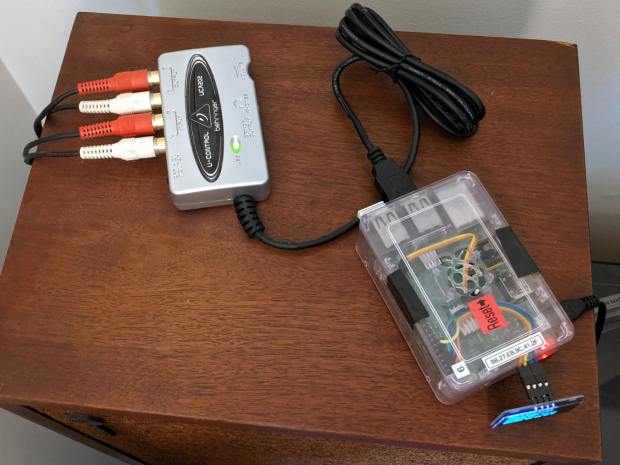
RPi streamer – Behringer UCA202 USB audio box Fiddle with the amp to select the phonograph, poke the TAPE 2 button to send audio to/from the UCA202, fire up an SSH session, kill the streaming audio program, and figure out what audio hardware is out there:
$ arecord -l
**** List of CAPTURE Hardware Devices ****
card 1: CODEC [USB Audio CODEC], device 0: USB Audio [USB Audio]
  Subdevices: 1/1
  Subdevice #0: subdevice #0
Not much else to choose from on a Raspberry Pi, so see what the UCA202 can do:
$ arecord --dump-hw-params
Recording WAVE 'stdin' : Unsigned 8 bit, Rate 8000 Hz, Mono
HW Params of device "default":
--------------------
ACCESS:  MMAP_INTERLEAVED RW_INTERLEAVED
FORMAT:  S8 S16_LE
SUBFORMAT:  STD
SAMPLE_BITS: [8 16]
FRAME_BITS: [8 32]
CHANNELS: [1 2]
RATE: [8000 48000]
PERIOD_TIME: [1000 65536000]
PERIOD_SIZE: [16 524288]
PERIOD_BYTES: [64 524288]
PERIODS: [2 1024]
BUFFER_TIME: (666 131072000]
BUFFER_SIZE: [32 1048576]
BUFFER_BYTES: [64 1048576]
TICK_TIME: ALL
--------------------
arecord: set_params:1233: Sample format non available
Available formats:
- S8
- S16_LE
Given those limited choices, 16 bit little-endian at 48 kHz seems like a no-brainer.
Find out all the ALSA device names:
$ arecord -L
null
    Discard all samples (playback) or generate zero samples (capture)
sysdefault:CARD=CODEC
    USB Audio CODEC, USB Audio
    Default Audio Device
front:CARD=CODEC,DEV=0
    USB Audio CODEC, USB Audio
    Front speakers
surround21:CARD=CODEC,DEV=0
    USB Audio CODEC, USB Audio
    2.1 Surround output to Front and Subwoofer speakers
surround40:CARD=CODEC,DEV=0
    USB Audio CODEC, USB Audio
    4.0 Surround output to Front and Rear speakers
surround41:CARD=CODEC,DEV=0
    USB Audio CODEC, USB Audio
    4.1 Surround output to Front, Rear and Subwoofer speakers
surround50:CARD=CODEC,DEV=0
    USB Audio CODEC, USB Audio
    5.0 Surround output to Front, Center and Rear speakers
surround51:CARD=CODEC,DEV=0
    USB Audio CODEC, USB Audio
    5.1 Surround output to Front, Center, Rear and Subwoofer speakers
surround71:CARD=CODEC,DEV=0
    USB Audio CODEC, USB Audio
    7.1 Surround output to Front, Center, Side, Rear and Woofer speakers
iec958:CARD=CODEC,DEV=0
    USB Audio CODEC, USB Audio
    IEC958 (S/PDIF) Digital Audio Output
dmix:CARD=CODEC,DEV=0
    USB Audio CODEC, USB Audio
    Direct sample mixing device
dsnoop:CARD=CODEC,DEV=0
    USB Audio CODEC, USB Audio
    Direct sample snooping device
hw:CARD=CODEC,DEV=0
    USB Audio CODEC, USB Audio
    Direct hardware device without any conversions
plughw:CARD=CODEC,DEV=0
    USB Audio CODEC, USB Audio
    Hardware device with all software conversions
They all point to the same hardware, so AFAICT the default device will work fine.
Try recording something directly to the RPi’s /tmp directory, using the
--format=datshortcut for “stereo 16 bit 48 kHz” and--mmapto (maybe) avoid useless I/O:$ arecord --format=dat --mmap --vumeter=stereo --duration=$(( 30 * 60 )) /tmp/Side\ 1.wav Recording WAVE '/tmp/Side 1.wav' : Signed 16 bit Little Endian, Rate 48000 Hz, Stereo +02%|01%+ overrun!!! (at least 1.840 ms long) +02%|02%+ overrun!!! (at least 247.720 ms long) +# 07%|06%##+ overrun!!! (at least 449.849 ms long) + 03%|02%+ overrun!!! (at least 116.850 ms long)Huh. Looks like “writing to disk” sometimes takes far too long, which seems to be the default for MicroSD cards.
The same thing happened over NFS to the file server in the basement:
$ arecord --format=dat --mmap --vumeter=stereo --duration=$(( 30 * 60 ))  /mnt/part/Transfers/Side\ 1.wav

Recording WAVE '/mnt/part/Transfers/Side 1.wav' : Signed 16 bit Little Endian, Rate 48000 Hz, Stereo

                               +   09%|07%  +                                 overrun!!! (at least 660.372 ms long)

                                +# 08%|06%# +                                 overrun!!! (at least 687.906 ms long)
So maybe it’s an I/O thing on the RPi’s multiplexed / overloaded USB + Ethernet hardware?
Trying a USB memory jammed into the RPi, under the assumption it might be better at recording than the MicroSD Card:
$ arecord --format=dat --mmap --vumeter=stereo --duration=$(( 30 * 60 ))  /mnt/part/Side\ 1.wav
Recording WAVE '/mnt/part/Side 1.wav' : Signed 16 bit Little Endian, Rate 48000 Hz, Stereo
                                  +01%|01%+                                   overrun!!! (at least 236.983 ms long)
Well, if it’s overrunning the default buffer, obviously it needs Moah Buffah:
$ arecord --format=dat --mmap --vumeter=stereo --buffer-time=1000000 --duration=$(( 30 * 60 ))  /mnt/part/Side\ 1.wav
Recording WAVE '/mnt/part/Side 1.wav' : Signed 16 bit Little Endian, Rate 48000 Hz, Stereo
                               +## 10%|06%# +                                 overrun!!! (at least 359.288 ms long)
When brute force doesn’t work, you’re just not using enough of it:
$ arecord --format=dat --mmap --vumeter=stereo --buffer-time=2000000 --duration=$(( 30 * 60 ))  /mnt/part/Side\ 1.wav
Recording WAVE '/mnt/part/Side 1.wav' : Signed 16 bit Little Endian, Rate 48000 Hz, Stereo
                                  +00%|00%+
Sampling four bytes at 48 kHz fills 192 kB/s, so a 2 s buffer blots up 384 kB, which seems survivable even on a Raspberry Pi.
The audio arrives at 11.5 MB/min, so an LP side with 20 min of audio will require about 250 MB of disk space. The USB memory was an ancient 2 GB card, so all four sides filled it halfway:
$ ll /mnt/part
total 1.1G
drwxr-xr-x  2 ed   root 4.0K Dec 31  1969  ./
drwxr-xr-x 17 root root 4.0K Jun  7 19:15  ../
-rwxr-xr-x  1 ed   root 281M Sep  1 14:38 'Side 1.wav'*
-rwxr-xr-x  1 ed   root 242M Sep  1 15:01 'Side 2.wav'*
-rwxr-xr-x  1 ed   root 265M Sep  1 15:27 'Side 3.wav'*
-rwxr-xr-x  1 ed   root 330M Sep  1 15:58 'Side 4.wav'*
Side 4 is a bit longer than the rest, because I was folding laundry and the recording stopped at the 30 minute timeout after 10 minutes of silence.
Now, to load ’em into Audacity, chop ’em into tracks, and save the lot as MP3 files …
-
Subscribe
Subscribed
Have a WordPress.com account? Log in now.

