-
XFCE vs. Screen Locking
For reasons not relevant here, I was asked to tweak an XFCE 20.04 installation to not ask for a password after the screen power-saver kicks in. There’s no need for a screensaver with an LCD panel, so this should be straightforward, as per the XFCE 18.04 setup:

XFCE Power Manager Light Locker settings 18.04 Which had no effect.
For some reason, perhaps having to do with an upgrade from 18.04 to 20.04, Light Locker wasn’t actually handling the screen locking; some dedicated searching suggested this is a problem of long standing.
So tweak the Lock Screen settings of the screen saver that’s not in use:
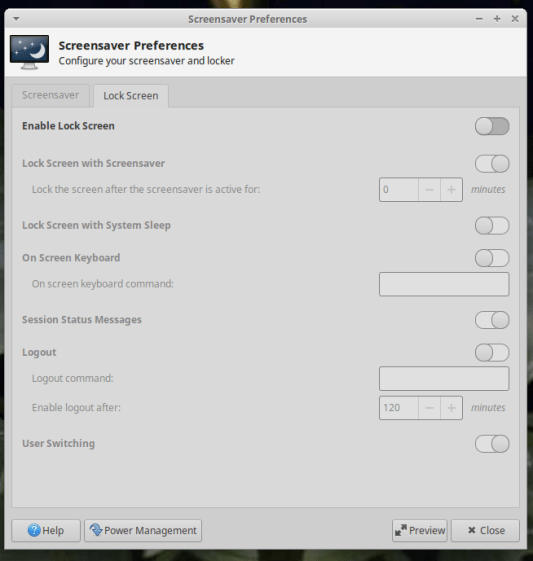
XFCE Screensaver Lock Screen Preferences – 20.04 If you’re doing this remotely, adding a stanza to
~/.config/xfce4/xfconf/xfce-perchannel-xml/xfce4-screensaver.xmlshould suffice:<?xml version="1.0" encoding="UTF-8"?> <channel name="xfce4-screensaver" version="1.0"> <property name="saver" type="empty"> <property name="mode" type="int" value="0"/> </property> <property name="lock" type="empty"> <property name="enabled" type="bool" value="false"/> </property> </channel>The threat model for this particular installation is “minimal”.
-
Subscribe
Subscribed
Have a WordPress.com account? Log in now.

