-
KeyboardIO Atreus Keymapping
Having a customizable keyboard like the KeyboardIO Atreus means one must customize it. As it turns out, I wanted to use some features of the underlying
QMKKaleidoscope firmware that aren’t exposed by Chrysalis, KeyboardIO’s otherwise competent keymap configuration utility, so what you see below runs on hard mode.Start by installing QMK, compiling the default Atreus layout, and flashing the keyboard just to confirm all the steps work:
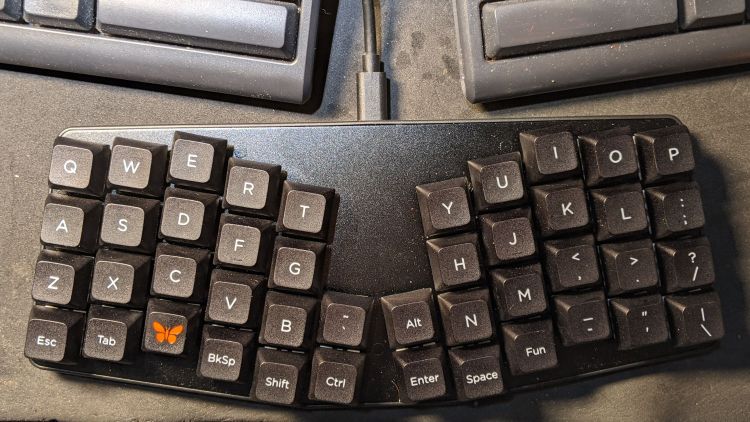
Atreus keyboard – overview With all that working, add (or create) two lines to the
rules.mkfile in the keymap directory you’re tweaking:AUTO_SHIFT_ENABLE = yes # allow automagic shifting TAP_DANCE_ENABLE = yes # allow multi-tap keysEnabling Auto-Shift lets you generate shifted characters (like
Z) by briefly holding down the unshifted key (likez). This requires unlearning an entire lifetime of touch typing practice, but is definitely worthwhile; if a thumb still reaches for the shift key, there’s no harm done. There are, of course, a myriad options, all of which I left unchanged.Complex passwords suffer, as you must blind-type carefully while tapping each key rapidly.
Enabling Tap Dance lets a key generate one character when tapped and another when double-tapped; you can go crazy with more taps. An
enum{}in thekeymap.cfile generates indexes for the keys and an array holds the action definitions:enum { TD_SPC_ENT, TD_BS_DEL, }; qk_tap_dance_action_t tap_dance_actions[] = { [TD_SPC_ENT] = ACTION_TAP_DANCE_DOUBLE(KC_SPC, KC_ENT), [TD_BS_DEL] = ACTION_TAP_DANCE_DOUBLE(KC_BSPC, KC_DEL), };Then each key uses a
TD()macro in thekeymap.cfile:… TD(TD_BS_DEL), … TD(TD_SPC_ENT), …In contrast, layer shifting uses straightforward built-in macros. The Fun key produces a momentary shift to Layer 1 (known as
_RS) when held down:… MO(_RS), …The
ESCkey in the lower left corner emits the expectedEscapekey code when tapped and switches to Layer 2 (a.k.a._LW) when held:LT(_LW,KC_ESC), …
For reference, the current state of the
keymap.cfile:// Modified from the KeyboardIO layout // Ed Nisley - KE4ZNU // Enable Auto Shift and Tap Dance in rules.mk #include QMK_KEYBOARD_H enum layer_names { _QW, _RS, _LW, }; enum { TD_SPC_ENT, TD_BS_DEL, }; qk_tap_dance_action_t tap_dance_actions[] = { [TD_SPC_ENT] = ACTION_TAP_DANCE_DOUBLE(KC_SPC, KC_ENT), [TD_BS_DEL] = ACTION_TAP_DANCE_DOUBLE(KC_BSPC, KC_DEL), }; const uint16_t PROGMEM keymaps[][MATRIX_ROWS][MATRIX_COLS] = { [_QW] = LAYOUT( /* Qwerty */ KC_Q, KC_W, KC_E, KC_R, KC_T, KC_Y, KC_U, KC_I, KC_O, KC_P , KC_A, KC_S, KC_D, KC_F, KC_G, KC_H, KC_J, KC_K, KC_L, KC_SCLN , KC_Z, KC_X, KC_C, KC_V, KC_B, KC_GRV, KC_LALT, KC_N, KC_M, KC_COMM, KC_DOT, KC_SLSH , LT(_LW,KC_ESC), KC_TAB, KC_LGUI, TD(TD_BS_DEL), KC_LSFT, KC_LCTL, KC_ENT , TD(TD_SPC_ENT), MO(_RS), KC_MINS, KC_QUOT, KC_BSLS), [_RS] = LAYOUT( /* [> RAISE <] */ KC_EXLM, KC_AT, KC_UP, KC_DLR, KC_PERC, KC_PGUP, KC_7, KC_8, KC_9, KC_HOME, KC_LPRN, KC_LEFT, KC_DOWN, KC_RGHT, KC_RPRN, KC_PGDN, KC_4, KC_5, KC_6, KC_END, KC_LBRC, KC_RBRC, KC_HASH, KC_LCBR, KC_RCBR, KC_CIRC, KC_AMPR,KC_ASTR, KC_1, KC_2, KC_3, KC_PLUS, KC_NO , KC_INS, KC_LGUI, KC_DEL , KC_BSPC, KC_LCTL, KC_LALT,KC_SPC, KC_TRNS, KC_DOT, KC_0, KC_EQL ), [_LW] = LAYOUT( /* [> LOWER <] */ KC_INS, KC_HOME, KC_UP, KC_END, KC_PGUP, KC_UP, KC_F7, KC_F8, KC_F9, KC_F10 , KC_DEL, KC_LEFT, KC_DOWN, KC_RGHT, KC_PGDN, KC_DOWN, KC_F4, KC_F5, KC_F6, KC_F11 , KC_NO, KC_VOLU, KC_NO, KC_NO, RESET, _______, _______, KC_NO, KC_F1, KC_F2, KC_F3, KC_F12 , KC_NO, KC_VOLD, KC_LGUI, KC_LSFT, KC_BSPC, KC_LCTL, KC_LALT, KC_SPC, TO(_QW), KC_PSCR, KC_SLCK, KC_PAUS ) };With all that set up, It Just Works and I can contemplate grafting a status LED into the thing.
-
Subscribe
Subscribed
Have a WordPress.com account? Log in now.

