-
Kicad-to-HAL: Basic Schematic Symbols
The LinuxCNC definition of the HAL NOT component looks like this:
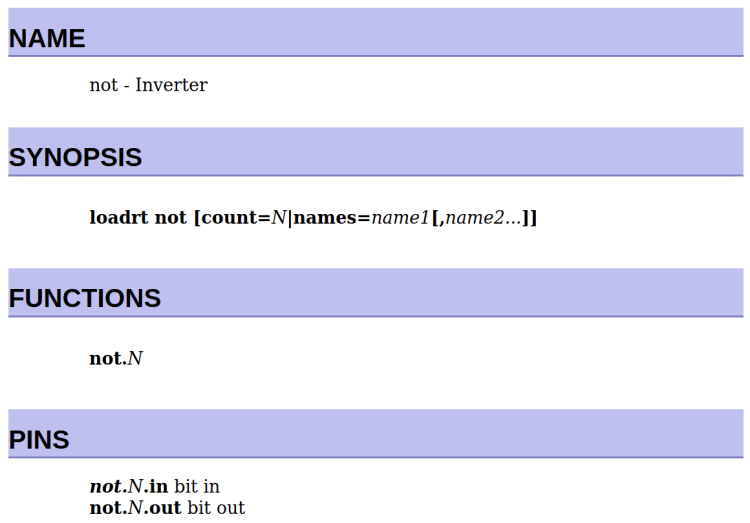
LinuxCNC HAL component – NOT The
loadrtcommand uses the “module name”, which is the file name of the module.Functions and Pins use the “function name”, as defined by whatever code lives inside the module.
As a rule of thumb, module names will have underscores between words, where the corresponding function name will have hyphens, but this is not mandatory.
The numeric suffix on the Function name tells you which of the many identical components it is.
The Pin names generally have the Function name and numeric suffix as their prefix.
The NOT gate symbol in
LinuxCNC-HAL.liblooks like this: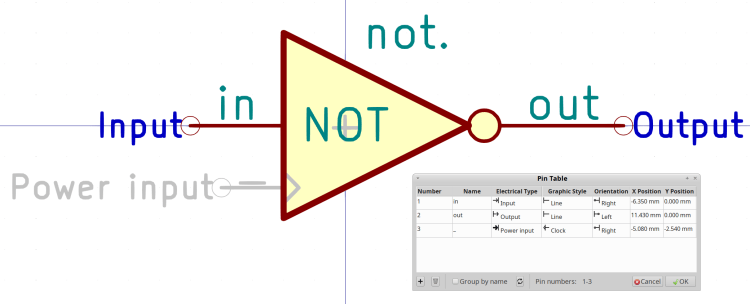
Kicad symbol – NOT Note that there is no Kicad footprint: these components will never see a circuit board.
The symbol Reference (above the symbol:
not.) must match the HAL Function name and must end in a period to make the Kicad numeric annotation easily separable. Jellybean components use the Kicad annotation as their identifier, so that the references will look likenot.0,not.1, and so on.The symbol Value (inside the symbol:
NOT) must match the HAL module name; it will be lowercaseified as needed.Kicad pin names must match the HAL pin names, must use only Kicad’s Input and Output “Electrical Type”, and must use only the Line “Graphic Style”.
Kicad-to-HALwill glue the pin onto the Kicad reference with a period in between (not.0.out) for use in the HAL configuration.I made the pins names visible for that screenshot. For a graphical component like this, I generally make them invisible.
The “Power input” pin is named “_” (a single underscore) and, in this case, is invisible. Kicad will automagically connect all such pins into a single net, so including a corresponding pin on a THREAD component (more about this later) will invoke
Kicad-to-HALmagick connecting the function name (with the numeric suffix) to the appropriate thread:addf not.0 servo-thread
The light gray + in the middle of the symbol (not quite centered in the O of NOT) comes from the LoadRT field you must include in the symbol properties:
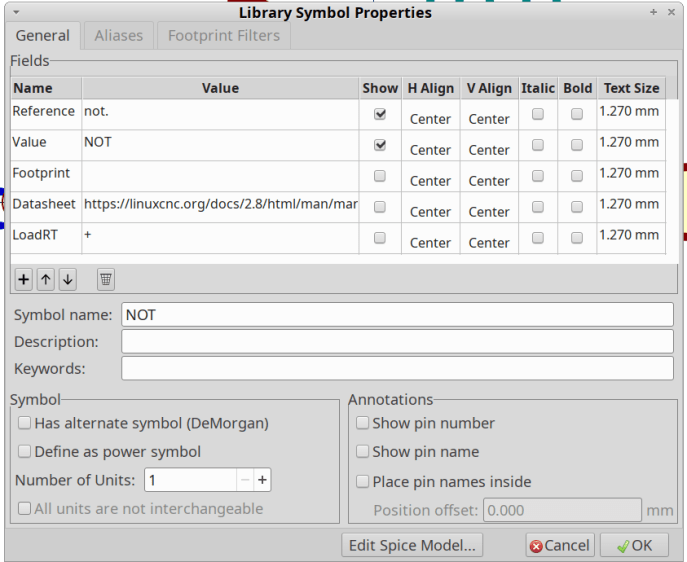
Kicad Symbol Properties – NOT That tells
Kicad-to-HALto add up the total number ofNOTcomponents and generate an appropriateloadrtcommand:loadrt not count=1
Not having to count the damn symbols, keep track of their numeric suffixes, and manually generate the
addfcommands justified this entire project.
-
Subscribe
Subscribed
Have a WordPress.com account? Log in now.

