Ed Nisley's Blog: Shop notes, electronics, firmware, machinery, 3D printing, laser cuttery, and curiosities. Contents: 100% human thinking, 0% AI slop.
Inside a batteries.com 9V batteryCorrosion inside batteries.com 9V battery
Back in the Good Old Days, 9 V batteries had a stack of half a dozen pancake cells inside that completely filled the outer case. These days, it seems they use cylindrical cells similar to AAAA cells, with more wasted space around the edges.
I retrieved these batteries from our smoke detectors. I tend to poke the self-test button occasionally and wait until the low-battery alarm starts chirping, rather than throwing half-used batteries out. Being that sort of bear, I date the batteries when I put them in; they usually last two years.
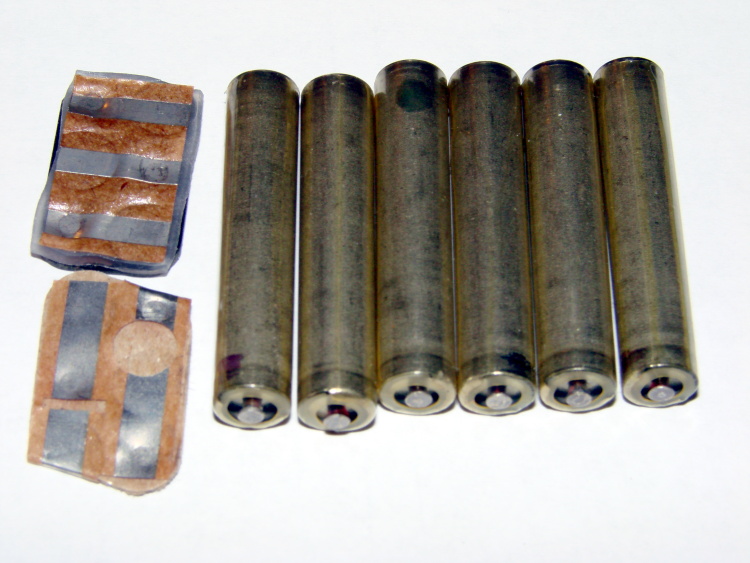
This one is from batteries.com and lasted 18 months. The obvious corrosion inside the shrink-wrap plastic sleeve says that the cell sealing isn’t nearly as good as you’d wish. The two most heavily corroded cells are completely dead, but the rest have about 500 mAh of life left in them (at a rather low 50 mA discharge rate). With a bit better QC, it’d be a winner.
Notice that the case contacts have sharp points that ensure a decent connection, perhaps despite the crud. Only one or two of the points actually make contact, which probably contributes to a faster assembly time: just get the ribbons in the right neighborhood and crimp the case closed. On the other hand, all the current must flow through one or two points, so don’t use them as a high-current source.
Eveready Gold 9V battery innards
On the other end of the scale, this Eveready Gold battery has six loose cells and lasted 2.5 years. All the cells have roughly the same level of charge remaining: they’re thoroughly dead.
The build quality seems better, with individually shrink-wrapped cells and a compliant closed-cell foam layer on the bottom of the case to maintain pressure against the contacts. No sharp points, so they need more pressure.
The cell polarity is exactly reversed from what you’d expect: the button end is negative. So, even though this looks like a cheap source of AAAA cells, that’s a cruel deception…
A long time ago I got an HP54602B oscilloscope with a serial port data link. HP provided a sample app that snarfed screenshots & data from the scope, but it wasn’t really ready for prime time and, besides, I vastly preferred to use OS/2 (!) and then Linux rather than Windows.
Here’s my Kermit script to fetch screenshots. All the software comes more-or-less standard in Ubuntu Linux and (I presume) in most others. If you’re running Windows, you’re on your own.
Scope Setup
HP54602B Serial Setup Screenshot
The oscilloscope’s HP Plotter setting spits out bog-standard HPGL commands in flat ASCII. I’ve always meant to investigate what HP Printer does, but …
I wish the scope ran faster than 19200 b/s, but that speed works reliably over generic USB-to-serial converters (and the scope can’t feed data that fast, anyway). The other choice, back in the day, was HPIB / GPIB; I’d have had to buy three or four different adapters to suit all the PC data buses since then: ISA, EISA, VLB, PCI …
Xon/Xoff flow control (a.k.a. handshaking) works better than hardware flow control, simply because the cable’s easier to build.
The Factors setting adds a bunch of text to the end of the data stream that’s not useful, except for the fact that an HPGL LB instruction follows all of the useful data and gives the Kermit script something to look for. Otherwise, the only way to detect the end of the stream is to time out after a looong time.
I haven’t the foggiest idea what Resolution does, but High seems appropriate.
Hardware Notes
The scope requires a Null Modem in front of a standard DB-25 to DB-9 cable. I’ve been meaning to rewire my standard cable to eliminate the Null Modem, but …
Adding an LED breakout / monitoring adapter to the serial port loads the signals too much and can lead to puzzling errors. Maybe it’s just my adapter: YMMV.
I’ve run the cable all the way across my basement lab with no problem. This is, after all, good old RS-232, not some high-falutin’ USB or Firewire interconnect.
Taking the Shot
Get a picture you like, poke the Print Screen button, then quick like a bunny run the script. The scope copies the current screen into an internal buffer, then sends out a torrent of HPGL commands. The script will capture the data and eventually spit out a PNG file.
You may want to Stop the trace, rather than leave it running.
In XY mode, the scope seems to have trouble copying the entire trace. I tap Auto Store twice, then Stop, then Print Screen. It’s fuzzier, but copies the whole thing.
What Happens
The script captures the incoming serial data into a log file, processes that text through the hp2xx program to get an Encapsulated Postscript EPS file, then runs that though convert to get a PNG file. The bank shot off EPS results in better-looking output, for reasons I don’t understand.
The 240-second timeout value for the Input command seems long, but it takes a lot of plotter commands to define a four-trace plot. A too-short timeout chops off the tail end of the HPGL stream and prompts bizarre error messages from hp2xx.
The parameters for hp2xx and convert came from protracted and tedious twiddling. The ‘scope image is 512 dots across and 300-some-ish vertically; the output mimics the not-quite-square graticule aspect ratio on the actual screen. If HP thinks it looks good, then it looks good to me.
The active (bright) traces use Pen 2, which I’ve set to Blue (color 4). The graticule, annotations, and stored traces all use Pen 1, which appears as Black (color 1). Tweak -c 14 as you wish.
The pen widths (set by -p 34) don’t actually seem to do very much, although I vaguely recall that using the default width of 1 makes the output entirely too faint.
The PNG has a transparent background that turns white when you actually use it in a document; I suppose you could overlay it atop a background image if you wanted to get cute.
When the dust settles and the smoke clears, you get PNG images like this. It’s an XY plot, so the blue section appears as a bright trace on the oscilloscope’s screen.
BH curve for LC0263-A coil
Kermit Script
#!/usr/bin/kermit +

# Fetches screen shot from HP54602B oscilloscope

# Presumes it's set up for plotter output...

# Converts HPGL to PNG image
set modem none
set line /dev/ttyS0
set speed 19200
set flow xon/xoff
set carrier-watch off
# Make sure we have a param
if not defined %1 ask %1 {File name? }
set input echo off
set input buffer-length 150000
# Wait for PRINT button to send the plot
echo Set HP54602B for HP Plotter, FACTORS ON, 19200, XON/XOFF
echo Press PRINT SCREEN button on HP54602B…
log session “%1.hgl”
# Wait for end of data stream
input 240 lb
echo … got final lb command
close session
close
echo Converting HPGL in
echo — %1.hgl
echo to PNG in
echo — %1.png
# without labels = no terminating lb info
#run hp2xx -m png -a 1.762 -h 91 -c 14 “%1.hgl”
#run mogrify -density 300 -resize 200% “%1.png”
# with labels = terminating lb
run hp2xx -q -m eps -r 270 -a 0.447 -d 300 -w 130 -c 14 -p 34 “%1.hgl”
run convert -density 300 -resize 675×452+2+2 “%1.eps” “%1.png”
While writing a column for Circuit Cellar, I managed to utterly botch the choice of a boost converter inductor. The inductor (the rightmost one in the lineup) was a common-mode choke from a power supply, so I figured it had enough meat for 300 mA of boost current.
Salvaged Inductors
Bzzzzt! Wrong choice!
So it’s time to document how to measure this stuff. The intent is to plot a BH curve: core flux density B versus magnetizing force H.
Quick inductor tutorial using (ptooie) Imperial units and avoiding Greek letters for simplicity:
Magnetomotive force mmf = 0.4 * pi * (N = turns) * (I = current)
induced voltage e = – N * (d phi / d t) * (10^-8) where phi = flux linking the N turns
Magnetizing force H = mmf / (MPL = mean path length around core)
Flux density B = phi / (Ac = effective core area)
also B = (mu = permeability) * H
You might think that B & H are lashed linearly together, but mu is most savagely nonlinear. It depends on H, temperature, core material, and a bunch of other stuff you don’t want to know about. So, by and large, plotting B against H shows you how mu varies: it’s the slope of the curve at any point. Vertical slope = high mu (good), horizontal slope = zero mu (bad).
Stirring all that together, you get the Fundamental Transformer Equation:
E in RMS volts = 4 * F * f * N * Ac * B * (10^-8)
F = form factor = rms / average
sine = 1.11
bipolar square = 1.00
unipolar square = 1.41
So…
H is proportional to mmf and thus to primary current
B is proportional to phi and thus the integral of secondary voltage
Sounds scary, but primary current & secondary voltage are easy to measure.
Inductor measurement test setup
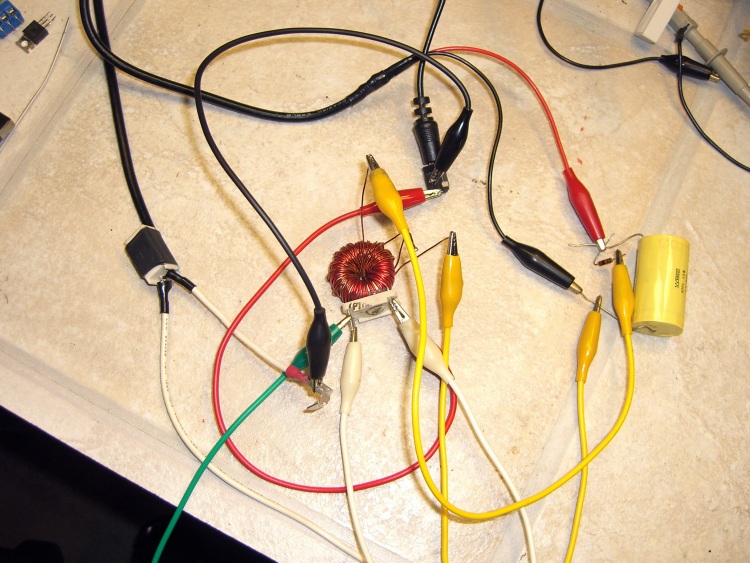
The basic lashup goes a little something like this: stick a sampling resistor in the primary, run the secondary through an RC integrator, feed both into an oscilloscope that can do XY plotting, drive the primary from a Variac, turn the knob, and watch at the results. You might want a bit more finesse than this, but, eh, it works.
The primary voltage will be relatively low, so plug a 12 VAC wall wart into the Variac. This gives you galvanic isolation from the power line, finer control over the primary voltage (more of a full turn on the Variac), and will prevent you from killing yourself or burning out your basement laboratory. You want a fairly husky wart if you’re measuring husky inductors. Remember: this is an AC measurement, so you want an AC wall wart, not one with a nice filtered DC output.
The resistance of the sampling resistor should be much less than the inductive reactance of the coil. We’ll measure it at 60 Hz because that’s easy, so for a coil of inductance L, the reactance at 60 Hz is 2 * pi * 60 * L. That simplifies to 377 * L, so a 1 mH coil has about 400 m-ohm reactance. I have a nearly infinite stash of 100 m-ohm sandbox power resistors, so that’s what we’ll use; you’d want less, but this is quick & easy.
If the inductor doesn’t have a secondary, poke some magnet wire through the core. Use some simple number of turns and remember that number, just in case you want to calibrate the results.
The time constant of the RC integrator must be a lot bigger than the frequency you’re integrating. For a 60 Hz signal, you want maybe a 6 Hz integrator: 60 Hz -> 17 ms, so pick 200 ms. Having a nice 1 uF film cap in my heap, the resistor works out to (200×10^-3) / (1×10^-6) = 200 k. Anything in that range will work fine. A larger cap gives you a smaller resistor and more signal to the scope.
Wired it up about like that and here’s what happens for the inductor I picked
BH curve for Bel 0571-0033-02 choke (rightmost)
The calibration of H is 100 mV / amp (from the 100 m-ohm resistor) and the scope display is thus 2 A/div. The calibration for B is whatever the secondary winding provides, scaled by 1/RC from the integrator.
For this coil, the value of mu is essentially infinite (B rises vertically for changes in H), but the core saturates at very small values of H (and thus primary current). It was a common-mode choke for a power supply, so that’s exactly what you want: high inductance for very small currents and no need for much in the way of core flux because the opposing line currents in the windings cancel.
I harvested some inductors from a bunch of dead power supplies in my heap and measured them similarly, using an existing winding as the secondary wherever possible. The results look like this:
BH curve for for coil with blue dot (3rd left)BH curve for 40580-R01 coil (2nd left)BH curve for LC0263-A coil (leftmost)
The area inside the loop is proportional to the core power loss, so it’s obvious that some inductors are better than others.
If you’re going to do this for real, you’ll want actual calibrations for both axes. You can work the numbers out from the equations and read real values for both B and H directly from the ‘scope graticule. Pretty slick, mmm?
The primary current can get surprisingly high, so turn the Variac knob up, make your measurement, and turn it back down again. The sampling resistor and the core can get scary hot if you let ’em cook while pondering the ‘scope display. A storage scope is most helpful, which comes pretty much for free with digital scopes these days.
I wrote about all this in more detail in the context of a resistance soldering unit in my February 08 Circuit Cellar column, so I should have known better.
Memo to self: measure first, write later.
And remember to turn off the WordPress Smiley option (Dashboard → Settings → Writing) so equations don’t get cutsy artwork instead of numbers. Feh!
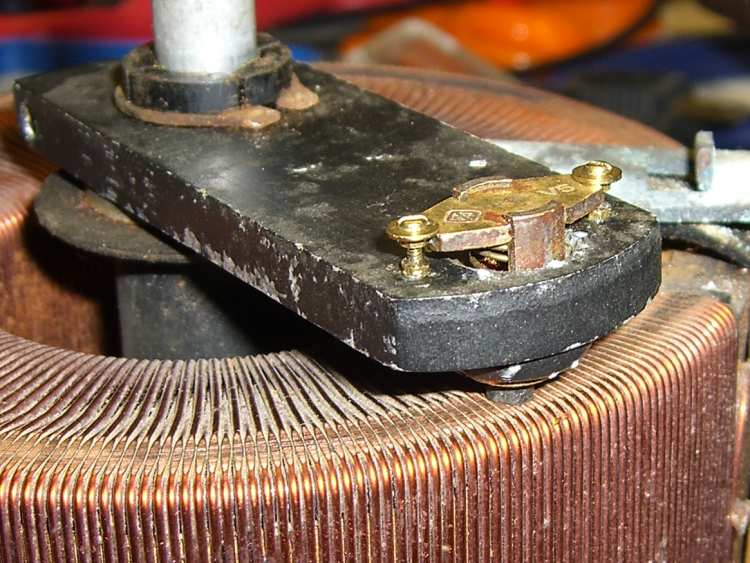
Variac Rotor Before FixupVariac Brush Holder and StakingVariac Rotor After Fixup
So I’ve had this ancient 5 A Variac on the heap for far too long, finally came up with an actual application, and discovered that not only was the line cord shot, it basically didn’t work.
Of course, I had to replace the cord & outlet before I discovered that it didn’t work…
The classic Variac failure happens when the carbon brush wears down to nothing, at which point the holder scrapes on the windings and the whole thing burns out. In this case, the brush still had 3/16″ left, but the sliding holder was firmly corroded in place.
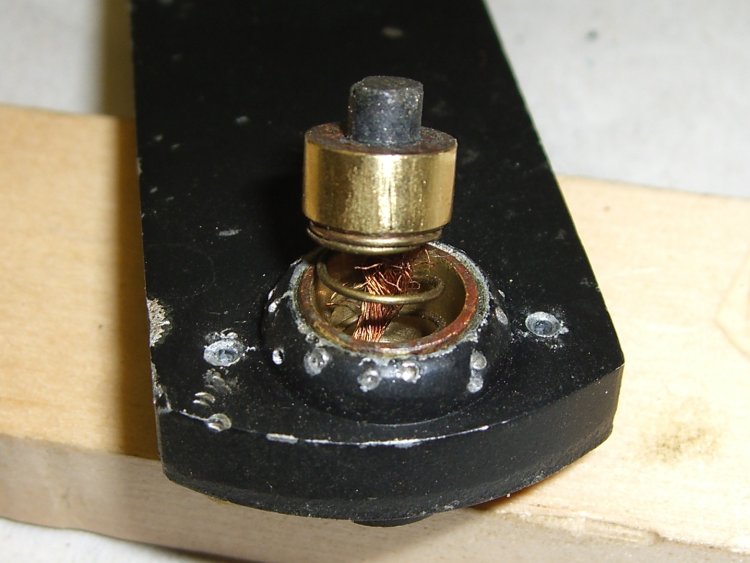
I soaked it in PB’laster, rapped it all over with a small drift punch, and managed to drive the holder out. In the process, the brass sleeve around the brush holder came out, putting the entire problem on the bench.
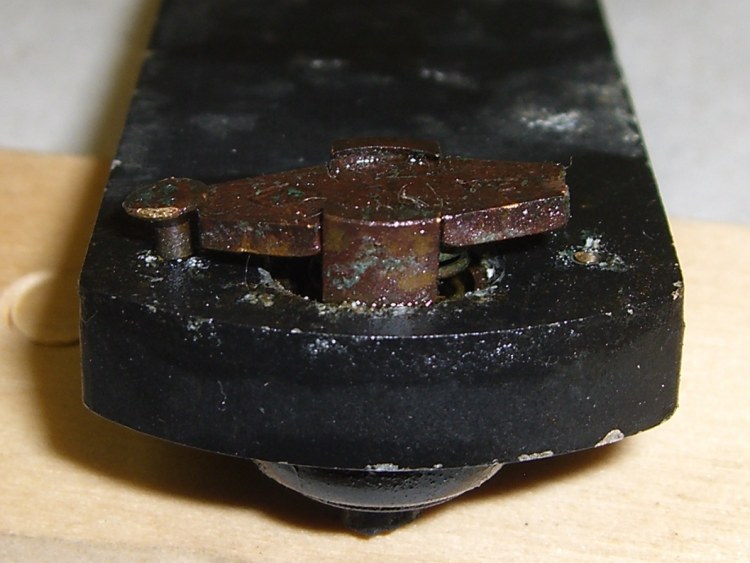
The rotor had two brass rivets securing the brush contact bar (the part that’s connected to the actual brush holder by a length of copper braid) that would not come out, nohow. After I broke one off (the first picture), I found that they were swaged over on the bottom, so I broke the other one off and punched both stubs out.
I spent a few hours wearing a headband magnifier and gently filing everything to a pair of slip fits: brush holder into sleeve, sleeve into rotor. The rotor is aluminum, so I applied a liberal dose of oxidation inhibitor, slipped the sleeve in place, and staked that sucker down.
Which meant I spent another half hour filing the brush holder to restore the slip fit…
Turned out that the rivets were 40 mils, the holes were 43, and 00-90 machine screws are 43.5. I don’t have a 00-90 tap (mostly because I know I’d break it by looking hard at it), so I just ran a screw into the hole and formed the threads. They must have 10% engagement, tops, but this isn’t a high-stress application.
This is, I think, the first time I’ve ever used those 00-90 screws and nuts. The washers are 0-80 so they reach over the brush contact bar far enough to hold it in place. Dang, those things are small!
The main conduction path seems to be through a brass slip contact, into the aluminum rotor, through the brass sleeve, and into the carbon brush. I’m not convinced the rivets / screws conduct any appreciable amount of current to the contact bar and through the braid, but I shined up the contact patches anyway.
Put it all back together, fired it up, and it worked!
Ought to be good for the next half-century, at least…
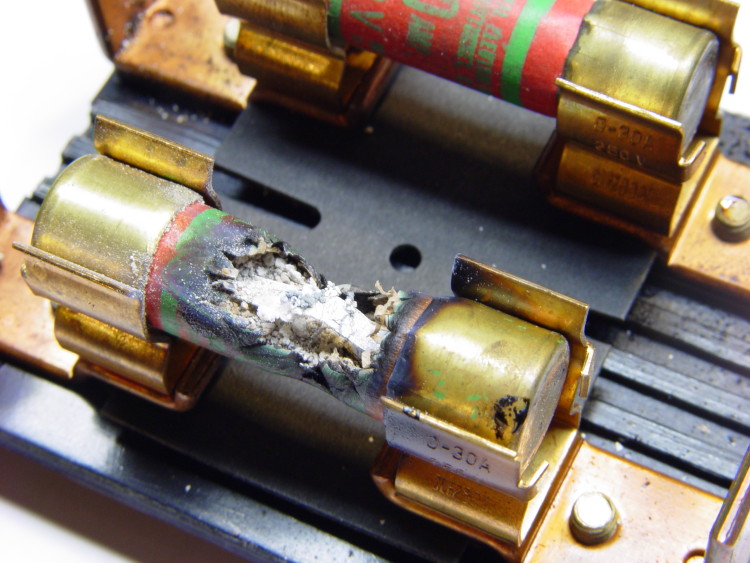
The electric water heater in the rental house stopped working. I found this in the fusebox.
Looks like it’d been simmering for a while!
Fuses never (uh, rarely) fail as shorts, but sometimes they don’t fail open. The block and fuse box don’t look overheated and seem to be OK, but, sheesh…
I have a pair of trackballs, one on each side of the keyboard, in the interest of dividing the strain on my wrists. The right-hand trackball, a Logitech Cordless Optical Trackman, suddenly stopped working one afternoon: the ball stops moving the pointer, the half-dozen buttons stop selecting things, the scroll wheel stops scrolling.
I poke the resync buttons, replace the batteries, generally futz around, and discover that it’s actually working fine, but with an RF range measured in inches rather than feet. Not good; it’s on a pull-out shelf in the desk leg well and there’s no place for the receiver within a few inches. Besides, it’s supposed to work better than that.
So I take the trackball apart, admire all the little bitty parts, reseat the ribbon cables, blow the fuzz out of the optical sensors, admit there’s not else much I can do, and reassemble it.
Works like a champ again: I love zero-dollar fixes!
I’m pretty sure this is Yet Another Ribbon Cable failure. Those cheap tin-on-tin connections get gassy after a few years, the resistance skyrockets, and (what with No User Serviceable Components Inside) the thing get tossed in the trash. Don’t get me started on RoHS.
As part of all this, I discovered that desktop gadgets mostly use the 27 MHz band, with a few in the low VHF and Bluetooth at 2.4 GHz. I’d have laid money saying everything except BT was UHF, which just goes to show what I (don’t) know…








 The Smell of Molten Projects in the Morning