Ed Nisley's Blog: Shop notes, electronics, firmware, machinery, 3D printing, laser cuttery, and curiosities. Contents: 100% human thinking, 0% AI slop.
I’m kludging up a clamp to grab AA cells around their positive terminal so that I can resistance-weld nickel strips to that button. The general idea is that the current passes through the strip, through the button, and out the side to the clamp, rather than trying to heat the button through the strip from the top.
Trial Fitting the Jaws
A snap-ring pliers has pretty nearly all the right attributes, so I’m making up a set of copper jaws with a hole in the middle to grab the terminal. Basically, I whacked off a ring from a copper pipe, hacksawed it lengthwise, hammered it flat (work-hardening it in the process), and drilled some holes.
Then I grabbed it in the Sherline vise and set up a teeny 4-mil slitting saw. A bit of manual CNC ran the saw past the copper and, after a while, the top half just fell over dead with a perfectly shiny cut right down the middle!
Slitting Success
Useful things to remember for the next time around:
Cut only 0.2 mm into the copper per pass
100 mm/min feed is fine
4000 rpm is fast enough
A drop of cutting lube is a bunch on this scale
This worked out a whole lot better than I expected…
Here’s a quartet of discharge tests for a new set of Tenergy Ready-to-Use cells. It’s the same one that produced the green and red traces in that post. It looks as though it still has a weak cell, but it’s not too far off of the others.
Tenergy RTU Pack A Tests – Aug 2009
The lower black trace is after sitting around for a few days, the others are hot off a 4C charger. I think the black trace is more representative of the long-term voltage.
The two middle traces are essentially identical: same charging method, same discharging method.
The blue trace is at 100 mA (C/23); the others are at 500 mA (C/4.6). The cells don’t produce much more energy at the lower rate and, at 1.8 Ah, are still well below their 2.3 Ah rating.
The difference in voltages between the green and blue traces most likely has more to do with the relatively skinny wires and crappy spring-loaded stainless-steel battery connections. The current varies by 400 mA and a mere 0.5 Ω between the battery and the voltage measurement would account for the entire difference.
I collected some loose cells and pulled some cells from the packs to see how they compared individually.
These are discharging at 500 mA, rather than 1 A, mostly because there were fewer tests and I could run ’em overnight. Other than the Tenergy RTU cell, they’re all old and wearing out…
Single Cell Comparison – Aug 2009
The green line is a new Tenergy RTU 2.3 Ah cell; it has a higher voltage, but still isn’t delivering anything close to its rating even at a load only slightly higer than C/5. I have three packs of those that will be cycling through the amateur radios on the bikes, but I don’t like the relatively low capacity. I’ll run these eight cells through the fast charger and do some rundown tests to see if they improve; I have my doubts.
The black line comes from an old batteries.com 2.5 Ah cell. It has the highest capacity of the group, but a rather low voltage. I’ll start cycling those through the blinky lights on the bikes.
The red line is a Tenergy 2.6 Ah cell. I think these are a year or two old, so they’re not faring well at all. OK voltage, but very low capacity. I think the batteries.com cells will work better in the lights, as they have 50% more capacity at a slightly lower voltage.
The blue line is an ancient Lenmar 2.0 Ah cell. As a fraction of its rated capacity, it’s doing OK, but the low voltage is a dealbreaker. Scrap.
Given the poor results from the old & new Tenergy cells, I’m not sure quite what to do. The advertised ratings are obviously optimistic, shipping charges pretty much wipe out any incentive to sample a batch of new cells, and cells get reformulated often enough that old tests you find on the web (this one included!) are useless.
I’ve been using NiMH AA cells to power the amateur radio HTs on our bikes for the last several years, using homebrew 6- and 8-cell packs like this one. In addition, I cycle a handful of loose cells through the LED blinky headlights we use as rear markers.
I don’t lavish much care on the packs, although they generally get recharged before they’re completely flat… if only because the radios automatically enter a low-power mode that takes some fiddling to cancel. They’re charged on a homebrew C/10 charger, typically overnight, and are uniformly warm to the touch when I take them off the charger. Slow charging is reputedly bad for the cells, although everybody seems to agree that fast charging isn’t much better; I have a 4C charger that really puts the screws to 4 cells at once.
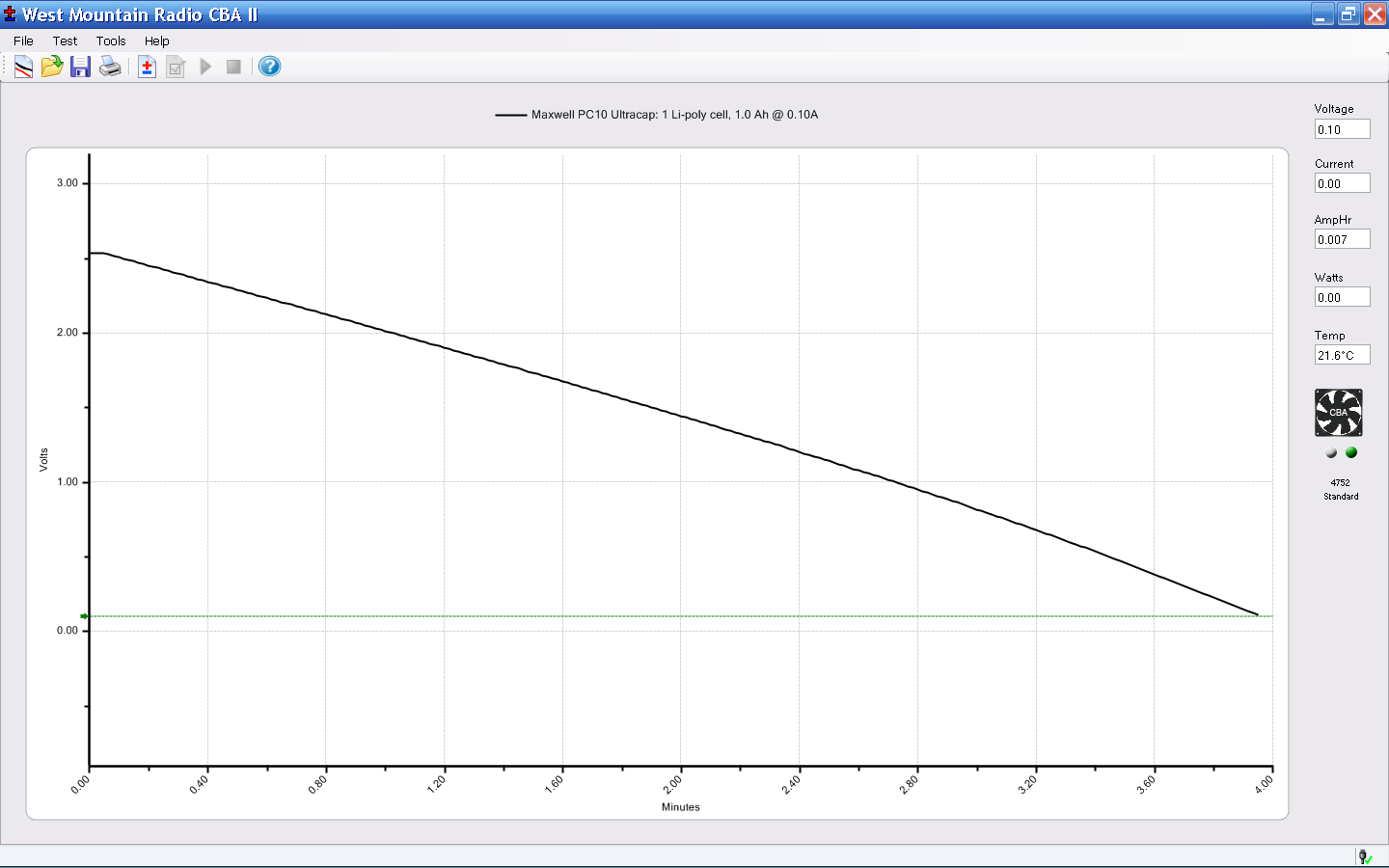
Over time the cells wear out and I’ve recently started figuring out which packs & cells to replace. I’m using a West Mountain Radio CBA II for the tests, running on our Token Windows Laptop. The X-axis divisions are its idea of how to do it; Gnuplot does a better job, but you get the general idea and exact numbers aren’t really important here.
Here’s a screen shot with all the discharge tests in one convenient lump. You’ll surely want to click on it for a legible legend…
Pack Comparison – August 2009
Some observations…
I’m using a 1 A (roughly C/2) discharge rate, because the radios draw about that much during transmit, although they run at 30-100 mA during receive. Battery capacity is inversely related to discharge rate and the usual highly over-optimistic advertised cell capacity is usually based on (at most) a C/5 or a much lower rate.
The shortest curves, the orange & black ones under 0.74 Ah, are two ancient 8-cell packs made from batteries.com cells. The cells actually have decent capacity, but the discharge voltage is much lower than it should be.
The black curve to the far right near 2.47 Ah is a freshly charged set of Tenergy 2.6 Ah cells that had been oops discharged completely flat. Other than this run, the Tenergy cells have been a major disappointment: the 6-cell packs near the bottom are running less than half their rated capacity and the 8-cell pack in blue isn’t much better.
The green & red traces out there to the right at 2.23 Ah are Duracell 2.65 Ah cells that are holding up remarkably well. Recent reviews indicate that Duracell (or whoever owns them these days) reformulated the chemistry early in 2009 and the new cells are crap. These cells are colored black-and-green, which seems to be different than the new ones.
The cluster of traces around 1.73 Ah are three 8-cell packs made from two dozen shiny-new Tenergy Ready-To-Use 2.3 Ah cells. I’m unimpressed so far, although they are still in their first dozen cycles. There’s obviously one weak cell in pack A that causes the abrupt fall-off in the two shortest times, but they’re all pretty much the same.
Given that we have three bikes and I want a backup pack for each bike, that works out to
8 cells/pack x 2 packs/bike x 3 bikes = 48 cells
I’d like to think that spending four bucks per cell bought you better cells, but the Duracell reformulation puts the kibosh on that notion. In any event, you can see this gets spendy pretty quickly…
I’ll run the best of the old cells in the blinky headlights, which run at a 50% duty cycle of 400 mA or so.
General idea: replacing a failing Mostek MK36000-series masked ROM in a Tektronix 492 Spectrum Analyzer memory board with an equally obsolete 27HC641 EPROM, using the bits found there.
The various datasheets give contradictory advice concerning device programming:
Assuming you have appropriate power supplies, then the waveform on VCE looks like this. The upper trace is the -OE signal for the data latch supplying the byte-to-be-burned, the lower trace is VCE on EPROM pin 21. Set VCC = 6 V on pin 24 while all this is going on. The currents range into the hundreds of mA; this is not a low-power device!
The squirts on the -OE latch signal before each programming cycle are eight quick writes to those antique DL-1414 displays that share the data bus with the EPROM. They show the current address and data byte during programming, plus other status & error messages.
The Microchip and GI datasheets both claim that the EPROM cells erase to all 1 bits, like every other EPROM I’ve ever used. The Philips datasheet says:
… after each erasure, all bits of the 27HC641 are in an undefined state. […] which is neither a logical “1” or a logical “0”
27HC641 EPROM in programming socket
The chip markings suggest they were made by Signetics, which got Borged by Philips some years ago. Lo and behold, the chip erases to a bizarre pattern that may be “undefined” but is perfectly consistent from erasure to erasure.
Therefore, you cannot blank-check a 27HC641 EPROM before programming it!
The Philips / Signetics datasheet doesn’t have a programming algorithm and the GI datasheet says you’re supposed to hold VCE at +12.5 V except when you’re asserting the programming data. So I used the Microchip algorithm on a Signetics chip and it seems to program properly.
The only quirk is that the Arduino Diecimila doesn’t have enough storage to hold the entire EPROM at once, so I verified each data byte as I wrote it, rather than doing the whole chip after the entire programming loop. The top picture shows a single 1 ms programming pulse followed by the 3-ms overburn pulse; the byte read back from the EPROM must agree with the source byte after each pulse. When it’s all done, I manually dump the entire EPROM as an Intel HEX file and verify that against the original HEX file: if it matches, the burn is good.
The byte-burning function goes a little something like this:
int BurnByte(word Address, byte Data) {
unsigned Iteration;
byte Success;
SetVcc(VH); // bump VCC to programming level
SetVce(VIH); // disable EPROM outputs
Outbound.Address = Address; // set up address and data values
Outbound.DataOut = Data;
Success = 0;
for (Iteration = 1; Iteration <= MAX_PROG_PULSES; ++Iteration) {
RunShiftRegister();
digitalWrite(PIN_DISABLE_DO,LOW); // present data to EPROM
SetVce(VH); // bump VCE to programming level
delayMicroseconds(1000); // burn data for a millisecond
SetVce(VIH); // return VCE to normal logic level
digitalWrite(PIN_DISABLE_DO,HIGH); // turn off data latch buffer
SetVce(VIL); // activate EPROM outputs
CaptureDataIn(); // grab EPROM output
SetVce(VIH); // disable EPROM outputs
RunShiftRegister(); // fetch data
if (Data == Inbound.DataIn) { // did it stick?
Success = 1;
break;
}
}
MaxBurns = max(MaxBurns,Iteration);
if (Success) { // if it worked, overburn the data
digitalWrite(PIN_DISABLE_DO,LOW); // present data to EPROM (again!)
SetVce(VH); // bump VCE to programming level
delay(3 * Iteration); // overburn data
SetVce(VIH); // return VCE to normal logic level
digitalWrite(PIN_DISABLE_DO,HIGH); // turn off latch buffers
SetVce(VIL); // activate EPROM outputs
CaptureDataIn(); // grab EPROM output
SetVce(VIH); // disable EPROM outputs
RunShiftRegister(); // fetch data
Success = (Data == Inbound.DataIn); // did overburn stick?
}
return !Success; // return zero for success
}
NOTE: the MK36000 and 27HC641 have slightly different address bit assignments.
The MK36000 address bits look like this:
pin 18 = A11
pin 19 = A10
pin 21 = A12
The 27HC641 address bits look like this:
pin 18 = A12
pin 19 = A11
pin 21 = A10
Now, if you’re building a programmer, just wire up the 27HC641 socket as if it were a MK36000 and everything will be fine. The byte locations within the chip won’t match those in the original MK36000, but it doesn’t matter because you store bytes at and the Tek CPU fetches bytes from the same addresses.
However, if you’re using a commercial EPROM programmer, it will write the bytes at the locations defined by the 27HC641 address bit assignments (because that’s all it knows), which will not work when plugged into the Tek board. Choose one of the following options:
build an interposer board to permute the address bits
cut-and-rewire the Tek board (ugh!)
write a program to permute the bytes in the HEX file
Think about it very carefully before you build or program anything, OK? The checksum will most likely come out right even with permuted bits, but the CPU will crash hard as it fetches the wrong instructions.
Memo to Self: always RTFM, but don’t believe everything you read.
The oddly named Kensington “Expert Mouse” (it’s a trackball) sits to the left of my keyboard, where it serves as my main pointer controller; I’m right-handed, but have used a left-hand mouse / trackball for years.
Also, search for Kensington scroll to find other posts. There may be no good fix for scroll ring problems.]
Recently the scroll ring has become balky, stuttering upward & downward rather than actually scrolling. It’s an optical device, so I suspected it had ingested a wad of fuzz that blocked the beam path.
The top photo shows the infra-red emitter adjacent to the scroll ring’s slotted rim. The silver bar to the right of the emitter is the magnet that provides those soft detents. There’s no obvious fuzz.
Disassembly is straightforward.
Tip the ball out into your hand and put it where it can’t possibly roll off the desk.
Peel the four rubber feet off the bottom, remove four screws, and the top half of the body pops off.
Remove three screws from each of the two button cap assemblies and pry the button caps off the case bottom.
Remove two screws from the ball socket, pull it off, and clean any fuzz from the openings.
Surprisingly, I didn’t find much crud at all.
Scroll Ring Emitter and Detector
This photo shows the IR emitter and detector, peering at each other across the electrical isolation gap in the circuit board. Nothing obviously wrong here, either…
They both seem to be dual elements, which makes sense for a quadrature position encoder. Unfortunately, replacing them seems to be really difficult; they don’t look like stock items.
So I put it back together, plugged the USB cable in, restarted the X server (this being Xubuntu 8.10), and it pretty much works again.
Kensington replaced a previous Expert Mouse under warranty when one of the three minuscule red bearing balls that support the trackball went walkaround, but that gadget had been getting erratic, too.
I’m not sure what’s going on, but I have a bad feeling about this.
We have a bunch of Hobo Data Loggers recording various & sundry temperatures, humidities, and light levels around the house; as the saying goes, “If you observe something long enough, it turns into science.”
Normally the things run on single CR2032 lithium cells, which last for a good long time. However, Something Happened to the one that’s collecting groundwater temperatures at the water inlet pipe from the town supply: it started eating lithium cells like potato chips.
Hobo Battery Mod – Inside View
It was still producing good data, so I was loathe to toss it out. Instead, I figured all it needed was more battery, as a high current for a lithium cell doesn’t amount to much for an AA cell. A pair of alkaline AA cells produces just about exactly 3 V and the data logger can’t tell the difference.
So I opened the logger one last time, soldered the wires from a dual AA cell holder to the appropriate points on the circuit board, affixed the holder to the back with one of the case screws, and it’s been working fine ever since.
However, this seems like one more application where whatever plastic they thought would last doesn’t: the AA holders routinely split at the ends. Maybe the joint should be thicker, maybe it’s the wrong plastic for the job, but without the cable tie acting as a belly band one end of the holder splits off in a year or so. Bah!
Update: Maybe I got a batch of bad CR2032 cells, as the logger’s current seems to be just about right. Read the comments and then check the followup there.