The Smell of Molten Projects in the Morning

Ed Nisley's Blog: Shop notes, electronics, firmware, machinery, 3D printing, laser cuttery, and curiosities. Contents: 100% human thinking, 0% AI slop.

Month: July 2012

  • LED Curve Tracer: Hardware

    Based on that comment and faced with two sacks of LEDs, I thought an LED curve tracer might come in handy at some point. While I could modify the MOSFET tester to work with LEDs, they have a higher forward voltage and a much lower current than that hardware can handle without some serious chopping & slicing.

    At least for the cheap 5 mm LEDs I’m considering, a forward drop well under 4 V and current under 75 mA should suffice. That suggests a +5 V supply for the LED, a fairly high current-sense resistor, and an Arduino for a quick-and-dirty controller.

    The overall idea:

    • Run the LED between a regulated supply and the MOSFET drain
    • MOSFET source to current-sense resistor to ground
    • Measure all three MOSFET terminal voltages
    • Set the gate voltage with a PWM-to-DC filtered voltage

    The MOSFET current depends on the gate-to-source voltage, which varies with the current through the sense resistor, so the firmware must measure the actual current and adjust the gate voltage to make the answer come out right. This being a DC application, it can probably monotonically increase VGS and stop when it sees the right current. The MOSFET must have a logic-level gate, so that voltages around +4 V will produce sufficient drain current.

    The PWM must run at 32 kHz to minimize the size of the filter cap.

    If the LED supply is slightly lower than the Arduino’s VCC supply, then the analog input can report the actual voltage and the forward drop is VCCLED - VDrain. Given a regulated supply, that’s as good measuring the voltage against the ground reference.

    The current is VSource / RSense. For a current under, say, 100 mA, a 10 Ω sense resistor will drop 1 V, leaving about 4 V of headroom for VGS. The default 5 V reference means the ADC steps are 5 mV, so the current steps will be 0.5 mA. One could use the Arduino’s internal 1.1 V band-gap reference for higher resolution: 0.11 mA. Changing that is a simple matter of software.

    So, after a bit of doodling and a pair of afternoon thunderstorms that forced a complete computer shutdown (and forced me into the Basement Laboratory), here it is:
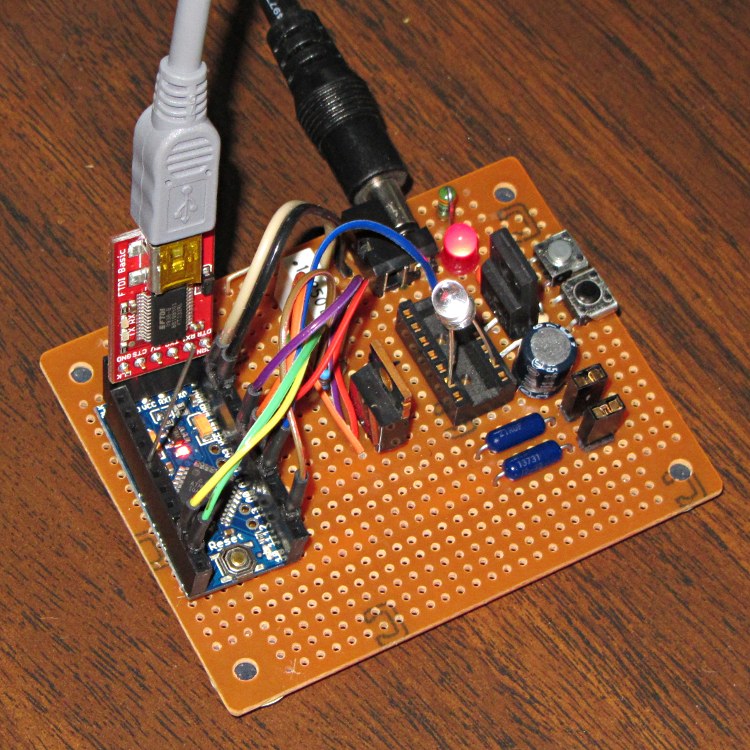
    LED Curve Tracer - overview
    LED Curve Tracer – overview

    The Arduino Pro Mini board (it’s actually a cheap knockoff) has female headers for all the usual signals and a male header to match the sockets on the FTDI Basic programmer board, all from my heap. The connections use flying leads stripped from a length of ribbon cable, soldered to male header pins snipped from a stick, and reinforced with heatstink tubing. The Pro Mini isn’t anchored in place and probably never will be.

    Another view, minus cables and FTDI:
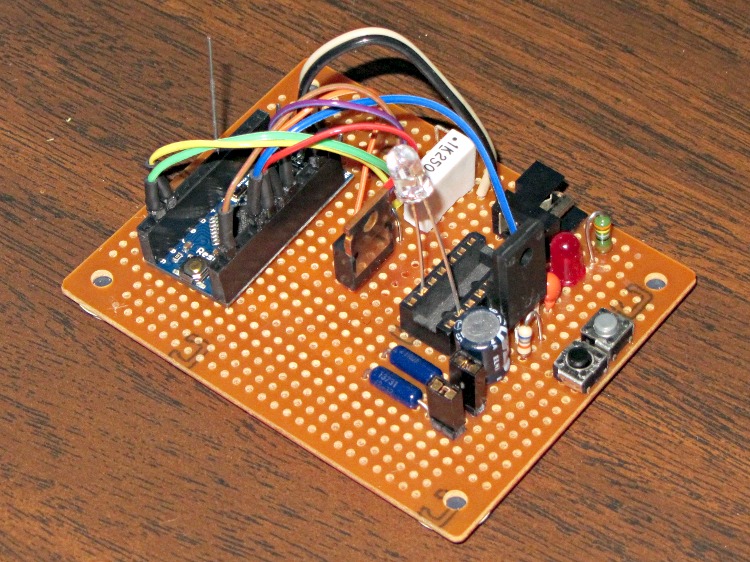
    LED Curve Tracer - top
    LED Curve Tracer – top

    The LED leads just jam into an old IC socket. The top pushbutton triggers the test, the bottom one doesn’t do anything yet.

    Nothing fancy at all; I hand-wired it to avoid all the usual DIY PCB hassles.The bottom view shows all the wiring:
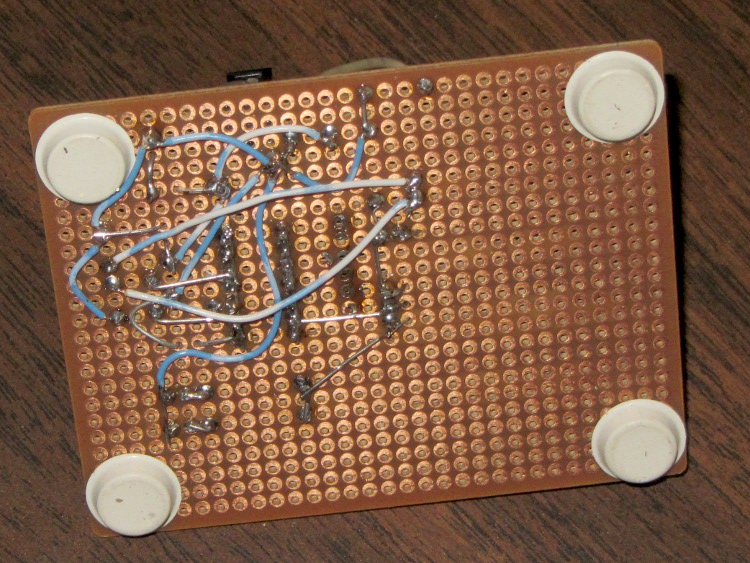
    LED Curve Tracer - bottom
    LED Curve Tracer – bottom

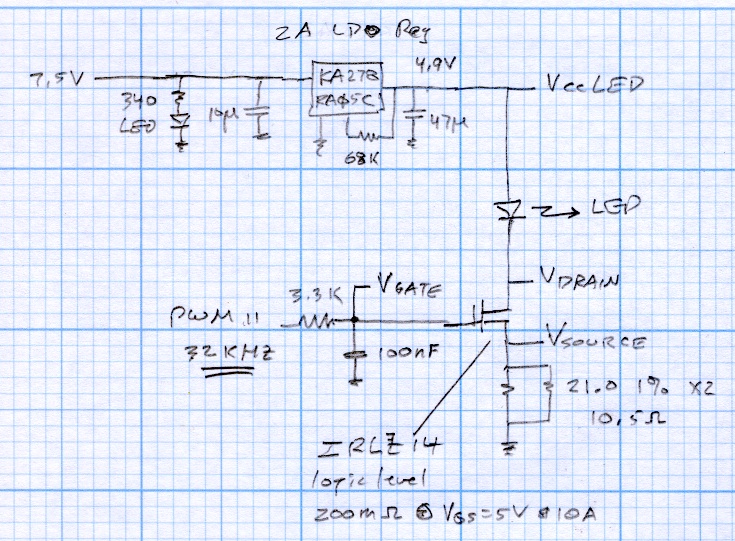
    The schematic, such as it is:

    LED Curve Tracer Schematic
    LED Curve Tracer Schematic

    The regulator is a random Fairchild KA278RA05C +5 V LDO, obtained surplus. The 68 kΩ resistor trims the internal divider to pull the output to 4.87 V, just a touch under the Arduino’s 4.93 V regulator. The power supply is a 7.5 V 2 A surplus lump with no pedigree.

    The MOSFET is an IRLZ14 logic-level FET with grossly excessive qualifications.

    The sense resistor is a pair of 21.0 Ω 1% resistors in parallel = 10.5 Ω. That’s just a firmware constant, so I don’t care what the actual value works out to be.

    Next, a dab of firmware…

  • Maximum PCB Platen: Hold-Down Screws

    The whole point of tweaking the Sherline was to get it ready to drill the Wouxun KG-UV3D GPS+voice PCB. While setting up for that, I drilled two #5 holes in the maximum-size PCB platen for 10-32 socket head cap screws to hold it to the tooling plate:

    Sherline with maximum PCB platen
    Sherline with maximum PCB platen

    The sloppy hole fit lets the platen align to the tooling plate with the outer two 6-32 screws on the back edge.

    Most of the PCB boards I make aren’t nearly as wide as the platen, which means the new SHCS won’t get in the way. The screws require a nut (as a spacer) to keep them from bottoming out on the Sherline’s table underneath the tooling plate and the washers are just because I can’t do it any other way; I should just shorten the screws and store them with the platen.

    Masking tape holds small PCBs to the platen reasonably well, probably because I use an unreasonably high 50 mil travel clearance. I have a defunct dehumidifier that might make a dandy low-volume vacuum pump to eliminate any lifting in the middle: a project that has been on the to-do list for far too long…

  • Hot Air Balloon Launch

    The local Chamber of Commerce sponsors a hot-air balloon weekend that always seems to attract terrible weather; we got to see one of the launches at a nearby park on a hot afternoon before the storms.

    The crew cold-inflates the balloon with a roaring gasoline-powered blower:

    Balloon - cold inflation
    Balloon – cold inflation

    Way over there on the left, almost out of sight, one of the ground crew tethers the top of the balloon:

    Balloon - anchoring the top
    Balloon – anchoring the top

    When it’s mostly inflated, they fire the burners for the hot inflation:

    Balloon - hot inflation
    Balloon – hot inflation

    And then the magic happens:

    Balloon - liftoff
    Balloon – liftoff

    The Montgolfier Brothers would be proud:

    Balloon - up and away
    Balloon – up and away

    These are all hand-held with the Canon SX230HS at looong telephoto, with a bit of cropping & tweaking. They’re the usual low-res blog pix, but the originals aren’t much less gritty… the camera you have is better than the camera you don’t: we were out and about on other errands.

  • Turkey Chicks!

    Some years ago we would see two or three turkey hens leading a creche of two dozen chicks. We haven’t seen that many chicks lately, which we attribute to the fox that’s been trotting through the yard and the hawks patrolling the treetops. Recently, a hen guided her five chicks (four visible here) across the front lawn:

    Turkey hen with chicks in grass
    Turkey hen with chicks in grass

    The family proceeded along the flowerbed at the top of the new wall at the driveway, where the chicks showed that their camouflage works really well against leaf mulch:

    Two turkey chicks
    Two turkey chicks

    If they keep their heads down, that is:

    Turkey chick in flower garden
    Turkey chick in flower garden

    The hen jumped off the wall and flapped down to the driveway, which is no big deal for such a large bird. It provoked a bit of discussion and hesitation among the chicks, who eventually followed her lead:

    Turkey chicks can fly
    Turkey chicks can fly

    Except for the last and smallest chick, who walked along the wall until the poor thing ran out of wall. It finally showed that it can fly just as well as its siblings:

    Last turkey chick flying
    Last turkey chick flying

    Admittedly, turkeys don’t fly all that well, but they get the job done; those chicks can fly up to a branch and snuggle under their mother’s wings, safe from the foxes.

  • Sherline Tooling Plate: Protecting the Tapped Holes

    While I had the tooling plate off, I cleaned the crud out of the tapped holes and ran a handful of 1/4 inch stainless steel 10-32 setscrews just below the surface:

    Sherline tooling plate with setscrews
    Sherline tooling plate with setscrews

    They’re pretty much invisible, of course, but they’re all present. FWIW, you need a 3/32 inch hex wrench for 10-32 setscrews.

    In the event that I gouge the aluminum surface (you can see the odd ding and blind hole) through a setscrew, I’ll regret doing this. Not having to remove the plate to dig swarf out of the last clamping hole after carefully aligning a part seems like a win.

  • Sherline CNC Mill Y Axis Home Switch: To The Front!

    Reassembling the mill provided an opportunity to move the Y axis Home switch from the rear of the axis to the front. The key discovery happened during the teardown: I can get the saddle off the Y axis dovetail by removing the gib, without sliding it off the front, which means a front switch can remain firmly glued in place.

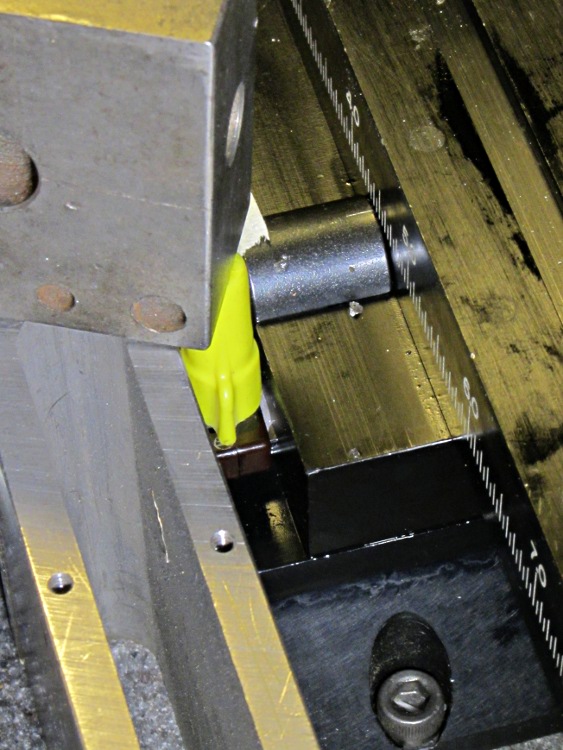
    A few random hunks of steel and a wire nut held the switch in position while the epoxy cured:

    Mounting Y axis home switch
    Mounting Y axis home switch

    The switch actuator bottoms out with the saddle just touching the preload nut, so the saddle can’t dislodge the switch: the switch trips just before the saddle hits the nut, at which point all motion stops and the motor stalls.

    Moving the switch means I can remove all the gimcrackery that poked the rear switch with the tooling plate in place; I was never happy with that setup. I also removed the small block that trapped the rear end of the Y leadscrew, under the assumption that, as I haven’t yet dropped anything on the leadscrew, I probably won’t. That adds about 1/4 inch to the maximum travel and allows the tooling plate to whack into the column.

    The switch wire runs along the stepper cable, a tidy technique that hasn’t introduced any glitches into the shared Home signal from the X axis drivers:

    Sherline mill - X and Y axis home switches
    Sherline mill – X and Y axis home switches

    The Y axis now seeks the Home switch in the positive Y direction, so that stanza in Sherline.ini looks like this:

    [AXIS_1]
    TYPE = LINEAR
    MAX_VELOCITY = 0.400
    MAX_ACCELERATION = 5.0
    STEPGEN_MAXACCEL = 10.0
    SCALE = 16000.0
    FERROR = 0.05
    MIN_FERROR = 0.01
    MIN_LIMIT = -0.5
    MAX_LIMIT = 4.90
    BACKLASH = 0.003
    HOME_IS_SHARED = 1
    HOME_SEQUENCE = 2
    HOME_SEARCH_VEL = 0.3
    HOME_LATCH_VEL = 0.016
    HOME_FINAL_VEL = -0.4
    HOME_OFFSET = 5.125
    HOME = 5.0
    
  • Reworking Sherline Anti-Backlash Nuts

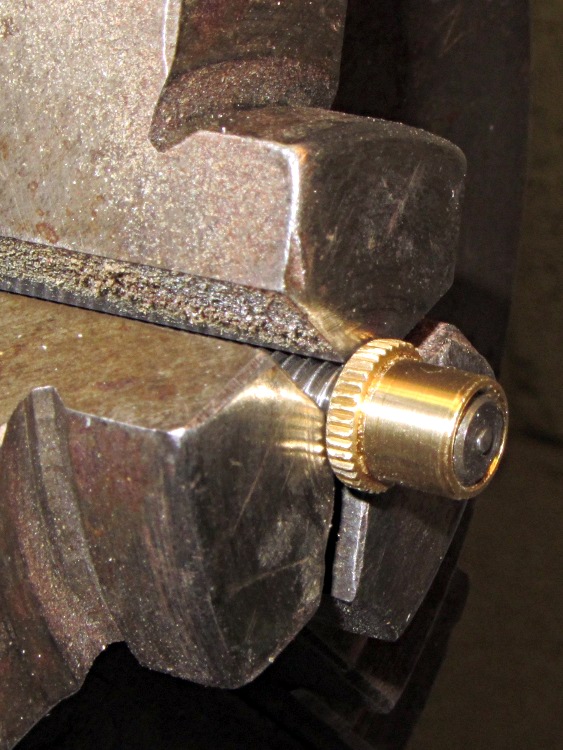
    The new Y axis anti-backlash nuts for the Sherline mill have a countersink on the end that fits into the saddle. The nut on the left is as-delivered (I bought two) and the nut on the right is after cleanup:

    Sherline Y axis anti-backlash nuts - original vs cleared
    Sherline Y axis anti-backlash nuts – original vs cleared

    The thread was munged enough to jam the leadscrew; it started fine from the knurled end, but wouldn’t emerge from the countersink. This being a left-hand thread, I couldn’t just run a tap through the nut, so clearing the thread required:

    • Some tedious handwork to clear enough of a path until …
    • I could force the nut over the old leadscrew, which re-formed the thread enough that …
    • More tedious handwork could remove the debris and bent brass

    After that, the OD of both nuts was slightly oversized: 0.316 inch, which didn’t fit in the 5/16 inch (0.3125) bore. So I mounted the nut on the old leadscrew, took advantage of the fact that a left-hand thread gets tighter with cutting force from the lathe bit [Edit: wrong! See comments], and turned it down just a hair:

    Turning down anti-backlash nut OD
    Turning down anti-backlash nut OD

    Purists will quibble that I should have used the four-jaw chuck. Turns out the three-jaw has under 1 mil of runout, which is as good as one could possibly want in light of the bearings.

    The X axis nuts were fine, so I suspect a recent production run had a bit of a tooling problem.

    [Update: The mail brings replacement nuts that look just fine. Must have been one of those glitches. No hard feelings!]