I believe this has nothing to do with the TSA:

In words:
we desire interesting cavity flashlight journey
inherit hideous roach rescue legend
The Smell of Molten Projects in the Morning
Ed Nisley's Blog: Shop notes, electronics, firmware, machinery, 3D printing, laser cuttery, and curiosities. Contents: 100% human thinking, 0% AI slop.
I believe this has nothing to do with the TSA:
In words:
we desire interesting cavity flashlight journey
inherit hideous roach rescue legend
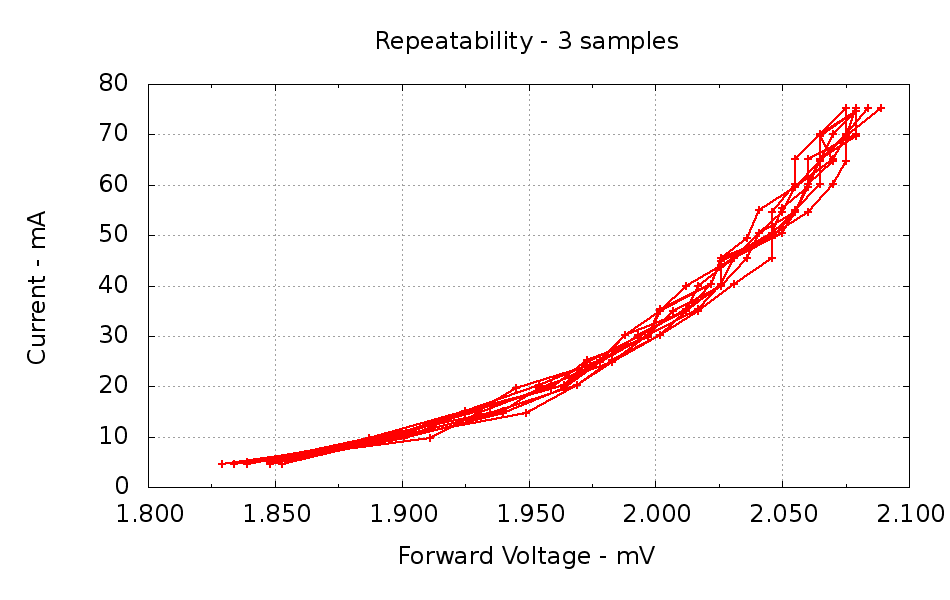
Measuring the same LED many times should produce the same data every time. Here’s an LED measured ten times in quick succession, with each data point consisting of the average of three ADC conversions:
Ten more measurements of the same LED, but with each data point being the average of ten ADC conversions:
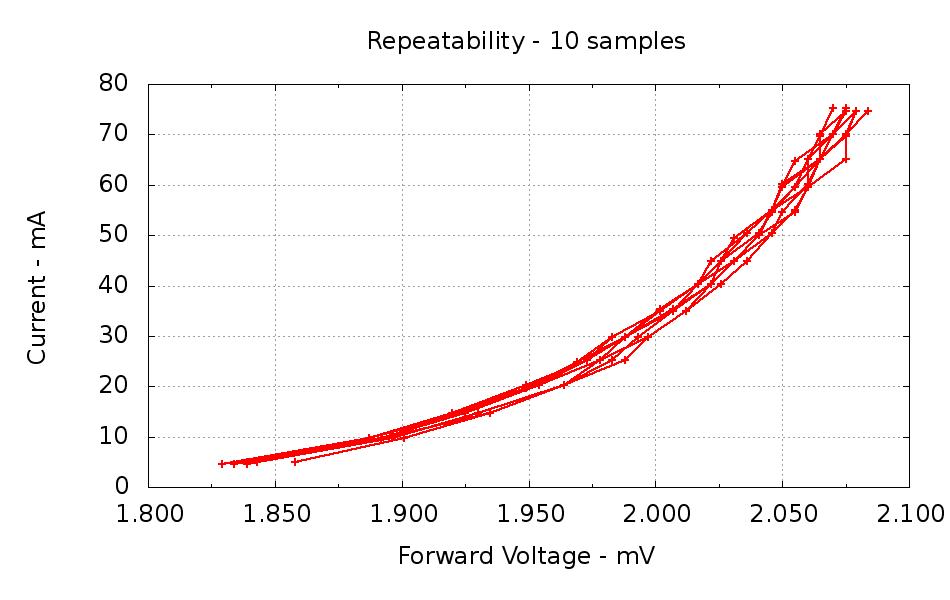
Not much to choose between the two, although averaging more readings does reduce the scatter just a bit. The ADC resolution is 5 mV, which is painfully obvious along the X axis. The Y axis has a smaller spread because it’s the independent variable: the firmware sets the MOSFET gate voltage to produce a given current and the ADC steps are relatively larger (the input voltage is only 75 mA × 10.5 Ω = 800 mV, tops).
I think it’s close enough for my simple needs.
The ADC code looks like this:
//-- Read AI channel
// averages several readings to improve noise performance
// returns value in mV assuming VCC ref voltage

#define NUM_T_SAMPLES 10

float ReadAI(byte PinNum) {
  word RawAverage;

  digitalWrite(PIN_SYNC,HIGH); // scope sync

  RawAverage = analogRead(PinNum); // prime the averaging pump

  for (int i=2; i <= NUM_T_SAMPLES; i++) {
    RawAverage += (word)analogRead(PinNum);
  }

  digitalWrite(PIN_SYNC,LOW);

  RawAverage /= NUM_T_SAMPLES;
  return Vcc * (float)RawAverage / 1024.0;
}
And the Gnuplot routine that produces the graphs, including a bit of cruft that reminds me how to make two Y axis scales:
#!/bin/sh
#-- overhead
export GDFONTPATH="/usr/share/fonts/truetype/"
base="${1%.*}"
echo Base name: ${base}
ofile=${base}.png
echo Output file: ${ofile}
#-- do it
gnuplot << EOF
#set term x11
set term png font "arialbd.ttf" 18 size 950,600
set output "${ofile}"
set title "${base}"
set key noautotitles
unset mouse
set bmargin 4
set grid xtics ytics
set xlabel "Forward Voltage - mV"
set format x "%6.3f"
set xrange [1.8:2.1]
#set xtics 0,5
set mxtics 2
#set logscale y
#set ytics nomirror autofreq
set ylabel "Current - mA"
set format y "%4.0f"
#set yrange [0:${rds_max}]
#set mytics 2
#set y2label "right side variable"
#set y2tics nomirror autofreq 2
#set format y2 "%3.0f"
#set y2range [0:200]
#set y2tics 32
#set rmargin 9
set datafile separator "\t"
#set label 1 "Comment" at 0.90,0.35 font "arialbd,18"
plot	\
    "$1" using (\$5/1000):((\$1>0)?\$2/1000:NaN) with linespoints lt 3 lw 2 lc 1
EOF
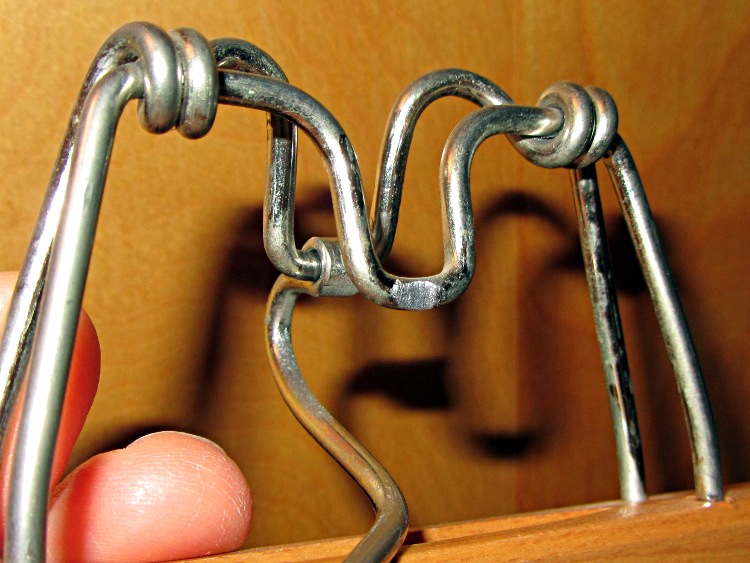
So I finally looked at why one of the trouser hangers made a nasty gritty noise. Turns out that, no suprise, when you rub steel against steel long enough, it wears away:
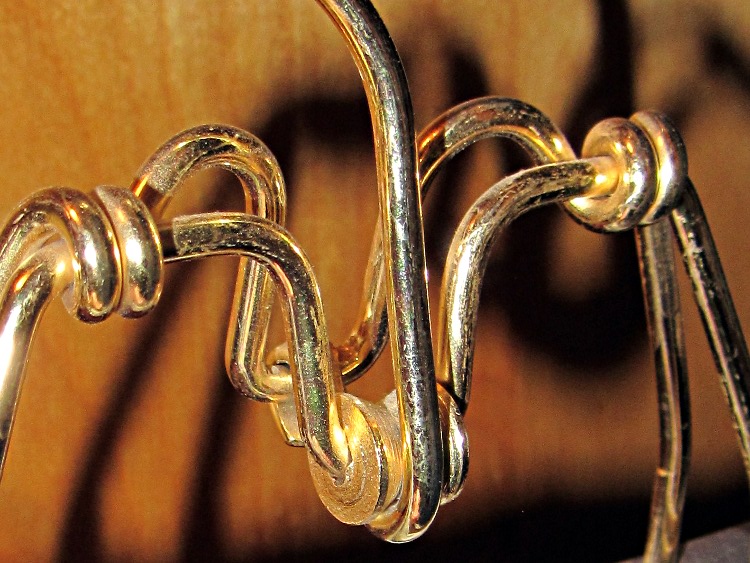
Another hanger had a huge roller that worked wonderfully well:
That one was obviously over-engineered, but a simple roller also works well:
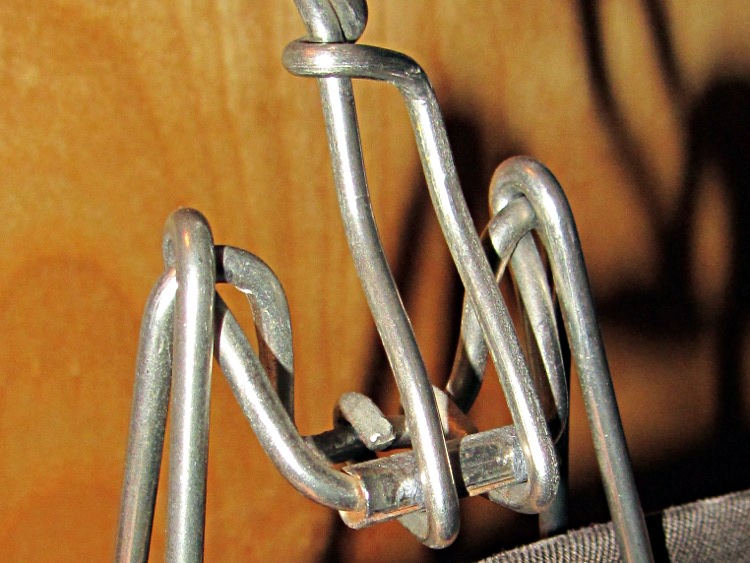
They cheapnified this one just a bit too much, because it’s not quite a roller any more:
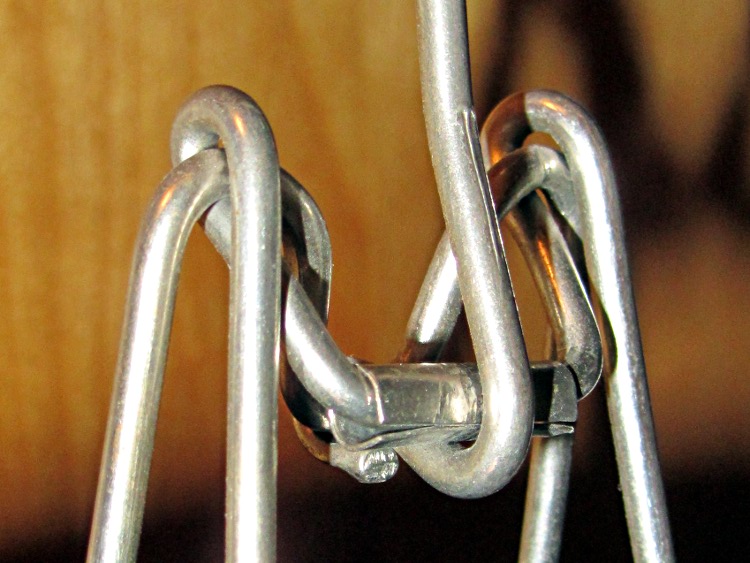
A bit of rummaging turned up enough hangers with working rollers, so it’s all good now…
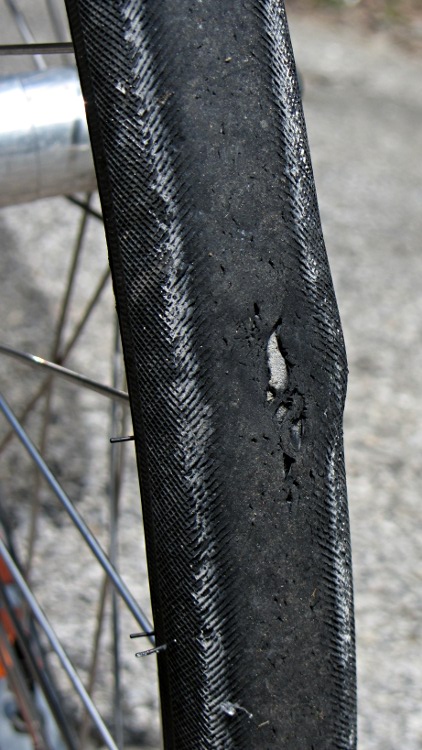
Found this aneurysm on the front tire just before a grocery ride, so I stuffed a spare tire and tube into a pannier before rolling away. As expected, it didn’t blow out, but …
I think this started with a gash in the Kevlar belt that didn’t quite penetrate the cords holding the tire together. As you’ve seen, our tires collect a remarkable number of cuts due to broken glass.
The cords inside the tire seemed fine, although the weave was somewhat distorted. The inner rubber layer wasn’t punctured, despite what it looks like here.
The tube also looked fine, despite riding on a tire liner for at least a year. The tube abrasion failures in the rear tire must be due to something other than just the combination of tube and liner; perhaps the tube flexes just enough to erode at the discontinuities.
This tire went directly to the trash!
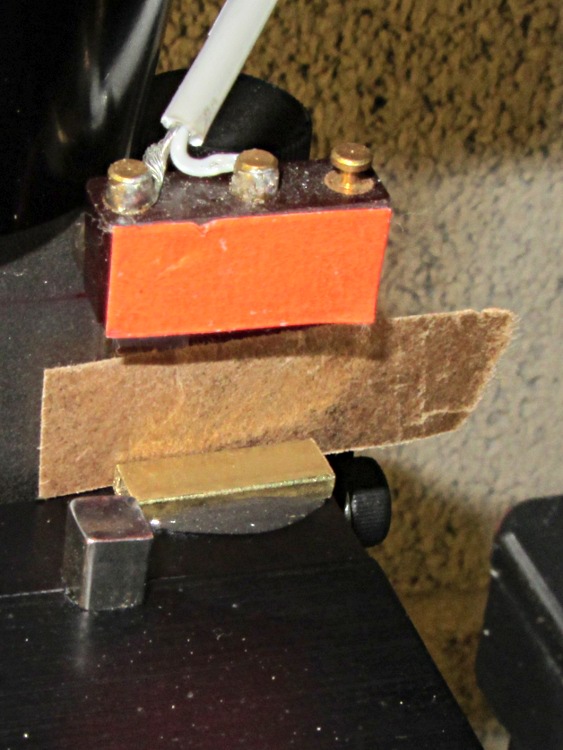
After drilling that PCB, I noticed that the Z axis saddle locking lever (which also functions as the backlash adjustment) had come loose. It turns out that if you don’t tighten the thumbscrew or it works loose, then the locking lever can turn with the leadscrew and, at the very top of the Z axis travel, can walk off the leadscrew thread.
A snippet of rectangular brass tubing epoxied to the top of the Z axis saddle solves that problem by removing 3/32 inch of precious travel. A slip of brown waxed paper (yes, harvested from the new Y axis leadscrew wrapper) kept the epoxy off the dovetail.
Just for consistency, I removed 0.09 inch from the Z axis home offset, but that really won’t make any difference.
HOME_OFFSET = 6.84
HOME = 6.5
Now, I’d put the switch in that position because the saddle jams against the preload nut exactly at the end of the switch button travel. Now I can crush the switch by manually running the Z axis beyond its Home position …
Measuring a handful of random LEDs from the heap produced a dataset that boiled down into a set of curves:
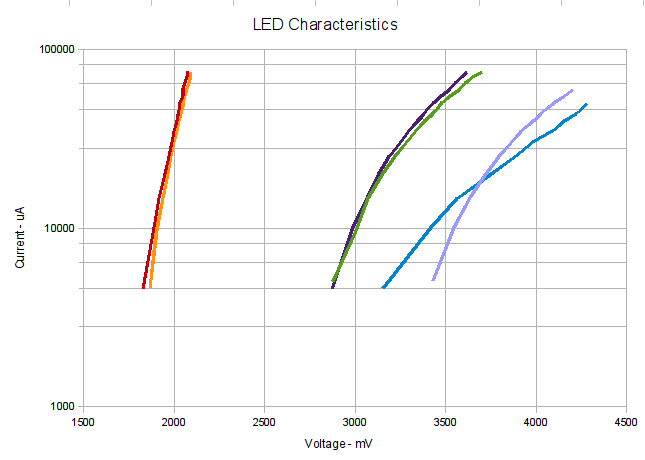
The Y axis (current) is logarithmic, so the traces should be straight lines. They’re loosely color-coded by LED color (black trace = white LED) and that blue trace looks mildly suspicious even to me. You’d want a better graphing program than OpenOffice Calc, but it’s OK for a quick look.
Note that the rated current for 5 mm LEDs is generally 20 mA, so 75 mA really puts the screws to them. That notwithstanding, the curve tracer machinery seems to work well enough.
The numeric values in the dataset have way more precision than the measurements have either accuracy or resolution. If we could put floats in those printf() format strings, then I’d be more inclined to prettify the results.
INOM is the nominal current in mA (and also the loop counter) and ILED is the measured LED current in μA. All the voltages are in mV, with a resolution of 5 V/1024 steps = 5 mV.
The dataset behind the curves, slightly massaged to weed out some, ah, bogosity that won’t appear with that firmware:
# LED Curve Tracer
# Ed Nisley - KE4ZNU - July 2012
# VCC at LED: 4867 mV
# Bandgap reference voltage: 1039 mV

# Insert LED, press button 1 to start...
# INOM	ILED	VccLED	VD	VLED	VG	VS	VGS	VDS	<--- LED 1
0	0	4867	3745	1121	0	0	0	3745
5	4585	4867	3042	1824	1925	48	1877	2994
10	10087	4867	2980	1887	2070	105	1964	2874
15	14672	4867	2951	1916	2142	154	1988	2797
20	20174	4867	2917	1949	2243	211	2031	2705
25	25218	4867	2898	1969	2320	264	2055	2633
30	30262	4867	2879	1988	2392	317	2075	2561
35	34847	4867	2869	1997	2450	365	2084	2503
40	39891	4867	2854	2012	2527	418	2108	2436
45	45393	4867	2840	2026	2604	476	2127	2363
50	49978	4867	2835	2031	2667	524	2142	2310
55	54563	4867	2821	2046	2729	572	2156	2248
60	60066	4867	2816	2050	2806	630	2176	2185
65	65109	4867	2806	2060	2859	683	2176	2123
70	70153	4867	2797	2070	2912	736	2176	2060
75	75197	4867	2792	2075	2989	789	2200	2002

# Insert LED, press button 1 to start...
# INOM	ILED	VccLED	VD	VLED	VG	VS	VGS	VDS	<--- LED 2
0	0	4867	3914	953	0	0	0	3914
5	5043	4867	1993	2874	1949	52	1896	1940
10	9628	4867	1863	3004	2070	101	1969	1762
15	14672	4867	1795	3071	2142	154	1988	1641
20	20174	4867	1713	3153	2243	211	2031	1502
25	25218	4867	1646	3220	2315	264	2050	1381
30	30262	4867	1583	3283	2397	317	2079	1266
35	34847	4867	1535	3331	2450	365	2084	1169
40	39891	4867	1482	3384	2532	418	2113	1063
45	44934	4867	1425	3442	2609	471	2137	953
50	50437	4867	1386	3480	2667	529	2137	856
55	54563	4867	1343	3524	2720	572	2147	770
60	60066	4867	1285	3581	2797	630	2166	654
65	64651	4867	1256	3610	2859	678	2180	577
70	69694	4867	1218	3649	2912	731	2180	486
75	74738	4867	1165	3702	2999	784	2214	380

# Insert LED, press button 1 to start...
# INOM	ILED	VccLED	VD	VLED	VG	VS	VGS	VDS	<--- LED 3
0	0	4867	3577	1290	0	0	0	3577
5	4585	4867	1997	2869	1945	48	1896	1949
10	10087	4867	1877	2989	2070	105	1964	1771
15	15131	4867	1795	3071	2166	158	2007	1636
20	20174	4867	1738	3129	2238	211	2026	1526
25	25218	4867	1680	3187	2320	264	2055	1415
30	30262	4867	1617	3249	2397	317	2079	1299
35	34847	4867	1574	3293	2450	365	2084	1208
40	39891	4867	1521	3346	2527	418	2108	1102
45	45393	4867	1473	3394	2604	476	2127	996
50	49978	4867	1434	3432	2667	524	2142	909
55	54563	4867	1391	3476	2720	572	2147	818
60	60066	4867	1343	3524	2802	630	2171	712
65	64651	4867	1314	3553	2854	678	2176	635
70	69694	4867	1280	3586	2907	731	2176	548
75	74738	4867	1246	3620	2970	784	2185	462

# Insert LED, press button 1 to start...
# INOM	ILED	VccLED	VD	VLED	VG	VS	VGS	VDS	<--- LED 4
0	0	4867	3736	1131	0	0	0	3736
5	5043	4867	1439	3427	1949	52	1896	1386
10	10087	4867	1323	3543	2070	105	1964	1218
15	15131	4867	1227	3639	2166	158	2007	1068
20	19716	4867	1150	3716	2243	207	2036	943
25	25218	4867	1073	3793	2315	264	2050	808
30	30262	4867	1006	3861	2402	317	2084	688
35	34847	4867	953	3914	2450	365	2084	587
40	39891	4867	881	3986	2527	418	2108	462
45	45393	4867	823	4044	2604	476	2127	346
50	50437	4867	760	4106	2676	529	2147	231
55	55022	4867	707	4159	2777	577	2200	129
60	59607	4867	659	4207	3134	625	2508	33

# Insert LED, press button 1 to start...
# INOM	ILED	VccLED	VD	VLED	VG	VS	VGS	VDS	<--- LED 5
0	0	4867	3702	1165	0	0	0	3702
5	4585	4867	1713	3153	1959	48	1911	1665
10	10087	4867	1449	3418	2070	105	1964	1343
15	14672	4867	1304	3562	2147	154	1993	1150
20	20174	4867	1116	3750	2243	211	2031	905
25	25218	4867	982	3885	2320	264	2055	717
30	30262	4867	885	3981	2397	317	2079	568
35	35305	4867	770	4097	2469	370	2099	399
40	39891	4867	712	4154	2527	418	2108	293
45	45393	4867	621	4246	2647	476	2171	144
50	49520	4867	582	4284	2797	519	2277	62

# Insert LED, press button 1 to start...
# INOM	ILED	VccLED	VD	VLED	VG	VS	VGS	VDS	<--- LED 6
0	0	4867	3687	1179	0	0	0	3687
5	4585	4867	3004	1863	1954	48	1906	2956
10	9628	4867	2965	1901	2041	101	1940	2864
15	14672	4867	2932	1935	2137	154	1983	2777
20	20174	4867	2903	1964	2243	211	2031	2691
25	25218	4867	2888	1978	2315	264	2050	2623
30	30262	4867	2869	1997	2397	317	2079	2551
35	34847	4867	2854	2012	2450	365	2084	2489
40	39891	4867	2840	2026	2527	418	2108	2421
45	45393	4867	2826	2041	2604	476	2127	2349
50	49978	4867	2816	2050	2662	524	2137	2291
55	54563	4867	2806	2060	2720	572	2147	2233
60	60066	4867	2797	2070	2802	630	2171	2166
65	64651	4867	2787	2079	2859	678	2180	2108
70	69694	4867	2777	2089	2917	731	2185	2046
75	74738	4867	2773	2094	2975	784	2190	1988
The main loop of the LED Curve Tracer firmware waits for a button push, then steps the LED current upward in 5 mA increments, measures a bunch of voltages, and prints the results in the tired old CSV format that feeds into Gnuplot and spreadsheets like nothing else.
The output looks thuslike:
# LED Curve Tracer
# Ed Nisley - KE4ZNU - July 2012
# VCC at LED: 4872 mV
# Bandgap reference voltage: 1039 mV

# Insert LED, press button 1 to start...
# INOM	ILED	VccLED	VD	VLED	VG	VS	VGS	VDS	<--- LED 1
0	0	4867	3697	1169	0	0	0	3697
5	4585	4867	3013	1853	1959	48	1911	2965
10	9628	4867	2970	1896	2075	101	1973	2869
15	14672	4867	2917	1949	2166	154	2012	2763
20	20174	4867	2898	1969	2282	211	2070	2686
25	25218	4867	2883	1983	2339	264	2075	2619
30	30262	4867	2864	2002	2407	317	2089	2546
35	34847	4867	2850	2017	2498	365	2132	2484
40	40349	4867	2835	2031	2546	423	2123	2412
45	45393	4867	2821	2046	2614	476	2137	2344
50	49978	4872	2826	2046	2657	524	2132	2301
55	54563	4872	2811	2060	2729	572	2156	2238
60	60066	4872	2802	2070	2792	630	2161	2171
65	64651	4867	2792	2075	2874	678	2195	2113
70	69694	4867	2792	2075	2922	731	2190	2060
75	75197	4867	2777	2089	3004	789	2214	1988

# Insert LED, press button 1 to start...
I suppose calling it a “curve tracer” isn’t quite accurate, because the graphs actually come from the plotting software. Feel free to add one of those gorgeous color LCD panels and draw curves on the fly.
The code includes a constant for the measured VCC voltage from the regulator on the board, which is not, in general, ever the 5.000 V you expect. This will vary from board to board, so don’t kvetch if you get the wrong results without changing the constant. I assume that the analog reference voltage is just about exactly equal to the supply voltage, because I can’t measure it any more accurately.
Measuring VCC, however, calibrates all the other voltages, including the LED supply regulator and the bandgap.
Just for fun, the code measures & reports the 1.1 V bandgap reference voltage, which works out to be a bit on the low side at 1.039 V. That’s well within the hardware’s 10% tolerance spec, but no better than the usual power supply tolerance, so you must measure one or the other to get the right answer.
The Pro Mini board includes a cap on the analog reference pin, making it as quiet as it’ll get. The datasheet recommends an elaborate LC filter upstream of AVCC that nobody uses and there’s no room for, but it doesn’t really matter for this purpose.
The function that adjusts the gate voltage to produce a given LED current includes a bailout test to make sure the MOSFET drain-to-source voltage doesn’t drop too low. That happens with blue or violet LEDs (or, maybe white LEDs, which have a similar chemistry) at high currents, where the forward drop exceeds 4 V. There’s not enough headroom between the +5 V LED supply and the 10.5 Ω sense resistor, but the LED supply can’t exceed 5 V because we’re using the Arduino’s internal ADC and that’s limited to the supply voltage.
The Arduino source code:
// LED Curve Tracer
// Ed Nisley - KE4ANU - July 2012
#include <stdio.h>
//----------
// Pin assignments
const byte PIN_READ_LEDSUPPLY = 0; // AI - LED supply voltage blue
const byte PIN_READ_VDRAIN = 1; // AI - drain voltage red
const byte PIN_READ_VSOURCE = 2; // AI - source voltage orange
const byte PIN_READ_VGATE = 3; // AI - VGS after filtering violet
const byte PIN_SET_VGATE = 11; // PWM - gate voltage brown
const byte PIN_BUTTON1 = 8; // DI - button to start tests green
const byte PIN_BUTTON2 = 7; // DI - button for options yellow
const byte PIN_HEARTBEAT = 13; // DO - Arduino LED
const byte PIN_SYNC = 2; // DO - scope sync output
//----------
// Constants
const int MaxCurrent = 75; // maximum LED current - mA
const float Vcc = 4.930; // Arduino supply -- must be measured!
const float RSense = 10.500; // current sense resistor
const float ITolerance = 0.0005; // current setpoint tolerance
const float VGStep = 0.019; // increment/decrement VGate = 5 V / 256
const byte PWM_Settle = 5; // PWM settling time ms
#define TCCRxB 0x01 // Timer prescaler = 1:1 for 32 kHz PWM
#define MK_UL(fl,sc) ((unsigned long)((fl)*(sc)))
#define MK_U(fl,sc) ((unsigned int)((fl)*(sc)))
//----------
// Globals
float AVRef1V1; // 1.1 V bandgap reference - calculated from Vcc
float VccLED; // LED high-side supply
float VDrain; // MOSFET terminal voltages
float VSource;
float VGate;
unsigned int TestNum = 1;
long unsigned long MillisNow;
//-- Read AI channel
// averages several readings to improve noise performance
// returns value in mV assuming VCC ref voltage
#define NUM_T_SAMPLES 10
float ReadAI(byte PinNum) {
word RawAverage;
digitalWrite(PIN_SYNC,HIGH); // scope sync
RawAverage = analogRead(PinNum); // prime the averaging pump
for (int i=2; i <= NUM_T_SAMPLES; i++) {
RawAverage += (word)analogRead(PinNum);
}
digitalWrite(PIN_SYNC,LOW);
RawAverage /= NUM_T_SAMPLES;
return Vcc * (float)RawAverage / 1024.0;
}
//-- Set PWM output
void SetPWMVoltage(byte PinNum,float PWMVolt) {
byte PWM;
PWM = (byte)(PWMVolt / Vcc * 255.0);
analogWrite(PinNum,PWM);
delay(PWM_Settle);
}
//-- Set VGS to produce desired LED current
// bails out if VDS drops below a sensible value
void SetLEDCurrent(float ITarget) {
float ISense; // measured current
float VGateSet; // output voltage setpoint
float IError; // (actual - desired) current
VGate = ReadAI(PIN_READ_VGATE); // get gate voltage
VGateSet = VGate; // because input may not match output
do {
VSource = ReadAI(PIN_READ_VSOURCE);
ISense = VSource / RSense; // get LED current
// printf("\nITarget: %lu mA",MK_UL(ITarget,1000.0));
IError = ISense - ITarget;
// printf("\nISense: %d mA VGateSet: %d mV VGate %d IError %d mA",
// MK_U(ISense,1000.0),
// MK_U(VGateSet,1000.0),
// MK_U(VGate,1000.0),
// MK_U(IError,1000.0));
if (IError < -ITolerance) {
VGateSet += VGStep;
// Serial.print('+');
}
else if (IError > ITolerance) {
VGateSet -= VGStep;
// Serial.print('-');
}
VGateSet = constrain(VGateSet,0.0,Vcc);
SetPWMVoltage(PIN_SET_VGATE,VGateSet);
VDrain = ReadAI(PIN_READ_VDRAIN); // sample these for the main loop
VGate = ReadAI(PIN_READ_VGATE);
VccLED = ReadAI(PIN_READ_LEDSUPPLY);
if ((VDrain - VSource) < 0.020) { // bail if VDS gets too low
printf("# VDS=%d too low, bailing\n",MK_U(VDrain - VSource,1000.0));
break;
}
} while (abs(IError) > ITolerance);
// Serial.println("# Done");
}
//-- compute actual 1.1 V bandgap reference based on known VCC = AVcc (more or less)
// adapted from http://code.google.com/p/tinkerit/wiki/SecretVoltmeter
float ReadBandGap(void) {
word ADCBits;
float VBandGap;
ADMUX = _BV(REFS0) | _BV(MUX3) | _BV(MUX2) | _BV(MUX1); // select 1.1 V input
delay(2); // Wait for Vref to settle
ADCSRA |= _BV(ADSC); // Convert
while (bit_is_set(ADCSRA,ADSC));
ADCBits = ADCL;
ADCBits |= ADCH<<8;
VBandGap = Vcc * (float)ADCBits / 1024.0;
return VBandGap;
}
//-- Print message, wait for a given button press
void WaitButton(int Button,char *pMsg) {
printf("# %s",pMsg);
while(HIGH == digitalRead(Button)) {
delay(100);
digitalWrite(PIN_HEARTBEAT,!digitalRead(PIN_HEARTBEAT));
}
delay(50); // wait for bounce to settle
digitalWrite(PIN_HEARTBEAT,LOW);
}
//-- Helper routine for printf()
int s_putc(char c, FILE *t) {
Serial.write(c);
}
//------------------
// Set things up
void setup() {
pinMode(PIN_HEARTBEAT,OUTPUT);
digitalWrite(PIN_HEARTBEAT,LOW); // show we arrived
pinMode(PIN_SYNC,OUTPUT);
digitalWrite(PIN_SYNC,LOW); // show we arrived
TCCR1B = TCCRxB; // set frequency for PWM 9 & 10
TCCR2B = TCCRxB; // set frequency for PWM 3 & 11
pinMode(PIN_SET_VGATE,OUTPUT);
analogWrite(PIN_SET_VGATE,0); // force gate voltage = 0
pinMode(PIN_BUTTON1,INPUT_PULLUP); // use internal pullup for buttons
pinMode(PIN_BUTTON2,INPUT_PULLUP);
Serial.begin(9600);
fdevopen(&s_putc,0); // set up serial output for printf()
printf("# LED Curve Tracer\n# Ed Nisley - KE4ZNU - July 2012\n");
VccLED = ReadAI(PIN_READ_LEDSUPPLY);
printf("# VCC at LED: %d mV\n",MK_U(VccLED,1000.0));
AVRef1V1 = ReadBandGap(); // compute actual bandgap reference voltage
printf("# Bandgap reference voltage: %lu mV\n",MK_UL(AVRef1V1,1000.0));
Serial.println();
}
//------------------
// Run the test loop
void loop() {
WaitButton(PIN_BUTTON1,"Insert LED, press button 1 to start...\n");
printf("# INOM\tILED\tVccLED\tVD\tVLED\tVG\tVS\tVGS\tVDS\t<--- LED %d\n",TestNum++);
digitalWrite(PIN_HEARTBEAT,LOW);
for (int ILED=0; ILED <= MaxCurrent; ILED+=5) {
SetLEDCurrent(((float)ILED)/1000.0);
printf("%d\t%lu\t%d\t%d\t%d\t%d\t%d\t%d\t%d\n",
ILED,
MK_UL(VSource / RSense,1.0e6),
MK_U(VccLED,1000.0),
MK_U(VDrain,1000.0),
MK_U(VccLED - VDrain,1000.0),
MK_U(VGate,1000.0),
MK_U(VSource,1000.0),
MK_U(VGate - VSource,1000),
MK_U(VDrain - VSource,1000.0)
);
}
SetPWMVoltage(PIN_SET_VGATE,0.0);
}
 The Smell of Molten Projects in the Morning