The Smell of Molten Projects in the Morning

Ed Nisley's Blog: Shop notes, electronics, firmware, machinery, 3D printing, laser cuttery, and curiosities. Contents: 100% human thinking, 0% AI slop.

Month: March 2012

  • Epson R380 Printhead Clog: Teardown Failure

    So the Epson R380’s magenta printhead has clogged and cleaning it doesn’t have any effect. I figured I’d pop the printhead out, rinse off the crud, and see if that improved the situation. Turns out, you can’t get there from here…

    The first step is removing the printer side panels, which involves sliding a steel strip into the not-really-vent slots along the side to release the catches as described there. This picture shows what’s going on inside:

    R380 side panel locking tab release
    R380 side panel locking tab release

    You must hit that slot in the catch with the strip, so the strip must be no wider than 15 mm = 5/8 inch and tapering the end would certainly help. After I removed the panels, I broke those latch tabs off; the panel has locating tabs that align the edges, so the latch tabs just keep you out.

    In any rational printer, accessing the printhead for cleaning would be trivially easy. Epson has a different attitude: KEEP OUT!

    My original idea was to release the rod upon which the ink tank carrier slides, then pull the whole thing out, but it turns out the rod is also a shaft that transmits rotary motion from one side of the printer to the other, plus a mechanism to raise and lower the printhead over the cleaning station (and, perhaps, the DVD carrier that I’ve never used). A vast assortment of gears, clips, encoder wheels, and doodads affixed to each end convinced me not to go that route right now.

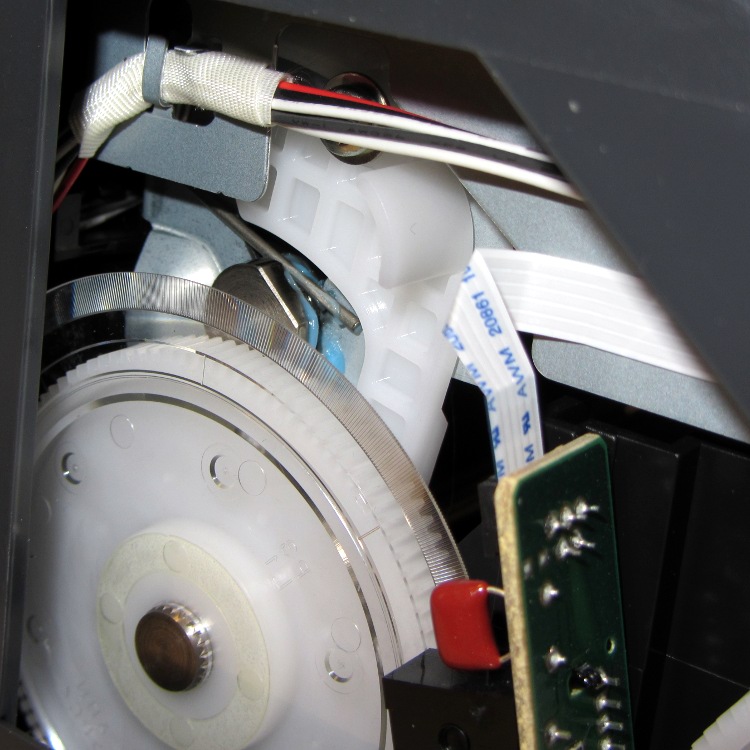
    The left side includes an impossibly delicate rotary encoder disk blocking the end of the shaft:
    R380 left side mechanism
    R380 left side mechanism

    Prying the spring out of the shaft notch allows it to slide to the right until another spring clip slams up against the inside of the frame on the right side. That clip may be pry-able, but it’s carefully arranged so as to be maximally inconvenient to reach.

    R380 right side interior
    R380 right side interior

    The ring holding the gear in place must be removable, somehow or another, even without an obvious hole or tab:

    R380 right side mechanism
    R380 right side mechanism

    With that encoder wheel blocking the left end of the rod, I gave up.

    Then I tried to dismantle enough of the ink tank carrier to release the printhead. The first step removed the tank carrier’s two side panels, both of which use pull-out clips to prevent them from sliding. A view of the removed panels shows the tabs:

    R380 Ink Tank Carrier side panels latches
    R380 Ink Tank Carrier side panels latches

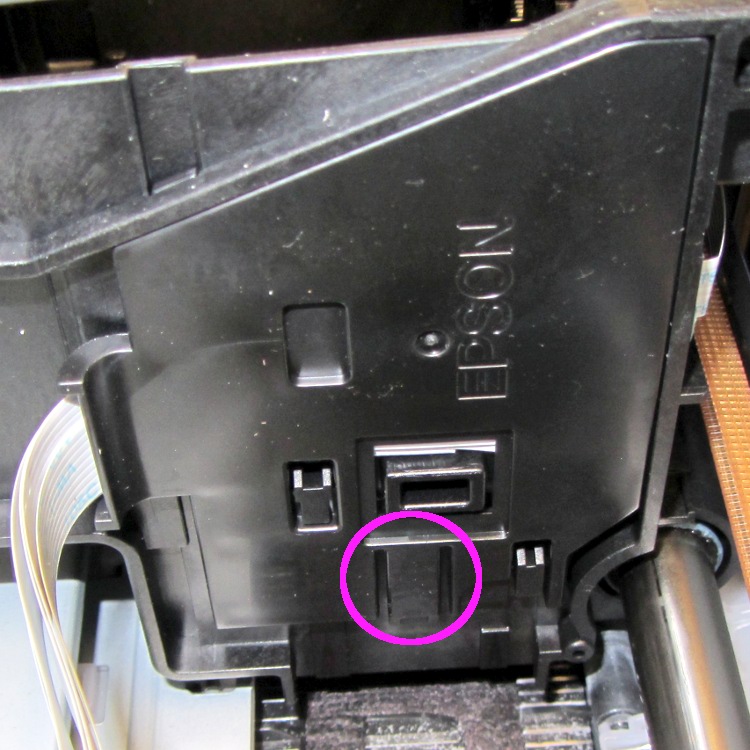
    The outside panel requires jamming a small screwdriver behind that tab at an awkward angle, then the panel slides downward:
    R380 Ink Tank Carrier - right side cover
    R380 Ink Tank Carrier – right side cover

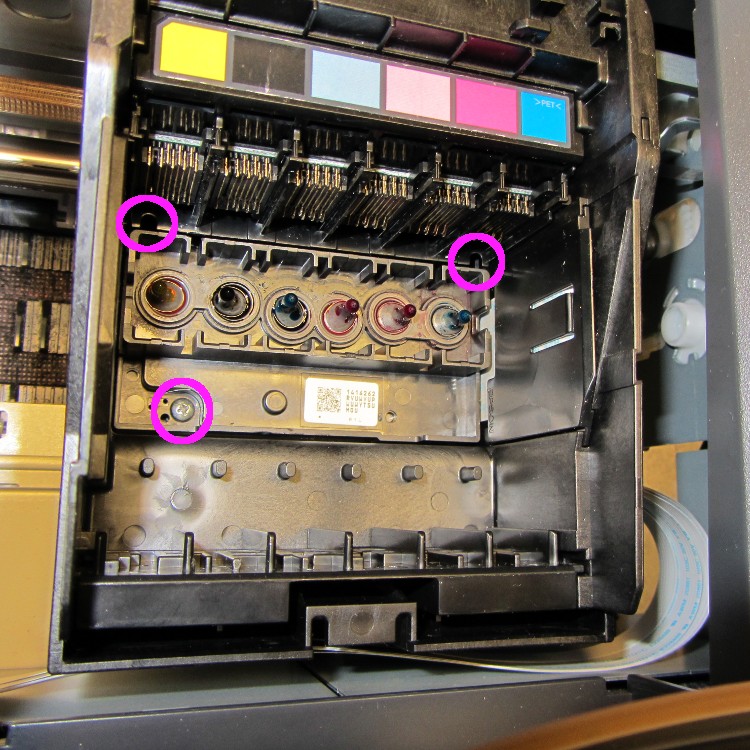
    You can release the inside panel with a fingernail near the top of the (unmarked, but obvious) tab outlined in white on the far right side, then slide upward:
    R380 Ink Tank carrier - interior
    R380 Ink Tank carrier – interior

    The magenta circles mark three screws that secure the printhead plate to the carrier, but it won’t do you any good. The two rear screws require a narrow-shaft Philips #1 driver and you cannot get the screws out through the holes; I managed to get them back in place, but don’t loosen them until you figure out how to remove the assembly holding the electrical contacts for the ink tanks.

    That assembly, marked by the six color panels, slides vertically into the rear wall of the carrier and seems to have a latch on the rear wall of the tank carrier. Of course, you can’t access the latch without dismantling the damn printer.

    So I put everything back together again and the printer works no worse than it did before. I’m considering connecting a syringe with length of tubing to the magenta inlet port, then forcing a toxic mix of water, alcohol, and detergent through the printhead:
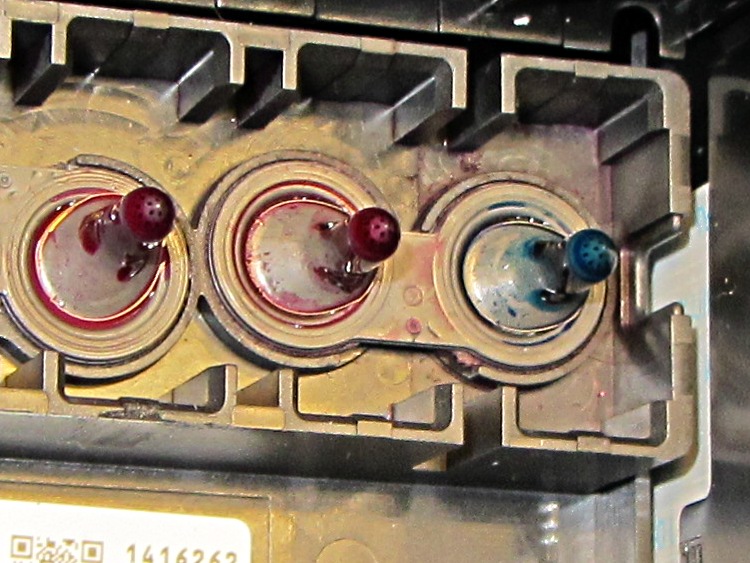
    R380 printhead ink inlets
    R380 printhead ink inlets

    Given that the printer cost something like $15 after rebate, it’s pretty much fully depreciated by now…

  • Helicopter Flyover

    Helicopter formation
    Helicopter formation

    While I was puttering around outside (an admittedly rare occurrence), a deep thuttering over the northern horizon eventually resolved into a formation of four helicopters. Hard to tell at this range, but they looked like Black Hawks southbound for the Stewart Air National Guard field.

    Our Larval Engineer reports that the college ROTC contingent includes some pilots-in-training who regularly land Black Hawks on the campus outfields.

    We are, fortunately, not in a part of the world where Bruce Cockburn’s commentary applies…

  • MOSFET RDS Tester: First Light

    Well, truth be known, it took a bit of tweaking to get to this point, but this was the first dependable & repeatable measurement:

    BUZ71A-overview
    BUZ71A-overview

    Rescaling the graph to show just the interesting part down near the origin:

    BUZ71A-detail
    BUZ71A-detail

    The VGS output steps from 4.0 to 10.0 V by 0.25 V, which is too fine until I get the Gnuplot script sorted out. The ID output runs from 0.0 A to 2.0 A in steps of 50 mA, which makes for smooth curves. These are all at 30 °C.

    The drain resistance flattens out nicely for VGS beyond 7 V, which is well over the BUZ71A max threshold of 4.0 V. That means you really need more than the usual 5 V supply to control the thing; I’ll eventually try some “logic level” MOSFETs. Part of the trick will be to find a logic-level MOSFET with a relatively high drain resistance suitable for current sensing.

    The board looks like this, with the foam shako for the thermal block and some MOSFET victims off to the side:

    MOSFET RDS Tester - overview
    MOSFET RDS Tester – overview

    The key part of the schematic:

    Schematic - MOSFET path
    Schematic – MOSFET path

    Two Arduino PWM outputs set the gate voltage and maximum drain current. The three jumpers near the middle allow various feedback paths, although the only one that really makes sense is closing the current loop. The trimpot is unused and the analog output directly sets the drain current limit at 0.5 A/V: 4 V → 2 A. The PWM outputs must run at 32 kHz, not the Arduino-standard 500-ish Hz.

    The MAX4544 SPDT analog multiplexers switch between ground and the PWM voltages. That’s a simple way to turn the outputs off and on without waiting for the PWM values to ramp up and down. The LEDs on those control signals provide an indication that the firmware hasn’t fallen off the rails.

    Three Arduino analog inputs report the drain voltage, actual drain current, and temperature input. The LM324 op amps run from ±12 V, so a pair of BAT54S dual diodes clamp the analog inputs at one Schottky diode drop below ground and above 5 V. That should be close enough to prevent any damage without rounding off the values near the extremes, given the fairly high op-amp output resistors; the analog inputs present a reasonably high impedance and it seems to not matter much.

    The measuring sequence amounts to a pair of nested loops:

    • Step the gate voltage
    • Step the drain current limit

    The inner loop ends when the current limit, the actual current, or the drain voltage exceeds the corresponding maximum value. The outer loop ends when the gate voltage exceeds its limit.

    A 100 ms delay after changing any analog output allows time for the voltages to settle before taking the next set of inputs.

    Each pass of the loop updates the PI loop controlling the thermal block temperature. That’s certainly sub-optimal, but works well enough for my simple needs.

    The Arduino source code for the measurement loop:

    void loop() {
    
        digitalWrite(PIN_HEARTBEAT,HIGH);           // show that we've arrived
    
    //--- Stabilize temperature
    
        Temperature = ReadTemperature();
        SetPeltier(Temperature,TSetpoint);
    
        if (abs(Temperature - TSetpoint) > T_ACCEPT) {
    
          Serial.print("# Exceed T limit: ");
          Serial.print(Temperature,1);
          Serial.print(" C ");
    
          while (abs(Temperature - TSetpoint) > T_DEADBAND) {
            Temperature = ReadTemperature();
            SetPeltier(Temperature,TSetpoint);
            TogglePin(PIN_HEARTBEAT);
            delay(SETTLING_TIME);
            Serial.print('.');
          }
          Serial.print(" Now at: ");
          Serial.print(Temperature,1);
          Serial.println(" C");
        }
    
    //--- Record current data point
    
        IDrainSense = GetIDrain();
        VDrainSense = GetVDrain();
    
        Serial.print(VGateSet,3);
        Serial.print('\t');
        Serial.print(VDrainSense,3);
        Serial.print('\t');
        Serial.print(IDrainSense,3);
        Serial.print('\t');
        Serial.print((IDrainSense == 0.0) ? 0.0 : (VDrainSense / IDrainSense),3);
        Serial.print('\t');
        Serial.print(Temperature,1);
        Serial.print('\t');
        Serial.print(millis() - StartTime);
        Serial.println();
    
    //--- Step to next point
    
        if ((IDrainLimit > MAX_DRAIN_CURRENT) ||        // beyond last current increment
            (IDrainSense > MAX_DRAIN_CURRENT) ||        // power supply current limit
            (VDrainSense > MAX_DRAIN_VOLTAGE)) {        // beyond linear voltage measurement
          IDrainLimit = 0.0;
          VGateSet += VGATE_STEP;
          if (VGateSet <= MAX_GATE_VOLTAGE) {
            PrintHeader();
          }
        }
        else {
          IDrainLimit += IDRAIN_STEP;
        }
    
        SetIDrain(IDrainLimit);
        SetVGate(VGateSet);
    
        TogglePin(PIN_HEARTBEAT);
        delay(SETTLING_TIME);                           // wait for settling
    
        if (VGateSet > MAX_GATE_VOLTAGE) {
          Serial.print("# Done! Elapsed: ");
          Serial.print((millis() - StartTime)/1000);
          Serial.println(" sec");
    
          SetIDrain(0.0);
          SetVGate(0.0);
          digitalWrite(PIN_DISABLE_IDRAIN,HIGH);
          digitalWrite(PIN_DISABLE_VGATE,HIGH);
          digitalWrite(PIN_ENABLE_HEAT,LOW);
          analogWrite(PIN_SET_IPELTIER,0);
    
          while (true) {
            TogglePin(PIN_HEARTBEAT);
            delay(25);
          }
        }
    
    }
    

    Everything is a compile-time option, which is certainly user-hostile. On the other paw, that allows me to get on with writing column instead of putzing around with the user interface… [grin]

  • Peltier PWM Temperature Control: Noise Blanking

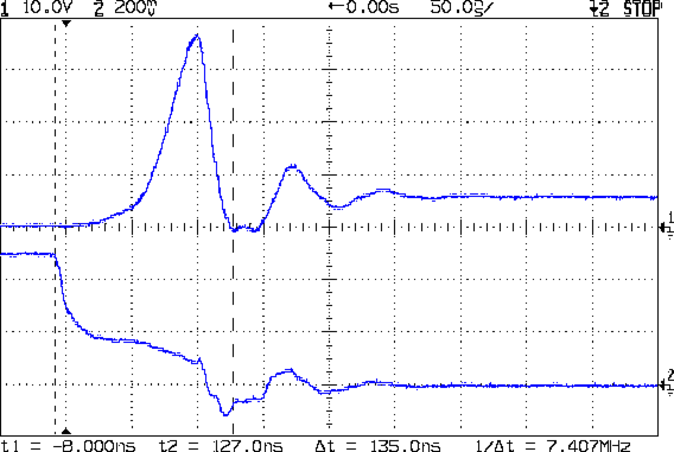
    The MOSFET tester I’m building controls the MOSFET’s gate voltage and drain current, while measuring the drain voltage. That, however, puts the drain terminal at a relatively high-impedance node between two current sources: the limiter and the MOSFET-under-test. When they’re both set to nearly the same value, the drain terminal picks up a generous helping of 32 kHz noise from the 3 A PWM Peltier module current. When either current source is set much larger than the other, the higher one serves as a relatively low impedance path that reduces the pickup.

    I thought about grounding the thermal block, but that means adding an insulating washer under every MOSFET-under-test, which means an even greater thermal control problem. So the easiest solution is to just turn off the PWM during measurements:

    Peltier Noise - VDS - PWM Shutdown
    Peltier Noise – VDS – PWM Shutdown

    The lower trace (at 5 V/div, not 500 mV as shown) is a digital output marking the duration of the three analog reads: temperature, drain voltage, and drain current. The upper trace shows the absolute worst case for the noise, which looks rather awful.

    The Peltier PWM comes from Arduino digital output 10, which is lashed to hardware Timer 1. Turning off the PWM requires setting the corresponding clock prescaler to “no input”, then setting it back to select the appropriate clock input after the measurement.

    Just on general principles, I average three successive analog inputs, so the Arduino source code for the analog reads looks like this:

    #define TCCRxB                  0x01        // set prescaler to 1:1 for 32 kHz PWM
    #define NUM_T_SAMPLES    3
    
    float ReadAI(byte PinNum) {
    word RawAverage;
    
        digitalWrite(PIN_SYNC,HIGH);                // scope sync
        TCCR1B = 0x00;                              // turn off Peltier module PWM
    
        RawAverage = analogRead(PinNum);            // prime the averaging pump
    
        for (int i=2; i <= NUM_T_SAMPLES; i++) {
            RawAverage += (word)analogRead(PinNum);
        }
    
        TCCR1B = TCCRxB;                            // restart Peltier PWM
        digitalWrite(PIN_SYNC,LOW);
    
        RawAverage /= NUM_T_SAMPLES;
    
        return (float)RawAverage;
    }
    
  • Peltier PWM Temperature Control: Power Supply Improvement

    Adding a touch of bulk local capacitance dramatically improved the Peltier power supply’s transient performance when the MOSFET turns on:

    Peltier Supply - 30 uF
    Peltier Supply – 30 uF

    That’s a 33 uF 300 V electrolytic that started life as a surface-mount kludge, simply soldered to the Peltier supply’s screw terminal pins on the bottom of the board.

    With the cap in place, the supply drops to 4 V at turn-on and bumps to 6 V at turn-off, with the transients much better-behaved now.

    Those spikes at the turn-off transient are also somewhat better, even if the MOSFET drain rings for another cycle before dying out. The peak is down to 35 V, which I think comes from the other end of the circuit being more reluctant to instantly jump 70 V, and the width has decreased, too:

    Peltier Drain Ringing - 30 uF Supply
    Peltier Drain Ringing – 30 uF Supply

    The ringing jumped to 15 MHz, rather than 5 MHz, which means it’s over faster even if there’s another cycle. If it were any worse, I’d be forced to re-figure the snubber RC numbers…

    The Miller capacitance effect still shows up clearly on the gate drive in the lower trace. There’s a reason why you really need higher-performance drivers for faster circuits!

  • Dr. Who Cookie Cutters: First Light!

    Dr. Who and Tux Cookies
    Dr. Who and Tux Cookies

    The chefs produced fine cookies from those fine Thing-O-Matic objects.

    Although the economic argument for producing custom cookie cutters may not be persuasive, the fact that you (well, I) can produce custom widgets certainly is. Most of the things I build and repair don’t require great mechanical strength or finicky dimensional precision, so a DIY 3D printer is exactly the right hammer for the job.

    Now, if only I had a laser cutter

  • Not a Hand Hole

    Abraham Lincoln once observed that calling a tail a leg doesn’t make it a leg, which seems to apply perfectly to this situation:

    Not a Hand Hole
    Not a Hand Hole

    Surely, the real reason boils down to:

    • A warehouse full of boxes with pre-cut hand holes
    • A stack of returns due to guys poking their hands too far into the boxes
    • A desire to disallow said returns

    I bet they pick up the box that way, too.