Ed Nisley's Blog: Shop notes, electronics, firmware, machinery, 3D printing, laser cuttery, and curiosities. Contents: 100% human thinking, 0% AI slop.
A group of 34 mm NEMA 17 steppers arrived from the usual eBay seller, I wired one up, and popped it in place under the original cork sheet. The bolts sit on steel washers riding atop compliant bushings from the batch of 43 mm NEMA 17 steppers that drive the extruder and Y axis.
[Update: Not that you’ll ever find another one, but here’s the straight dope directly from the motor label…
Astrosyn P/N FH5-1043 02
Minebea 17PM-J034-P2VS
No. T6Z01-03
]
Putting a cork sheet under each motor was a nice idea, but it didn’t work as intended: the bolts quite effectively couple the vibration to those resonant acrylic and plywood sheets. I had to cut the two front bushings in half to ease the bolt heads under the X axis stage at that end of its travel, but the motor is now isolated from the Y stage. I’m sure the bolts touch the slots, but even I am unwilling to fit compliant bushings around the bolts.
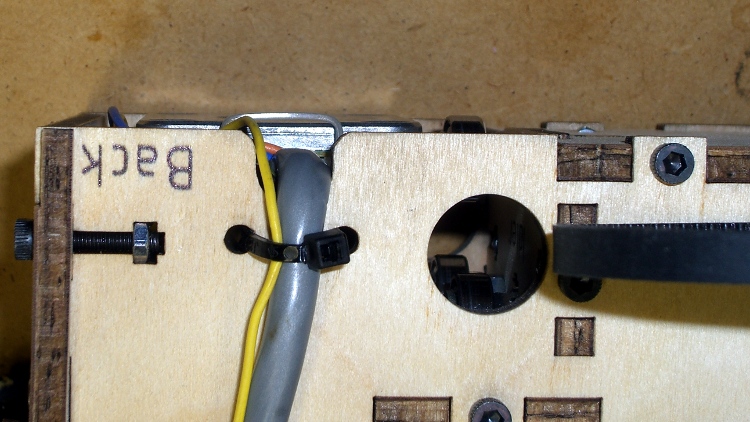
Lashing the cable to the side of the box should suffice for strain relief, as the jacket forces it to flex in a large upward loop with no sharp bends.
X axis motor wire strain relief
That picture’s inverted so the flash lights up the stuff sticking out of the bottom of the box. The thin silvery arch is a cable tie around the motor connector holding it securely against the motor frame, but the Y axis follower bearing just to its right actually sticks out slightly more.
This motor has six active terminals and could run in either unipolar or bipolar mode. The wiring harness has four leads and that’s why I bought it: the MBI driver board expects a bipolar motor.
The winding resistance is a mere 2 Ω, compared to the MBI motor’s 35 Ω. Of course, I don’t have any specs for this motor, but similar Minebea 17PM-J0xx motors run around an amp with 130-180 mN·m of pull-in torque, compared to the MBI motor’s 14-ish mN·m. I expect to run it around 500-750 mA at half the rated torque, where it’ll dissipate maybe a watt, tops, with no overheating.
The G-Code in BenJackson’s Smooth Motion test does a good job of identifying mechanical constraints and stepper motor problems. Even after doing all the rod alignments and sundry tweaks, my TOM wasn’t reliable around 4000 mm/min = 65 mm/s and had terrible mechanical resonances around 5000 mm/min. While normal extrusion feeds run around 30 to 40 mm/s (1800 to 2400 mm/min), I didn’t have a warm fuzzy feeling that everything was operating correctly and, in fact, the TOM suffered the occasional missed step.
The per-axis speeds in thingomatic.xml limit the maximum speed attainable in the G-Code; you can set the F value in the G-Code as high as you like, but the axis won’t move any faster than it’s allowed. I think ReplicatorG applies those limits when it converts human-readable G-Code into binary Sanguino3G code.
After installing the new Y axis stepper motor and X rod follower, I ran through another series of tests to see what was new & different. With all the mechanical binding eliminated and a decent Y motor at 800 mA, the TOM now traverses reliably up to about 5500 mm/min = 90 mm/s. The X axis loses steps dependably by 6000 mm/min = 100 mm/s with the current set to 300 mA.
Note that this is not printing, just moving. Printing requires attention to a whole bunch of details, but first you gotta have reliable motor control.
So I set the upper limit at 5000 mm/min and we’re both perfectly happy. Indeed, with the new Y axis motor, the mechanical resonances have vanished and it’s a much quieter machine at the normal speeds. As a confidence builder, that one will suffice for now.
I have a 34 mm NEMA 17 in hand to replace the X axis motor; it’ll be all good.
It’s actually a snub-nosed version of that, cut down by 15 mm to fit the TOM’s vertical space; the nozzle homed 3 mm above the last of the 345 layers.
I wanted to discover three things:
Are there any axis skips in a 4 hour print?
Can ABS film + aluminum plate anchor a tall object?
Can I use up all the pink filament?
Answers: no, just fine, not quite.
I did not re-check the platform alignment after installing the new Y axis motor and fiddling a bit with the Y axis rods. Quite to my dismay, the platform was about 0.5 mm too high (crunch!), so I gave the Z axis leadscrew a mighty twist and salvaged the first layer during the Outline extrusion. Despite that, the first layer seemed to be flat within the usual 0.2 mm (eyeballometrically measuring the first infill, as the Outline was trashed) and adhesion was fine.
The grip delaminated a bit and the butt pulled the film up, which isn’t entirely unexpected for huge objects.
I enclosed the build chamber before starting this print, but the temperature still isn’t all that high in the Basement Laboratory and the plastic was barely warm when I took it out. I’m not convinced any reasonable chamber temperature will solve the problem; it may work out better to assemble large objects from thinner parts.
This was the first full-up test of the X Rod Follower and the new Y axis stepper motor. Prior to printing this thing, I did a quick torture test (about which, more later) and dialed the motor currents back:
X REF = 0.63 V → 315 mA
Y REF = 1.76 V → 880 mA (in a 2 Ω winding)
Z REF = 0.54 V → 270 mA
A REF = 0.99 V → 450 mA (in a 2 Ω winding)
After four hours the Y, Z, and A steppers were barely warm to the touch and a thermocouple stuck into one of the X stepper’s bolt holes reported it was 38 °C, just above barely warm. I’m adducing evidence that the MBI steppers aren’t appropriate for the TOM’s requirements and that the default current settings are much too high.
The NEMA standards for stepper motors don’t specify the shaft dimensions, alas. While most NEMA 17 steppers have 5 mm shafts, the X and Y axis motors in a Thing-O-Matic have 3/16 inch shafts: MBI belt pulleys with 4.76-ish mm ID won’t fit on 5 mm OD shafts.
(Note: the “17” in NEMA 17 means the mounting holes are on a more-or-less 1.7 inch circle. The side of the motor frame will be close, but that’s not the controlled dimension. Some relevant diagrams live there.)
I plan to replace the Y axis stepper with a better motor (I got a set of three, one of which is now driving the stepper extruder), which means either buying a new pulley or having some Quality Shop Time. Plus, a bit more length on the Y axis shaft than what comes standard would be a Good Thing, too.
[Update: From the motor label, not that you’ll ever find one like it…
38 mm case
Minebea-Matsushita 17PM-K150-P1V
No T6824-02
]
So I built an adapter from 5/16 and 3/16 rod with a setscrew to grab a flat on the stepper shaft and a pin for the torque. The larger rod turned out to be La Salle Fatigue-Proof steel, not that it matters, and the smaller rod is plain old W-1 Water Hardening Drill Rod, both from Brownell’s, a long time ago in a universe far away. You could turn and drill the adapter from a single length of 5/16 rod if you prefer, but take some care to maintain the alignment.
A bit of lathe & Sherline CNC work:
Face one end of the 5/16 rod
Drill half an inch with a #9 drill (0.196 + runout = 5 mm)
Drill another quarter inch with a #12 drill (0.189 = 4.8 mm)
Saw off 3/4 inch, face the raw end
Saw & face an inch of 3/16 rod
Epoxy little rod in big rod, set upright, wait overnight
Cross drill #43 and tap 4-40 near big end
Cross drill #56 for 0.045 music wire pin
Chamfer pin hole, clean, epoxy pin in place, wait overnight
File two flats on 3/16 shaft for MBI pulley setscrews
Tapping shaft adapter
I grabbed the small rod in the vise with the large rod resting on the top of the jaws while the epoxy cured, figuring that it’d be pretty much self-aligning. Not that a few mils one way or the other will matter, as it’s driving a timing belt in a flexy machine anyway.
Cross-drilling the pin hole required eyeballing the center of the length of 3/16 rod within the 5/16 rod. It’s not critical, but avoid missing the poor thing entirely. You want to minimize the nested length, so as to keep the adapter as short as possible, but keep at least one diameter (3/16 inch) so as to maintain alignment.
Tapping should involve a bottoming tap, but I used what I had and it worked out OK.
Now, one reason I was willing to do this is that the stock Y axis motor shaft was already too short. As nearly as I can tell, the TOM dimensions were set before MBI started shipping those cork sound-deadening plates, because the shaft is recessed into the pulley by about the thickness of that plate.
The MBI pulleys are an extremely tight fit on a 3/16 inch rod, so, rather than forcing the pulley, I enlarged the hub with a #12 drill (same as in the adapter) to get another 1.5 mil of clearance; it’s now an easy slip fit on the rod.
Drilling MBI motor pulley
Anyhow, the bottom flange of the pulley is 17 mm above the ridge on the motor and this one worked out to a bit over 20. No problem, I can just lower the motor a little bit, flip the pulley over to get the setscrew end of the hub on the top, and it’ll have plenty of room. A bit more shaft is much better than not enough, sez I.
Y axis motor shaft extension
The motors came from the usual eBay seller complete with a squishy silicone sound deadening panel that turned out to be exactly the right thickness, when stacked atop a cork sheet, to put the pulley where it needed to be. I cut a second cork sheet, so as to isolate the bolt heads from that acrylic body panel, and it’s all good.



 The Smell of Molten Projects in the Morning