The Smell of Molten Projects in the Morning

Ed Nisley's Blog: Shop notes, electronics, firmware, machinery, 3D printing, laser cuttery, and curiosities. Contents: 100% human thinking, 0% AI slop.

Month: November 2010

  • Spectrometer: Quick and Dirty Image Processing

    Having gotten a spectrometer image from the crude camera lashup, the next task is to (figure out how to) extract some meaningful data. The general idea is to use ImageMagick and Gnuplot as much as possible, so as to avoid writing any actual software.

    The original image is the high-res version of this:

    First light - warm-white CFL - no adjustments
    First light – warm-white CFL – no adjustments

    Use ImageMagick to crop out a slice across the middle and convert it to lossless PNG:

    convert -crop 2500x100+0+1000! dsc00273.jpg dsc00273-strip.png
    
    dsc00273-strip.png
    dsc00273-strip.png

    I can’t figure out how to reset the image size using -extract, but -crop gets the job done.

    The default ImageMagic PNG compression is 75, so I should include a -quality 100 option, too.

    Because we have colors separated spatially, all we need is a grayscale intensity plot. The easy and, alas, wrong way to convert the color image to grayscale goes like this:

    convert -colorspace GRAY dsc00273-strip.png dsc00273-strip-gray.png
    
    dsc00273-strip-gray.png
    dsc00273-strip-gray.png

    That grayscale value is a weighted sum of the RGB components that preserves human-vision luminosity:

    Gray = 0.29900*R+0.58700*G+0.11400*B

    I think it’s better to simply add the RGB components without the weights, because we care more about the actual spectral intensity. That might allow overly high intensity in some peculiar situations, but I’ll figure that out later. First, get the red / green / blue channels into separate files:

    convert -separate dsc00273-strip.png dsc00273-strip-chan%d.png
    
    dsc00273-strip-chan0.png
    dsc00273-strip-chan0.png
    dsc00273-strip-chan1.png
    dsc00273-strip-chan1.png
    dsc00273-strip-chan2.png
    dsc00273-strip-chan2.png

    That looks better: the intensities resemble the original colors.

    Then add those three files together, pixel by pixel, to produce a single grayscale file:

    convert -compose plus dsc00273-strip-chan0.png dsc00273-strip-chan1.png -composite dsc00273-strip-chan2.png -composite dsc00273-strip-spect.png

    
    dsc00273-strip-spect.png
    dsc00273-strip-spect.png

    Extract a one-pixel row from the middle and write it as a raw binary file. You could extract the row from the original image, but I think some blurring might be appropriate, so later is better. There’s no point in trying to display a one-pixel-tall image, so I won’t bother.

    convert -crop 2500x1+0+50 dsc00273-strip-spect.png gray:dsc00273-line.bin
    

    Fire up Gnuplot and have it plot the grayscale intensities:

    gnuplot
    plot 'dsc00273-line.bin' binary format="%uint8" record=2500x1 using 1 with lines lt 3
    

    And there’s the spectrogram…

    Gnuplot - dsc00270 - CFL
    Gnuplot – dsc00270 – CFL

    A quick-and-dirty bash script to persuade ImageMagick to make something similar to that happen, including all the commented-out cruft that I’ve been copying forever so I don’t forget the magick incantations when I need them again:

    #!/bin/sh
    base=${1%%.*}
    echo Base name is ${base}
    convert -crop 2500x100+0+1000! $1 ${base}-strip.png
    convert -separate ${base}-strip.png ${base}-strip-chan%d.png
    convert -compose plus ${base}-strip-chan0.png ${base}-strip-chan1.png -composite ${base}-strip-chan2.png -composite ${base}-strip-spect.png
    convert -crop 2500x1+0+50 ${base}-strip-spect.png gray:${base}-line.bin
    export GDFONTPATH="/usr/share/fonts/TTF/"
    gnuplot << EOF
    set term png font "arialbd.ttf" 18 size 950,600
    set output "${base}-spect.png"
    set title "${base} Spectrum"
    set key noautotitles
    unset mouse
    set bmargin 4
    #set grid xtics ytics
    #set xrange [0:1400]
    set xlabel "Red <- Colors -> Violet"
    #set format x "%3.0f"
    #set logscale y
    set ylabel "Light intensity"
    #set format y "%3.0f"
    #set yrange [0:60]
    #set ytic 5
    #set datafile separator "\t"
    #set label 1 "mumble" at 1600,0.300 font "arialbd,18"
    plot	\
    	"${base}-line.bin" \
    	binary format="%uint8" record=2500x1 \
    	using 1 with lines lt 3
    EOF
    display ${base}-spect.png
    

    Observations & ideas:

    It turns out that the flat topped peak in the middle was in the original green channel data: that color was overexposed.

    If I had a camera that could do RAW images, this whole thing would work even better. Using 16-bit intensity channels would be exceedingly good; the original JPG file has only 8-bit channel resolution: 1/256 = -24 dB, which isn’t anywhere near good enough. That’s assuming the camera + JPG compression has 24 dB dynamic range, which I doubt.

    That blue / violet peak over on the right looks great: the optical focus is fine & dandy. I focused the spectrometer at roughly infinity, set the camera to infinity, then tweaked the spectrometer to make the answer come out right.

    FWIW, I think that deep blue-violet line is the mercury G-line emission at 435 nm, which would explain why it’s so narrow. The others are rather broad phosphor emissions from the CFL tube’s surface.

    LEDs can provide spectral wavelength calibration markers, although their peaks are rather broad in comparison to mercury emission lines. A 400-450 nm “UV” LED puts out a broad blue-violet blur on the left (reddish) side of the emission line. Maybe it’s really the mercury emission H-line at 404 nm?

    An IR LED puts a line on the far left side, about twice the distance to the left of the red line as the green line is to its right. I don’t know the exact wavelength, but it’s around 900 nm. The camera (my old DSC-F717) can do IR + visual images, but it insists on auto-setting the exposure and focus, which wipes out the other lines. The line is barely visible with the camera’s internal (and highly effective) hot mirror in place. Maybe with a more stable setup that would work.

    Diode lasers in IR, red, green, and blue? Hmmm…

    ImageMagick (probably) can’t detect those LED markers and scale the output file width, as it deals with intensity over a regular XY grid. A Python script could swallow the output binary file and spit out a scaled binary file with the bump peaks set to known locations. Actually, I’d be willing to bet there’s a perverse way to get IM to do X-axis scaling, but I’m even more certain the command-line syntax would be a wonder to behold.

    Inject the LED images with a beamsplitter or teeny mirror across the bottom of the spectrometer slit and get intensity calibration, too. Vary the LED intensity with a known current for decent calibration over several orders of magnitude. That could compensate for the crappy dynamic range: as long as the LEDs aren’t saturated, you can correct them to a known peak value. IM can probably do that automagically, given known regions on the input curve.

    Blur the strip image to get rid of color noise and irregularities in the slit. Perhaps a vertical sum in each channel along (part of?) the entire strip, then divide by the strip height, which would completely avoid blurring along the horizontal axis. If, of course, the entrance slit is exactly vertical with respect to the camera sensor.

    IM knows how to deskew / rotate images. Apply that before summing, so as to correct small misalignments?

    Different cameras have different entrance pupils. A quick check shows the DSC-H5 has a much smaller entrance pupil at full zoom: the spectrum covers more than the full screen, so the spectroscope won’t work well with that camera. Normally, you’d like to fill the entrance pupil with the image, but …

    Getting all the optical machinery supported and aligned and oriented will require an optical bench of some sort. Perhaps my surface plate with magnetic sticky bases?

    I think this is going to work…

  • Spectrometer: Quick and Dirty Camera Mount

    This is a proof-of-concept lashup for a camera-mounted spectrometer; I wanted to find out if the image processing would work, but needed some images without devoting a lot of time to the hardware.

    The general idea is that a direct-view spectrometer produces a focused-at-infinity image for your eye. Substitute a camera for your eye and you get an image with the spectral components laid out in a spatial array, suitable for measurement and calculation.

    The trick is holding the spectrometer on the lens axis while blocking ambient light. I figured that I could mount the spectrometer in a disk that fit into the camera’s 58 mm filter threads, then hold it in place for the few pix I’d need to get started.

    The end result was Good Enough for the purpose, although it’s definitely a kludge…

    Spectrometer mounted on camera
    Spectrometer mounted on camera

    The (admittedly cheap) prism-based direct-view spectrometer has a slide-to-focus mechanism that substitutes heavy grease for mechanical precision. A guide screw in a slot prevents the focusing tube from rotating in the body tube, so I decided to replace that with a locking screw to clamp the tubes together. It’s a very fine thread, undoubtedly metric, screw, but a bit of rummaging in my teeny-screw drawer turned up a match (those are mm divisions on the scale):

    Spectrometer screw vs standard thread
    Spectrometer screw vs standard thread

    I think the spectroscope makers filed down the head of an ordinary brass screw to fit the slot, rather than using an actual fillister screw. That’s a Torx T-6 head on the flat-head screw, which probably came from a scrapped hard drive. I eventually found a round-head crosspoint screw (requiring a P-1 bit) that worked better, with a brass washer underneath for neatness.

    That got me to this stage:

    Spectrometer with locking screw
    Spectrometer with locking screw

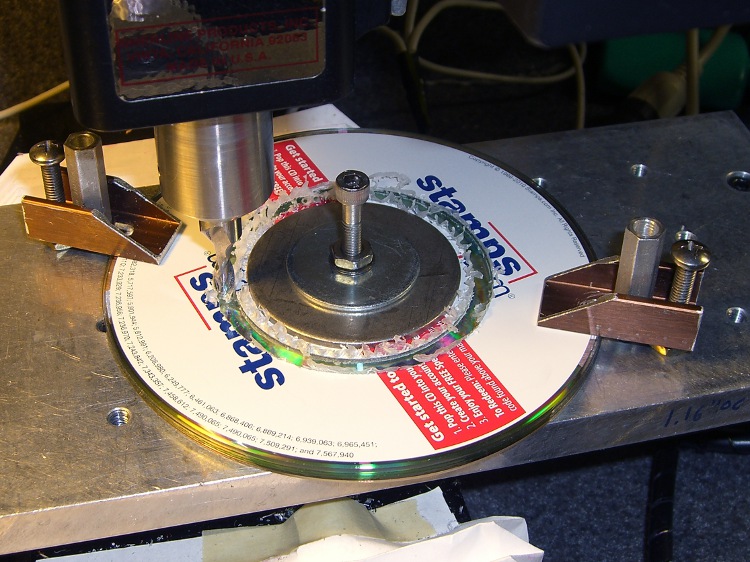
    Making the adapter disk involved, as usual, a bit of manual CNC to enlarge the center hole of a CD from 15 to 15.75 mm, then cut out a 57 mm cookie. A stack of CDs makes a perfectly good sacrificial work surface for this operation, with some fender washers clamping the pile to the tooling plate. Those homebrew clamps are smaller than the Official Sherline clamps and work better for large objects on the small table.

    Milling outside diameter
    Milling outside diameter

    I briefly considered milling a thread into the OD, but came to my senses… I still have that pile of 10-32 taps, but now is not the time!

    While in the Machine Tool Wing of the Basement Laboratory, I bored a short plastic bushing to a tight slip fit on the focusing tube to clamp the disk to the eyepiece, with the intent of keeping the eyepiece from whacking the camera lens. That’s the small white cylinder in the first picture.

    As it turned out, I had to mount the whole affair on a sunshade that screwed into the camera filter mount, because the eyepiece protruded far enough to just barely kiss the lens.

    A liberal covering of black electrical tape killed off all the stray light. Hand-holding all the pieces together and aiming it at the CFL tube over the Electronics Workbench produced this First Light image:

    First light - warm-white CFL - no adjustments
    First light – warm-white CFL – no adjustments

    Believe it or not, that’s pretty much in focus. Much of the width in the red & green lines seems to come from the phosphors, as there’s a bar-sharp narrow blue line to the far right, beyond the obvious blue line.

    Settings: manual focus at infinity, manual exposure 1/60 @ f/2.4, auto ISO = 100. Maybe 30 cm from the 27 W CFL tube: way more light than I’ll ever get through a liquid sample in a cuvette.

    Now to fiddle with ImageMagick and Gnuplot…

  • Bed Bugs: Wrapup

    So there you have it: the bugs that killed three months.

    We’ve gone a month without a bite and are only now restoring furniture to the bedroom. Each piece goes up on powder traps and gets a week in isolation to reveal any bugs before we reload the drawers with clean clothing. After vacuuming and washing there shouldn’t be any bugs left on the furniture, if the piece had any to begin with. Almost certainly that is wasted effort, but …

    Maybe next year we’ll buy new chairs and a couch for the living room. For sure, they won’t have plush, overstuffed upholstry.

    With any luck (and the regular use of a hot box disinsector), you won’t go through what we did.

    However, should you discover a row of bites across your body, the actions you take during the next few days will determine the level of catastrophe during your next year. The problem will not go away by ignoring it; if you get a breeding population going in your house / apartment / condo, you will definitely need a commercial pest-control service.

    If you think tossing out some furniture to get rid of a few bugs is expensive: just wait.

    Good luck!

    The rest of (this chapter of) the Bed Bug Story:

  • Bed Bugs: Hot Box Disinsector

    Now, having seen what we’ve been living through, you might ask yourself

    Wouldn’t It Be Nice If there was some way to be absolutely sure that mumble does not happen to me?

    There isn’t, but you can stack the odds in your favor by disinsecting everything that enters your house. In particular, when you return from a trip, you must treat your luggage with the same casual regard as you apply to any lump of highly radioactive waste.

    Because all bed bug stages die when exposed to temperatures over 45°C (113°F, which I round to 120°F), the simplest way to ensure that you’re not bringing any passengers home is to heat your luggage / packages / clothing / whatever to an internal temperature around 120°F, then let it soak for maybe an hour to ensure all the occupants get the message.

    What you need is a box that gets hot on the inside, but not hot enough to set your luggage on fire. As with all things sold for bed bug problems, the commercial solution seems grossly overpriced for what looks like an uninsulated ripstop nylon bag containing a rack, a heater, and a fan.

    It should come as no surprise that I built something that’s bigger, uglier, and harder to use… but it produces data and you can do science. And, with liberal use of my parts heap, the overall price is maybe 10 dB down from the commercial version…

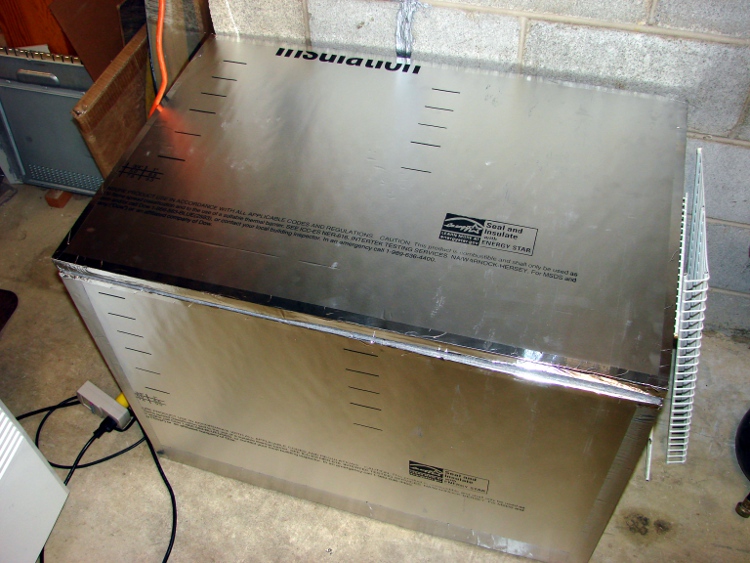
    Hot box exterior
    Hot box exterior

    I figured that this widget is going to be a major part of our lives from now on, so a foldable / storable heater wasn’t particularly useful. In point of fact, we’ve been using it heavily and I don’t expect that to stop any time soon.

    It’s a rigid box made of Dow Tuff-R rigid polyisocyanurate foam insulating board, held together with 4-inch wide aluminum HVAC tape. The rim around the top is sealed with opposing strips of felt weatherstripping, held on with double-stick tape.

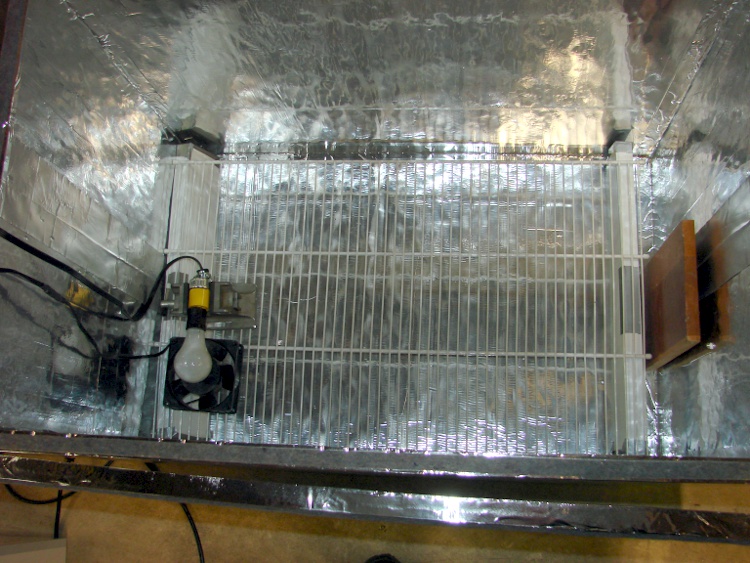
    Inside, I used lengths of wire shelving to support the thing-to-be-baked. After we’ve used it a bit more, I’ll conjure up permanent supports for the second level shelving (stacked on the right of the exterior picture); right now, they’re supported on wood blocks as needed.

    Hot box interior
    Hot box interior
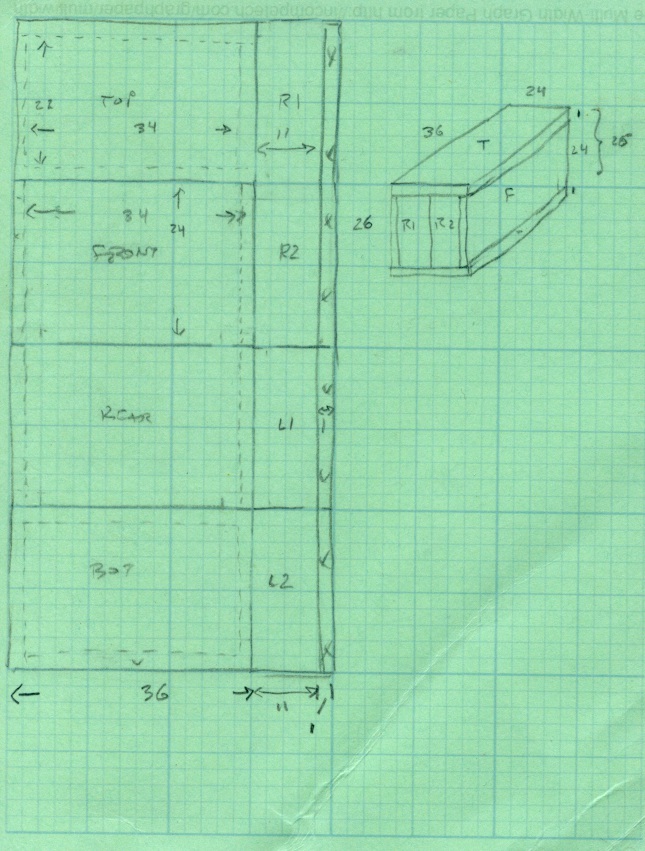
    Hot Box - Dimension sketch
    Hot Box – Dimension sketch

    The interior dimensions work out to 34x22x24 inches: it’s made from a single 4×8 foot sheet of insulating board. Here’s my working sketch showing how the parts lay out and fit together. (clicky the pic for more dots).

    The only waste is the 1-inch strip along the right edge; the slab I bought came with a molding imperfection, so discarding that edge was OK.

    I cut the sheet into four 2×4 foot strips, cut a 13-inch strip off each plank, then trimmed the 1 inch waste. That seemed less prone to catastrophic blundering than (trying to) make a pair of 8-foot cuts and whack each resulting strip in quarters. An ordinary razor utility knife worked fine, although I found that making two passes along each cut produced cleaner results than trying to do it all in one.

    I assembled it with the heavy / shiny aluminum foil side inward, although I doubt it makes any difference. Cover all the edges with tape, tape all the joints both inside and outside, and it becomes a nice rigid box when you’re done. Pay attention to getting the sides at right angles; I used a framing square.

    The board allegedly has an insulating mojo of:

    R = 6.5 ft2 • h • °F/Btu

    Figuring a surface area of 32 ft2 and a temperature differential of 120 – 60 = 60°F, the box should require 295 BTU/hr = 87 W to maintain that temperature.

    Which, as it turns out, is pretty close to how it worked out:

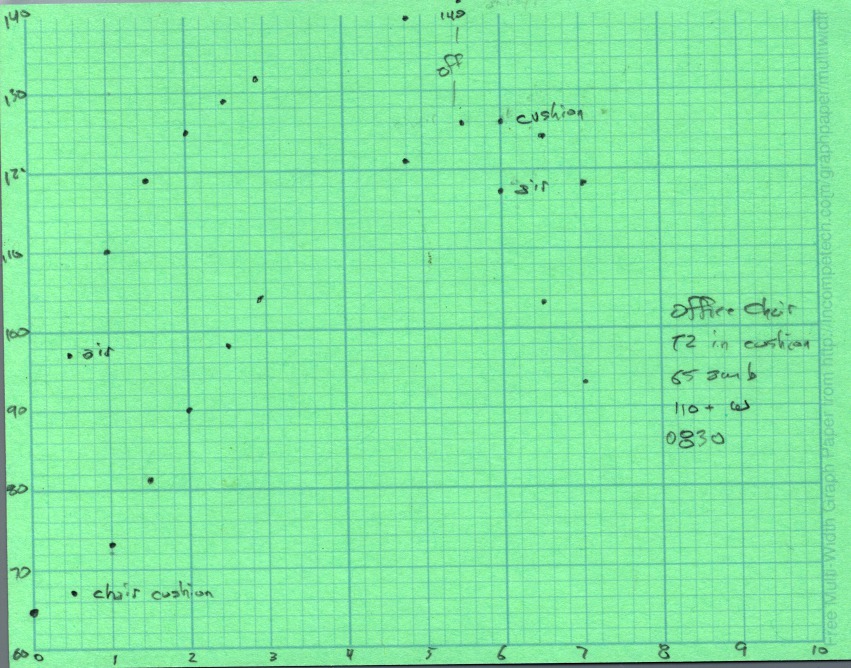
    Hot Box - Temp vs Time - First light
    Hot Box – Temp vs Time – First light

    The lower curve shows a 60 W bulb with a 10 W 120 VAC fan heats the interior to a bit over 100°F in 100 minutes, where it looks to be stabilizing. That was the first test and showed that I was on the right track.

    The second test, with a pair of 60 W bulbs and the fan produced the two upper curves: one for air, the other inside some cloth jammed inside a plastic bucket to simulate a (tiny) suitcase. The combined 130 W heats the box over 150°F in two hours, with the somewhat insulated bucket trailing neatly behind as you’d expect.

    Without opening the box, I connected the bulbs and fan to a Variac plugged into my Kill-A-Watt meter and dialed it for 100 W total dissipation. The temperature fell to slightly over 130°F in 80 minutes and looks like it would stabilize near there.

    Ambient temperature was 67°F, so

    R = 32 ft2 • 67°F / (341 BTU/hr) = 6.3

    Close enough, I’d say. Given those few data points, it looks like the temperature sensitivity around 130°F is 0.7°F / W. [Update: typo in the equation. Doesn’t change the answer much at all.]

    I swapped in a 100 W bulb, removed the Variac, and heated the cushions from my office chair.

    Hot Box - Chair cushions
    Hot Box – Chair cushions

    One thermocouple is hanging in mid-air, the other is wedged inside one of the cushions. After nearly 5 hours the cushion is up to killing temperature and I turned the heater off. The air temperature drops rapidly, but the cushion stays over 120°F for another two hours.

    The light bulb is just a proof of concept, because it’s entirely too hot: if the fan fails, your luggage ignites. I plan to build a rather subdued heater with a surface temperature around 140°F and a controller that monitors several sensors to ensure the contents reach killing temperatures and stay there long enough.

    But that’s a project for another day…

    [Update: If you’re arriving from a link, start at the overview to get The Whole Story.]

  • Bed Bugs: Dying on Planet Sticky

    Even half an inch of masking tape forms an impenetrable barrier for small creatures; you could splurge on 2-inch tape to get more surface area if you’re squeamish. I did see a spider stepping daintily along a barrier, but, for the most part, all these specimens became mired within a few millimeters of an edge. That made it easy to decide which direction they were traveling: incoming insects stuck near the floor and a (very few) outbound insects stuck at the top, just after leaving the non-sticky surface.

    This is, we think, a well-fed first- or second-instar bed bug caught on a tape barrier; it’s not quite the right shape for the book louse seen below. A powder trap caught the only other bed bug in our collection.

    Bed bug on tape
    Bed bug on tape

    In addition to that sole bed bug, the tape barriers captured a steady stream of critters that were not bed bugs. The trick is sorting through all the false positives…

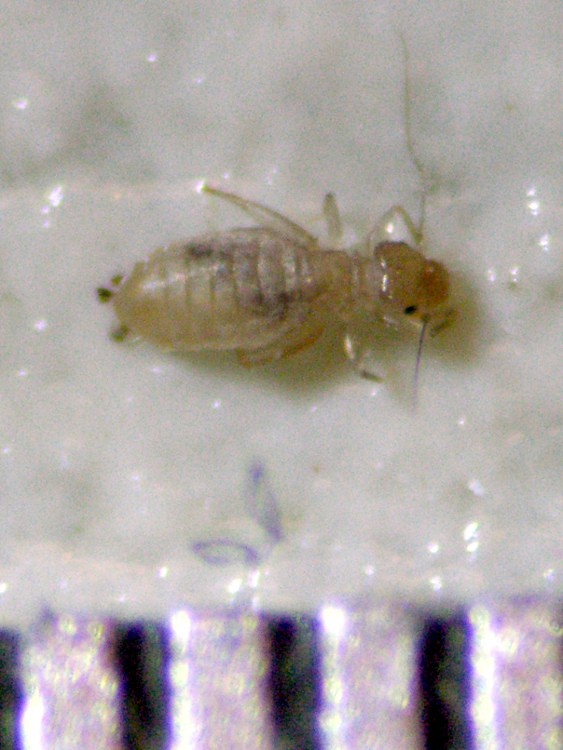
    Given the number of books in the house, we caught many book lice. These have a disturbing resemblance to bed bugs, but are basically harmless to humans. You don’t really need books to have book lice, although we captured most of them adjacent to our bookshelves.

    Book louse with 0.5 mm scale
    Book louse with 0.5 mm scale

    This scary critter is a carpet beetle larva. They survive on any fabric surface and can infest upholstery as well as carpets.

    Carpet beetle larva with 0.5 mm scale
    Carpet beetle larva with 0.5 mm scale

    Dust mites, at least for their first few instars, are transparent little bags of bug stuff. The first instar may have six legs, just like a first instar bed bug, but successive instars have eight.

    Dust mite first instar
    Dust mite first instar

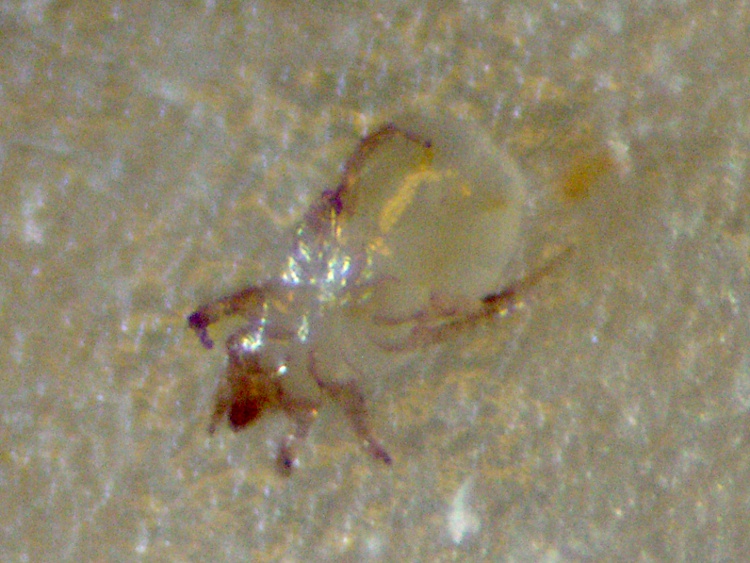
    Here’s a close up view, showing it has eight legs:

    Dust mite
    Dust mite

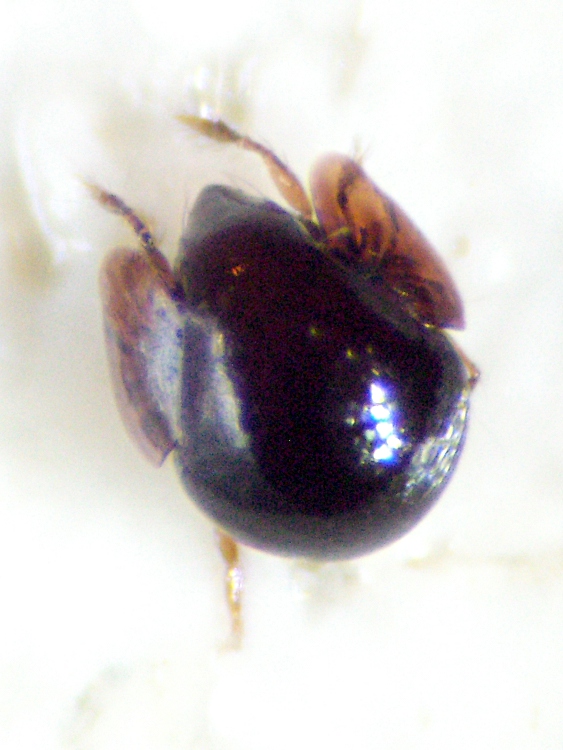
    We have no idea what this cute little thing might be. It’s about 0.5 mm in diameter and, to the naked eye, looks like nothing so much as bed bug crap. But it’s alive!

    Spherical insect - dorsal
    Spherical insect – dorsal

    This terrifying apparition sprinted across the (non-isolated) kitchen table, whereupon I mashed it with a magazine. It’s most likely not a bed bug; we’re guessing a spider of some sort. That stylet in its proboscis doesn’t look spider-ish, though.

    Red insect with stylet
    Red insect with stylet

    It might be related to this eight-legged critter; the lancet on the front end is similarly scary. The legs aren’t the same, though.

    Mystery bug
    Mystery bug

    All in all, we found a bewildering variety of insects, bugs, and spiders wandering around in our house. None of them are particularly harmful, although I now have a (most likely pyschosomatic) allergy to dust mites.

    We’re not entomologists: if you know what the mystery critters are, I’d like to hear from you!

    Up next: a Hot Box that might forestall all this excitement.

  • Bed Bugs: Living on Planet Sticky

    During the course of our adventure, we disinsected four rooms with varying degrees of attention to detail.

    • Our bedroom: everything except bookshelves
    • Guest bedroom: killed bed, but not much else
    • Living room: killed desks and chairs, isolated couch
    • Downstairs office: killed desk and chairs, spread DE

    In each case, we wondered how could we demonstrate that there are no bugs left to kill? Yeast reactor lures don’t produce human-scale amounts of carbon dioxide, although we did deploy them to see what happens. Simply moving everything back into the room didn’t seem like a Good Idea: repeating the whole process if we got another bite wasn’t attractive.

    Given the low level of infestation, we decided that the most effective bed bug lure was an actual human: me. Ideally, we could intercept the approaching bed bugs before they bit me and, if no bed bugs were attracted to me, then we simply didn’t have any.

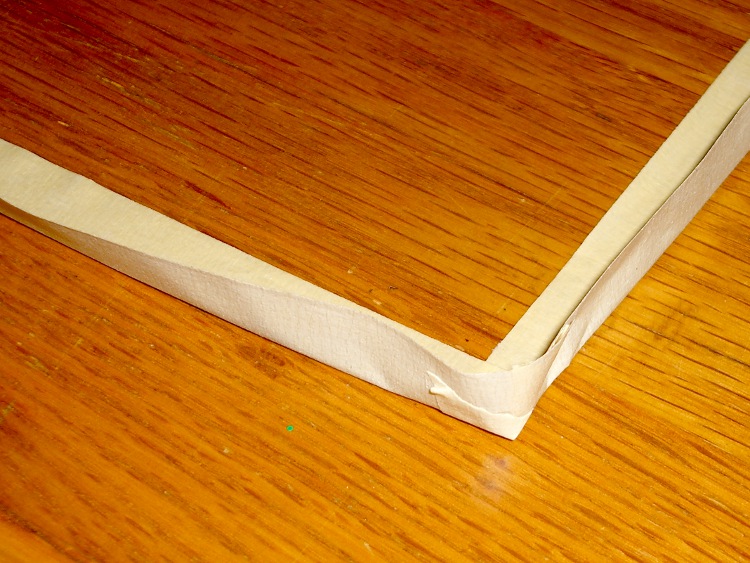
    Now, I’m not sufficiently brave (or stupid) to simply spend the night (“sleeping” may be too strong a term) on the floor, waiting for a bed bug to stroll over and puncture me. I laid out a barrier around an air mattress and sleeping bag: a ring of masking tape folded so half stuck to the floor and half presented a sticky surface to incoming bugs.

    Tape barrier on floor
    Tape barrier on floor

    To date, we’ve gone through four rolls of masking tape and I just bought two more three-packs. Buy in bulk and save!

    The best tape is ordinary, albeit good-quality (we’ve been using 3M), painter’s masking tape; the three-day kind works fine. Fancy long-duration blue tape isn’t sticky enough. You should pull the tape up, examine it for stuck bugs, and lay down fresh tape about twice a week.

    This works well on our hardwood floors, but wall-to-wall carpets probably won’t provide enough flat surface for the tape. If you’re serious about this project, those carpets might just have to go…

    I’ll leave to your imagination the picture of an air mattress, sleeping bag, and suchlike in the middle of a large rectangle of tape inside a stripped room. I’ve been sleeping that way, in various rooms, for the last three months. I didn’t spend any nights in the basement: it’s just too cold down there, even in summertime.

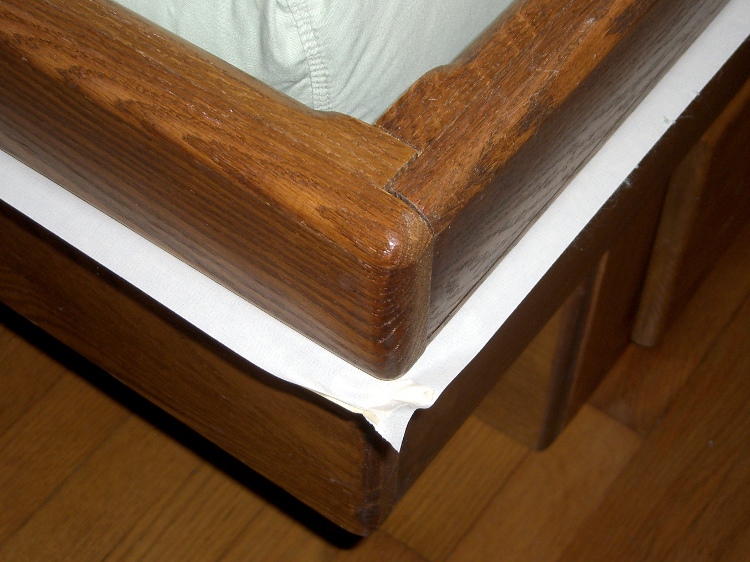
    We only recently reassembled our platform bed, with a layer of diatomaceous earth underneath. I taped the cracks and gaps around the platform and applied a ring of tape to the outside: any intruders will encounter a sticky surface. So far, no bugs, although I just renewed the tape once again.

    Isolated platform bed
    Isolated platform bed

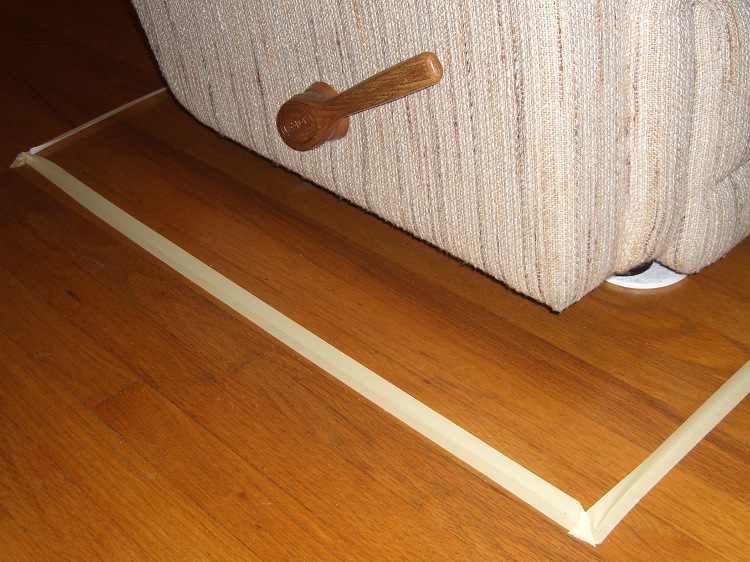
    You can also lay tape down with the adhesive facing inward. Here’s the living-room couch we’ve abandoned in place, up on powder traps and isolated with a ring of masking tape:

    Isolated couch
    Isolated couch

    After you’ve deployed a variety of lures, traps, and tapes, you’ll start collecting a wide variety of insects and bugs. Some of them might even be bed bugs…

    [Update: If you’re arriving from that link in bedbugger.com, this adventure has many parts. Start there to see them all.]

  • Bed Bugs: Furniture Isolation

    After we dismantled our bedroom, Mary got bitten while sleeping in the guest bed. That bed, a much smaller, more-or-less standard double bed mattress and box spring on a metal frame, was much easier to disinsect:

    • Wash and dry all the bed linens
    • Toast the pillow in the clothes dryer
    • Vacuum the mattress and box spring
    • Encase the mattress and box spring
    • Heat the frame to killing temperature
    • Reassemble everything
    Encased mattress and isolated foot
    Encased mattress and isolated foot

    However, there’s not much point in doing that if a bed bug can simply crawl from the floor up a bed frame leg. We put powder traps under each bed foot, using tall containers to prevent access.

    Although the traps collected a fair amount of dust, we didn’t find any insects of any kind in the powder.

    Yes, that’s a length of Kapton tape on the mattress encasement. Mary discovered that heating the encasement with a hair dryer isn’t a good idea: the fabric is actually a non-woven plastic film that melts at a surprisingly low temperature. Kapton sticks to the fabric and the adhesive doesn’t promptly turn into goo.

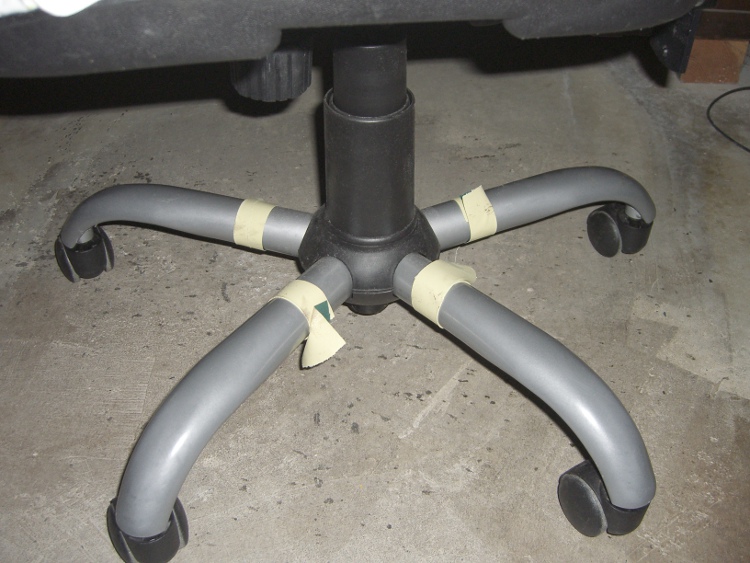
    Powder traps work well for stationary furniture like beds and tables and desks, but they aren’t useful for chairs. I applied a ring of tape (masking or duct, as you prefer) around chair legs, folded lengthwise so the sticky side is outward. The tubular steel legs on this office chair terminate in fishmouth welds on the central pillar, so the bugs can’t crawl up through the inside:

    Isolated desk chair
    Isolated desk chair

    That’s the chair I pulled out of storage after scrapping out my homebrew car-seat chair. Turns out I installed the replacement seat about a week before sustaining a bite while sitting at my desk. Calling down the angelfire on that comfy chair was more annoying than expensive, but … no more bug bites in the basement!

    For historic reasons, I use an ancient Balans chair at the Electronics Workbench. Four strips of masking tape isolated it from the floor:

    Isolation tape on Balans chair leg
    Isolation tape on Balans chair leg

    Isolating the chair from the floor obviously doesn’t prevent a bed bug from crawling up your leg, but we never had a problem with that. They’re not really hunters and vastly prefer to lurk in furniture than track and pounce on a moving shoe…

    As it turned out, we never trapped any bed bugs on chair legs, which is most likely a testament to how few bugs we actually had. However, larger tape barriers were quite effective in another context: isolating entire regions of a room.

    Up next: Voyage to Planet Sticky